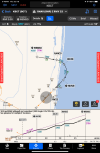
Pretty cool update to Garmin Pilot

I am not very knowledgeable, but I have spent a lot of time with FF. And the money goes only one way - out. All I do is pay, pay, pay. The only thing other people give me is a hard time. I bought the GP IFR edition, and have been flying it on the sim. My first reaction when I saw GP was that FF would quickly go out of business. Then I got into GP with the flight planning, and I thought there is no way I'm going to abandon FF. When I fly, the FP box is at the top of the screen all the time. If I get a re-route, I just flick the bubbles to make them disappear, or insert a bubble as appropriate. It is incredibly intuitive. FF does the ATC routes better, as I described in a previous post. But the Smart Charts, those are extremely impressive and helpful. They are -- MAGIC. I turn on the briefing strip, and it stays at the top of the plate. Very helpful, and just the information necessary. I find the information on the plate to be perfect. FF is getting better, and when you select an approach, you check boxes indicating whether you are flying an LNAV, LPV or other approach, at it displays the appropriate MDA/DH on the plate.

This is gilding the lilly, and probably unsustainable for me, but I have a FF subscription and I just bought GP for a year. But, I plan the flight on FF, and just switch to the Smart Chart on the approach. The only extra preparation is to load the Smart Chart for the airport approach some time en route, preferably before you leave.
 
I use both ios and android versions of gp, love them both. android downloads work more reliably. Honestly i think people complain just because, the minor differences between the two aren't enough to worry about, including smart charts.
 
For years I've said that Garmin should create a Pilot Lite for people that just want DB Concierge.
Yes! There is no reason DB Concierge has to be in an EFB other than Garmin wants to force you to use their EFB because they don't like that there is one tiny part of the aircraft electronics market they don't have a stranglehold on. But, it doesn't make me leave their competitor, it just ****es me off that I still have to pay for theirs when I don't use it because I find it aggravating to use. I think the "it works like my panel mount" comments are funny, because I have a bunch of Garmin stuff in my panel and I've probably got at least 2500 hours flying behind Garmin stuff but Pilot does not make sense to me.

Not that I'd use it. :D I've heard too many people having too many problems and slow connections to to panel devices when using DB Concierge.
The real issue is getting iPadOS to be okay with being connected to a WiFi network that isn't connected to the Internet. It tries REALLY hard to connect to the Internet...

But once you're connected to the panel, the only real speed issue is if you have FliteCharts. All the other databases get sent in a few seconds, while FliteCharts takes several minutes.

SD Cards are simple and fast.
But in the case of the FS510, also quite expensive, so I don't like pulling it.

But the Smart Charts, those are extremely impressive and helpful. They are -- MAGIC. I turn on the briefing strip, and it stays at the top of the plate. Very helpful, and just the information necessary. I find the information on the plate to be perfect. FF is getting better, and when you select an approach, you check boxes indicating whether you are flying an LNAV, LPV or other approach, at it displays the appropriate MDA/DH on the plate.
But the briefing strip is missing com frequencies, and you have to push another button for that, and then push the Brief button to get the briefing strip back on. Same thing for looking at the missed.

My ForeFlight-user impression of SmartCharts is that it's very slick looking, but it's a bit more gimmicky than I tend to like. It's a very simple, VERY sharp depiction, and being pleasing to the eyes makes it pleasing to the brain at first. But then you have to push Details to brief it and that blows away the graphical depiction which makes the briefing a bit more difficult. It seems that if I were to brief the approach, I'd first hit Details, brief the notes, hit Details again so I can see the plate, then hit COMs to set those up, then hit Missed to brief that while being able to see it, then hit Brief to get the main details up top and keep them there. That's more touches than I think I really want to be doing.

Also, I've loaded a very simple approach - The RNAV(GPS) 14 into KJXN - and while both ForeFlight and GP let me load it into the flight plan (KUES KJXN) as going direct to RIGSE IF with NoPT, SmartCharts is throwing a warning saying that the chart it's showing is not the approach that's in the active flight plan. It is, but for some reason SmartCharts does not let me remove the HPILPT and fly the NoPT TAA.

That said, it's a pretty compelling feature and I hope they continue to expand and refine it... And I expect ForeFlight will have a response very soon.

This is gilding the lilly, and probably unsustainable for me, but I have a FF subscription and I just bought GP for a year. But, I plan the flight on FF, and just switch to the Smart Chart on the approach. The only extra preparation is to load the Smart Chart for the airport approach some time en route, preferably before you leave.
I suppose this is easier if you beam your flight plan from ForeFlight up to the panel and then back down to Pilot, but having to enter it twice would annoy the hell out of me!
 
Also, I've loaded a very simple approach - The RNAV(GPS) 14 into KJXN - and while both ForeFlight and GP let me load it into the flight plan (KUES KJXN) as going direct to RIGSE IF with NoPT, SmartCharts is throwing a warning saying that the chart it's showing is not the approach that's in the active flight plan. It is, but for some reason SmartCharts does not let me remove the HPILPT and fly the NoPT TAA
I’m not sure what you are seeing. I just loaded that into Pilot and used both ways of removing the hold from the flight plan. That doesn’t remove the depiction of the hold from the SmartChart, if that’s what you are referring to, but I wouldn’t expect it to (and wouldn’t want it to).

But there are definitely things about the SmartCharts which will require learning new briefing and in-flight methodologies. And, just as with traditional charts, we will find our own variations. Others simply won’t like ‘em. The ability to declutter means more options. I don’t see myself ever loading a SmartChart with the Vectors transition in a real flight, for example. Different strokes.

Part of the learning curve for me is learning the best ways for me to use them.
 
SD Cards are simple and fast.
I find this interesting. GP automatically downloads my updates in the background so when I'm at the plane, the only faffing about I have to do is establishing a WiFi connection with my 275, which usually takes 5-10 seconds. After that, the entire update loads in seconds and propagates throughout my panel without any further requirement from me. The entire evolution is probably 30 seconds.

In contrast, the one item in my plane that needs an SD card (GNC 215) requires me to: remember to pull the card (or use a spare); load the database manager on my PC; dig up the USB SD card reader, plug it in, and install the card; click through menu options in the database manager to download and subsequently load the update on the card; remember the damned card when going to the airport, and then reinstall the card when I get there. The only step that's faster is perhaps the final one (plugging in a card vs connecting to WiFi), otherwise updates via SD cards are a giant PITA that hopefully will be relegated to history at some point.
 
IMG-7553.jpg
This seems similar to overlaying the procedure and plate on foreflight


Am I missing something?
 
Not really sure what you're asking, but if it's trying to compare with SmartCharts, here's the smartchart for the same approach with the WEMSO transition.

More information and less clutter IMO.
IMG_0012.PNG
 
  • Like
Reactions: cdb
Sorry if I have missed this… but with the new features does Garmin Pilot show an associated Obstacle Departure procedure if there is any? I like Jeppesen because it will show these procedures on the -9 chart. I know they’re not required most of the time for part 91 but its a nice to know feature for my SA and its nice to easily find them on the Jepp charts.
 
Sorry if I have missed this… but with the new features does Garmin Pilot show an associated Obstacle Departure procedure if there is any? I like Jeppesen because it will show these procedures on the -9 chart. I know they’re not required most of the time for part 91 but its a nice to know feature for my SA and its nice to easily find them on the Jepp charts.
I assume you are asking about the ones that are not charted (a charted ODP will have a SmartChart just like any other charted procedure). I don't know of an EFB that doesn't have ODPs. The question is always "where?"

The FAA shows them in the Terminal Procedures Publication. Jepp puts them on the 10-9. Foreflight links to them on the Airport pages. In Garmin Pilot, it's part of the Airports and the Charts pagesA bit like Jepp, the GP airport SmartChart considers them part of the Airport Diagram and, like the other SmartCharts, it's a tab. In this photo, I selected the airport on the Airports page, then touched Airport Diagram >Runway/Dep.

I took the simple one from my home base, but you'd see the same thing for a more complex textual ODP, except the "Takeoff Minimums..." would be a link to have room for the full ODP text.

(The charted ones are pretty nice since it's easy to see both the chart and the route decryption at the same same without zooming and pinching and sliding.)

1750438110610.png
 
I’m not sure what you are seeing. I just loaded that into Pilot and used both ways of removing the hold from the flight plan. That doesn’t remove the depiction of the hold from the SmartChart, if that’s what you are referring to, but I wouldn’t expect it to (and wouldn’t want it to).
Okay... I guess I just assumed that's why it was throwing an error saying that the SmartChart I was looking at was not the same approach I had in my flight plan. It was... Any other ideas why it would say that?

But there are definitely things about the SmartCharts which will require learning new briefing and in-flight methodologies. And, just as with traditional charts, we will find our own variations. Others simply won’t like ‘em. The ability to declutter means more options.
SmartCharts has, for the first time ever, made me wish for a "re-clutter" option. :rofl:
 
I am not very knowledgeable, but I have spent a lot of time with FF. And the money goes only one way - out. All I do is pay, pay, pay. The only thing other people give me is a hard time. I bought the GP IFR edition, and have been flying it on the sim. My first reaction when I saw GP was that FF would quickly go out of business. Then I got into GP with the flight planning, and I thought there is no way I'm going to abandon FF. When I fly, the FP box is at the top of the screen all the time. If I get a re-route, I just flick the bubbles to make them disappear, or insert a bubble as appropriate. It is incredibly intuitive. FF does the ATC routes better, as I described in a previous post. But the Smart Charts, those are extremely impressive and helpful. They are -- MAGIC. I turn on the briefing strip, and it stays at the top of the plate. Very helpful, and just the information necessary. I find the information on the plate to be perfect. FF is getting better, and when you select an approach, you check boxes indicating whether you are flying an LNAV, LPV or other approach, at it displays the appropriate MDA/DH on the plate.

This is gilding the lilly, and probably unsustainable for me, but I have a FF subscription and I just bought GP for a year. But, I plan the flight on FF, and just switch to the Smart Chart on the approach. The only extra preparation is to load the Smart Chart for the airport approach some time en route, preferably before you leave.
I first played with it on X-plane, but did you know there's a built-in "simulator"? If you go to the top right, theres a circle with three dots in it. If you press that you get a Tool drop-down menu. Select "Demo Mode" from there, it brings up a "Demo Mode" window, where you can set the altititude, ground speed, initial location, etc. If you have flight plan entered, it will follow your flight plan. It won't automatically do the descent down an approach (or at least I haven't found it) or you can pick Manual to set the track yourself.

Great tool for investigating Garmin Pilot features!
 
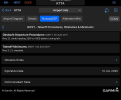
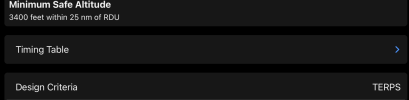
Noticed by some else. I checked and confirmed:

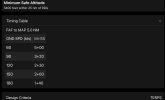
No timing table for approaches that require timing. Assumption of GPS (or DME) capability in the aircraft? Figure you can just calculate it easily? Something else?

I don’t see the app’s capability to identify the MAP or even time to the MAP calculation being sufficient from a regulatory perspective.
Addressed, apparently.

 
Addressed, apparently.

Yep I see them. They’ve also begun to fill in the missing charts.

Interesting about the table. They are still looking at it as an optional add-on, perhaps assuming we are going to use the MAP waypoint in a GPS in normal situations. It’s a touch-activated touchdown, remaining hidden until you touch.

1752721272975.png

1752721312561.png
 
Having “internet” traffic is a fun thing
 

Attachments

  • IMG_6647.jpeg
    IMG_6647.jpeg
    497.4 KB · Views: 24
  • Like
Reactions: cdb
Looks like ForeFlight's response to Garmin Smart Charts:

 
Does it show your position on the profile view when flying with the smartchart?
 
Looks like ForeFlight's response to Garmin Smart Charts:


Does it show your position on the profile view when flying with the smartchart?

More info in the FF specific thread:

Thread 'Here come Foreflight's enhanced approach charts' https://www.pilotsofamerica.com/com...-foreflights-enhanced-approach-charts.151847/
 
Looks like ForeFlight's response to Garmin Smart Charts:
Apparently there were pilots testing FF's version last year and my **guess** is FF always planned to announce it this year at OSH. I'm also **guessing** that Garmin was also going to release theirs at OSH too, but then decided to release their version early so they could be first.

It will be interesting when someone can put them side by side and see how they compare.
 
A review from a pilot vs the info from either FF's or G's marketing department. :D
OK. I've got a lot more experience with ForeFlight's Dynamic Procedures than I do with Garmin's SmartCharts.

My impression of SmartCharts is that they look REALLY good - But that's because they're vector generated, so they're as sharp as your screen can get, and because they look good they get everyone excited. But I *very* quickly got uncomfortable with them because they're actually TOO clean IMO. Some people will probably like that presentation, but I'm the guy who loves to have information available at a glance. I did not feel like it was very easy with Garmin's SmartCharts to verify that it was actually telling me the correct minimums (they have addressed this in the most recent update however), and I feel like briefing them is VERY tap-heavy because there is no briefing strip any more - You have to separately tap into the frequencies, the "brief" that has a few of the briefing strip items, and the missed approach procedure. You also still have to go to the Plates view to get to them, they don't integrate with maps.

ForeFlight's Dynamic Procedures doesn't give you the fancy view, but as usual with ForeFlight a lot of thought clearly went into making it usable. When you first select the procedure you see the aircraft category, equipment status, and type of minimums and specifically select them and hit "Add to Route". That does two things: It puts either the NACO (gov't) or Jepp plate, as appropriate, right onto the map as well as adding all of the waypoints, altitudes, etc into the flight plan. This isn't actually a new feature, it's been there - But now with Dynamic Procedures, you also get a sidebar that gives you all of the briefing items right up top (as well as buttons to change the approach or hide the plate), in the order you need them, followed by a list of waypoints, legs, altitudes, courses, and distances to be flown, all in the order you'll be flying it, ending with the minimums. Below that is a small 3D view that lets you see what the approach lights will look like and what the runway environment will look like on short final, that can be expanded to full screen with a tap. Finally, the last thing in the sidebar is the missed approach procedure.

FF has also added the approach into the Profile view, so you do get to see where you are vertically on the approach as well, and you can still show airspace, icing, turbulence, etc on the profile as well.

So, everything is there, in the order you need it, and you can follow through it all without switching away from the map and without having to tap buttons to get the information you need. And since it's on the map, you also still have the ability to show traffic, weather, and all that as well.

Happy to address any questions you may have!
 
OK. I've got a lot more experience with ForeFlight's Dynamic Procedures than I do with Garmin's SmartCharts.
Thanks for the review. I'll be interested to see FF's Dynamic Procedures when they're released.

As for putting the Plate on the Map, personally one of the things I REALLY hate about FF. I get that some people like it, but a lot don't and it should be an option.

I'm happy with the waypoints being drawn out on the Map now and the Dynamic Procedures should be a great improvment. But I'll wait to see the presentation before for I decide if I stop switching to the Plates page when I'm on the Approach. But for sure while I'm still on the transition on the Map page, I'll be Tapping the plate and then Tapping on the Hide Plate as fast as I can. :D
 
I prefer the FAA charts, and pretend I am thumbing through my trusty sea green Chart Supplement in my 1954 Cessna Spam Can with Clamp on DC 10s. The soothing aroma of old avionics and butt sweat stained blue mohair give me a peace no plastic Cirrus with big screen monitors could ever match.

Note: can’t afford a newer/faster plane lol.

IMG_6467.jpeg
 
As for putting the Plate on the Map, personally one of the things I REALLY hate about FF. I get that some people like it, but a lot don't and it should be an option.
Yes, it's the default, but it's not difficult to turn it off in either app.

If you want to see what Dynamic Procedures looks like, there are some picture in the thread on that subject.

A full side-by-side comparison is difficult since they both have multiple options but perhaps someone will do a long video that goes point by point.

Ultimately, some users will like one more than the other. For example, my impressions of the two are exactly opposite @flyingcheesehead's. I'm very impressed with Pilot's SmartCharts (despite some limitations); not as much with ForeFlight's Dynamic Procedures.
 
As for putting the Plate on the Map, personally one of the things I REALLY hate about FF. I get that some people like it, but a lot don't and it should be an option.
Interesting. Why don't you like it?

You don't have to ONLY use the plate on the map. It's usually easier to brief in the Plates view without all of the distractions present on the map. However, once I'm getting near the destination I'd rather be seeing it right on the map for improved situational awareness, weather, traffic, and everything that Plates On Maps enables.
 
Interesting. Why don't you like it?
The Chart over the Map to me is just clutter I don't need or want. It's just a personal preference that I see as unneeded clutter, but I get that some people think it's the coolest thing. So it should be an OPTION.

If you Tap and Hide Chart, FF still shows you the Approach Course, Wpts and Altitudes. But what do you or other people do with the Chart if you leave it on? I you change the Transparency setting so you can easily read the Chart in all lighting conditions, you've basically wiped out the Map and just duplicated what you get on the Plates page that's one Tap away. If you have the Transparency set so you can sort of see the Chart, what's the point? You're now probably looking at the Route FF has put onto the Map anyway, and... wait for it... the Chart overlay is just clutter that doesn't really do much for you. :D

Again, I get that a lot of people like it, but why force it on people that don't. When I want to look at the Chart, I Tap Plates. When I want to look at the Map with my Route that includes the Approach Route, I Tap Map. And I learned with Paper Plates, so typically when I'm really ON the Approach, I switch to the Plates page. If I end up going Missed, eventually I'm going back to the Map and I don't need to go through the extra Taps, especially if it's bumpy, to get rid of the Chart.
 
The Chart over the Map to me is just clutter I don't need or want. It's just a personal preference that I see as unneeded clutter, but I get that some people think it's the coolest thing. So it should be an OPTION.
I'm curious... Do you use a chart as your background, or just the basemap with the Aeronautical layer?

And you're right, it should be optional, is it not? @midlifeflyer alluded to it being an option earlier.

If you Tap and Hide Chart, FF still shows you the Approach Course, Wpts and Altitudes. But what do you or other people do with the Chart if you leave it on?
Ooooh, you'd hate how I have it set up. I have the plates set to semi-transparent so I can see through to the chart, mainly so that I can see major bits like cities if I break out before I'm on the FAC and I want to acquire the airport visually. And I also generally have the radar and traffic layers on, so I get those on top of the approach chart too...

But yeah, I do still leave the chart up on the map because I don't go back to Plates after the initial briefing, and I like to have things like obstacles, minimums, etc to be available at a glance, and those are on the plate. You do make a good point that maybe the plate isn't really necessary once the approach is part of the flight plan, especially with Dynamic Procedures. I'll have to give that a shot too.

If nothing else, Dynamic Procedures makes it much easier to hide the chart already, and also to show it again once it's hidden.
 
I'm curious... Do you use a chart as your background, or just the basemap with the Aeronautical layer?
I'm an Aeronautical Layer only user 99ish % of the time. I'll use Enroute Charts for planning sometimes on the computer, but generally start with FF's Route Advisor for IFR. I'll also go to the Sectional to get names of mountains or rivers. But the majority of the info I need is just a Tap or a Press away and a lot easier to read in conjested areas than the Sectional. I'm also a Track Up person, so if I'm heading South, no need to flip the Sectional around like the old days. And yes, you can get great at knowing left is right if you keep the chart with North up. But I've actually heard some stories of close calls. One was a guy that was tired and at night, and he turned right towards a mountain instead of left because the line he drew on the Sectional went right. Obviously nothing happened and it was a quick catch. But he said changed to always turning the chart so it was oriented the way he was flying. (It only has to go bad once...)

But yeah, I do still leave the chart up on the map because I don't go back to Plates after the initial briefing, and I like to have things like obstacles, minimums, etc to be available at a glance, and those are on the plate. You do make a good point that maybe the plate isn't really necessary once the approach is part of the flight plan, especially with Dynamic Procedures. I'll have to give that a shot too.
Up until you're really inside an IAF or somewhere that you mind set has changed from Enroute, Transition and NOW you're on the Approach, I also stay on the Map. And I add the Procedure, so I see my Route all the way through the Approach, but I don't have Plate covering anything on the Map. And yes, it's like I learned, you use the Enroute Chart while Enroute, then you start looking at the Approach Plate, which gives you everything you need to know.
 
But what do you or other people do with the Chart if you leave it on?
Well, since this is a GP thread, I’m not sure which app you are asking about. But either way, if I am using plates over maps, the plate is pretty opaque. If it’s a real approach, I only care about an impression of weather (which is delayed) and traffic (which is separated by ATC). But I still like the display on the Map because of the additional highlighted course an altitude information.

In GP, at this point, I’m gonna be in the SmartChart.
 
I'm an Aeronautical Layer only user 99ish % of the time.
I'm also a Track Up person
Oh, well THAT explains it. ;)

But I guessed you were probably going to answer that way. I'm still a north-up sectional-watcher (enhanced by the Aeronautical layer) and so I'm used to there being a lot on the screen at once, so the plate being there doesn't bug me at all, and I prefer the official FAA published everything. Maybe it's because of my long history developing and testing software, but I do not blindly trust anything put there by a computer unless I have a way to verify it for myself. That's why the plate is always on my map in spite of the route and altitude being depicted, for example.
 
and I prefer the official FAA published everything. Maybe it's because of my long history developing and testing software, but I do not blindly trust anything put there by a computer
I’m guessing they use software to create those FAA charts. And different software to say they are current and display them. No? Or are you saying you brief the 8260 source documents?

Joking of course. Our preferences are our preferences. But saying you use an EFB instead of paper charts drawn by hand but don’t trust software?
 
Joking of course. Our preferences are our preferences. But saying you use an EFB instead of paper charts drawn by hand but don’t trust software?
Yeah, well... I am sure the FAA has to go through more stringent QC on their software than any EFB, kind of like how the various levels of certified panel mount units' software do. You don't fly approaches using an iPad as primary nav either, do you? ;)

Even so, I have found errors on approach plates before. Nothing earth-shattering or life-threatening though. And I'm very happy at how quickly they address those errors when you let them know - The charting office is exactly the opposite of everything you've ever heard about government employees. Friendly, prompt, responsive. In fact, far better service than I've gotten from most any private business!
 
Yeah, well... I am sure the FAA has to go through more stringent QC on their software than any EFB, kind of like how the various levels of certified panel mount units' software do. You don't fly approaches using an iPad as primary nav either, do you? ;)
Primary for nav? No. Primary for what we are discussing - Charts? Only for the past 14 years :D. How about you? (That, BTW, is one of the differences between the products. SmartCharts are intended as a potential replacement for Jepp and FAA charts; Foreflight's Dynamic Procedures are not.)
Even so, I have found errors on approach plates before. Nothing earth-shattering or life-threatening though.
Now, that would be interesting. Next time we find a charting error (not a source document error), lets see if the SmartChart gets it right. It should.
 
I Really Really REally like the new smartcharts atleast while putzing around looking at them at my desk, while flying, the govt plate overlaying the map is about as perfect as it gets. I've only shot 3 or 4 approaches since the feature was released, maybe i'll get better with it
 
Back
Top