
You are using an out of date browser. It may not display this or other websites correctly.
You should upgrade or use an alternative browser.
You should upgrade or use an alternative browser.
Pretty cool update to Garmin Pilot
- Thread starter Hang 4
- Start date

- Joined
- Jan 9, 2013
- Messages
- 2,595
- Display Name
- Jon
- Home Airfield
- KCMA
May I ask how you went about downloading the update. I am not seeing a prompt to do so.
Never mind, I just got it
Never mind, I just got it
- Joined
- Jan 9, 2013
- Messages
- 2,595
- Display Name
- Jon
- Home Airfield
- KCMA
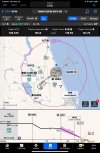
I have been trying to get this to overlay on to the map with a flight plan loaded... looks like for now it reverts back to the original style plate... But I will say it is a fresh modern look... good on GarminThe new version of GP now includes "smart charts". My simple stupid way of describing them is interactive approach plates. Came out today. A really different way to present the information.
Only IOS version at this point.
Last edited:

- Joined
- May 25, 2006
- Messages
- 22,001
- Location
- KTTA, North Carolina
- Display Name
- Who you kiddin?
- Home Airfield
- KTTA
I’ve been playing with it on the ground and I don’t think it was intended to be an overlay. With its multiple buttons, etc, it just has too much extra functionality. These are not just charts; this is a complete (electronic( charting product! Something only the FAA and Jepp have done previously in the US.I have been trying to get this to overlay on to the map with a flight plan loaded... looks like for now it reverts back to the original style plate... But I will say it is a fresh modern look... good on Garmin
Besides, the goal is to declutter the chart. An overlay doesn’t do that unless it’s opaque. Perhaps at some point, there will be options to turn on such things as weather in the chart view.
I’m really looking forward to flying with it.
Last edited:

eman1200
Touchdown! Greaser!

jimhorner
Line Up and Wait
- Joined
- Oct 28, 2012
- Messages
- 949
- Location
- Santa Clara, California
- Display Name
- Jim Horner
- Home Airfield
- KSJC
I just downloaded it and have been playing with it a bit. One thing that using the overlay gives is the ability to show traffic on the map with overlay. Anyone know if traffic is shown on the chart? I'm looking forward to playing with the feature in some VFR conditions first.
Sent from my iPhone using Tapatalk Pro
Sent from my iPhone using Tapatalk Pro
I’ll admit that’s pretty slick. When it’s time to update my tablet, I *might* be compelled to go to iPad w/GP although they’re going to need to continue to update the web interface and watch the pricing. If it’s a significant premium over iFly EFB, it’ll be a long row to hoe for me to buy it.
Nothing has changed with the Approach Plates and you're still downloading and using either the Gov. or Jepp Plates. The "SmartChart" is just a name Garmin is using for how they display the procedure on the Map. They did not create a "new" Approach Plate or Charts. So if you overlay an Approach Plate, it will be the same one you've always used.I have been trying to get this to overlay on to the map with a flight plan loaded... looks like for now it reverts back to the original style plate... But I will say it is a fresh modern look... good on Garmin
- Joined
- May 25, 2006
- Messages
- 22,001
- Location
- KTTA, North Carolina
- Display Name
- Who you kiddin?
- Home Airfield
- KTTA
I guess we’ll disagree a bit. This may be digital, but it’s as much a charting replacement as a Jepp package.Nothing has changed with the Approach Plates and you're still downloading and using either the Gov. or Jepp Plates. The "SmartChart" is just a name Garmin is using for how they display the procedure on the Map. They did not create a "new" Approach Plate or Charts. So if you overlay an Approach Plate, it will be the same one you've always used.

Sierra_Hotel
Cleared for Takeoff
- Joined
- Oct 30, 2019
- Messages
- 1,272
- Display Name
- Sierra_Hotel
- Home Airfield
- KLBX
Very cool. Looking forward to trying it out when I get back to flying.

Hang 4
En-Route
- Joined
- Aug 18, 2017
- Messages
- 3,424
- Display Name
- Hang 4
Nothing has changed in the data. The difference is that the traditional plate is just a digital picture of a printed plate. You can overlay it and your plane shows up geo referenced, but it's still just a digital representation of a piece of paper.Nothing has changed with the Approach Plates and you're still downloading and using either the Gov. or Jepp Plates. The "SmartChart" is just a name Garmin is using for how they display the procedure on the Map. They did not create a "new" Approach Plate or Charts. So if you overlay an Approach Plate, it will be the same one you've always used.
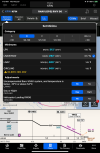
The smart chart is a whole different animal. It's fully dynamic. It will display minima that are only relevant to your situation. (night/day, class, extreme temps etc) Basically you customize the chart to show only relevant data. Once it's set, all the irrelevant stuff is hidden. So trying to read the paragraph on extreme temp adjustment while trying to maintain a scan. Just click on the relevant stuff and it's all that's showing on the main view. This is just one example.
- Joined
- May 25, 2006
- Messages
- 22,001
- Location
- KTTA, North Carolina
- Display Name
- Who you kiddin?
- Home Airfield
- KTTA
when discussing procedure source documents, I used to sometimes mention how it doesn’t matter if we used government charts, Jepp charts, “Joe the chart-maker,” or rolled our own, so long as it reflected the regulatory source data.Nothing has changed in the data. The difference is that the traditional plate is just a digital picture of a printed plate. You can overlay it and your plane shows up geo referenced, but it's still just a digital representation of a piece of paper.
The smart chart is a whole different animal. It's fully dynamic. It will display minima that are only relevant to your situation. (night/day, class, extreme temps etc) Basically you customize the chart to show only relevant data. Once it's set, all the irrelevant stuff is hidden. So trying to read the paragraph on extreme temp adjustment while trying to maintain a scan. Just click on the relevant stuff and it's all that's showing on the main view. This is just one example.
View attachment 141468
I’m sure it will take a little getting used to and I’m guessing there will be some changes as what I think is a trial market phase gets feedback, but for a first truly digital charting product, this is very impressive.
eman1200
Touchdown! Greaser!
So I’ve been giving people here a hard time for using flat screen television sized tablets because they say the font is too small. Using the “old” charts, you can simply zoom in and voila, the font size increases:

I’m seeing the font size stay the same when zooming using the new charts:


I’m seeing the font size stay the same when zooming using the new charts:
eman1200
Touchdown! Greaser!
Correct, but the fonts are bigger on smart charts.
Eh?

Ed Haywood
Final Approach
Do they only display north up, or is track up an option? 
The georeferenced airplane icon on the vertical profile is way cool. Does any other product do that?
The georeferenced airplane icon on the vertical profile is way cool. Does any other product do that?
- Joined
- May 25, 2006
- Messages
- 22,001
- Location
- KTTA, North Carolina
- Display Name
- Who you kiddin?
- Home Airfield
- KTTA
Looks like only north upDo they only display north up, or is track up an option?
Pretty sure the answer is no. Not even Jepp.The georeferenced airplane icon on the vertical profile is way cool. Does any other product do that?

Nick Geber
Pre-takeoff checklist
- Joined
- Oct 10, 2022
- Messages
- 220
- Display Name
- NIckG
- Home Airfield
- KHND
Its a fantastic upgrade. Mirrors very closely the functionality of the avionics - e.g. when I choose an approach and transition on my 750, all the other data goes away. Now GP has a similar interface but dynamically presenting all of the info as relates to your aircraft is stellar.
- Joined
- May 25, 2006
- Messages
- 22,001
- Location
- KTTA, North Carolina
- Display Name
- Who you kiddin?
- Home Airfield
- KTTA
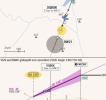
I just did an approach in X-Plane using it. Since it marks the location of where you will reach DA if on glideslope/path, the georeferenced profile view is very interesting.
eman1200
Touchdown! Greaser!
I just did an approach in X-Plane using it. Since it marks the location of where you will reach DA if on glideslope/path, the georeferenced profile view is very interesting.
View attachment 141487
While doing an approach, the only reason I’m ever looking at the plate my phone is to get altitudes/headings/distances. Once at the faf I rarely have any need to look at the plate. I hope this doesn’t draw my attention away from flying the actual approach. But then again, I haven’t used it yet so who knows.
- Joined
- May 25, 2006
- Messages
- 22,001
- Location
- KTTA, North Carolina
- Display Name
- Who you kiddin?
- Home Airfield
- KTTA
I think there's a real potential for distraction early on but at some point we'll get used to it and treat it like a "standard" plate. In my case, I don't even look at the chart it for headings and distances or, depending what equipment I'm flying, altitudes during the approach. For me, the EFB in flight is for the most part a way to look up stuff, a briefing tool, and a moving map I glance at for situational awareness. I think this does a great job at those tasks.While doing an approach, the only reason I’m ever looking at the plate my phone is to get altitudes/headings/distances. Once at the faf I rarely have any need to look at the plate. I hope this doesn’t draw my attention away from flying the actual approach. But then again, I haven’t used it yet so who knows.
There are clearly some cool bells and whistles here, but now that I've used it (sort of) where this really shines is that line of buttons across the top.
- Joined
- May 25, 2006
- Messages
- 22,001
- Location
- KTTA, North Carolina
- Display Name
- Who you kiddin?
- Home Airfield
- KTTA
Just in case -- the yellow highlights are mine, not Garmin's.Okay, that’s slick enough to get me thinking about switching now.
Just in case -- the yellow highlights are mine, not Garmin's.
Thabks; I’m watching the AvWeb video right now. I like what they’re doing with SID/STARs and the airport diagrams.
There’s some good thinking that went into this feature. My wife’s got a relatively new iPad that I’ll try to sneak away with tomorrow and install a trial subscription on.

Pinecone
Final Approach
I am hoping that this is just the initial release and that they will build upon it.
1) Traffic and weather should be options
2) It should be on the panel avionics also (G3X/G500Txi and GTNs)
3) It should interact with the panel avionics. If I go through the steps of determining my minimums for that approach, it should be able to push this to the Minimum setting on the G3X. It should also interact for setting coms and nav frequencies.
1) Traffic and weather should be options
2) It should be on the panel avionics also (G3X/G500Txi and GTNs)
3) It should interact with the panel avionics. If I go through the steps of determining my minimums for that approach, it should be able to push this to the Minimum setting on the G3X. It should also interact for setting coms and nav frequencies.
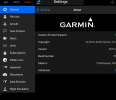
If you go to the Plates in Pilot you're telling me you see a Plate with the Garmin copyright on it??? I'd be real interested in seeing a screen grab if that's the case. My guess is your Plates/Charts are still Gov. or Jepp.I guess we’ll disagree a bit.
What I think you're looking at with the SmartChart is basically what you see on your Garmin Navigator when you plug in a route and pick the entry point and then look at the Map page. Yes, it is a MUCH better graphical representation, but it is not a new chart. Just the data displayed on the Map. ForeFlight has been doing this for years, it just does not look anywhere close to how well Pilot has designed the graphical dispay.
Totally agree, it is a great graphical presentation. I'm just saying Garmin did not create a new Approach Plate or Charts. They just upped their game with the digital presentation of the data.The smart chart is a whole different animal.
As for the other options, also a great update, but that's just the EFB doing the quick calculations it can easily do when you plug specific info into it.
- Joined
- May 25, 2006
- Messages
- 22,001
- Location
- KTTA, North Carolina
- Display Name
- Who you kiddin?
- Home Airfield
- KTTA
What’s an approach chart? I’d say just the data displayed on a (virtual) piece of paper.Just the data displayed on the Map
Without getting into the details of copyright law, the Garmin copyright is a software copyright.
Ed Haywood
Final Approach
I'm VFR only, so got no dog in this fight, but I do love to see innovation. I throw stones at Garmin on a regular basis, so happy to throw them props on this one.
Okay, I get what you're saying. Similar to FF's Aeronautical layer.What’s an approach chart? I’d say just the data displayed on a (virtual) piece of paper.
Just that a lot of people are equating it to a replacement to the Gov. or Jepp Plates, which are a different animal in my mind. EFB is a display of the data. The Gov and Jepp Plates/Charts are the documentation from the creation of the Approach or whatever. Even if in digital form, the Gov. or Jepp plate is the fall back of what you're supposed to do. I doubt Pilot or FF will ever screw up because we know they are flawless!
 But if there is an issue, I can see the question being asked if the Gov/Jepp plate was also reviewed. Probably won't mean much in the reality as an EFB is an approved device... until the Attorneys get involved.
I'm also assuming that in the latest release of Pilot there is still a section of Approach Plates and Enroute Charts and Garmin is not telling you that you don't need the Gov Plates or your subscription to Jepp... or am I wrong on that?
Initial reaction: I like the planning on FF better. In GP, I have not been able to plan routing on the map. FF shows the various routing depicted on the screen. If you drop down to the text routes, you can select one and the appropriate route will be highlighted. On GP, the routes are selected from the flight planning page. The routes are described textually. If you're not familiar with the area, the text descriptions are almost useless. It's much easier to have the routes depicted, and be able to highlight the text that correspond to the routes.
Last edited:
Hang 4
En-Route
- Joined
- Aug 18, 2017
- Messages
- 3,424
- Display Name
- Hang 4
You can toggle back and forth between the standard plate and the smart chart. The standard US gov plates have always come with the premium version of GP.I'm also assuming that in the latest release of Pilot there is still a section of Approach Plates and Enroute Charts and Garmin is not telling you that you don't need the Gov Plates or your subscription to Jepp... or am I wrong on that?
Nick Geber
Pre-takeoff checklist
- Joined
- Oct 10, 2022
- Messages
- 220
- Display Name
- NIckG
- Home Airfield
- KHND
You can absolutely plan your route from map. Go to the map page. Tap the edit flight plan text at the top. Put in your staring location and ending location. You'll get a line between the 2 on the map page and you can drag it around and add waypoints visually exactly like FF. Or you can enter you staring and ending locations and tap the edit text at the top and chose precleared routes, just like FF.Initial reaction: I like the planning on FF better. In GP, I have not been able to plan routing on the map. FF shows the various routing depicted on the screen. If you drop down to the text routes, you can select one and the appropriate route will be highlighted. On GP, the routes are selected from the flight planning page. The routes are described textually. If you're not familiar with the area, the text descriptions are almost useless. It's much easier to have the routes depicted, and be able to highlight the text that correspond to the routes.
I know you can do flight planning from the map page. I am talking about displaying the preferred routes. I can look them up on the flight plan page, but there are only text descriptions of the routes. I haven't figured out how, or if I can display preferred or pre-approved routes between the departure and arrival airports on the map page.
For example, from
No Flight Plan
Tap to Edit
Tap on the bubble.
Add Origin Airport
Type KMTN
Add Destination Airport
Type KFDK
Click Routing
Review the Planned ATC Routing
There is no graphical depiction of the routes. There is no graphical depiction like there is in FF. In the above example, it's not a problem because there are few routes and they're all about the same. But with a complicated series of routes, and with some of the routes going out of the way, I like the ability to see where those routes are going and how far many total miles they are. I can't do that until I select a route, and when I do the the other options are lost.
I'm not saying that is a fatal flaw. On the Flight Plan page, the ATC routes are displayed. It's just something that I will have to work around.
No Flight Plan
Tap to Edit
Tap on the bubble.
Add Origin Airport
Type KMTN
Add Destination Airport
Type KFDK
Click Routing
Review the Planned ATC Routing
There is no graphical depiction of the routes. There is no graphical depiction like there is in FF. In the above example, it's not a problem because there are few routes and they're all about the same. But with a complicated series of routes, and with some of the routes going out of the way, I like the ability to see where those routes are going and how far many total miles they are. I can't do that until I select a route, and when I do the the other options are lost.
I'm not saying that is a fatal flaw. On the Flight Plan page, the ATC routes are displayed. It's just something that I will have to work around.
Last edited:
Nick Geber
Pre-takeoff checklist
- Joined
- Oct 10, 2022
- Messages
- 220
- Display Name
- NIckG
- Home Airfield
- KHND
Yes, you can choose "routing" from the drop-down menu. You don't get a little preview box/graphical image like you do in FF. You can load a suggested route and see it in the pao page right aways, if you dont like that one you can choose another one etc. and see it immediately. If you want a mini visual preview of the precleared routes, you have to do it through the flight planning tab.I know you can do flight planning from the map page. I am talking about displaying the preferred routes. I can look them up on the flight plan page, but there are only text descriptions of the routes. I haven't figured out how, or if I can display preferred or pre-approved routes between the departure and arrival airports on the map page.