At least Garmin provides an Android version although feature parity doesn’t exist between the two OS as recently as January of this year.….If Garmin has the Foreflight model of **** you, for not using Apple then **** them.

You are using an out of date browser. It may not display this or other websites correctly.
You should upgrade or use an alternative browser.
You should upgrade or use an alternative browser.
Pretty cool update to Garmin Pilot
- Thread starter Hang 4
- Start date

- Joined
- May 25, 2006
- Messages
- 22,002
- Location
- KTTA, North Carolina
- Display Name
- Who you kiddin?
- Home Airfield
- KTTA
There is absolutely nothing better than iFly in the Android EFB market.No. I don't use GP. Student is new to the game so switching to iFly - which is better when comparing Android to Android - isn't undoing any sort of preference.
- Joined
- May 25, 2006
- Messages
- 22,002
- Location
- KTTA, North Carolina
- Display Name
- Who you kiddin?
- Home Airfield
- KTTA
FIFY.At least Garmin provides an Android version although feature parity doesn’t exist between the two OS as recently as one second agoJanuary of this year.
"Feature parity doesn't exist" is being extra kind to the Android version of Pilot.

Sierra_Hotel
Cleared for Takeoff
- Joined
- Oct 30, 2019
- Messages
- 1,272
- Display Name
- Sierra_Hotel
- Home Airfield
- KLBX
FIFY. The iOS version connects to any GDL 90 device. The IOS version has a bigger list of compatible devices. My backup is an old XGPS 170D. It's not even in the compatible device list but works just fine with the iOS version of Pilot. I wrote to Garmin customer service abotu it and they informed my that any GDL 90 compatible device should work.
I actually don't know if it works with the Android version or not. @EdFred, have you asked Pilot support? Russ is very responsive.
Interesting. I originally gave GP a shot specifically because it supported Android, but once I got a iPad and noticed the differences between the two I never went back to the Android one.
- Joined
- May 25, 2006
- Messages
- 22,002
- Location
- KTTA, North Carolina
- Display Name
- Who you kiddin?
- Home Airfield
- KTTA
The one on my Android phone basically has four functions. Looking at weather and filing a flight plan when my iPad isn't handy; receiving my anticipated clearance and update information; emergency backup in the air (when all I really care about is having charts).Interesting. I originally gave GP a shot specifically because it supported Android, but once I got a iPad and noticed the differences between the two I never went back to the Android one.
I believe you do it via WiFi, not Bluetooth. A lot of devices use Bluetooth, like my ForeFlight connection to my GTN. So if you're trying that, switch over and see if you can find it via WiFi.Anyone?

EdFred
Taxi to Parking
- Joined
- Feb 25, 2005
- Messages
- 31,402
- Location
- Michigan
- Display Name
- The Ed
- Home Airfield
- 9D9 / 6Y9 / 88TN
This was via WiFi. The iFly app would grab the data, GP would not. So dumb. I get the whole Garmin limiting broadcasting under the guise of "security," but come on man, with GP, you're grabbing the data hat out there for anyone to have. Garmin basically telling flight instructors: "You have to only fly in planes that have Garmin units."I believe you do it via WiFi, not Bluetooth. A lot of devices use Bluetooth, like my ForeFlight connection to my GTN. So if you're trying that, switch over and see if you can find it via WiFi.
****ing idiots.
Sierra_Hotel
Cleared for Takeoff
- Joined
- Oct 30, 2019
- Messages
- 1,272
- Display Name
- Sierra_Hotel
- Home Airfield
- KLBX
I carried my own Stratux with me so it didn't matter what was in the plane.

Stephen Shore
Pre-takeoff checklist
I flew my first approach with the Garmin Smart Charts yesterday - IMC and was even assigned a hold (1st time that has happened to me in a long time at a small airport). I really liked the Smart Chart. I can't really say that it is necessary (I have a GTN 750) but it was easier to "see" where I was in relation to the actual waypoints. I liked it.
So anyone that wanted to switch say from ForeFlight to Garmin pilot really has to learn two different new applications?No but it interfaces with fltplanGo which does.

Hang 4
En-Route
- Joined
- Aug 18, 2017
- Messages
- 3,425
- Display Name
- Hang 4
Does Garmin pilot allow you to file and brief flights?
That's not correct. I file and brief with GP and don't use fltplanGo.No but it interfaces with fltplanGo which does.

jimhorner
Line Up and Wait
- Joined
- Oct 28, 2012
- Messages
- 949
- Location
- Santa Clara, California
- Display Name
- Jim Horner
- Home Airfield
- KSJC
Does Garmin pilot allow you to file and brief flights?
No but it interfaces with fltplanGo which does.
Incorrect. I file and brief frequently from within Garmin Pilot.
From the trip planning page, just tap on file:

After the Flight plan is accepted, there will be a message:

There's also a briefing tab that can be clicked to get a briefing and a selection to determine the briefing type.

jimhorner
Line Up and Wait
- Joined
- Oct 28, 2012
- Messages
- 949
- Location
- Santa Clara, California
- Display Name
- Jim Horner
- Home Airfield
- KSJC
And once the flight plan has been accepted, i get an email from Garmin Pilot:


- Joined
- Aug 9, 2022
- Messages
- 1,171
- Location
- Surrounded by Civil War ghosts
- Display Name
- Probably AI
- Home Airfield
- KHWY
I routinely brief and file via GP on the iPad with no other interface, including abbreviated, full, or outlook briefs as needed. SFRA flight plans in particular (since the only thing that changes are the date/time) are super easy. I just clone the most recent one, double-check the desired time, and then file. Probably a 10-15 second evolution.

Ed Haywood
Final Approach
At least Garmin provides an Android version although feature parity doesn’t exist between the two OS as recently as January of this year.
Seems like the market is coalescing on 3 main players: FF, GP, and IFly. Of those, iFly is the most open and platform-agnostic.
Absent the new smart charts feature, how do you compare iFly to the others on IFR capability?
Even if it was built into Pilot, you'd still have to learn how they do their briefings and filing. So no *additional* work really.So anyone that wanted to switch say from ForeFlight to Garmin pilot really has to learn two different new applications?
And I'm a FF user too, but I believe it's pretty seamless to go into FltPlanGo. Basically the same as hitting the Flights tab in FF.

- Joined
- Mar 15, 2016
- Messages
- 5,585
- Display Name
- Ari
I think that the confusion here may come from the option (which may still exist) to add your FltPlan.com credentials into Garmin Pilot, which then changes some of the features of the Pilot app to use FltPlan.com. Filing flight plans would be one such feature. I didn’t realize this on-off behavior was determined by entering credentials at first and hated it. Once I took my FltPlan.com credentials out of Pilot, I had a much better user experience. I don’t know the extent to which the separate app FltPlanGo was involved in that nonsense.Even if it was built into Pilot, you'd still have to learn how they do their briefings and filing. So no *additional* work really.
And I'm a FF user too, but I believe it's pretty seamless to go into FltPlanGo. Basically the same as hitting the Flights tab in FF.
I can assure anyone who is concerned about it that you do NOT need to interact with FltPlan.com or FltPlanGo at all to get briefings and file your flight plans through Garmin Pilot. That’s true at least on iPhone and iPad, as of the date of this post.
Last edited:
Hang 4
En-Route
- Joined
- Aug 18, 2017
- Messages
- 3,425
- Display Name
- Hang 4
I had the exact same experience. I disconnected FltPlanGo from GP. Much easier to just use native GP with your LEIDOS credentials.I didn’t realized this on-off behavior was determined by entering credentials at first and hated it. Once I took my FltPlan.com credentials out of Pilot, I had a much better user experience. I don’t know the extent to which the separate app FltPlanGo was involved in that nonsense.
- Joined
- May 25, 2006
- Messages
- 22,002
- Location
- KTTA, North Carolina
- Display Name
- Who you kiddin?
- Home Airfield
- KTTA
It’s also true on the GP Android app.I think that the confusion here may come from the option (which may still exist) to add your FltPlan.com credentials into Garmin Pilot, which then changes some of the features of the Pilot app to use FltPlan.com. Filing flight plans would be one such feature. I didn’t realize this on-off behavior was determined by entering credentials at first and hated it. Once I took my FltPlan.com credentials out of Pilot, I had a much better user experience. I don’t know the extent to which the separate app FltPlanGo was involved in that nonsense.
I can assure anyone who is concerned about it that you do NOT need to interact with FltPlan.com or FltPlanGo at all to get briefings and file your flight plans through Garmin Pilot. That’s true at least on iPhone and iPad, as of the date of this post.
- Joined
- Mar 15, 2016
- Messages
- 5,585
- Display Name
- Ari
It struck me as an idiotic option to provide, at least without some explanation. “Optionally, if you are a masochist, enter your FltPlan.com credentials here. Doing so will deactivate the user-friendly version of half of this app, downgrade your computer to Windows ME, and replace your coffee creamer with spoiled buttermilk.”I had the exact same experience. I disconnected FltPlanGo from GP. Much easier to just use native GP with your LEIDOS credentials.

Nick Geber
Pre-takeoff checklist
- Joined
- Oct 10, 2022
- Messages
- 220
- Display Name
- NIckG
- Home Airfield
- KHND
That is incorrect. Garmin Pilot allows you to file and brief flight p[lans just like ForeFlight. You have a choice between Leidos and FlightPlan GoNo but it interfaces with fltplanGo which does.
Seems like the market is coalescing on 3 main players: FF, GP, and IFly. Of those, iFly is the most open and platform-agnostic.
Absent the new smart charts feature, how do you compare iFly to the others on IFR capability?
In Android, iFly is the most feature rich and offers parity or near parity with their iOS offering. Plan, brief, file, geo-referenced charts all exist in both versions. You can add charted departures and SIDs to the flight plan, which can’t be done with GP on Android.
Both FF and GP have some UI refinement that iFly doesn’t. For example, GP’s NOTAM on the chart is nice.

I think it’s also easier to get to the scratchpad in GP/FF simply from the number of clicks perspective. By the same token, FF probably has the deepest/most integrated weather features. Both have Jepp charts as an option, iFly doesn’t.
Really, it comes down to whether you want integration/data connectivity with your panel mount avionics or not. If you do and G is your navigator, then GP (iOS) or FF is likely the choice to make.
If you’re using an IFD or a non-G ADS-B source, then iFly is pretty much your choice regardless of OS.
- Joined
- May 25, 2006
- Messages
- 22,002
- Location
- KTTA, North Carolina
- Display Name
- Who you kiddin?
- Home Airfield
- KTTA
I’m guessing at a possible reason for the option. FltPlan.com has been around for a long time, since well before the EFB era. It was probably the most used planning and filing site by Part 135 and small corporate flight department. It also has extra features like PDC, custom call signs, EAPIS services.It struck me as an idiotic option to provide, at least without some explanation. “Optionally, if you are a masochist, enter your FltPlan.com credentials here. Doing so will deactivate the user-friendly version of half of this app, downgrade your computer to Windows ME, and replace your coffee creamer with spoiled buttermilk.”
I’ve always felt that was the reason Garmin acquired them to begin with - to tap into and retain some that market, which was being courted by ForeFlight. If I was correct, I think it explains the ongoing connection.
My accounts are connected in the app and I used it to import some of my aircraft profiles. But even with that connection, @Anthem, I get to choose my filing service and I always choose Leidos
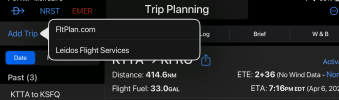
- Joined
- May 25, 2006
- Messages
- 22,002
- Location
- KTTA, North Carolina
- Display Name
- Who you kiddin?
- Home Airfield
- KTTA
Parity. Unless they have gone further, the strength of iFly as a multi platform app (including Windows and its own dedicated hardware) has been that it appears to sit on top of the OS rather than being integrated into it. So it’s not subject to OS-associated differences. That strength is also one of its weaknesses. You can’t, for example, go to a site like FltPlan.com or SkyVector, create an IFR flight plan, choose from the common clearances for the route, copy it, and tap to paste it in iFly’s route planner.In Android, iFly is the most feature rich and offers parity or near parity with their iOS offering
- Joined
- Mar 15, 2016
- Messages
- 5,585
- Display Name
- Ari
I get that they wanted to leverage the FltPlan.com user base. And it’s not as bad as some software “features” I’ve found myself screaming “Why would anyone ever want it to do that?” at the screen over the years. Such as WordPerfect, which I had to use at work 2007-2011 and, if you had some text selected (like an address in a letter so you could print an envelope) and chose File->Save, it would save only the selected text and not the rest of the document. (If memory serves, it would also reset the “file changed since saved” bit and not ask you to save your changes if you then closed the file. Leaving you with an address saved on disk without the text of the letter.)I’m guessing at a possible reason for the option. FltPlan.com has been around for a long time, since well before the EFB era. It was probably the most used planning and filing site by Part 135 and small corporate flight department. It also has extra features like PDC, custom call signs, EAPIS services.
I’ve always felt that was the reason Garmin acquired them to begin with - to tap into and retain some that market, which was being courted by ForeFlight. If I was correct, I think it explains the ongoing connection.
My accounts are connected in the app and I used it to import some of my aircraft profiles. But even with that connection, @Anthem, I get to choose my filing service and I always choose Leidos
View attachment 141774
Ed Haywood
Final Approach
In Android, iFly is the most feature rich and offers parity or near parity with their iOS offering. Plan, brief, file, geo-referenced charts all exist in both versions. You can add charted departures and SIDs to the flight plan, which can’t be done with GP on Android.
Both FF and GP have some UI refinement that iFly doesn’t. For example, GP’s NOTAM on the chart is nice.
I think it’s also easier to get to the scratchpad in GP/FF simply from the number of clicks perspective. By the same token, FF probably has the deepest/most integrated weather features. Both have Jepp charts as an option, iFly doesn’t.
Really, it comes down to whether you want integration/data connectivity with your panel mount avionics or not. If you do and G is your navigator, then GP (iOS) or FF is likely the choice to make.
If you’re using an IFD or a non-G ADS-B source, then iFly is pretty much your choice regardless of OS.
I upgraded iFly to get IFR charts. Have been messing with those. Is there a way to fly holding patterns in iFly?
I upgraded iFly to get IFR charts. Have been messing with those. Is there a way to fly holding patterns in iFly?
There isn’t a way to add them to your flight plan, though from a practical standpoint I can draw the hold on the map if necessary. Nor is there in any Android EFB I’ve come across. Foreflight and Garmin Pilot for iOs offer that feature.
I do wish iFly would load the missed approach segment of the IAP, but really that’s time to be instrument scanning and not dorking with the EFB. My workaround for that is just using the plate in full screen mode since it’s 1) georeferenced and 2) the plane symbol is superimposed on it, which is good enough to do the job. You can also have the plate superimposed on the chart and just zoom in as necessary.
EdFred
Taxi to Parking
- Joined
- Feb 25, 2005
- Messages
- 31,402
- Location
- Michigan
- Display Name
- The Ed
- Home Airfield
- 9D9 / 6Y9 / 88TN
Why not, you know, use your certified equipment to do that part? I fly IFR/IMC and the iFly is there for information (altitudes mostly) and it's the G5/430W that I'm actually flying by.There isn’t a way to add them to your flight plan, though from a practical standpoint I can draw the hold on the map if necessary. Nor is there in any Android EFB I’ve come across. Foreflight and Garmin Pilot for iOs offer that feature.
I do wish iFly would load the missed approach segment of the IAP, but really that’s time to be instrument scanning and not dorking with the EFB. My workaround for that is just using the plate in full screen mode since it’s 1) georeferenced and 2) the plane symbol is superimposed on it, which is good enough to do the job. You can also have the plate superimposed on the chart and just zoom in as necessary.
Why not, you know, use your certified equipment to do that part? I fly IFR/IMC and the iFly is there for information (altitudes mostly) and it's the G5/430W that I'm actually flying by.
Uh, I do. But plates don’t show on a GTN650 and since I use them to brief the approach, it’s just easier to leave the EFB on the approach plate in full screen mode.

As for actually using the EFB to depict a hold, for published holds, I just refer to the applicable IFR Low chart for a published or draw it on the chart for a random.
The hold gets loaded into the GTN for actual nav guidance; the EFB depiction exists simply as a cross check.
Ed Haywood
Final Approach
I raised the question about holds in EFBs because I do not have certified equipment yet. I will probably install a GPS 175 this fall. However, in the interim, I wanted to amuse myself by flying the RNAV approach at a nearby field where I get gas. I have my EFB set up to feed nav data to my HSI, so I was hoping to get a reasonable simulation of what certified equipment would look like. I found it easy to load the approach in the EFB, but could not figure out how to load the procedure turn or missed approach hold in a way that would facilitate flying them by reference to the HSI.
Before anyone chimes in about how inappropriate that is for training, I don't care. This is for entertainment only. For personal reasons, I need the distraction.
Before anyone chimes in about how inappropriate that is for training, I don't care. This is for entertainment only. For personal reasons, I need the distraction.
Last edited:
I raised the question about holds in EFBs because I do not have certified equipment yet. I will probably install a GPS 175 this fall. However, in the interim, I wanted to amuse myself by flying the RNAV approach at a nearby field where I get gas. I have my EFB set up to feed nav data to my HSI, so I was hoping to get a reasonable simulation of what certified equipment would look like. I found it easy to load the approach in the EFB, but could not figure out how to load the procedure turn or missed approach hold in a way that would facilitate flying them by reference to the HSI.
Before anyone chimes in about how inappropriate that is for training, I don't care. This is for entertainment only. For personal reasons, I need the distraction.
What’s the airport?
Ed Haywood
Final Approach
What’s the airport?
CHN and X06.
I am at FD77. The IAF for CHN RWY 18 is 9 minutes away. Thought it would be fun to give it a go. That will get me motivated to spend the coin on a GPS 175 and hire @farangutan to do it for real.
Last edited:
CHN and X06.
I am at FD77. The IAF for CHN RWY 18 is 9 minutes away. Thought it would be fun to give it a go. That will get me motivated to spend the coin on a GPS 175 and hire @farangutan to do it for real.
Not saying I’d do it without being properly equipped, but if I were going to fly an RNAV into CHN, I’d enter off one of the T feeders to bypass the course reveral and asked for alternate missed approach for vectors to FD77.
In **VFR** conditions with a Safety Pilot, let them chime in all they want. Nothing wrong with it.Before anyone chimes in about how inappropriate that is for training, I don't care. This is for entertainment only. For personal reasons, I need the distraction.
In **VFR** conditions with a Safety Pilot, let them chime in all they want. Nothing wrong with it.
I’d probably fly it with an instrument rated safety pilot in case ATC throws out a question that may not be obvious to a non-rated pilot or I’d skip flight following entirely.
I’d also fly it without foggles the first time.
Yep, same with learning a GPS on the first couple of flights. Even if you're not under the hood, having someone there to look out the window while your head is buried inside is always a good thing.I’d probably fly it with an instrument rated safety pilot in case ATC throws out a question that may not be obvious to a non-rated pilot or I’d skip flight following entirely.
I’d also fly it without foggles the first time.