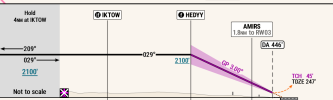
Here come Foreflight's enhanced approach charts

midlifeflyer

Touchdown! Greaser!
PoA Supporter
Joined
May 25, 2006
Messages
22,002
Location
KTTA, North Carolina
Display Name
Who you kiddin?
Home Airfield
KTTA
 
That was quick. I’m glad I didn’t make the jump to GP too soon. And I like that I’ll have access to Dynamic Procedures not just on the highest level subscription
 
"Dynamic Procedures will be available for all ForeFlight customers through October, after which it will require a ForeFlight Essential or Premium subscription plan."
 
ForeFlight's response didn't take long. Tells me this must have already been in the works.
 
ForeFlight's response didn't take long. Tells me this must have already been in the works.

Since G and FF released this stuff so close together, something tells me they either independently got the same idea and developed it to close delivery dates, or someone asked a question to the right folks at the FAA and the response was a public “we’re fine with that”.
 
I just watched the videos and it looks like the end results will be compatiable, but the method for getting to the solution is different. FF sounds more like it will be all in a sidebar versus GP being more "chart-like".

If this is the case, I wonder if the iPad mini will have enough screen real estate for my old eyes.
 
It will be an up-sale for the basic level customer. So, instead of $125/year, you'll have to pay $250/year to enjoy this fancy tool. Or, more if you want the Cadillac level of subscription.
 
I suspect both of them have been in the works for quite a while. Kind of what was happening with Foreflight and WingX in the early days.

In a sense, they are both evolutionary rather than revolutionary. The depiction of procedures on the Map for both have become more detailed over the course of time. In the case of both apps, loading an approach on the map currently gives a lot of detail, even if you choose not to overlay the plate on the Map.
 
I suspect both of them have been in the works for quite a while. Kind of what was happening with Foreflight and WingX in the early days.

In a sense, they are both evolutionary rather than revolutionary. The depiction of procedures on the Map for both have become more detailed over the course of time. In the case of both apps, loading an approach on the map currently gives a lot of detail, even if you choose not to overlay the plate on the Map.
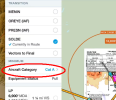
Another thing that could be nice to declutter, would be you plug in your Approach Category and it only gives you the numbers for that and eliminates notes for other Categories.
 
Another thing that could be nice to declutter, would be you plug in your Approach Category and it only gives you the numbers for that and eliminates notes for other Categories.
At least in terms of minimums - altitude and visibility, it's in SmartCharts and, based on that page discussing it, will be part of Dynamic Procedures.
1752773001968.png
 
ForeFlight's response didn't take long. Tells me this must have already been in the works.
Yup.

It will be an up-sale for the basic level customer. So, instead of $125/year, you'll have to pay $250/year to enjoy this fancy tool. Or, more if you want the Cadillac level of subscription.
Basic level customers didn't even have georeferenced plates though, so I doubt there's many instrument pilots at the basic level.

At least in terms of minimums - altitude and visibility, it's in SmartCharts and, based on that page discussing it, will be part of Dynamic Procedures.
View attachment 142917
What you're showing is already part of ForeFlight - When you hit the Procedures button, you make those selections. That isn't going away.
 
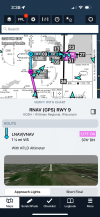
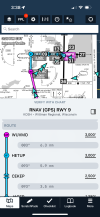
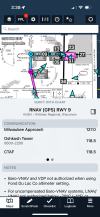
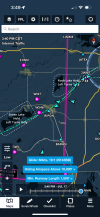
Played around with it for a few minutes. It’s a pretty good implementation from what I have played with so far. Pretty clean and intuitive.
 

Attachments

  • IMG_1585.png
    IMG_1585.png
    1.1 MB · Views: 55
  • IMG_1587.png
    IMG_1587.png
    548.9 KB · Views: 48
  • IMG_1586.png
    IMG_1586.png
    611.2 KB · Views: 48
Also - don’t recall seeing this last year. Maybe I missed it. Pretty cool of you are headed to FISKE.

This is showing in the base map with nothing selected.
 

Attachments

  • IMG_1588.png
    IMG_1588.png
    1.3 MB · Views: 47
Also - don’t recall seeing this last year. Maybe I missed it. Pretty cool of you are headed to FISKE.

This is showing in the base map with nothing selected.

Garmin has it, too.

 
Also - don’t recall seeing this last year. Maybe I missed it. Pretty cool of you are headed to FISKE.

This is showing in the base map with nothing selected.
It was not there last year, it's new as of a day or two ago.

What you *do* have selected is the Aeronautical layer, that's where it lives... So you can get it on top of a sectional too if you want.

Garmin has it, too.
Not just in GP (SmartCharts) but also in their navigation databases for panel mount avionics, so you can load it into your 750/650/375/355/175 if you have the 2507 Garmin data cycle loaded. And I'm happy to see that both ForeFlight and Garmin have added extra waypoints so that the arrival actually follows the tracks and shores instead of just going direct.

Both are good things to have, but please use them to help you keep your eyes outside!
 
Last edited:
…
Not in Garmin Pilot, but in the navigation database. …!
Interesting. From the Sporty’s announcement. I agree it only mentions the nav database, but the mockup below indicates it’s in the KOSH Charts page. Tricky advertising if that’s not the case.
ee7fd0bfdd9a5bd4a2378615210cf27d.jpg
 
Interesting. From the Sporty’s announcement. I agree it only mentions the nav database, but the mockup below indicates it’s in the KOSH Charts page. Tricky advertising if that’s not the case.
You are correct, apparently they added it in SmartCharts as well. I didn't see that until after my post, which I've now edited.
 
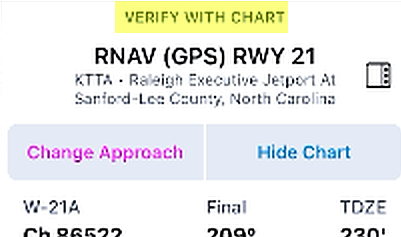
In the FWIW Department… I don’t have the same initial reaction to this that I had to the SmartCharts. I like the idea of the pictorial view of breaking out, but if the sidebar is intended to be an enhanced briefing strip to be slid away when complete, why the disclaimer? If I have to verify with the chart anyway, I’m not sure what value it adds.
 
I think the FF Dynamic Charts are a hot mess. Way too cluttered.
 
I think the FF Dynamic Charts are a hot mess. Way too cluttered.
To each their own. I love it, but I'm also the guy that would occasionally ask the FO if I could split their PFD screen so I could have a fourth MFD window (G3000). :D

And it definitely doesn't give you the "ooh ahh" effect that the sharply drawn SmartCharts do... But I'm more about usability than ooh and ahh.

It can get to be a bit much if you have everything turned on in Maps and you're on an iPad Mini like I am, but I'm guessing that most of the people who don't like having all the bells and whistles on at once, probably already don't have all the bells and whistles on at once.

If nothing else, it's very easy to show and hide it.
 
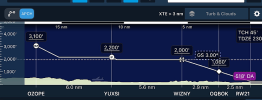
In my earlier photo one item was not turned on. In that photo mode, you’ll notice that the Profile View Is the default route profile, but there is an APR button. I neglected to switch it on. This is what it brings up (airplane is in the ground in this picture). More helpful….
1752925419566.png
 
In my earlier photo one item was not turned on. In that photo mode, you’ll notice that the Profile View Is the default route profile, but there is an APR button. I neglected to switch it on. This is what it brings up (airplane is in the ground in this picture). More helpful….
View attachment 142974
Must only be on the top tier subscription. Have the middle tier, while it has other aspects of the Dynamic Charts, does not have the APCH button in the profile view. Might be time to check out GP….but then have to get a new ADSB receiver.
 
Must only be on the top tier subscription. Have the middle tier, while it has other aspects of the Dynamic Charts, does not have the APCH button in the profile view. Might be time to check out GP….but then have to get a new ADSB receiver.
That's not why you are not seeing it. It has not been generally released yet. AFAIK, the only dynamic features in the full release so far are added choices in the Procedure Advisor. When it is released, according to Foreflight....
1752932176974.png
 
That's not why you are not seeing it. It has not been generally released yet. AFAIK, the only dynamic features in the full release so far are added choices in the Procedure Advisor. When it is released, according to Foreflight....
View attachment 142975
I am in the Beta program and Dynamic Procedures is showing up in the TestFlight version which I run on my phone. I run the release versions on my Ipad, so I don't see it there. I don't know what to think yet...It takes up too much real estate on the phone screen, and it may be too much on the Mini.
 
I am in the Beta program and Dynamic Procedures is showing up in the TestFlight version which I run on my phone. I run the release versions on my Ipad, so I don't see it there. I don't know what to think yet...It takes up too much real estate on the phone screen, and it may be too much on the Mini.
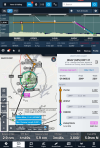
Yes, it's in the Test Flight version. And yes, it can get very cluttered if everything is turned on (even without the synthetic vision panel too!). The good news is that its features are mostly toggles. Pretty much everything you see in this picture can be turned on and off- Sidebar, profile view, chart.

What I think is going to happen is that pilots will decide which options are helpful and which are not. For example, in my typical setup in flight, I'm displaying the flight plan in the panel; the EFB is my moving map and approach chart. So, I might use the sidebar for the briefing and at an unfamiliar airport and check out that breaking out view. Then get it out of the way.

This is on a Mini.

 
In my earlier photo one item was not turned on. In that photo mode, you’ll notice that the Profile View Is the default route profile, but there is an APR button. I neglected to switch it on. This is what it brings up (airplane is in the ground in this picture). More helpful….
View attachment 142974
It's still there even when you don't hit the APCH button, you just have to zoom in on that part of the flight. APCH just does the zoom for you.
 
It's still there even when you don't hit the APCH button, you just have to zoom in on that part of the flight. APCH just does the zoom for you.
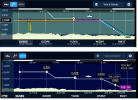
Yes, but it's not just the zoom. It's also the addition of approach detail. Comparing apples to apples...

1752951671860.png
 
I messed around with this today while another pilot did IFR approaches. When he did a course reversal, both the (new) profile views stumbled. The plane icons disappeared, and after a few minutes reappeared, but were still traveling in the original (un course reversed) direction. Has anyone else seen this?
 
I messed around with this today while another pilot did IFR approaches. When he did a course reversal, both the (new) profile views stumbled. The plane icons disappeared, and after a few minutes reappeared, but were still traveling in the original (un course reversed) direction. Has anyone else seen this?
I have not tried a course reversal. Did they disappear outbound but reappear inbound? Or did it seem to be random? The first might make sense.
 
I have not tried a course reversal. Did they disappear outbound but reappear inbound? Or did it seem to be random? The first might make sense.
They disappeared when we turned outbound. They reappeared when we were inbound, but were still traveling in an outbound direction (I believe eventually they stopped moving altogether, but things were getting busy and I stopped watching). Interested if it was a one off, or if someone can replicate.
 
They disappeared when we turned outbound. They reappeared when we were inbound, but were still traveling in an outbound direction (I believe eventually they stopped moving altogether, but things were getting busy and I stopped watching). Interested if it was a one off, or if someone can replicate.
Was the course reversal in your flight plan?
 
They disappeared when we turned outbound. They reappeared when we were inbound, but were still traveling in an outbound direction (I believe eventually they stopped moving altogether, but things were getting busy and I stopped watching). Interested if it was a one off, or if someone can replicate.
A thought…

Which approach? Hete’s one local to me. Were you in the grey “not to scale” area when your airplane disappeared? Did it reappear when you returned to the georeferenced portion? That would be expected.

1753091798488.png
 
In a sense, they are both evolutionary rather than revolutionary. The depiction of procedures on the Map for both have become more detailed over the course of time. In the case of both apps, loading an approach on the map currently gives a lot of detail, even if you choose not to overlay the plate on the Map.
Yeah... I'm not seeing anything groundbreaking, at least in FF. I can't speak to GP, as I do not use it.

As you point out, there was already a great amount of detail simply by loading the procedure into the FF flight plan. Doing so would load the entire selected procedure with all fixes into the flight plan on the georeferenced map, accompanied by altitude restrictions at each fix. Adding the sidebar seems mostly redundant. As well, the enhanced profile view just paints a prettier picture of what your altimeter and GS indicator should already be telling you.

Not trying to rain on anyone's parade. It's cool, and not everyone's brain processes information the same way. Having more ways to present the same information is great. I'm not seeing some giant leap in the app's usefulness, though. Please - educate me if I'm missing something here.
 
Yeah... I'm not seeing anything groundbreaking, at least in FF. I can't speak to GP, as I do not use it.
I posted this elsewhere about my impressions about the difference between the two (copy paste)

At their most basic level, Dynamic Procedures is a Map informational overlay; SmartCharts are terminal areas charts (IAPs, SIDs and STARs). Intended use is different. SmartCharts are a potential chart replacement. As Garmin says in some of it's videos on the product, SmartCharts satisfy FAA requirements (at least in the Part 91 world). Once the offering is complete, you could conceivably fly with only SmartCharts without either FAA or Jepp terminal charts. Foreflight's Dynamic Procedures, OTOH, are not. They may start from the same data source, but as FF specifically says on the Sidebar, you are expected to

image.png.1e657bdf6d89e88cd37809330c56183d.png

This is not a huge surprise. FF is part of the same company as Jepp. If FF said you could replace Jepp Charts with these, that would be the surprise.

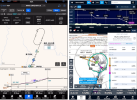
One of the more practical differences is the depiction of weather and traffic. As a Map overlay, with Dynamic Procedures, it's there. SmartCharts, as somehting separate from the Map, do not (currently?) display those. But, unlike Foreflight, Pilot does split screen and, from playing with that, the SmarCharts are so decluttered that I think they work well side by side with the Map (so long as you leave the vertical profile off).

These are two different approaches, but with everything turned on that can be at any one time, you can get a small idea of the basic differences between the two.
1753094809408.png
 
Last edited:
In the FWIW Department… I don’t have the same initial reaction to this that I had to the SmartCharts. I like the idea of the pictorial view of breaking out, but if the sidebar is intended to be an enhanced briefing strip to be slid away when complete, why the disclaimer? If I have to verify with the chart anyway, I’m not sure what value it adds.
I wonder if FF is somewhat hamstrung by their relationship with Jeppesen which holds them back from getting too far into charting.

Edit: just saw that you basically say the same thing above..,
 
Back
Top