Here come Foreflight's enhanced approach charts

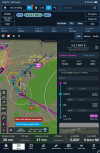
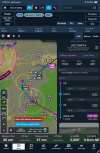
It's a feature not a bug ;) When you flew the approach, you may have noticed that you captured the glideslope at 2600; no need to descend to 2200. So the relevant altitude for that leg is the 2167 confirmation altitude. The LOC-only version has the 2200 stepdown.

I'm fine with it, but I mentioned to FF that they are likely to get some negative feedback from the dive and drivers out there for what amounts to choosing a technique rather than remaining true to the source document.
Completely get what you’re saying. But some do descend to the published glide slope intercept altitude. Guess I’m surprised they didn’t include that anywhere in the new feature.

Maybe calling it an error was poor wording. Just thought the published GS intercept altitude would be part of the enhanced briefing.
 
From the webinar, there’s no publicly releasable timeline for implementing SIDs/STARs with Dynamic Procedures.
 
FF has a Dynamic Procedures webinar today at noon central.
It was an okay webinar. I guess they covered what they could in the hour (40ish min presentation & 20ish Q&A).
 
But some do descend to the published glide slope intercept altitude. Guess I’m surprised they didn’t include that anywhere in the new feature.
I can't look at an Approach now, but are you saying they don't show the Lightning Bolt intercept altitude? I'd call that a BUG if that's the case as it's a mandatory check.

And we're not talking the Maltese Cross. The Lightning Bold and Cross may look like they are in the same place, but totally different function.
 
I can't look at an Approach now, but are you saying they don't show the Lightning Bolt intercept altitude? I'd call that a BUG if that's the case as it's a mandatory check.

And we're not talking the Maltese Cross. The Lightning Bold and Cross may look like they are in the same place, but totally different function.
Correct. The glide slope intercept altitude (lightning bolt) isn’t part of the enhanced briefing info if, and only if, it differs from the glide slope altitude at the Maltese cross.
 
I'd call that a BUG if that's the case as it's a mandatory check.
This may be the wrong thing to do, but a bug is unintentional. This isn’t.

BTW Jepp charts do not show the lightning bolt.that’s probably where it comes from.
 
Last edited:
This may be the wrong thing to do, but a bug is unintentional. This isn’t.

BTW Jepp charts do not show the lightning bolt.that’s probably where it comes from.
Perhaps, but Jepp charts do still obviously publish a glide slope intercept altitude, just no lightning bolt.
 
BTW Jepp charts do not show the lightning bolt.that’s probably where it comes from.
I haven't used Jepp in decades. I wonder when they dropped the Lightning Bolt.

So if I'm understanding correctly... If the GS Intercept happens to be the same as the Maultese Cross, they just show the one Altitude. If the GS Intercept, aka the ILS FAF, is different than the LOC FAF altitude, they will show it separate from the LOC FAF altitude?
 
This may be the wrong thing to do, but a bug is unintentional. This isn’t.
Yes, but I hadn't read at that point it was intentional. I now sort of know what they're doing if it matches the LOC FAF altitude.

But now wanting to assume, an email has been sent to FF Suport to clarify. Because knowing the GS Intercept Altitude is a MUST HAVE item.
 
I haven't used Jepp in decades. I wonder when they dropped the Lightning Bolt.

So if I'm understanding correctly... If the GS Intercept happens to be the same as the Maultese Cross, they just show the one Altitude. If the GS Intercept, aka the ILS FAF, is different than the LOC FAF altitude, they will show it separate from the LOC FAF altitude?
if you load the ILS you get the confirmation altitude. If you load the LOC you get the LOC FAF altitude. They are treated as different approaches, just like they are when there is a stepdown inside the FAF (even in the panel avionics).

That’s part of the idea - only showing what you need based on your selections.

Here’s a sample from my area.and notice the the confirmation altitude is displayed as mandatory. Sorry I didn’t include the plate. I hide it for less clutter.

IMG_3548.pngIMG_3547.png
 
Yes, but I hadn't read at that point it was intentional. I now sort of know what they're doing if it matches the LOC FAF altitude.

But now wanting to assume, an email has been sent to FF Suport to clarify. Because knowing the GS Intercept Altitude is a MUST HAVE item.
Yes. I know it’s intentional because I asked and FF told me.

I’m not as sure as you the minimum altitude for GS intercept is a must have. Their point is that you will have intercepted the GS earlier and higher and that the important altitude is the one that confirms you are in fact on it
 
if you load the ILS you get the confirmation altitude. If you load the LOC you get the LOC FAF altitude.
Actually I knew that... Still trying to keep their Dynamic Procedures straight in my head vs a multi decade of "standard" approaches. :D
 
if you load the ILS you get the confirmation altitude
Just in case anyone cares, “confirmation altitude” is my term. In the source documents, it’s the glideslope altitude at the “FAF” or “OM” depending on where it’s located. That’s where it’s coming from.

1754568256736.png
 
Has anyone figured out how to disable the dynamic procedures sidebar? I know how to close the sidebar, just don’t want to have to do it every time I load an approach. thx.
 
I know how to close the sidebar, just don’t want to have to do it every time I load an approach. thx.
Does yours automatically open? Try closing it, deleting the Route and maybe even Close FF and reopen it and see if it just shows the little box now if you add an Approach.

I didn't think it defaulted to Open, but I wander if it defaults to the last mode you use. So if you always have it open, it will always open if you add a Procedure. (I'll have to play around when I get my iPad in hand.)
 
Does yours automatically open? Try closing it, deleting the Route and maybe even Close FF and reopen it and see if it just shows the little box now if you add an Approach.

I didn't think it defaulted to Open, but I wander if it defaults to the last mode you use. So if you always have it open, it will always open if you add a Procedure. (I'll have to play around when I get my iPad in hand.)
Thanks for the idea, but if minimize the side bar and then delete route or just the procedure, when I load a new procedure the sidebar rears it’s ugly head. Kind of frustrating.

From ForeFlight customer service, “At this time, there is no way to disable to Dynamic Procedures feature… We appreciate the feature request. I will pass your request on to our Product Management team for their consideration.”
 
Thanks for the idea, but if minimize the side bar and then delete route or just the procedure, when I load a new procedure the sidebar rears it’s ugly head. Kind of frustrating.
Interesting. Mine just shows the icon so that I can open the DP if I want.

And I'm sure you checked to see that you're on the lates iPadOS/iOS and the latest FF release.
 
Interesting. Mine just shows the icon so that I can open the DP if I want.
Interesting. I thought I saw that behavior in the first beta but changed by the second or third. Are you loading thorough the Procedure Advisor or another method?
 
From ForeFlight customer service, “At this time, there is no way to disable to Dynamic Procedures feature… We appreciate the feature request. I will pass your request on to our Product Management team for their consideration.”
Not too surprising. With Dynamic Procedures I see people wanting to turn on or off all sorts of things. You don't want the sidebar on by default. I'm sure there are those who would want the profile view to turn on by default. I pretty much always hide the plate once I've verified the approach sequence and use the sidebar.
 
As for the On/Off... Also remember that it is free for only 3 months to the lower subscription tiers. So depending upon what subscription you have, it may disappear all together in a few weeks.
 
As for the On/Off... Also remember that it is free for only 3 months to the lower subscription tiers. So depending upon what subscription you have, it may disappear all together in a few weeks.
Made my first attempt today to look at and play with Dynamic Procedures on my mini. It doesn't come up on my current Foreflight subscription which is the Essential at $250 per year. Logged in then dug into their website, then read this thread, and at this point (someone please correct me if I'm wrong) seems I need to wait until the October plate update to have it downloaded to take a look. Is the early "try it out" version a Beta version for the lower subscriptions to pay more if they're interested in upgrading to Dynamic Procedures?

@midlifeflyer - thank you for the screenshots and insights. I appreciate the user tips for reducing duplicity and clutter. Especially when using a Mini.
 
Made my first attempt today to look at and play with Dynamic Procedures on my mini. It doesn't come up on my current Foreflight subscription which is the Essential at $250 per year. Logged in then dug into their website, then read this thread, and at this point (someone please correct me if I'm wrong) seems I need to wait until the October plate update to have it downloaded to take a look. Is the early "try it out" version a Beta version for the lower subscriptions to pay more if they're interested in upgrading to Dynamic Procedures?

@midlifeflyer - thank you for the screenshots and insights. I appreciate the user tips for reducing duplicity and clutter. Especially when using a Mini.
You are welcome.

If you update the app to ensure you have the current version, you should have the Dynamic Procedures now. It was generally released early in August. It's a feature update. They are pulling the data from the Jepp database, not the traditional plates. I don't know if they block the feature if the traditional plates aren't current, but aside from that possibility, they don't have any direct connection to the traditional plates.
 
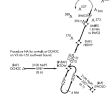
There is, btw, an interesting bug/defect/anomaly in Dynamic Procedures. Because of the way I use it, it's not something I noticed myself. It was mentioned in a FB group. You can see it with the following steps on your local approaches but, for illustration, I'll use the RNAV 3 into KTTA, my home base..

1. Load an approach with the Procedure Advisor. Use a transition other than one that is also an IF. I'm coming from the ESE, so I'm choosing EWOLO.​
In Foreflight, the loaded approach is a single item.​
2. As you fly along, you are instructed to proceed to the IF and expect straight in, in my example, to IKTOW. There are four ways (maybe more) to make the change in FF​
a. Reload the approach through the Procedure Advisor this time using IKTOW as the transition (there's more than one way to do this).​
b. Touch the packaged approach in the flight plan edit window to expand it and go D→ IKTOW.​
c. Touch IKTOW in the flight plan NavLog window and go D→ IKTOW.​
d. Touch IKTOW on the Map and go D→ IKTOW.​

b-d will remove the Dynamic Procedures enhancements - sidebar, MSA ring, approach profile view; apparently it no longer recognizes it as an approach. Need to reload the approach to get it back. It's only Dynamic Procedures that goes away. If the traditional chart is overlayed, the chart remains in place as it did before Dynamic Procedures.

1757619065937.png
 
It doesn't come up on my current
They gave everyone the Dynamic Procedures for 3 months. I'm not sure how many weeks are remaining, but you definitely should have the Dynamic Procedures.

People have had problems when they did not have the **currernt** iPadOS/iOS and the latest version for FF, so check that. If you have your iPad set up to auto update your Apps, Apple does not always do it as soon as the update is released. So confirm in the App Store you have the latest. I'm showing iPadOS 18.6.2 and FF v17.8.1 (162995).
 
b-d will remove the Dynamic Procedures enhancements
I'd go with what I believe is the correct answer E: :D

On your primary Navigation (pending how it does it) you'd go Direct IKTOW within the Approach as this is how you are going to NAVIGATE to the IKTOW.

In FF, which you do not Navigate by, I'd just Tap the line between IKTOW and HEDDY, then in the drawer that opens on the right, Tap "Fly Leg" (at the top) and you're good to go. FF will continue as soon as you cross IKTOW. And had you been told you were now getting Vectors to Final, up in the Route drawer, Tap on the Approach and one of the options is Vectors to Final, so you can easliy switch to that too. And if you're miles out, I'd probably just delete the Approach and re add it so that my Nav Log after the flight was accurate.
 
I'd go with what I believe is the correct answer E: :D

On your primary Navigation (pending how it does it) you'd go Direct IKTOW within the Approach as this is how you are going to NAVIGATE to the IKTOW.
:D

Because of the way I use it, it's not something I noticed myself.
that can probably be read a number of ways, but it really means you and I have pretty much the same procedure. The part I quoted from you is exactly what I would do. Only difference is, I wouldn’t even touch FF.
 
In FF, which you do not Navigate by, I'd just Tap the line between IKTOW and HEDDY, then in the drawer that opens on the right, Tap "Fly Leg" (at the top) and you're good to go
…but yes, that works and doesn’t remove the Dynamic Chart features.
 
They gave everyone the Dynamic Procedures for 3 months. I'm not sure how many weeks are remaining, but you definitely should have the Dynamic Procedures.

People have had problems when they did not have the **currernt** iPadOS/iOS and the latest version for FF, so check that. If you have your iPad set up to auto update your Apps, Apple does not always do it as soon as the update is released. So confirm in the App Store you have the latest. I'm showing iPadOS 18.6.2 and FF v17.8.1 (162995).

You were correct, thanks! I updated the latest software on both the Mini and Foreflight and now have a Mini running with operational Dynamic Procedures.

Found that the right side sidebar does not show when initially opened until a small button is pushed, which is good. Played around a little with it, and first impressions are under-whelming (but that could change while gaining more familiarity). The Dynamic Chart features and functions place another layer of button pushing, pinching, and moving the information presented around the small screen that at first doesn't seem to be a huge jump compared to finding the information needed on the standard approach plates, which are very familiar.

Having some of the small sized print info that's on the plates presented on a sidebar and profile list / view, and in a larger font size is nice, but certainly not a game changer. Same with the larger and more prominent color course lines, waypoints, altitudes and distances in the side view profile. Clean, but still needs to be set up and shifted around for personal preferences.

I have the feeling overall it is a nice enhancement that I'll grow to like more once getting more familiar with and become fluid in its operation. Just like every other electronic enhancement and advance we've had in the last few decades of GA flying... we take it as it comes at us.
 
Found that the right side sidebar does not show when initially opened until a small button is pushed, which is good.
I've heard mixed results on this. I *think* it does the last thing you did... So if it was open when you cleared everthing, the next Approach it will be open. If closed, you'll get the icon.

However, I thought I had it closed last time, and it was open when I went to the Map page. But this was at home on the Internet and I was looking at an Airport I've never flown to. So I'm wondering if there is something in the code that some Approaches open and some do not. If this is the case (still need to confirm) there may be a BUG in the current version as it should act the same all the time.
 
Back
Top