
Rent a car in a place that drives on the left side. You'll be using your windshield wipers a lot when changing lanes.It amazed me that while there seemed to be a consensus on turn signals

You are using an out of date browser. It may not display this or other websites correctly.
You should upgrade or use an alternative browser.
You should upgrade or use an alternative browser.
Touch Screens Are Making [Vehicles] Worse. It’s Time to Bring Back Buttons and Knobs.
- Thread starter DJTorrente
- Start date

Larry in TN
En-Route
- Joined
- Nov 16, 2013
- Messages
- 4,433
- Location
- Nashville, TN
- Display Name
- Larry in TN
- Home Airfield
- ORD
It looks like that depends on where the car was built. Asian cars move the turn stalk to the right while European cars keep it on the left.Rent a car in a place that drives on the left side. You'll be using your windshield wipers a lot when changing lanes.
That's even worse.Asian cars move the turn stalk to the right while European cars keep it on the left.
Larry in TN
En-Route
- Joined
- Nov 16, 2013
- Messages
- 4,433
- Location
- Nashville, TN
- Display Name
- Larry in TN
- Home Airfield
- ORD
It is for us, but it actually makes sense. It leaves your inboard hand free to shift.That's even worse.

Cap'n Jack
Final Approach
Which Asian cars? China & Taiwan has them on the left, just like here. India, despite driving on the left, also has them on the left side. Hong Kong does have them on the right, and they drive on the left side of the road like in India. I can't speak about Japan or Korea.It looks like that depends on where the car was built. Asian cars move the turn stalk to the right while European cars keep it on the left.
Last edited:

Silvaire
En-Route
- Joined
- Oct 10, 2012
- Messages
- 4,799
- Display Name
- Silvaire
It's not so bad once you get used to taking off from a dead stop in fifth gearRent a car in a place that drives on the left side. You'll be using your windshield wipers a lot when changing lanes.

ColinD
Line Up and Wait
I had a Subaru Sambar about 15 years ago, and it took about a week of driving before I stopped activating the wipers every time I intended to signal a turn. The pedals and shift pattern were the same (not mirrored,) so that part was a non-issue.

Hengelo
Cleared for Takeoff
- Joined
- Aug 31, 2021
- Messages
- 1,228
- Display Name
- Hengelo
Just came back from six months in NZ. It's worse on the return lolRent a car in a place that drives on the left side. You'll be using your windshield wipers a lot when changing lanes.
Albany Tom
Final Approach
- Joined
- Jul 23, 2021
- Messages
- 5,703
- Display Name
- Albany Tom
Remember to switch back to looking left before crossing the street...Just came back from six months in NZ. It's worse on the return lol

- Joined
- Jun 7, 2008
- Messages
- 27,384
- Display Name
- Bob Noel
- Home Airfield
- KBED
Remember to switch back to looking left before crossing the street...
I recall London having some signs on the streets warning pedestrians to look right before crossing the street.

midwestpa24
Final Approach
Remember to switch back to looking left before crossing the street...
I don't know about anyone else, but I always look both ways, even on a one way street. I have little faith in humanity.

Shift what? [TIC -- I've loved my manual transmissions]It is for us, but it actually makes sense. It leaves your inboard hand free to shift.

- Joined
- Aug 9, 2022
- Messages
- 1,171
- Location
- Surrounded by Civil War ghosts
- Display Name
- Probably AI
- Home Airfield
- KHWY
On the military bases in Japan, the windshield wipers coming on at intersections was how you identified the new drivers on base!I can't speak about Japan or Korea.

- Joined
- Jul 3, 2011
- Messages
- 5,482
- Location
- GDK & SBS
- Display Name
- Geezer
- Home Airfield
- GDK Greene County
Me too but it was the UK. I was driving in the middle of a street with no center line paint. As an oncoming car was approaching, I reactively drifted to the left setting up a head on collision. Fortunately, I recovered before that or else winding up in somebody's front yard.Just came back from six months in NZ. It's worse on the return lol
- Joined
- Aug 9, 2022
- Messages
- 1,171
- Location
- Surrounded by Civil War ghosts
- Display Name
- Probably AI
- Home Airfield
- KHWY
"Me in the middle. Me in the middle. Me in the middle." - My mantra as I went back and forth between left and right hand driving in various countries over the course of about six months.Me too but it was the UK. I was driving in the middle of a street with no center line paint. As an oncoming car was approaching, I reactively drifted to the left setting up a head on collision. Fortunately, I recovered before that or else winding up in somebody's front yard.

flyingcheesehead
Taxi to Parking
- Joined
- Feb 23, 2005
- Messages
- 28,191
- Location
- UQACY, WI
- Display Name
- iMooniac
- Home Airfield
- KUES/KMKE
Yep - Not having to be in full control is just like having a 2-axis autopilot in a plane. You get a lot less fatigued on longer trips because you don't have the constant percieve-adjust loop.Given that these systems seem to require active monitoring (to the point of giving drivers a "time-out" in Tesla's case, I gather from another thread) and given that we know humans are generally very poor at monitoring tasks, what is the benefit of sitting there staring ahead and monitoring vs just actually driving?
I presume that with the more advanced Tesla-style systems, trust is eventually built up, but apparently the thing is tracking your eyes or some such, so you still have to be looking ahead. Is that relaxing?
Also, possibly a bit counterintuitively, I've found that the steering on the Tesla is a lot more reliable than the speed control. It loves to brake suddenly when I'm not expecting it, and often takes WAY too long to get up/back up to speed unless I give it a nudge, but the steering works fine.
So, I guess the difference is that I can use both hands on my sandwich.
OK... So if you use auto 100% of the time, and it works as well as you say, that means you never use the knob, right? So why do you want a knob that you never use?This is one of the reasons I love my ten-ish years old Subaru. The climate control has knobs, so I can easily adjust if I want to. But! More importantly, it's got an "auto" mode that I use 100% of the time. I just tell it what temp I want and it does the rest. In the winter that means that it doesn't turn the fan on until the car has produced enough heat to start warming the cabin, then it runs the fans on high until things are warmed up and finally reduces them when things are comfortable and maintains the temp. Same in reverse. If it's set for "auto" and it's hot out, it runs the AC on high until the cabin is properly chilled and then goes into a maintenance mode.
Anyway, mostly I just wanted to point out that "automation" and "knobs" are not mutually exclusive. I prefer knobs, but I do also want automation. As another example, I like that I have physical switches for adaptive cruise and lane following. But I also like that I have the automation needed for cruise and lane following.
slinger
Pre-Flight
The Chinese have owned Volvo since 2015I hate futzing around with the touch screens. At least point registration has improved a great deal since the early ones. The early touch screen ATMs and gas pumps come to mind. What a PITA that used to be, especially in cold weather.
Voice commands with Apple Car Play usually work pretty well in my wife's 2022 Volvo and my 2024 Ford Ranger. The native voice commands in the Volvo suck though. And its "environmental controls" are downright stupid. I think a lot of that is that the car is Swedish, and Swedes think in Swedish, no so much in English (especially my version of it).

wilkersk
En-Route
Maybe so, but I swear the software must be coded in Swedish!The Chinese have owned Volvo since 2015

MBDiagMan
Final Approach
- Joined
- May 8, 2011
- Messages
- 5,233
- Location
- Mount Pleasant,Texas
- Display Name
- Doc
- Home Airfield
- KOSA Mount Pleasant, Texa
Tesla FSD- I have not needed to drive a car for years...
Interesting timing of the article as Ford changes its strategy.
I've never learned all the buttons and knobs in my cars.
I miss the days of only having stirrups and reins. Things were safer then.
1979 W200 4x4 Low tech gold.
Parked for 20 years - aired up the tires, dragged it out, borrowed a 12 volt battery off a farm tractor, checked the oil, topped up the brake fluid and was driving it in less than 2 hours. Lights, alternator, wipers, brakes, clutch, transfer case shift lever all, manual windows, vacuum brake booster, all work fine. Radiator, engine oil, and power steering were full. HVAC box prob packed with mouse nest. All gear boxes need oil level checked and stuff greased.
Literally opened both cab doors and power washed it inside and out.
View attachment 148208
View attachment 148209View attachment 148213
That truck body stylremsined virtually the same from the 1972 model year until about 1993.
I was discharged from the Army July 9, 1971 and didn’t want to start school until the Spring Semester. I landed a job with DodgeTrucks Inc in Dallas, a subsidiary of Chrysler Corp., before the end of July as Warranty Administrator. Part of my compensation was a company pickup for my use. A few days after I started to work, a transport rolled in with ‘72 model pickups and I was told to pick one out. This was a full two months before they were introduced to the public. The one I chose was a carpeted and air conditioned Limited Edition. It was really fun driving it around with people asking about it. They were basically putting assembly line guinea pigs on the road this way. It was by far the crappiest piece of crap I’ve ever driven. I saw the warranty costs and they far exceeded the list price of the truck.
In about ‘92 I personally bought a Dodge Cummins one ton that was very much the same truck with different running gear. It was okay, but the cab wasn’t much different.

Rockymountain
Line Up and Wait
I think the combination of well placed buttons and touchscreen is very nice. Touchscreen is for multi layered and complicated stuff did Lends itself to graphics and buttons for simple stuff that are used frequently. Some of these cars, are gonna need type ratings pretty soon though.

Half Fast
Touchdown! Greaser!
- Joined
- May 7, 2016
- Messages
- 21,192
- Location
- Central Florida
- Display Name
- Half Fast
- Home Airfield
- KGIF
If a self-driving car has a touchscreen, does it have to touch itself?
Only when it thinks about the “driver”.If a self-driving car has a touchscreen, does it have to touch itself?
Edit: ( for some odd reason your post made me think of the song with lyrics “when I think about you I touch myself”).
Last edited:

pfarber
Pattern Altitude
- Joined
- Jun 20, 2021
- Messages
- 1,653
- Display Name
- pfarber
Touch screens are all about reliability. No knob/button to break, less discrete connections to break, less parts to wear out.
Remember kids, its not about what you want, it what a company can deliver for the least cost possible.
Remember kids, its not about what you want, it what a company can deliver for the least cost possible.

FastEddieB
Touchdown! Greaser!
- Joined
- Oct 14, 2013
- Messages
- 11,865
- Location
- Lenoir City, TN/Mineral Bluff, GA
- Display Name
- Fast Eddie B
- Home Airfield
- Big T Airport (80TN)
I think the implementation is everything.
In our Tundra, temp is controlled by a dedicated paddle on the panel. Easy peasy.
In our Tesla, temp is controlled by placing my thumb over the temp display (the “67” on the lower left) and sliding left or right. Or just tapping left or right of the number. Equally easy peasy.
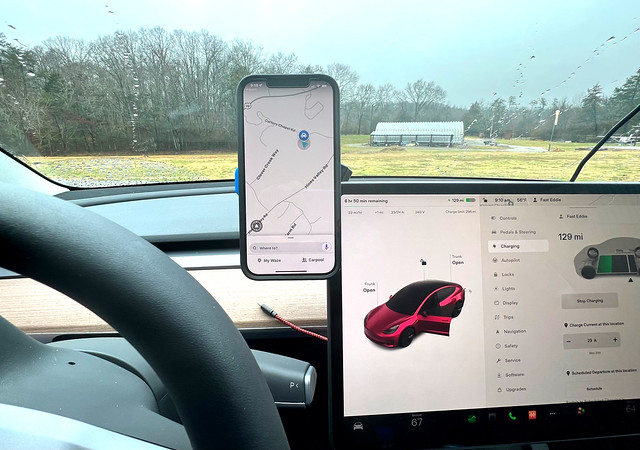
It’s pretty rare to have to delve into menus and submenus for anything important on a typical drive - even a long one.
In our Tundra, temp is controlled by a dedicated paddle on the panel. Easy peasy.
In our Tesla, temp is controlled by placing my thumb over the temp display (the “67” on the lower left) and sliding left or right. Or just tapping left or right of the number. Equally easy peasy.
It’s pretty rare to have to delve into menus and submenus for anything important on a typical drive - even a long one.
- Joined
- Jun 7, 2008
- Messages
- 27,384
- Display Name
- Bob Noel
- Home Airfield
- KBED
Over the years I've heard a number of presentations where some salesman would describe the bliss of their system and it's wonderful user-interface.
I learned key phrases that show a problem with the interface and the demonstration of it. "You just...", "You simply...", and such. Almost every single time those phrases/words were used, the interface was not particularly easy to use or simple or effortless.
I learned key phrases that show a problem with the interface and the demonstration of it. "You just...", "You simply...", and such. Almost every single time those phrases/words were used, the interface was not particularly easy to use or simple or effortless.
Albany Tom
Final Approach
- Joined
- Jul 23, 2021
- Messages
- 5,703
- Display Name
- Albany Tom
Kind of like when I hear the phrase "transparent" from a vendor, I translate that into my head as "we're thieves".Over the years I've heard a number of presentations where some salesman would describe the bliss of their system and it's wonderful user-interface.
I learned key phrases that show a problem with the interface and the demonstration of it. "You just...", "You simply...", and such. Almost every single time those phrases/words were used, the interface was not particularly easy to use or simple or effortless.

JOhnH
Touchdown! Greaser!
It reminds me of my old calculus professor many many years ago:Kind of like when I hear the phrase "transparent" from a vendor, I translate that into my head as "we're thieves".
"It's intuitively obvious to the most casual observer". Every time he said that it made me feel dumber than the most casual observer.

Touching thoughts.If a self-driving car has a touchscreen, does it have to touch itself?
slinger
Pre-Flight
If it touches itself too much, does it turn into an eighteen wheeler?Touching thoughts.
- Joined
- Aug 9, 2022
- Messages
- 1,171
- Location
- Surrounded by Civil War ghosts
- Display Name
- Probably AI
- Home Airfield
- KHWY
I have to ask: With that giant screen glued to the dash, why on earth is the phone there being used for navigation? Looking at the USB charging cable poking out, it appears to be a routine use. Surely the big screen is better?I think the implementation is everything.

Mahneuvers
Pattern Altitude
- Joined
- Nov 3, 2020
- Messages
- 1,665
- Display Name
- Mahneuvers
This is an edge case for sure. Google Maps updates traffic more quickly than Tesla Navigation (even with premium connectivity). When in areas with express lanes, Tesla shows smooth sailing ahead while GM let's me know I need to get into express lanes. Also, GM alerts me to speed traps....why on earth is the phone there being used for navigation?...
Albany Tom
Final Approach
- Joined
- Jul 23, 2021
- Messages
- 5,703
- Display Name
- Albany Tom
Because Tesla has info on all the Teslas. While Google has info on ALL the cars.
Larry in TN
En-Route
- Joined
- Nov 16, 2013
- Messages
- 4,433
- Location
- Nashville, TN
- Display Name
- Larry in TN
- Home Airfield
- ORD
That is an interesting questions, so I asked...
---------------------------------
Tesla's navigation system uses a hybrid approach to gather traffic information, combining data from its own fleet with third-party providers.
Primary Sources of Traffic Data
Tesla Fleet Crowdsourcing: Similar to Waze, Tesla collects anonymized telemetry (speed and position) from millions of its own vehicles on the road. This provides high-resolution, real-time data on traffic flow and road conditions.
Third-Party Providers: Tesla integrates data from commercial services like TomTom and potentially MapBox to supplement its own fleet data. These partners often provide incident reports, road closures, and construction alerts.
Government & Public Agencies: In some regions, data about accidents or major delays is sourced from government transportation agencies.
How it Works in Your Car
Visual Layer vs. Routing: While the map you see on the screen is powered by Google Maps, the actual routing engine and traffic calculations are handled by Tesla’s own software (often using MapBox or Valhalla frameworks).
Online Routing: For the car to account for traffic when suggesting a route, the Online Routing setting must be enabled.
Premium Connectivity: While all Teslas use live traffic for routing (finding the fastest way), you typically need a Premium Connectivity subscription to see the colored traffic lines (Live Traffic Visualization) on the map itself.
========================
And Google Maps's data...
----------------------------------
Google Maps builds its real-time traffic view by layering several different types of data, ranging from the phones in our pockets to government-installed road infrastructure.
1. Crowdsourced GPS Data (The Primary Source)
The most significant source of data comes directly from the millions of smartphone users who have Google Maps open with location services enabled.
Speed Tracking: Your phone sends anonymous bits of data back to Google, reporting how fast you are moving.
Aggregated Flow: By combining data from thousands of phones on the same road, Google can differentiate between a single person stopping for coffee and a genuine traffic jam.
Waze Integration: Since acquiring Waze, Google also integrates user-reported incidents such as accidents, construction, and speed traps.
2. Historical Traffic Patterns
Google uses over a decade of collected data to predict what traffic should look like at any given time.
Predictive Analysis: It knows that a specific highway is consistently congested on weekday mornings between 8 and 10 AM.
Gap Filling: If there aren't enough active users on a quiet road to provide real-time data, Google falls back on these historical trends to estimate your travel time.
3. Government and Third-Party Sensors
While early versions of Maps relied heavily on this, it remains a vital supplemental source for major highways.
Road Infrastructure: Many local transportation agencies use radar, active infrared, or laser sensors to detect vehicle size and speed.
Official Alerts: Google partners with government agencies to receive direct feeds regarding planned road closures, construction, and emergency situations.
4. Advanced AI and Machine Learning
Once all this raw data is gathered, AI models process it to provide the final ETA.
Dynamic Rerouting: The system recalculates your ETA every few minutes by comparing live signals against historical averages to see if a delay is worsening or clearing up.
Anomaly Detection: Algorithms filter out "noise," such as mail delivery trucks that make frequent stops, so they don't accidentally trigger a traffic alert on the map.
Half Fast
Touchdown! Greaser!
- Joined
- May 7, 2016
- Messages
- 21,192
- Location
- Central Florida
- Display Name
- Half Fast
- Home Airfield
- KGIF
So… the matrix is here and we should all be sourcing vintage cars to not be actively tracked on a moment by moment basis.
Take the blue pill. You’ll be happier.

FastEddieB
Touchdown! Greaser!
- Joined
- Oct 14, 2013
- Messages
- 11,865
- Location
- Lenoir City, TN/Mineral Bluff, GA
- Display Name
- Fast Eddie B
- Home Airfield
- Big T Airport (80TN)
I have to ask: With that giant screen glued to the dash, why on earth is the phone there being used for navigation?
I sometimes have Waze up on the phone, but primarily use Tesla navigation. But I also tend to use the phone for podcasts and music and other “phone” stuff. It also keeps the phone charged via the QuadLock mount.
It’s okay, my daily driver is a 2001 without any “onstar” or related types of stuff. I can fall back on the ‘72. ‘47, or ‘28 if it gets to an emp or a carrington event level . Plus the shovelhead has a magneto and kick start if gets down to itTake the blue pill. You’ll be happier.
Larry in TN
En-Route
- Joined
- Nov 16, 2013
- Messages
- 4,433
- Location
- Nashville, TN
- Display Name
- Larry in TN
- Home Airfield
- ORD
I used Waze frequently on my previous cars. Thought I would in the Tesla but haven't. I have used the phone/Bluetooth a few times for podcasts, would do that more often if driving longer trip, but 99% of the time I'm listening to the integrated Spotify app.I sometimes have Waze up on the phone, but primarily use Tesla navigation. But I also tend to use the phone for podcasts and music and other “phone” stuff. It also keeps the phone charged via the QuadLock mount.
I drove older cars for decades. I'm 60, and have only bought "new" three times. Now I enjoy the newer car and fancier tech. Driving older cars, over the years, has had a significant affect on my ability to build wealth.It’s okay, my daily driver is a 2001 without any “onstar” or related types of stuff.
Perhaps a sore spot.If it touches itself too much, does it turn into an eighteen wheeler?
There is almost nothing in our lives that has the effect of reducing wealth accumulation as much as new car depreciation, particularly if we buy new, high end cars every few years before the depreciation has flattened. An exception would be divorceDriving older cars, over the years, has had a significant affect on my ability to build wealth.
I bought used for years for that reason, but after buying my second rental property in 2002 (now paid off and worth $1.1M) I allowed myself to buy an $18K retail new car, discounted to $13080. Since then I’ve bought new cars at substantial discount from retail and driven them until the wheels fall off. That’s all the annual car depreciation I can stand.
I’ve also avoided divorce…
Last edited: