The MyFlightBook thread

Is there not a method to store all your own data in your device, thought I'd read that.
If excessively concerned, one could to a regular dl as a backup.
You can donate to the cause and get a spreadsheet dumped into the cloud provider of your choice, nightly.
 
You can donate to the cause and get a spreadsheet dumped into the cloud provider of your choice, nightly.
And you can manually download your own copy whenever you wish (unless that's changed).
 
Sorry if this has been asked already - but how are flight instructor signatures handled when porting to other e-flightbooks? Does the actual signature image get transferred too?

Let's just say Foreflight or any of the most popular books since I'm sure the answer depends on which software.
 
Sorry if this has been asked already - but how are flight instructor signatures handled when porting to other e-flightbooks? Does the actual signature image get transferred too?

Let's just say Foreflight or any of the most popular books since I'm sure the answer depends on which software.

DCR, I have used three methods of recording endorsements, BFRs etc on MFBP.
1. Uploading an image (jpg) of any sticker, piece of paper etc etc onto my elogbook.
2. Same, with a pdf (which my iphone can apparently generate) from something an instructor emails you
3. You can also send, through the app, a request emailed to your instructor which they can access and then sign on the app.
All are recorded and preserved for years, I just checked.
 
  • Like
Reactions: DCR
Is there not a method to store all your own data in your device, thought I'd read that.
If excessively concerned, one could do a regular dl as a backup.
There are several. If you're using the mobile apps, there's a pack-and-go feature that lets you view your data while offline, but I think you were asking for something a bit more flexible.
For that, you'd use the website. Go to Logbook->Download, and you can download a CSV snapshot of all of your data and optionally a zip file with records of your endorsements and images.
You can also connect MyFlightbook to Dropbox, Box, Google Drive, and One Drive and with the press-of-a-button save the aforementioned CSV and zip files to the respective service. The beauty of the CSV is that you can open it in any spreadsheet program for analysis, or to do a bulk edit, or (gasp) if you decide to move to another service (heaven forbid!) you can use it to import your data into that service.

And of course, Dropbox/Box/Google Drive/One Drive all will sync to your mobile device.

It is, after all, your data...
 
Eric, is there a way to create "airports" only visible to me?

I've recently started flying ultralights. I almost always fly from non-airports. Like a friend's farm, that kind of thing. I could enter the coordinates each time, but that seems like it would be tedious. I'd like to create a user-defined location, like "Bob's Farm" with the coordinates and be able to enter "Bob's Farm" in the route of flight. But if I create it as an airport, then I think that makes it available to everybody, which isn't really necessary or even appropriate.

Is there a way to do this, or something like this, that I'm missing?

Note - this is for manual entering of flights in the log. How would this work for autodetecting? I assume it would find the nearest airport in the database and use that, which also wouldn't really work for my intended use.
 
I had a bad news/good news experience with MFB recently: I went out of town for a checkride, and I left my old paper logbook in the safe at home because I haven't used it in years (you can see where this is going). At the checkride, the DPE asks me for an endorsement that I received before my my original glider solo, 11 years ago, that only exists in my paper logbook. And unfortunately, my instructor was also out of town . . . . But he was able to pull out his phone and do the endorsement right in MFB. :cheers: So MFB saved my butt (and all my old endorsements are now scanned and uploaded).
 
Eric, is there a way to create "airports" only visible to me?

I've recently started flying ultralights. I almost always fly from non-airports. Like a friend's farm, that kind of thing. I could enter the coordinates each time, but that seems like it would be tedious. I'd like to create a user-defined location, like "Bob's Farm" with the coordinates and be able to enter "Bob's Farm" in the route of flight. But if I create it as an airport, then I think that makes it available to everybody, which isn't really necessary or even appropriate.

Is there a way to do this, or something like this, that I'm missing?

Note - this is for manual entering of flights in the log. How would this work for autodetecting? I assume it would find the nearest airport in the database and use that, which also wouldn't really work for my intended use.
Hi, Russ. No, I don't have the notion of private-to-you airports. I actually don't want to have such a feature, for the exact same reason that I don't want private-to-you aircraft: crowd-sourcing of data depends on people creating shared data. If it's private, then the crowd-sourcing will fail.

But there is absolutely nothing wrong with making up codes for your friend's farm and using that. I generally suggest 5- or 6- letter/number codes, so as to avoid naming conflicts with ICAO, FAA, and IATA codes, but go ahead and give that sand bar or field a name. And then, yes, autodetection will work (once the airport database update migrates to the iOS/Android device, which usually takes a few months...)
 
Hi, Russ. No, I don't have the notion of private-to-you airports. I actually don't want to have such a feature, for the exact same reason that I don't want private-to-you aircraft: crowd-sourcing of data depends on people creating shared data. If it's private, then the crowd-sourcing will fail.

But there is absolutely nothing wrong with making up codes for your friend's farm and using that. I generally suggest 5- or 6- letter/number codes, so as to avoid naming conflicts with ICAO, FAA, and IATA codes, but go ahead and give that sand bar or field a name. And then, yes, autodetection will work (once the airport database update migrates to the iOS/Android device, which usually takes a few months...)
Thanks Eric, I'll give it a try.
 
Possible feature: recurring donations.
 
Possible feature: recurring donations.
It's a great feature, but it's a feature of the pilot not of MyFlightbook. :) I do send out reminders one year minus 3 days of your last donation, but I would never want to presume that I'm still offering value, or that a given user is in a position to continue supporting MyFlightbook. I HATE subscription services that make as much (or more!) money from people who forget that they have subscribed and keep paying for something for which they're not getting value than they make from their core value proposition.
 
(very minor) Bug report:

When in the "sign flight" screen for a CFI, scrolling the page brings up a magnifying glass icon on the bottom of the screen to enlarge the text, etc.

This icon is on a black bar which goes across the bottom of the screen (Android 15 / Google Pixel 8a). The black bar also covers the "sign flight" button. You have to sit still for about 3 seconds for the bar to go away.

If you don't know to leave the thing be for a few seconds (like I / my CFI didn't) you will just keep scrolling up and down wondering "Where did the sign flight button go?" (like I did).

End bug report.
 
Is the MyFlightBookWeb GitHub you linked here a better place to report issues? I have another one (I think) regarding GPS on the android app.
Probably the easiest is to email me, actually. But going direct to github is fine too! There are actually three separate github repositories; any of them are fine. https://github.com/ericberman/MyFlightbookWeb/issues has issues with the website/back-end code. https://github.com/ericberman/myflightbookAndroid/issues/ has issues with the Android app, and https://github.com/ericberman/MyFlightbookiOS/issues/ has issues with the iOS app.
 
For the Part 135 XC requirements in the Training section, the language of how time is calculated is:
Cross-country time here uses the logged Cross-Country time for a flight or the Total Time, if the route has more than one airport, whichever is greater

"More than one airport" means two unique airports, yes? So logging "ABC ABC" counts as one airport, and "ABC DEF" counts as two?
 
In this scenario, correct. If you search for “non local flights”, “ABC ABC” is the same as “ABC” and is considered local. “ABC DEF” is non local.
For the Part 135 XC requirements in the Training section, the language of how time is calculated is


"More than one airport" means two unique airports, yes? So logging "ABC ABC" counts as one airport, and "ABC DEF" counts as two?
 
Is it possible to log multiple flights with one entry? I'm instructing in gliders, and most lessons consist of multiple flights. For students with paper logbooks, I put each flight on a line, then use the combined comment lines to describe what we worked on. For students with Myflightbook, I've been everyone multiple flights and copying the comments for each one. But it would be nice if there's a way to just log a single lesson with multiple flights.
 
Is it possible to log multiple flights with one entry? I'm instructing in gliders, and most lessons consist of multiple flights. For students with paper logbooks, I put each flight on a line, then use the combined comment lines to describe what we worked on. For students with Myflightbook, I've been everyone multiple flights and copying the comments for each one. But it would be nice if there's a way to just log a single lesson with multiple flights.
I'm not entirely clear on what you're trying to do, but since there are no glider flights with more than one landing (I assume! Not counting motorgliders of course), if you put the day's flights all on one line, the number of landings would indicate how many flights it was. In the comments you could just put Flight 1 - boxing the wake. Flight 2 - rope break practice. Flight 3, etc. I guess add the individual flight times to each comment as well. Would this work for what you're trying to do?

I assume you're trying to save time versus making 5 entries a day or whatever for each student, yes?
 
I'm not entirely clear on what you're trying to do, but since there are no glider flights with more than one landing (I assume! Not counting motorgliders of course), if you put the day's flights all on one line, the number of landings would indicate how many flights it was. In the comments you could just put Flight 1 - boxing the wake. Flight 2 - rope break practice. Flight 3, etc. I guess add the individual flight times to each comment as well. Would this work for what you're trying to do?

I assume you're trying to save time versus making 5 entries a day or whatever for each student, yes?
Yes, that's the goal. But with students, some flights have zero landings (by them). Also, the number of logged flights is significant, so I wouldn't want to put multiple under one flight, and just list them separately in the comments.

As an example, of we do five pattern tows, I'd like a way to enter the info once and have it duplicated across five flights.
 
Yes, that's the goal. But with students, some flights have zero landings (by them). Also, the number of logged flights is significant, so I wouldn't want to put multiple under one flight, and just list them separately in the comments.

As an example, of we do five pattern tows, I'd like a way to enter the info once and have it duplicated across five flights.
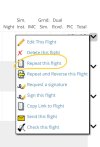
You could use the repeat flight feature.

IMG_0574.jpeg
 
Yes, that's the goal. But with students, some flights have zero landings (by them). Also, the number of logged flights is significant, so I wouldn't want to put multiple under one flight, and just list them separately in the comments.

As an example, of we do five pattern tows, I'd like a way to enter the info once and have it duplicated across five flights.
I don't know of a way to do that other than copy and paste. But if it's 5 pattern tows, isn't that pretty similar to making 5 patterns and landings in a powered plane? In which case in a powered plane it would all be on one line anyway, with some comment like "landing practice".
 
I don't know of a way to do that other than copy and paste. But if it's 5 pattern tows, isn't that pretty similar to making 5 patterns and landings in a powered plane? In which case in a powered plane it would all be on one line anyway, with some comment like "landing practice".
As he mentioned, during training, flight count matters as part of the requirements for certification.

(ii) 2 hours of solo flight time in a glider in the areas of operation listed in § 61.107(b)(6) of this part, with not less than 10 launches and landings being performed.
Entering them on the same line makes it harder to count and the software can’t count it for you.
 
As he mentioned, during training, flight count matters as part of the requirements for certification.


Entering them on the same line makes it harder to count and the software can’t count it for you.
Got it. It appears that the Repeat Flight option (which I see is on the apps too) would work for that. Which I did not know about until just now.
 
I love when y'all do my product support work for me! :) @Lindberg - let me know if there are other properties/attributes that you'd like to be able to stick on such a flight.
 
I see the repeat flight option when I'm looking at my log book, but not when looking at a student's logbook. Is it in a different spot?
 
I see the repeat flight option when I'm looking at my log book, but not when looking at a student's logbook. Is it in a different spot?
Correct, when you're looking at a student's logbook (from within your account), your options are basically limited to signing a flight or re-signing a flight that's had a voided signature. Most of the other options in that menu (delete, send to another pilot, request a signature) are also off-limits due to either deliberate limitations on what you can do with another pilot's logbook, or to avoid circularity (e.g., requesting signatures...from yourself). Are you adding all of these flights directly into the student's logbook?
 
Yes, that's how I've been doing it.
ahh. Not really a scenario I had been contemplating for repeat a flight (had been focused more on someone doing a milk run professionally day after day). So you're doing, say, 5-6 entries for a single student at a time? At least for the ones where they did the landing, you can just put one entry with the appropriate number of landings. Since it's a glider, if you put, say, "4" into the landings field, then in the 8710 form that will count as 4 flights towards the flight count. I just double-checked the code for that - this is true for gliders, balloons, and airships only - so a flight with 10 touch-and-go's in a 172 is still only 1 flight, but a flight with 10 landings in a glider is 10 flights. So you'd still need to do a distinct entry for each flight where they didn't perform the landing, but that should reduce the burden considerably.

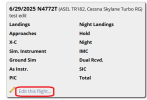
There's another hack that may help as well: have your student fill in their own darned logbook (good skill to develop!) and request signatures from you using Training->Request Signatures. Two advantages to this: (a) why should you do all the work of data entry? Make 'em do it themselves! :) and (b) if a flight is awaiting a signature *from you* (i.e., they've explicitly asked you to sign it), then that unlocks the magic "edit this flight..." option, so you can fix the stuff that they mucked up. That option ONLY appears for flights that are unsigned and where your username is already attached to the flight as the CFI.
1751214479943.png
 
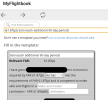
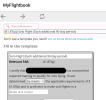
For the 61.87(p) 90 day solo endorsement, there are two options. (see images below)

First one says:
- [instructor] has given [student] the instruction required by 61.87(p)
- [student] has "met the requirements" of 61.87(p)
- [student] is competent to make safe solo flights in [airplane make/model]
- any limitations per 61.89(a)(8)

Second one says:
- [student] has recieved required training to qualify for solo flight
- [instructor] has determined "[student] meets the applicable requirements" of 61.87(p)
- [student] is proficient to make flights in [airplane make/model]

As far as I can see the only difference is that the first one has a spot to add limitations. Also, one is called "solo" and the other is "solo flight". Is there any other meaningful / legal difference between these two?

1751327000353.png

1751327015184.png
 
I think that's likely that AC 61-65 changed their wording from one revision to another and I didn't realize that there was an existing one to update, so I added the new one. AC-61-65 is explicitly non-regulatory (i.e., as long as the endorsement includes whatever attestations the regulation requires, you can use whatever language you like to express those attestations; they're just providing sample ones to use). I.e. - go ahead and use whichever one you like; they are semantically identical but for the limitation, so if no limitations use the 2nd one, if limitations then use the 1st. Note too that the *1st* endorsement is under 61.87(n), not (p), and there's yet another unique template for that...
 
ahh. Not really a scenario I had been contemplating for repeat a flight (had been focused more on someone doing a milk run professionally day after day). So you're doing, say, 5-6 entries for a single student at a time? At least for the ones where they did the landing, you can just put one entry with the appropriate number of landings. Since it's a glider, if you put, say, "4" into the landings field, then in the 8710 form that will count as 4 flights towards the flight count. I just double-checked the code for that - this is true for gliders, balloons, and airships only - so a flight with 10 touch-and-go's in a 172 is still only 1 flight, but a flight with 10 landings in a glider is 10 flights. So you'd still need to do a distinct entry for each flight where they didn't perform the landing, but that should reduce the burden considerably.
This is perfect! I had no idea it counts flights differently for gliders. That will totally work as soon as they start doing the landings. I wish I'd known this 10 years ago for my own logging. That doesn't allow for using the altitude values, but I'm happy to put those in the comments of they matter.
There's another hack that may help as well: have your student fill in their own darned logbook (good skill to develop!) and request signatures from you using Training->Request Signatures. Two advantages to this: (a) why should you do all the work of data entry? Make 'em do it themselves! :) and (b) if a flight is awaiting a signature *from you* (i.e., they've explicitly asked you to sign it), then that unlocks the magic "edit this flight..." option, so you can fix the stuff that they mucked up. That option ONLY appears for flights that are unsigned and where your username is already attached to the flight as the CFI.
View attachment 142386
I think I'll do this when they get further along.
 
Hi again! Regarding full stop landings:

When viewing the logbook in the browser there is a little note next to landings which explains:

(D) indicates a full-stop daytime landing​
(N) indicates a full-stop night-time landing​

It would be helpful for students going to a checkride (don't know who else would care about these details) to add this note to the PDF version so that it is very clear which landings are full stop (night, in particular).

That's all - thanks as always for your hard work! It's no problem to bring up the browser or app to explain just thought it would make the process a little cleaner to have that note directly in the PDF. I'll probably just add a text overlay to the PDF with your note before I print out the logbook (checkride coming up!).
 
Not a bad idea, mostly just need to figure out where to put it. Most layouts divide day and night landings, so they don't need this, but a few layouts do.
 
Not a bad idea, mostly just need to figure out where to put it. Most layouts divide day and night landings, so they don't need this, but a few layouts do.

I mean if everyone knows what it means except for me then don't worry about it!
 
I just noticed a little joke that I assume @EricBe included in MFB on purpose.

In the Training/Achievements page most of the Achievements have a link to click to view the applicable flights that made that achievement. Such as "Longest streak of consecutive flying days", the link filters your logbook to show only the flights on those days.

Well there is also a "longest streak of consecutive NON-flying days", where if you click the link, filters your logbook to show only the flights in that date range, but of course there ARE NONE, so the resulting page is blank! As it should be. I have to imagine that Eric, when making that Achievement, realized it and left the link (to a null result) in on purpose. At least I like to think so.

Silly, and made me laugh.

Here's what I get when I click:

1769202501906.png
 
Back
Top