The MyFlightBook thread

@EricBe , I've been having trouble with the android version of the app reliably tracking flights and detecting takeoffs and landings.

Sometimes it works, sometimes it doesn't, and I don't see what I'm doing differently. For example, today it tracked none of my flight tracks, but did get some of the landings. (Note, the plane is a jet, so about any set takeoff speed should work and the unit is connected to a Stratus 3.)

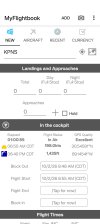
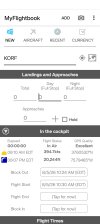
Here's a screen shot for some point in cruise for today. It did detect the takeoff, and you can see it shows the GPS signal as excellent, but there is no elapsed time shown. It did NOT save a track log. I can't remember if it detected the landing or not.

I verified it is the current version.

Any advice? Thanks!
Screenshot_2026-08-05-10-40-49-22_f0c43eb2a30039a4bfe485a2c8025504.jpg
 
@EricBe , I've been having trouble with the android version of the app reliably tracking flights and detecting takeoffs and landings.

Sometimes it works, sometimes it doesn't, and I don't see what I'm doing differently. For example, today it tracked none of my flight tracks, but did get some of the landings. (Note, the plane is a jet, so about any set takeoff speed should work and the unit is connected to a Stratus 3.)

Here's a screen shot for some point in cruise for today. It did detect the takeoff, and you can see it shows the GPS signal as excellent, but there is no elapsed time shown. It did NOT save a track log. I can't remember if it detected the landing or not.

I verified it is the current version.

Any advice? Thanks!
Hmmm... a few things to check:
- are your location permissions set to "Allow all the time"? If not, then it can't record while in the background. (Are you recording too?)
- The lack of the elapsed time is the interesting bit. If I recreate your scenario above (specified block out and flight start and nothing else, I do get the recording icon (the red dot) and my elapsed time runs forward. If I turn off recording, I lose the red dot but I still get the marching elapsed time

Looking at the code, the main other thing I see that could cause a 00:00:00 elapsed time is if the pause time is greater than the elapsed time. I.e., when you are "in progress" and things are marching forward, you get a little green pause/play icon on the right side next to GPS Quality; when you press pause, I start accumulating pause time instead of elapsed time, and then when you unpause, the elapsed time is computed as normal minus pause time, and if that's less than 0 I pin it at 0. If somehow there's a stray pause time that's large, then elapsed would stay at 0. Not sure how that could arise, but it does get reset to 0 when you reset the flight (which happens either manually or after you submit a flight). If you reset the flight and set a block out and a flight start, does the elapsed time march again for you?
 
Hmmm... a few things to check:
- are your location permissions set to "Allow all the time"? If not, then it can't record while in the background. (Are you recording too?)
- The lack of the elapsed time is the interesting bit. If I recreate your scenario above (specified block out and flight start and nothing else, I do get the recording icon (the red dot) and my elapsed time runs forward. If I turn off recording, I lose the red dot but I still get the marching elapsed time

Looking at the code, the main other thing I see that could cause a 00:00:00 elapsed time is if the pause time is greater than the elapsed time. I.e., when you are "in progress" and things are marching forward, you get a little green pause/play icon on the right side next to GPS Quality; when you press pause, I start accumulating pause time instead of elapsed time, and then when you unpause, the elapsed time is computed as normal minus pause time, and if that's less than 0 I pin it at 0. If somehow there's a stray pause time that's large, then elapsed would stay at 0. Not sure how that could arise, but it does get reset to 0 when you reset the flight (which happens either manually or after you submit a flight). If you reset the flight and set a block out and a flight start, does the elapsed time march again for you?

I flew again recently, in a different plane, and it worked just fine that time.

The one difference that I suspect might have something to do with the problem is that the "problem airplane" has a Stratus 3, which my Android phone running MFB was connected to. But we kept getting on Foreflight on our tablets "Switch to Foreflight Mode?" Sometimes we'd press okay, sometimes cancel, and sometimes we had to restart Foreflight to get traffic and such to show. So I wonder if this mode had something to do with the connection to the MFB android phone.

I also noticed on the problem flights that even if I left the MFB app open (as I would normally do when using it to log a flight), the next time I unlocked the phone, the home screen would be showing instead. On the "working" flight it stayed running every time I unlocked my phone. So I wonder if there's some connection there with the data from the Stratus.
 
Interesting - I don't even know what "switch to foreflight mode" means. MFB registers for background position updates, so you shouldn't need to leave the app open during flight. But it does sound like there may have been some weird interaction with the Stratus 3.
 
@EricBe - disregard my previous posts at this time.

The problem I'm having now is that on the android app, it seems to be doing everything correctly - auto detecting takeoffs and landings, calculating flight time, determining XC time, etc., EXCEPT it's not recording a track log. It looks like it is while in flight, showing GPS information, but is not saving any track data. For example, screenshot from a recent flight seems to show everything acting normally.

I have tried both normal and high-resolution recording, but no difference.

The app is the latest version 2026.10.03.

Any ideas?Screenshot_2026-10-02-09-48-56-30_f0c43eb2a30039a4bfe485a2c8025504.jpg
 
A few things to check:
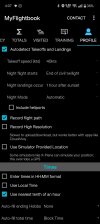
a) Obvious, but I need to ask it anyhow: confirm that recording is set to on (go to the Profile tab). Not just high-resolution.
b) Go to the Android's settings app and make sure that the app has permission to ALWAYS receive updates. Otherwise, I'm not getting updates when the screen goes dark or if you switch away
c) (Screenshot above confirms that it's not a problem, but I'll offer it for completeness...): I'm listening to the GPS only when there is a defined (engine start, block out, or flight start) and NOT a corresponding (engine end or block in).
d) I generally defer recording until a takeoff event, but in the screenshot above that also is clearly not a problem.
 
A few things to check:
a) Obvious, but I need to ask it anyhow: confirm that recording is set to on (go to the Profile tab). Not just high-resolution.
b) Go to the Android's settings app and make sure that the app has permission to ALWAYS receive updates. Otherwise, I'm not getting updates when the screen goes dark or if you switch away
c) (Screenshot above confirms that it's not a problem, but I'll offer it for completeness...): I'm listening to the GPS only when there is a defined (engine start, block out, or flight start) and NOT a corresponding (engine end or block in).
d) I generally defer recording until a takeoff event, but in the screenshot above that also is clearly not a problem.

Thanks.

A- recording is set to on.
B- Permissions, Location is set to all the time
Also, app is set to allow background activity.
 
Hmmm...I wonder if I have a regression? I did rework the background recording a bit, but I explicitly tested it and it worked fine. And if you're detecting, then the samples should in fact be coming in. Gremlins around this have been biting you for a while, though, haven't they, so I don't think it's this version specifically. I can try using the Android on my flight on Thursday morning, see what happens. (My "testing" is I set the takeoff speed to 20kts and drive around the block in the car with engine-start set to on.)

One other thing to try, though: I wonder if there's a bug around engine vs. block. I don't think so, but try setting engine start/end as well?
 
For example, screenshot from a recent flight seems to show everything acting normally.
In your screenshot, the "world map" icon was visible:
1791330541093.png

When your flight is complete and the record is saved, does that icon remain present? If so, what does it show when you tap it?
 
In your screenshot, the "world map" icon was visible:
View attachment 155569

When your flight is complete and the record is saved, does that icon remain present? If so, what does it show when you tap it?
Try it! :) It maps your flight. And yes, it's there even after you save a flight.
 
In your screenshot, the "world map" icon was visible:
View attachment 155569

When your flight is complete and the record is saved, does that icon remain present? If so, what does it show when you tap it?
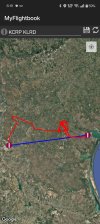
For me specifically, it shows a map with my departure and arrival airports, but without the actual flight path (the issue I'm working on).

During flight it shows the departure airport but nothing else.
 
That gibes with not recording. No recording = only blue path (airport-to-airport great circle), no red path (= GPS flight path). If you have both, it will show both. Note that you should be able to download a GPX of your flight from flightaware and attach it to the flight on the web, but I do want to figure out why recording isn't working for you. It should.
 
I just did another test run this morning, and it recorded fine. Try deleting/re-installing the app? (I admit I'm grasping a little bit here...)
 
I will try that but it feels like I did that a few months ago.

Last night I cleared the app data and the cache to see if that would help.

Today I flew and it recorded the departure and destination airports and the landing but did not calculate the flight time (which it had been doing before). And it still did not record the flight path.

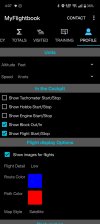
Here are the options selected in my Profile if it helps:

Screenshot_2026-10-08-16-07-38-34_f0c43eb2a30039a4bfe485a2c8025504.jpg
Screenshot_2026-10-08-16-07-48-79_f0c43eb2a30039a4bfe485a2c8025504.jpg
 
Hmmm...Looks like I do have a bug with auto-total on block-in not triggering (if you then edit the block-in time by jiggling by a minute back and forth, it triggers). https://github.com/ericberman/MyFlightbookAndroid/issues/351. But everything else looks fine. If you manually set a flight start time (or in flight after it's detected a flight start), do you see the red "recording" circle to the left of the GPS information?
One other thing to try - what happens if you use engine times instead of block times?
 
Hmmm...Looks like I do have a bug with auto-total on block-in not triggering (if you then edit the block-in time by jiggling by a minute back and forth, it triggers). https://github.com/ericberman/MyFlightbookAndroid/issues/351. But everything else looks fine. If you manually set a flight start time (or in flight after it's detected a flight start), do you see the red "recording" circle to the left of the GPS information?
One other thing to try - what happens if you use engine times instead of block times?

We might be on to something here. If, here on the ground, I manually trigger a Flight Start, it gives me the red recording circle and the green pause symbol.

BUT, if you look at my in-flight screen shot from post 765, it does NOT have these symbols. I assume this means it's not actually recording.

I don't fly again (probably) until Tuesday, but I will switch to Engine Time instead of Block Time and see if that changes things.

Re: Auto-total with Block In, you are correct, I was able to force it to do the math by adjusting the block in time by a minute (and then back).
 
Looks like something isn't triggering with block time that should be. Investigating now...
 
Got it. Legitimate bug, should be trivial to fix. In the meantime, use engine start/stop to control recording, in addition to (or instead of) block out/in.
 
Got it. Legitimate bug, should be trivial to fix. In the meantime, use engine start/stop to control recording, in addition to (or instead of) block out/in.
Thanks! Glad you were able to figure it out.
 
Update is live; give it a try on your next flight. Should fix both of the block issues. (Block out wasn't doing an implied engine start so didn't start recording, block-in wasn't doing an implied engine end so didn't trigger autototal)
 
Update is live; give it a try on your next flight. Should fix both of the block issues. (Block out wasn't doing an implied engine start so didn't start recording, block-in wasn't doing an implied engine end so didn't trigger autototal)
Fix worked! Used Block Time as before. Thanks for the quick response, it's why I use and keep recommending MFB!

Screenshot_2026-10-14-18-19-57-56_f0c43eb2a30039a4bfe485a2c8025504.jpg
 
Fix worked! Used Block Time as before. Thanks for the quick response, it's why I use and keep recommending MFB!
Excellent! Thanks for helping me track down that oversight!
 
@EricBe - question on MFB that has me a bit stuck - I have it set up to record flight pat, record high resolution, autodetect takeoffs and landings, use nearest tenth of an hour, and auto-fill total time with block time.

Everything works, except auto-filling the total time. When done, and I tap "engine stop" total time remains at 0.0. Use error, or bug there?

edit - it might be user error as I just realized I had it set to auto-fill based on block time, but I'm recording engine start to engine stop. Updated, and will try again next flight to see.
 
I think the answer is in your question: you said "auto-fill total time with block time" but you're tapping "engine stop" Engine start/stop and block start/stop are separate but distinct. If you want to auto-total from engine time, then set the auto-total to engine time.
 
What are these ? question marks indicating please
Ha! There’s nothing more than a terrible icon to indicate that I don’t know what the Image for the aircraft or flight or whatever should be. It is nothing more than a placeholder.
 
Ha! There’s nothing more than a terrible icon to indicate that I don’t know what the Image for the aircraft or flight or whatever should be. It is nothing more than a placeholder.
No, it means the user needs to take and upload a picture of the airplane!
 
Back
Top