Looking for Decent Checklist Creation App or Website

Leo Langston

Pre-takeoff checklist
Joined
Dec 30, 2016
Messages
148
Display Name
llangston1
I am trying to create some decent looking checklists for my 1949 Ryan Navion A with the E-225 engine. I haven’t found any good ones I could copy. Those usually are either Bonanza related or something with a fuel injected engine which I don’t have. I have the items I want to use. I would prefer a smaller 5x7 format rather that a full 8.5x11 size. When I use Word and print them out Kinkos wanted $70 to laminate, trim and spiral bind the pages. Ouch. I set up a free account at Flight Checklists but ran out of my allotment of 300 Check items before I got through all my emergency lists. Plus their formatting isn’t the greatest or easiest when trying to move items around to organize the checklists and minimize wasted page space. So what apps o web sites have others used to create some customized checklists for their plane?

Thx
Leo
N4937K
 
If I can find the originals, I'll send you mine (alas it is targetted toward my IO-550 conversion and the installation of the autopilot). Other than the after takeoff power reduction (which applies to even some of the E-series engines, I can't remember if the 225 has the issue), there's not a whole lot that's IO specific. I originally had the GO-435 in mine.

There's one for the original E185 over Rip had on his site: http://www.navioneer.org/riprelay/The Navion Files/navion.htm
 
I picked up a low-end laminator at Office max or whatever it is today for $20. Punch 2 holes and 2 key rings, each $1. DIY when you want to update something.
 
I have A glass panel Aspens with engine monitor and GPSs so there are a lot of extra items I added for settingbup and cross checking, programming the avionics prior to any IFR flight (currently in training) There is a bunch of stuff I need to remember to do and check now that was never in a Navion checklist. Plus I want a lot of the emergency items in there just in case. A lot of it may be to show a DPE I have them to use in case I need them. I can laminate myself and I have an old Day timer paper punch but a spiral binding would be nice. So I am looking around to see what folks were using on line if anything.
 
People still use checklists these days?

/s
 
Welk my IFR instructor wants me to have them and use them especially with a DPE. I tried the electronic ones in FF and GP and they are too much trouble to remember to bring them up and cycle thru them in the heat if battle. My problem is I can use them preflight but once I am flying I rarely use them especially during cruise or descent and landing especially while I am hand flying an approach.
 
I just used ppt and fitted my lists to half pages in landscape view (i.e., 5.5x8.5). Then I inserted them into clear plastic sleeves from Staples and used small split rings to connect them into a book. Simple, cheap, easy to update.
 
I just designed mine in word, trimmed it to size, and used my wife’s laminator.
 
My laminator cost $40 on Amazon and will do up to a full size sheet of paper.

Not only did I laminate my custom checklists, I also did my cruise performance chat and a couple of other charts I have handy in the plane.

And other things around the house. :D
 
I write checklists in Word on 5x8 format, black and white - just the killer items. (It’s a backup to make sure I didn’t miss something that will break the plane or occupants, not a solo student lesson plan.) I then save them as PDFs in Foreflight, and print a copy that gets put in clear page protectors.
 
I have been designing my own, originally in WordPerfect DOS (which really dates me) and later in Microsoft Word ,since I was a student pilot in 1990. I used to spend time laminating them until I realized that I would make changes, usually to shorten them, but also to add special equipment information). Laminating also became an exercise in futility because I am not an owner and I have flown something over 30 different makes and models of singles with varying equipment. I would need to open up my own copy shop. At some point, I came across those crew checklist binders from PDI Pueblo and began using the sleeves to hold my checklists. Still do.
 
I write checklists in Word on 5x8 format, black and white - just the killer items. (It’s a backup to make sure I didn’t miss something that will break the plane or occupants, not a solo student lesson plan.) I then save them as PDFs in Foreflight, and print a copy that gets put in clear page protectors.
Can you post a few pics of your sheets and sleeves. I like that idea.
 
I picked up a low-end laminator at Office max or whatever it is today for $20. Punch 2 holes and 2 key rings, each $1. DIY when you want to update something.
Yeah, Margy laminated ours when she was a school teacher (gives an idea how long ago).
 
When I use Word and print them out Kinkos wanted $70 to laminate, trim and spiral bind the pages.
All of the local FedEx Office Print shops here have self-service laminators. 8.5x11 is something in the $2 range for 7mil. I go there because many home laminators can't go beyond 5mil. I also trim it down to 5x8 myself at home.

I'm okay with just a hole punch and ring instead of a spiral bind, although I could probably figure out a way to DIY that if sufficiently motivated.
 
As the others mentioned I’ve used a word processor with the page sized to 5x7. Then just print on card stock. Hole punch and go fly.

It sounds like you are also pulling more for your IFR training that can easily be put on a page. I’ll caution that a checklist can quickly become a Do list with every little step noted.
 
I do custom checklists and put them in page protectors. They come in different sizes. I think I had a box or 500 5x8 protectors at one point I used in the lab to create instrument operation quick guides.
 
I am partial to single-page checklists (two sides), like the Checkmate ones or make your own. Especially for someone making their own - because it’s really easy to just print a new one when you make changes. Laminate if you want, print on heavier paper if you want, or just print out a batch of them on normal paper. I do not like multiple-page “book”-type checklists, too easy to be on the wrong page in my experience.

Ours at work are single sheets, folded into quarters. These are our “backup” checklists since they are also built into the FMS displays, but we use them routinely for various operations. They are laminated, and get pretty beat up with use, but it’s simple and cheap to print new ones.

Notice they do not include emergency procedures, for those we break out the actual POH which is tabbed and structured for easy reference.

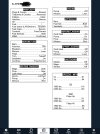
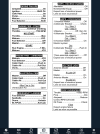
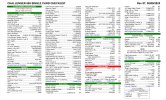
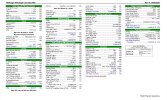
For the King Air, front and back (notice that much of the second page is briefing stuff, meaning they just filled up the white space with something useful but not really a “checklist”).

IMG_0488.jpeg
IMG_0489.jpeg
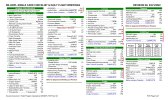
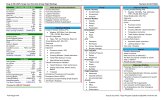
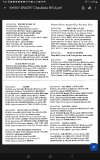
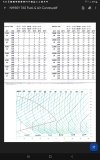
Then for the Challenger:

IMG_0490.jpeg
IMG_0491.jpeg

Notice that these checklists are pretty involved, commensurate with the lack of automated systems of either model. I would suggest that a checklist for a typical light GA airplane should be much much shorter.
 
I use self-adhesive laminating sheets. No laminator needed.

One page, half sheet of paper, both sides.

Half sheet of paper is 8.5 x 5.5 and allows 2 columns on each side, length wise. One side for pre-start/start column and pre-taxi/taxi/runup/pre-takeoff column. The other side for takeoff/climb/cruise column and descent/landing/taxi/shutdown.

I used MS Word for mine. Just make it in landscape view on an 8.5 x 11 with 4 columns, print, and fold the paper in half, and laminate it.

Modified the list over the years for my own failings. Just the check items, no response.

My emergency checklist stays completely separate.
 
I am partial to single-page checklists (two sides), like the Checkmate ones or make your own.
The new owner of CheckMate has created a way for folks to get a custom version of the newer version of the lists. I've chatted with him elsewhere, and he seems like a good dude who is interested getting the best product to the community he can. Might be worth looking into as an option for a more professional style list.
 
I used MS excel/word. I was able to get the formatting I wanted to get a perfect 1/2 page layout front and back. I can send you some source files if you are interested.
 

Attachments

  • Screenshot_20240718-093244_Drive.jpg
    Screenshot_20240718-093244_Drive.jpg
    811.1 KB · Views: 32
  • Screenshot_20240718-093320_Drive.jpg
    Screenshot_20240718-093320_Drive.jpg
    456.5 KB · Views: 27
I am partial to single-page checklists (two sides), like the Checkmate ones or make your own. Especially for someone making their own - because it’s really easy to just print a new one when you make changes. Laminate if you want, print on heavier paper if you want, or just print out a batch of them on normal paper. I do not like multiple-page “book”-type checklists, too easy to be on the wrong page in my experience.

Ours at work are single sheets, folded into quarters. These are our “backup” checklists since they are also built into the FMS displays, but we use them routinely for various operations. They are laminated, and get pretty beat up with use, but it’s simple and cheap to print new ones.

Notice they do not include emergency procedures, for those we break out the actual POH which is tabbed and structured for easy reference.

For the King Air, front and back (notice that much of the second page is briefing stuff, meaning they just filled up the white space with something useful but not really a “checklist”).


Then for the Challenger:


Notice that these checklists are pretty involved, commensurate with the lack of automated systems of either model. I would suggest that a checklist for a typical light GA airplane should be much much shorter.
Conceptually, these look a lot like mine. Like yours, mine are limited to two pages. The first page covers up to take off and departure climb and the second page from cruise to shutdown. Mine has a bunch of additional pages, but those are information pages about avionics because of the multiple airplanes with different systems I fly and teach in. Those are basically reminders about, "okay, how does this autopilot work?' Something look at at the beginning to brief myself. And don't look at them again.

The perhaps funny thing about mine is they are not intended for use by anyone else. Once while flying with a friend, the usual checklist in the airplane was missing, and he asked to use mine. He got to the part on my checklist where it said "switches on," looked at me, handed it back to me, and pulled out the POH.
 
The new owner of CheckMate has created a way for folks to get a custom version of the newer version of the lists. I've chatted with him elsewhere, and he seems like a good dude who is interested getting the best product to the community he can. Might be worth looking into as an option for a more professional style list.
My CFI made me buy CheckMate's. After trying a few others, I ended up liking them so much that I modeled my home-grown ones after theirs.

However, I don't laminate. When one gets dog-eared I just print out another. Also handy for when I see something that could use revision. I just pencil in a note on the old one and have it next to me when I edit the file.

Also, I use PowerPoint.
 
I am trying to create some decent looking checklists for my 1949 Ryan Navion A with the E-225 engine. I haven’t found any good ones I could copy. Those usually are either Bonanza related or something with a fuel injected engine which I don’t have. I have the items I want to use. I would prefer a smaller 5x7 format rather that a full 8.5x11 size. When I use Word and print them out Kinkos wanted $70 to laminate, trim and spiral bind the pages.
You can buy a laminator for ~$20, or half-size sheet protectors for less than that amount.
 
The new owner of CheckMate has created a way for folks to get a custom version of the newer version of the lists. I've chatted with him elsewhere, and he seems like a good dude who is interested getting the best product to the community he can. Might be worth looking into as an option for a more professional style list.
That might be interesting. There just aren’t any professionally made checklists for a Navion that I can find. Plus my plane had the glass panel so I need more steps to ensure I get it all set up before and during flight. All the emergency procedures would be quite a bit different from other retracts.
 
That might be interesting. There just aren’t any professionally made checklists for a Navion that I can find. Plus my plane had the glass panel so I need more steps to ensure I get it all set up before and during flight. All the emergency procedures would be quite a bit different from other retracts.
This is exactly the reason the FAA recommends customized rather than off-the-shelf checklists. One of the flight schools I’m associated with uses Checkmate. Not all that helpful with a 172M that has dual G5, GTN650xi, and a GFC500 autopilot.
 
I am trying to create some decent looking checklists for my 1949 Ryan Navion A with the E-225 engine. I haven’t found any good ones I could copy. Those usually are either Bonanza related or something with a fuel injected engine which I don’t have. I have the items I want to use. I would prefer a smaller 5x7 format rather that a full 8.5x11 size. When I use Word and print them out Kinkos wanted $70 to laminate, trim and spiral bind the pages. Ouch. I set up a free account at Flight Checklists but ran out of my allotment of 300 Check items before I got through all my emergency lists. Plus their formatting isn’t the greatest or easiest when trying to move items around to organize the checklists and minimize wasted page space. So what apps o web sites have others used to create some customized checklists for their plane?

Thx
Leo
N4937K


I like to print my checklist on a standard 8.5×11 sheet and fold it in half so it’s compact. The front side has all the normal procedures, and the back holds emergency procedures and performance numbers. I also include a quick sketch with key speeds and critical tasks for the traffic pattern and instrument descents. I don’t bother laminating. If it gets damaged or flies out the window, I just print another. I’m constantly updating the checklist anyway. I use my own LaTeX template.

Making your own checklist is one of the most useful things you could do when transitioning to a new aircraft. I don't like pre-made checklists. I've seen all sorts of nonsensical things - like, turn airconditioner off (yea, I wish), turn ignition key to start (how else would you start?), etc... but don't have things I like to be reminded of (like check hydraulic fluid level).
 

Attachments

  • checklist.png
    checklist.png
    363.5 KB · Views: 28
Making your own checklist is one of the most useful things you could do when transitioning to a new aircraft.
Agreed. The very first thing I do with a new to me aircraft, even one I am only teaching in, is to grab a copy of the POH and create a checklist. Same with new-to-me avionics, including my simple reference information sheets.
1755699025442.png
 
I have the checklist items and flows I want. It’s the formatting tools that I am lacking. I am not a Word or excell expert and don’t really care to become one. I have gotten the hang of Flight Checklists.com but I haven’t settled on 8.5x11 or the half page size. You have to do a lot of reediting and moving around when you change paper sizes and that’s a pain. I will get there eventually.
 
I have the checklist items and flows I want. It’s the formatting tools that I am lacking. I am not a Word or excell expert and don’t really care to become one. I have gotten the hang of Flight Checklists.com but I haven’t settled on 8.5x11 or the half page size. You have to do a lot of reediting and moving around when you change paper sizes and that’s a pain. I will get there eventually.
Word….at the top of the menu bar there’s an option “for 2 column.”

Or, go find a YouTube that explains the simpler aspects of Word formatting.

Or, hire a local teenager to do it for you.
 
Got one for the G1000?
No, for a few unrelated reasons.

I first began flying with a G1000 16 years ago, and I wasn't doing these back then.

With the G1000, you're really talking about two different systems. A PFD that does, well, PFD things, and an MFD, which is roughly the equivalent of having a GNS or GTN navigation unit.

The third reason is the real one. This is not a teaching document, although I've handed one or two out when I thought it would be helpful for glass-to-glass transitions. None of these systems are particularly susceptible to teaching from a one page picture. and these are not meant for that. These simple references are strictly for me. As I've mentioned other times, I teach in just about everything that Garmin, Dynon, Avidyne, Aspen produces. These documents do nothing more that give me quick reminders of discreet items that work differently from the 90% that's the same across products and manufacturers. Basically, highly personalized functional reminders. They are not intended to be helpful to anyone else but me, although have handed out PFD ones to transitioning pilots. A dual G5 isn't all that different from analog, so a couple of quick pointers is often enough for some people (although definitely not for others).
 
I have the checklist items and flows I want. It’s the formatting tools that I am lacking. I am not a Word or excell expert and don’t really care to become one. I have gotten the hang of Flight Checklists.com but I haven’t settled on 8.5x11 or the half page size. You have to do a lot of reediting and moving around when you change paper sizes and that’s a pain. I will get there eventually.
Agree. You don’t need it to look professional, just be useful to you. If 8.5x11 works just use it.

But …. Learning word or excel could prove useful too. Just saying
 
I put the checklists in the MVP 50 but I tend to use the laminated one. I like the single card one and just stick it under my leg between uses. My wife likes the flippy style (so guess which one we actually have).
 
As for laminating, I just use clear Contact paper (for shelves) from WM, Target, or even HD. Make the checklist in whatever size and color you want. Cut the Contact paper big enough to fold over the sheet plus leave a 1/2” margin all around (or more) - so, twice the size of the sheet plus some. Put the fold in the Contact paper on the side where you’ll want the rings, etc. Carefully lay the paper on one half and press it in, then fold the Contact paper over and press it on to the back, leaving at least 1/2” between the checklist edge and the fold. Then trim the other edges to preference but at least 1/8” or so all around.

My first one lasted about 10 years this way. When I recently redid it, I put a piece of Weed Eater line along the fold in the Contact paper to make it even stronger.
 
Back
Top