GFC 500 Tips for Vertical? Nav?

WDD

Final Approach
PoA Supporter
Joined
Oct 16, 2019
Messages
8,855
Location
Atlanta / Marietta
Display Name
Vintage Snazzy (so my adult children say)
Home Airfield
KPUJ
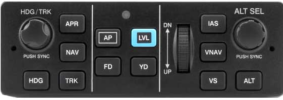
Any tips / tricks for using the GFC 500? Just got it installed, and the only "tricky" part that I need to get smarter on is the altitude.
1745340584823.png


ALT is easy - hit ALT and like cruise control, it hold current altitude. VS and IAS is my focus now. I enter the desired altitude with the right knob. For example, I'm at 3500 and I enter 4000. To activate, I need to hit VS or IAS. As I'm climbing, I choose IAS. It seems that to be able to adjust the IAS speed, I need to first hit IAS button. As soon as I do however, it starts flying with whatever is popping up when I hit IAS. I need to then quickly adjust it after it has engaged.

Is there a way have a default IAS speed that you always start with? It would be nice if I started with a IAS of my current IAS vs say 140 that I need to quickly adjust.

It also seems that for descents where you pick VS, the default is 0, with the adjustment wheel clicking 100 foot increments. That's manageable, because the autopilot isn't doing anything until I get the V S where I want it.

Watched the videos, training e classes, and read the manuals. But real people offering real world advice can't be replaced.

Thanks!
 
Last edited:
  • Like
Reactions: WDD
I preselect my ias to Vy on the ground and let the autopilot fly my climb. Preselect your altitude and it'll level off and trim for you. Often on trips I only touch the yoke when I'm within 200' of the ground and to hit the ptt to check in.
 
  • Like
Reactions: WDD
As soon as you hit IAS, it defaults to your current IAS. You'll need to roll the wheel back to slow down and climb or roll forward to speed up and descend.

If you're not sure what you're doing, set everything up for FD mode and then press AP once you're satisfied it's doing what you think it should be doing.
 
As soon as you hit IAS, it defaults to your current IAS. You'll need to roll the wheel back to slow down and climb or roll forward to speed up and descend.

AH! That was what I was missing.

So, to ascend / go Up in the IAS mode I need to turn the wheel "Down" to decrease the speed. Otherwise it can't climb, as it would bleed off speed below what is set.

EDIT: Apparently this is opposite. Turn wheel in "UP" direction to pitch up with either IAS or VS, and in IAS mode it will decrease the IAS speed to allow pitch up/ascend.

Thank you
 
Last edited:
AH! That was what I was missing.

So, to ascend / go Up in the IAS mode I need to turn the wheel "Down" to decrease the speed. Otherwise it can't climb, as it would bleed off speed below what is set.

Thank you
Actually, you turn it "UP" to go slower in IAS mode. Think of the nose - up points it up, down points it down regardless of mode. IAS for climbing, VS for descents.
 
Actually, you turn it "UP" to go slower in IAS mode. Think of the nose - up points it up, down points it down regardless of mode. IAS for climbing, VS for descents.
So turning the wheel in UP direction in IAS makes the IAS go down? OK - that makes more sense. It mimics the pitch control of the manual trim wheel - pitch up / ascend, pitch nose down for descend.
 
I like routine for running these autopilots. Keep the heading bug on your current heading, some systems will do this automatically. Make sure your desired altitude is set. For IFR, I set the heading bug for the rw heading, take off, make sure either is on the current course (usually) and hand fly to 400 feet. At that point I'm good to engage the autopilot. The goal is to prevent any unwanted turns or pitch changes when you engage. For the 700 with a toga button, you typically start out on the runway with FD in pitch and roll mode ( again, you can set your lateral mode, I like to leave the vertical mode in pitch at this point). So when you engage per previous at 400 feet, after you are in heading or nav mode, you will be in pitch mode. Typically by 400 feet I'd have accelerated to my desired climb speed already, so I just press IAS or FLC whatever the designation, then fine tune it to 120 knots or whatever is appropriate. It's pretty easy, if you follow logical steps every time, you should never be surprised.

Edit: I do set the heading bug and altitude on the ground, every time.
 
Last edited:
AH! That was what I was missing.

So, to ascend / go Up in the IAS mode I need to turn the wheel "Down" to decrease the speed. Otherwise it can't climb, as it would bleed off speed below what is set.

EDIT: Apparently this is opposite. Turn wheel in "UP" direction to pitch up with either IAS or VS, and in IAS mode it will decrease the IAS speed to allow pitch up/ascend.

Thank you
You spin it the same way you spin the trim wheel on your plane. That should make it easier for you to remember.
 
You might want to go up with a CFI that's well versed in all your new equipment.
For sure. There's a lot going on, particularly when you add in approaches. You're only a couple hours flying time from @midlifeflyer. I'd think about trying to get a couple hours with him or equivalent to really get to know your systems. I learned mine the hard way, but got a lot out of the interchange on this board around some of the finer points. Getting up for a couple hours with someone that can make it really work well is still on my to-do list.
 
A little easier said than done. My club CFIs don't have experience with GI 275's or GFC 500. One of our planes is at the avionics shop right now getting GI 275's installed and will be the first in the club not to have analogue vacuum powered what not.

Everything else besides the IAS and VS altitude programming seems to be somewhat easy and making sense. The tips shared here do help a lot though, like loading in the CRAFT initial altitude and initial heading, etc.

I flew a few approaches already (by hand) on Monday with a SP, and it seemed to go fine. The GI 275 HSI almost seemed too easy, and I kept thinking I was missing something. Punching the APR button when on final I'm thinking would feel like cheating too much LOL.
 
Everything else besides the IAS and VS altitude programming seems to be somewhat easy and making sense
Don’t get too wound up over it. Think back to you early instrument training when they talked about constant airspeed climbs and descents vs constant rate climbs and descents. That’s all it really is. IAS mode targets an airspeed; you get whatever rate of climb or descent that airspeed results in. VS mode targets the rate of climb or descent you want; airspeed is whatever you get. You want to climb at your best enroute climb speed of 90 KIAS? Use IAS mode. Want to descend without bursting your passengers eardrums? Use VS mode.

VS mode is where people get all worked up. Targeting rate in a climb could conceptually lead to a stall as the airplane continuously increases its angle of attack to try to meet that 1200’/mile climb rate you set. Not all that likely since the GFC500 will disengage if certain pitch/bank limits are exceeded.

People talk about “IAS for climb; VS for descent.” Some say it’s the stall issue, but I think it just comes up more often that way because it’s generally more efficient and comfortable.
 
Last edited:
BTW - part of the pick up process from the avionics shop was ground orientation with an external power source. The installer and I then went flying trying everything out, including having the AP fly an approach. The AP IAS and VS just didn’t click for me at that time.
 
BTW - part of the pick up process from the avionics shop was ground orientation with an external power source. The installer and I then went flying trying everything out, including having the AP fly an approach. The AP IAS and VS just didn’t click for me at that time.
Not a surprise. You don’t really understand what things are for until you apply them in flight.
 
One of our planes is at the avionics shop right now getting GI 275's installed and will be the first in the club not to have analogue vacuum powered what not.
May I offer one tip? If you have analog backup gauges, cover them during your transition period. CFIs often have them for analog partial panel. If not, round sticky notes are the perfect size.
 
People talk about “IAS for climb; VS for descent.” Some say it’s the stall issue, but I think it just comes up more often that way because it’s generally more efficient and comfortable.

Agreed. Our airplanes typically have a "sweet spot" for climbing, which is an indicated airspeed that provides a good compromise of forward speed, rate of climb, engine temperatures and forward visibility. The vertical speed can be all over the place, depending on weight and atmospheric conditions (even in turbocharged aircraft, though to a lesser extent). IAS is convenient because it maintains this indicated airspeed for efficient cruise climb.

We don't have that same problem in a descent. Engine cooling, visibility, forward speed - none of those things is a concern in the descent. So VS makes the math easy (and/or ATC happy).

- Martin
 
You might want to go up with a CFI that's well versed in all your new equipment.

Amen to that.

I fail to understand how so many people happily fork over more than a hundred grand for a substantial panel upgrade, and then refuse to spend just one percent of that figure on the kind of instruction they would need to actually use all the fancy stuff confidently which they just bought.

- Martin
 
Any tips / tricks for using the GFC 500? Just got it installed, and the only "tricky" part that I need to get smarter on is the altitude.

View attachment 140161


ALT is easy - hit ALT and like cruise control, it hold current altitude.
Yes... Or you bug the altitude you want before you get there and you should have ALT in white while you're still climbing/descending and it'll automatically intercept the altitude and ALT will turn green when you get to the bugged altitude.

VS and IAS is my focus now. I enter the desired altitude with the right knob. For example, I'm at 3500 and I enter 4000. To activate, I need to hit VS or IAS. As I'm climbing, I choose IAS. It seems that to be able to adjust the IAS speed, I need to first hit IAS button. As soon as I do however, it starts flying with whatever is popping up when I hit IAS. I need to then quickly adjust it after it has engaged.
Yes. In this instance, hit IAS and then immediately roll the wheel back towards you until it shows the speed you want for the climb.

FWIW, a short climb like that of 500 feet, you may want to use PIT or VS. There won't be a significant difference in performance over 500 feet to worry about. Longer climbs, definitely use IAS... But you may find it more comfortable to use PIT or VS at the beginning of the climb to get it established and then switch to IAS when you get close to the desired speed. However, this is more of an advanced technique to just smoooooooth things out for your pax, so feel free to ignore it for now. ;)

Is there a way have a default IAS speed that you always start with? It would be nice if I started with a IAS of my current IAS vs say 140 that I need to quickly adjust.
It should always start with your current IAS I think?

What navigator do you have? GTNs (Xi or not) can do VNAV as well.

I like routine for running these autopilots. Keep the heading bug on your current heading, some systems will do this automatically. Make sure your desired altitude is set. For IFR, I set the heading bug for the rw heading, take off, make sure either is on the current course (usually) and hand fly to 400 feet. At that point I'm good to engage the autopilot. The goal is to prevent any unwanted turns or pitch changes when you engage. For the 700 with a toga button, you typically start out on the runway with FD in pitch and roll mode ( again, you can set your lateral mode, I like to leave the vertical mode in pitch at this point). So when you engage per previous at 400 feet, after you are in heading or nav mode, you will be in pitch mode. Typically by 400 feet I'd have accelerated to my desired climb speed already, so I just press IAS or FLC whatever the designation, then fine tune it to 120 knots or whatever is appropriate. It's pretty easy, if you follow logical steps every time, you should never be surprised.

Edit: I do set the heading bug and altitude on the ground, every time.
Great advice.

You should have a TO/GA (or just "Go Around") button that you can use to set the FD for the initial climb. Dial in runway heading and HDG mode, and bug your initial cleared altitude. Take off, use heading bug as necessary to get headed in the right direction, engage the autopilot, get on NAV when you're ready, then get on IAS and adjust to the desired climb speed.

Always set the altitude bug to whatever altitude you've been cleared to; the next place you want to level off really. Always keep the heading bug synced up with your actual heading.

VNAV, if you have that capability: You'll need three things to make it work: Set the VNAV constraint on the GTN, dial the bug to the level-off altitude, and hit the VNAV button on the GFC. If you miss any one of those three it won't do anything.

If you can't do VNAV, use VS for the descent.

Hit APR when you hear "cleared for the approach" and not before. If you get told to intercept the localizer or final approach course, hit NAV instead. That will ensure you don't descend before you're cleared to.

I preselect my ias to Vy on the ground and let the autopilot fly my climb.

Be very careful with this, and ensure you get your climb speed established before activating the autopilot, and respect the limitation on when to turn the autopilot on after takeoff. If you put it in IAS mode on the ground and engage the autopilot shortly after takeoff and before you reach climb speed, it may nose you right back into the ground (or obstacles).

I think a better practice is to use TOGA and maybe go ahead and put the heading bug on runway heading (vs ROL mode), but leave it in TO (or PIT if you need to adjust it) mode, then switch to IAS once the climb is established.
 
On takeoff I always try to have the plane in a stable climb, trimmed, flying initial heading, then it’s set heading bug, HDG, IAS, and AP.

Whenever I didn’t do this the AP would sometimes make the plane even more unstable, and I would and have to disengage it.
 
On takeoff I always try to have the plane in a stable climb, trimmed, flying initial heading, then it’s set heading bug, HDG, IAS, and AP.

Whenever I didn’t do this the AP would sometimes make the plane even more unstable, and I would and have to disengage it.

If there’s no other mode engaged*, it will engage in PIT & ROL mode, capturing your current attitude (within some pro-stability limits).

Since your climb should be pretty stable by the 800’ minimum engagement altitude, if engaging the GFC destabilizes you, absent some user error, I would have the installer check it out.

(*As a matter of preference, I use TOGA for takeoff)
 
One procedure I always perform is periodic synching the heading bug with current heading by pressing the HDG knob. When ATC gives me a “turn right xx deg for traffic”, when I engage heading mode, I know the aircraft is not going off in an unexpected direction. I do this while VFR also just to make it habit.

Edit- I have a GFC500 so no CWS available. :(
 
One procedure I always perform is periodic synching the heading bug with current heading by pressing the HDG knob. When ATC gives me a “turn right xx deg for traffic”, when I engage heading mode, I know the aircraft is not going off in an unexpected direction. I do this while VFR also just to make it habit.
Good habit. It will also help to have a heading bug to follow if the AP craps out completely
Edit- I have a GFC500 so no CWS available. :(
CWS isn’t particular helpful for vectors anyway. Basic paradigm is, when you release it, it captures new vertical, but returns to old lateral.
 
e very careful with this, and ensure you get your climb speed established before activating the autopilot, and respect the limitation on when to turn the autopilot on after takeoff. If you put it in IAS mode on the ground and engage the autopilot shortly after takeoff and before you reach climb speed, it may nose you right back into the ground (or obstacles).
I guess if you turn it on at 10'....im at Vy before I climb away from the runway. The only way it would pitch down is if the engine quits, at which point Vy coincides with best glide. If you're not at/above Vy by the 800' you're supposed to wait for to turn it on....
I think a better practice is to use TOGA and maybe go ahead and put the heading bug on runway heading (vs ROL mode), but leave it in TO (or PIT if you need to adjust it) mode, then switch to IAS once the climb is established.
All the toga button does is set pitch to ~10 degrees. I find that to be largely worthless. It's an okay starting point for a missed approach when you're busy, but pitch for best climb varies with weight and temperature. I'm generally switching back to ias mode ASAP on a missed. I don't find the flight director to be very useful anyway. I know what attitude i need the plane in to make it do what i want.

The only benefit i see to the toga button is to activate the missed and quickly change the a/p mode to something that will move you away from the ground. I would much prefer if it would go to ias mode set at Vy rather than a generic pitch.

Before takeoff I bug the rw (or assigned) heading, set hdg mode, bug my assigned altitude, and set ias mode to vy. When I hit 800' (okay I'll admit I rarely wait that long...) all I have to do is press the a/p button. If I get "proceed on course, it's "direct, enter, enter", nav, a/p on.
 
press alt select
Dial in your next cleared altitude
hit "VS"
Thumbwheel down to -.5 (-500fpm)

And "no" on the default IAS. The process is the same.
press IAS
dial in the selected airspeed
his IAS (within the capability of your airframe, of course)

B
 
CWS isn’t particular helpful for vectors anyway. Basic paradigm is, when you release it, it captures new vertical, but returns to old lateral.
For HDG, yes. ROL will often hold whatever bank you release CWS at though. CWS behavior depends on the mode you're in, and likely the brand of autopilot as well.

It seems my most common use of CWS on non-Garmin autopilots is to make minor corrections, usually to altitude. I've flown Garmin autopilots that had CWS, but I don't think I ever actually used it!

I guess if you turn it on at 10'....
Yes. Like I said, if you respect the limitations, it's no problem. It's all about layers of safety though, and I don't expect every consumer of information on a web board is as conscientious as you.

Also, FWIW, you'll spend less time fiddling with the autopilot if you just hit IAS when you get to Vy anyway. ;)

All the toga button does is set pitch to ~10 degrees. I find that to be largely worthless.
Pitch for the TOGA button varies depending on aircraft type, but yes, it's just intended to be an initial value to get you going in the right direction until you put in the desired mode.

I don't find the flight director to be very useful anyway.
If you use it right, it's useful.

One thing here: NEVER have the FD on if it's not telling you to do what you want it to do. If you get into a situation where you're ignoring it on purpose, you'll always ignore it. If you get too busy to keep it doing the right thing, just turn it off.

But, if you are diligent about keeping the autopilot modes doing what you want the plane to do even when you're hand flying, the FD can save your bacon. I've gotten busy while hand flying a couple of times and then the FD flying away caught my attention - I could have completely blown an altitude if I had learned to ignore it.

The only benefit i see to the toga button is to activate the missed and quickly change the a/p mode to something that will move you away from the ground. I would much prefer if it would go to ias mode set at Vy rather than a generic pitch.
They probably just want to give you the option of going to Vx or something instead. Again, it's just an initial thing to get the airplane moving in the right direction until you set it up for what you want.
 
Amen to that.

I fail to understand how so many people happily fork over more than a hundred grand for a substantial panel upgrade, and then refuse to spend just one percent of that figure on the kind of instruction they would need to actually use all the fancy stuff confidently which they just bought.

- Martin
Even better, if you do G3X or G500TXi, go to Garmin for the in person training. A LOT of great info.

Then follow up with a local, KNOWLEDGEABLE instructor.

Yeah, people can be penny wise and pound foolish.
 
Even better, if you do G3X or G500TXi, go to Garmin for the in person training. A LOT of great info.

Then follow up with a local, KNOWLEDGEABLE instructor.

Yeah, people can be penny wise and pound foolish.
Terry, have you been to the in person course in Kansas? If so, did you feel that you got your money's worth. I have been contemplating it. (G500Txi/GFC500/GTN750/650/Txi EIS)
 
Dang - that’s hard core. Post a picture when can.
Currently, the 430 is still in place but will be replaced by a 650xi. It just went into the avionics hangar for the replacement as well as installing the Txi EIS which will replace all analog gauges in the right panel (new panel will be cut). I will also install a GMA350c to replace the 340. I'll put up a photo when done in a few weeks.

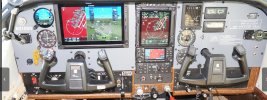
This is the panel at the moment:

IMG_0494.jpeg
 
Last edited:
Terry, have you been to the in person course in Kansas? If so, did you feel that you got your money's worth. I have been contemplating it. (G500Txi/GFC500/GTN750/650/Txi EIS)
Yes, I did.

It was a bit like drinking from a fire hose, but I think it was worth it.
 
Currently, the 430 is still in place but will be replaced by a 650xi. It just went into the avionics hangar for the replacement as well as installing the Txi EIS which will replace all analog gauges in the right panel (new panel will be cut). I will also install a GMA350c to replace the 340. I'll put up a photo when done in a few weeks.

This is the panel at the moment:

View attachment 140233
Very nice. What had you choose the G500TXi vs G3X for your display?

@Pinecone What led you to the G3X for your panel?
 
Very nice. What had you choose the G500TXi vs G3X for your display?

@Pinecone What led you to the G3X for your panel?
The previous owner made my decision ;) Just decided a few minutes ago to add a second GI275 on the right side of the panel for another ADI; this will make it easier for my safety pilot to swap out for some simulated approaches when I go up for instrument practice.
 
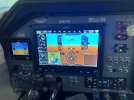
Here's mine. G3X 10", G3X 7", G-5, GFC-500, GTN-750Xi, GTN-650Xi, GTX-345R, PS Engineering 450B audio panel
That... That is the panel I want. I have a GI275 that is going to become the backup and my audio panel is a GMA350c with the voice commands, but you've got the rest. I still need to add the G3Xs (really kinda hoping a "G4X" comes out soon) and GFC500, and will probably just stick with the GNC355 since I don't think #2 Nav radio is worth an extra $5,850. :o

Now I need to go mop up all this drool.
 
Back
Top