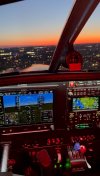
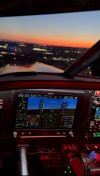
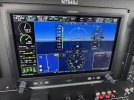
Went flying last night and heading east I turned on the autopilot and it started to do a 180 turn, I’m like no, that’s not what I want so I take over and hand fly and turn on the autopilot with heading mode on.
View attachment 138947
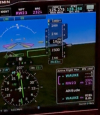
The "scoreboard" (the little window at the top that shows all of your autopilot modes) tells all. If you were trying to engage NAV mode, well, look at the scoreboard and the HSI. It was probably going to try and intercept the ILS localizer outbound, given your heading and the "BC" in the scoreboard.
Nav doesn't work 'til the HSI is doing what you want. It's worth adding a couple of items to your before takeoff checklist to get the flight plan entered and the HSI set up the way it should be. You noticed the green needles and VLOC instead of GPS, but that's the sort of thing that you want to ensure is set up and ready on the ground EVERY TIME so that you're in the habit. Taking off into IMC like this can kill you, so it's good to keep those habits VFR too.
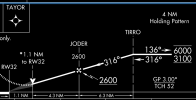
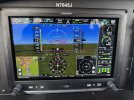
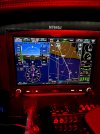
We crossed the pond and I loaded and activated the KUGN RNAV 23 with LIRIC as the IAF with no course reversal. Look at that 67mph headwind, literally dead on!! So now I’m NAV mode A/P with an altitude hold ALT at 6500’. I want to keep some altitude over the pond, but now the question is can the A/P automatically descend? What mode is needed for that?
That, is VNAV.
You need to do three things to get VNAV to work:
1) Set the VNAV constraint on the GTN by setting an altitude for a fix in the flight plan. Since you had an approach already set up, the altitudes at the fixes on the approach should already be in there. It's also worth practicing manually putting in an altitude at a fix that's in your flight plan as well as creating an along-track offset fix - This function is REALLY useful when you get a clearance like "Cross 20 miles east of Farmington and maintain 4000" you can do it automatically.
2) Set the altitude bug to the new altitude. If you're holding altitude (ALT is green) just switching the bug won't cause the autopilot to deviate from where you are.
3) Hit the "VNAV" button on the autopilot mode controller.
If you miss any of those, nothing will happen.
So I’m wondering about this, I know I can manually set the desired ALT with a IAS or VS descent. I haven’t tried VNAV yet. I’m also thinking ALT mode would be overriding any other settings and keeping me at 6500’.
IAS and VS are "now" modes. VNAV is a "when we get to the TOD" mode, so it will not override ALT, nor will ALT keep it from working at the right time. If you hit VNAV when you don't have a VNAV constraint properly set up it'll do nothing, but if you did that part correctly you should see ALT in green and VNAV in white. When you get to TOD, ALT will go away and VNAV will turn green.
So I press ALT and now ALT changes to PIT with a white GP. What does PIT mean and what do those mean together?
PIT = Pitch. As previously mentioned, it's the default vertical mode just like ROL is the default lateral mode. If you're in ALT and you press ALT, you're turning ALT off so it'll switch to PIT. Same thing will happen in the other modes, for example, if you are in VS and you hit VS, it'll go into PIT.
The white GP stands for Glide Path, which refers to the vertical component of the approach you have loaded. GS and GP are analogous, GS is for GlideSlope on an ILS while GP is for GlidePath on an RNAV approach.
So, PIT in green and GP in white means that it'll maintain the set pitch until it intercepts the approach glidepath (as long as you don't intercept any terrain or obstacles first!

)
I adjusted to 2300’ to get where I needed to be at LIRIC.
That explains why it also has ALTS in white... Which means it'd intercept 2300, though I must admit I've never tried arming modes "out of order" like that to see what happened.
Once at LIRIC I figured I’m on the approach so I pressed APR.
Remember that what APR means is "It's OK to go down when I get to the glidepath." You don't need to be on the approach to hit APR, nor do you necessarily want to hit APR even after you're on the approach (for example, ATC tells you to "Intercept the localizer" but doesn't clear you for the approach yet).
Such as when you load and activate an approach, can you at this point just press APR and will the autopilot fly you down to minimums?
Yes. But, the best practice is to hit APR when ATC clears you for the approach, with a few scenarios that are exceptions.
Imagining I have nothing in the way from 66G to KUGN RNAV 23 via LIRIC (which you don’t when above 4800’), the autopilot could in theory fly the airplane from just after clearing the trees at 66G down to minimums at KUGN without any inputs needed from the pilot (minus fuel, gear, flaps, and throttle/prop/mixture controls).
Kinda.
While it will probably work, "just clearing the trees" is likely below the minimum autopilot engagement altitude.
Also, VNAV is meant for descents and even then, only one. You can do a VNAV descent followed by an approach descent, but you can't just create a flight plan with multiple descending and climbing VNAV restrictions for something like the Chicago lakeshore and just hit "VNAV" and forget it.
For a flight like you took from 66G to KUGN, you can have the autopilot fly the whole flight from 800 AGL on climbout (minimum engagement altitude) down to minimums on the approach on the other end, but you'll still have a few buttons and knobs to deal with along the way.
For setup, you'd need to do the following:
* Set up your flight plan, including the approach, and ensure there's a vertical constraint included for VNAV, such as 2300 at LIRIC.
* Hit your TOGA button, which should put you in TO mode for both pitch and roll. (This is equivalent to PIT at the proper attitude for your plane and ROL with wings level.)
* Set your heading bug to runway heading
* Set your altitude bug to your desired cruising altitude.
* Ensure the HSI is showing the proper track for the first leg of your flight plan (it should do this automatically, just check it to be sure)
Then, take off, hand flying into the flight director. Hit IAS and set your desired climb speed, and HDG to maintain the runway heading you set earlier. At 800 AGL, hit AP to engage the autopilot. Adjust the heading to turn towards your course and then hit nav to arm an intercept, or just hit -D> and NAV.
When you get to cruise and ALT is green (and after doing your cruise checklist), hit VNAV and set the altitude bug down to the constraint you set in the flight plan. If that constraint is in a spot where you can intercept the approach glidepath without more than a single level-off at the constraint altitude, just hit APR when you're cleared for the approach and disconnect at minimums.
It's pretty cool, but it's definitely not set-it-and-forget-it, nor should it be. You still need to actively monitor your status for situational awareness.
While that is one avenue that could be taken, I’m learning and understanding here just fine from the many posts above. I have trained with a 650/500/5 combo, and while flying or in student mode, I just don’t have the mental capacity to ask these questions. Here is a safe space for me to think about my questions and ask them here albeit your post saying go get a CFI is more of a toughen up and do it my way approach which may be off putting for some people who are trying to learn. You don’t know peoples situations, time to airport, scheduling, etc. It isn’t as simple as you put it. Your input is duly noted, hopefully you better understand my viewpoint from my response.
Hopefully you're getting good info here. I think the concern is that you should be developing good habits right away, not stumbling into them a few at a time and needing to knock out the bad ones. On the other hand, I do keep coming up with situations where it's worth testing the system's behavior in edge cases, so there's some value to being in flight and learning as well.
The Garmin GTN trainer app in a 1G/0 airspeed environment is a great way to work through the various functions and capabilities while referencing the appropriate AFMS suppllement(s) and other references for the low, low cost of nothing except time.
If you’ve never used the trainer app, it’s really worthwhile.
It is, but they have separate apps for GTN Xi, G3X, and some others but they don't let you put together a full panel and learn how they interact with each other, so there are limits to what you can learn. They're a good way to start, but you really need to get into the airplane before too long.