Coupled approach - GTN650Xi & GFC500

"midlifeflyer, post: iPad sim for what? If you are talking about GNS, there isn’t one from Garmin.

To answer your other question, yes the GNS series has VTF.

GTN series has the iPad Sim. That’s what I work with students on. Good to know about the GNS VTF.
 
Last edited:
GTN series has the iPad Sim. That’s what I work with students on. Good to know about the GNS VTF.
Personally, I think the Windows one is a bit better because you can "fly" it with a PFD and get a fuller "experience." Unfortunately, the PFDs, while "real" units sold by Garmin, are not the G5 or G3X units we see in many GA aircraft, but since they all work similarly, the G600-based displays are still a step up from nothing.

I've used the GDU 700P emulation with pilots transitioning to G5s with decent success. The GDU 700L will do the same for a G3X transition. Not the same, but visually helpful to see navigator entries and changes reflected on a PFD.
 
I use this config on my laptop to work thru a bunch of stuff. Just wish I could add a GFC500 instead of the basic three button AP.
Garmin is missing out on a bunch of potential business...

If they created a "Garmin Avionics Simulator" that truthfully emulated their equipment and allowed you to build a complete panel either on one or several networked devices and optionally use it with MSFS and X-Plane, not only would they make it much easier for people to experiment with their gear during the sales process, they could tap into the flight simmer market by charging a subscription fee. They could even sell database updates! :rofl: Then just give avionics shops codes that would give 6 or 12 months for free.

Pilots could not only try things out, they could also use them for training and familiarization, leading to better safety (and fewer lawsuits).
Simmers could get cool panels that actually worked.
Garmin could make a bunch more money.
 
…
If they created a "Garmin Avionics Simulator" that truthfully emulated their equipment and allowed you to build a complete panel either on one or several networked devices and optionally use it with MSFS and X-Plane, …

Pilots could not only try things out, they could also use them for training and familiarization, leading to better safety (and fewer lawsuits).
Simmers could get cool panels that actually worked.
Garmin could make a bunch more money.
RealSimGear uses Garmin’s GTN trainer for their XP plug-in; Navigraph sells db updates to the XP crown for $25/mo, I think it is.

While the Navigraph chart updates work flawlessly with the XP native avionics, the RSG GTN650/750 plug-in is limited to whatever db garmin is distributing at the time.

A few versions of garmin trainer back, you could just copy/paste your garmin db to the trainer db and have current charts.

That’s a long-winded way of saying I agree.
 
Last edited:
; Navigraph sells db updates to the XP crown for $25/mo, I think it is.
If you want only US, data updates are free from the FAA . But that and Navigraph can only update the xplane data, not the data in the Garmin trainer.

But interesting you mentioned “charts” and the use of the Garmin db in some older Garmin trainers. I use that to update my GNS and G1000 trainers nav database, but have not seen that for things like approach charts.
 
IMG_8518.jpeg

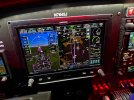
Went flying again and changed from the double cue to single cue. Someone also mentioned to get rid of the highway in the sky, I’ll play with that next time. Was able to load the VNAV descent in and as one mentioned, I needed to bug the altitude which worked fine. So I’m guessing you can program the altitude criteria waypoints but the autopilot VNAV won’t descent below the bugged altitude.

Another question, the VNAV setting in the menu on the G3X is grayed out. Any idea why? Either a config setting or maybe only available in the descent?

Personally I liked the double cue because it was the same one used on the B737Max sim that I flew in and I felt it was easier to match bank angles.
 
As far as the heading bug pointed somewhere other than the nose of the plane, one more example comes to mind: Departures like "enter controlled airspace on heading 150" and similar heading-after-takeoff scenarios.
That is what I do, I set the heading bug to an initial assigned heading. That way, once I get to the proper altitude, I can turn to the heading bug (or engage auto pilot and let it turn).

I also hit TOGA button when starting my take off roll. That sets the flight director to wings level and 7 degrees nose up.
 
Personally I liked the double cue because it was the same one used on the B737Max sim that I flew in and I felt it was easier to match bank angles.
I prefer dual cue.

1) It is what I am used to from USAF aircraft.

2) It doesn't cover up things on that I want to see.
 
Another question, the VNAV setting in the menu on the G3X is grayed out. Any idea why? Either a config setting or maybe only available in the descent?
I don’t recall offhand but there are numerous things where the G3X Touch can do the feature on its own without a GTN, but the GTN can also do the feature on its own. When you have both G3X Touch and GTN units, you pick one of them to run these features. And you normally pick the GTN. Examples that do come to mind are flight plans and smart glide. Perhaps VNAV is also on that list, and you have it running off the GTN so the G3X disables its internal version.
 
I don’t recall offhand but there are numerous things where the G3X Touch can do the feature on its own without a GTN, but the GTN can also do the feature on its own. When you have both G3X Touch and GTN units, you pick one of them to run these features. And you normally pick the GTN. Examples that do come to mind are flight plans and smart glide. Perhaps VNAV is also on that list, and you have it running off the GTN so the G3X disables its internal version.
I don’t know if that’s true in this case, but I have seen that before with other features and other PFD/GPS combos.
 
Another question, the VNAV setting in the menu on the G3X is grayed out. Any idea why? Either a config setting or maybe only available in the descent?
Are you referring to the AP status on top of the PFD? If so, that's not "greyed out", but rather armed, but not yet active. The standard for the GFC 500 is that any active modes (AP, GPS and ALT) in your picture are what the AP is actually doing - so AP is on, following GPS guidance and maintaining altitude. It has VNAV ready to descend, when valid criteria are met e.g. reaching top of descent and altitude bug set at an altitude lower than where you are now.
I'm not familiar with the G3X, but in my plane there is a step on the GTN to activate VNAV that is separate from setting the constraint in the flight plan. Sort of like "direct to" for horizontal navigation.

If that's not what you meant by "greyed out", then in the words of Emily Litella - "Nevermind" :).
 
Are you referring to the AP status on top of the PFD? If so, that's not "greyed out", but rather armed, but not yet active.
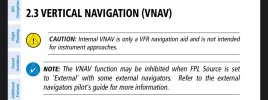
Yeah, I was thinking of that possibility too, but he mentioned “menu.” The G3X has internal VNAV (for VFR use only) and the menu selecting it is often greyed out when the flight plan is handled by the GPS.
1742469651888.png
 
Was able to load the VNAV descent in and as one mentioned, I needed to bug the altitude which worked fine. So I’m guessing you can program the altitude criteria waypoints but the autopilot VNAV won’t descent below the bugged altitude.
Bingo. Think of the VNAV constraints in the flight plan as your "planned" or "expected" altitudes, but the bug is what you are actually cleared to. That's another best practice - Only move the altitude bug to altitudes you are cleared to or otherwise OK to descend to (for example, an approach altitude after you're cleared for the approach). The autopilot will never pass the bug.

Another question, the VNAV setting in the menu on the G3X is grayed out. Any idea why? Either a config setting or maybe only available in the descent?
Which menu? Got a pic? I think @iamtheari might be right below if that's what you're referring to:

I don’t recall offhand but there are numerous things where the G3X Touch can do the feature on its own without a GTN, but the GTN can also do the feature on its own. When you have both G3X Touch and GTN units, you pick one of them to run these features. And you normally pick the GTN. Examples that do come to mind are flight plans and smart glide. Perhaps VNAV is also on that list, and you have it running off the GTN so the G3X disables its internal version.
I don’t know if that’s true in this case, but I have seen that before with other features and other PFD/GPS combos.
Well, if you think about what would happen if you set up VNAV on the GTN and then separately set up VNAV on the G3X... Which one is it supposed to follow? I suspect @iamtheari is correct here and that when a GTN is present, the VNAV is disabled on the G3X.

I'm not familiar with the G3X, but in my plane there is a step on the GTN to activate VNAV that is separate from setting the constraint in the flight plan. Sort of like "direct to" for horizontal navigation.
Yes, there is VNAV Direct in the GTN, and that's exactly what it does, but we haven't really talked about that yet.

Where that might be useful is this - If you set up your flight plan with your desired altitude constraints, for example, maybe you want to be at the intermediate leg altitude of the approach when you get to the IF, and then ATC doesn't clear you down until after your normal (say, 500fpm) TOD and you need to descend a little faster, VNAV Direct sets the exact angle to get there. Essentially, you're telling it "TOD is right now." That way it won't descend any quicker than it needs to to arrive at the altitude constraint. No need to guess how many fpm you need to get there on time. Very handy.
 
Well, if you think about what would happen if you set up VNAV on the GTN and then separately set up VNAV on the G3X... Which one is it supposed to follow? I suspect @iamtheari is correct here and that when a GTN is present, the VNAV is disabled on the G3X.
Yes according to the snip of the Pilot Guide I posted.
 
Are you referring to the AP status on top of the PFD? If so, that's not "greyed out", but rather armed, but not yet active. The standard for the GFC 500 is that any active modes (AP, GPS and ALT) in your picture are what the AP is actually doing - so AP is on, following GPS guidance and maintaining altitude. It has VNAV ready to descend, when valid criteria are met e.g. reaching top of descent and altitude bug set at an altitude lower than where you are now.
I'm not familiar with the G3X, but in my plane there is a step on the GTN to activate VNAV that is separate from setting the constraint in the flight plan. Sort of like "direct to" for horizontal navigation.

If that's not what you meant by "greyed out", then in the words of Emily Litella - "Nevermind" :).
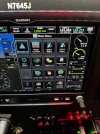
I’ll get a photo next time, it’s in the menu options page of the G3X.
 
IMG_8583.jpeg

Here’s the VNAV greyed out in the menu.

Did 2 approaches last night, both worked perfectly.
 
With a GTN G3X setup you only get guidance from 1 source at a time. You can't set up the say the nav on the GTN but use VNAV on the G3X simultaneously. The G3x can do most everything on it's own, so a lot of its manual is describing how to use those functions if you do not have a separate nav source.
 
Back
Top