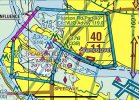
The new sectional charts look awful and are hard to read

I only turn on the aeronautical layer in foreflight when I want a georeferenced taxi diagram.

Theoretically, I could see it being useful as a "dark mode" for night flying.

For the kind of flying I do, there's no value add over the sectional.

I expect that the endgame will be the usual playbook for building an onramp to vendor lock-in:
* citing bandwidth fees, EFBs will charge an extra $x for raster charts vs. vector
* pilots are cheap and will go for the vector charts
* citing lower demand, support for raster charts will be dropped
* now that you have no choice, prices go up by $x anyway
 
The Aeronautical layer in Foreflight is basically the digital replacement for the Sectional. Much cleaner, can be zoomed in or out, text is always oriented correctly, MUCH less clutter. (I'm assuming G Pilot is similar.)

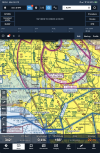
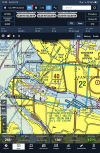
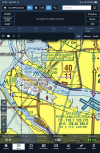
The first pic below is what my ForeFlight screen always looks like. I picked FRG as an example to show the various airspaces, VORs, etc. around there. Second pic is if I want info on FRG. There's more info if I scrolled down in the column showing, then there are all the tabs to pull up more info. All the info that's on the Sectional and then SOOOOO much more.

View attachment 146111View attachment 146112
How did you get the exaggerated runways at KFRG?
 
How did you get the exaggerated runways at KFRG?
Turn on extended centerlines in the settings (gear icon). Only shows at airports in the FPL. Note that it’s useful for finding the centerline, but it’s not useful for determining the shape of the runway configuration for visual identification of an airport, just that those particular runways exist.
 
Like most choices in life, there are pros and cons to each side. Which you pick depends on what you prioritize.

The value add of vector over raster is readability in electric format. Decluttering, scaling, and customizing allow you to more easily find the information most important to you at a glance, and to tailor your view to the kind of flight operations you are conducting.

That may not be your priority. But given this thread is about readability of sectionals, it is clearly a concern.
 
Some people are not enslaved to FF or GP.
Also, if those apps derive that extra layer in-house and a mistake is made, you're it as far as airspace violations go. The actual sectional, being an FAA product, is potentially the only real deal.
This is an understatement. No matter what, when VFR we’re bound to the info as presented in the sectional and/or TAC. It is the source of VFR truth. Turning off vector layers (intentionally) or mis-configuring them in an EFB or an in-panel nav unit won’t hold up as an excuse when violating airspace or causing some other sort of negative outcome.

Again, I like FF and use it all the time, but I find the sectional much more useful for the reasons I stated above (mostly general visual orientation and immediate terrain/obstruction awareness). There are also some cases where the vector layer might be more useful, no doubt, and the profile view is very valuable in a very set-piece, follow-the-magenta-line situation.
 
After reading up on just how the FAA shares aeronautical data, I really do believe the rasterized charts will be relics of the past before much longer. As EFBS and NextGen ATC become the standard, we will all be absorbed into the matrix.
 

This is an understatement. No matter what, when VFR we’re bound to the info as presented in the sectional and/or TAC. It is the source of VFR truth. Turning off vector layers (intentionally) or mis-configuring them in an EFB or an in-panel nav unit won’t hold up as an excuse when violating airspace or causing some other sort of negative outcome.

Again, I like FF and use it all the time, but I find the sectional much more useful for the reasons I stated above (mostly general visual orientation and immediate terrain/obstruction awareness). There are also some cases where the vector layer might be more useful, no doubt, and the profile view is very valuable in a very set-piece, follow-the-magenta-line situation.
What is vector layer? Disregard the pic, it’s something I started elsewhere and I can’t make it go away.
 

Attachments

  • 1760363774267.png
    1760363774267.png
    5.3 MB · Views: 22
What is vector layer? Disregard the pic, it’s something I started elsewhere and I can’t make it go away.
Vector is the electronic version - points in space that form lines, shapes, and colors with the ability to turn them on and off and touch for access to further data.

The pic looks like a signature line :)

You might be able to tap the attachment and trash-bin it.
 
I haven’t figured out how to get an MEF, OROCA, hilltop altitude, or a bunch of other items from the traditional raster charts to show up on a vector chart. I’m currently using Garmin Pilot but it’s rare that they or ForeFlight will have a feature the other lacks for more than a few weeks at a time. There are plenty of times when a traditional chart gives me useful information immediately that modern vector charts either can’t give or make a hassle to find.
 
Some people are not enslaved to FF or GP.
Also, if those apps derive that extra layer in-house and a mistake is made, you're it as far as airspace violations go. The actual sectional, being an FAA product, is potentially the only real deal.
My comment only relates to those using an EFB and then sticking it on the Sectional layer. :D If you're flying with a Sectional, then that's what you've got.

And yes on occasion there have been some incorrect info in EFBs, but generally that error actually comes from the FAA as the EFB folks do not process the data, just load what they are given. I tried to get them to actually add Tower and Ground frequencies for an every summer tower during the months it was in operation, but nope, gotta come from the FAA. So the NOTAM that came out in May slowly moved to the bottom and was missed by a lot of people, including professional crews.

And I've seen just as many errors on the Sectional over the decades I flew with them. Often corrected by a NOTAM that again was buried and often missed.

But if you're talking is the Sectional or the EFB safer? EFB hands down, unless you fly in more rural or small city areas where the airports are not on top of each other. Once you get into congested airspace, compared to an EFB, the Sectional is just plan useless. (IMHO)
 
How did you get the exaggerated runways at KFRG?
On the Map page Tap on the Settings at the top of the page (cog wheel). Scroll down just a bit to the Map Overlay section and then turn ON Extended Centerlines.

It will show you the Extended Centerlines for the Airports you have in your Route. So if you're using Airports as Waypoints, it can clutter up the Map in congested areas.
 
My comment only relates to those using an EFB and then sticking it on the Sectional layer. :D If you're flying with a Sectional, then that's what you've got.

And yes on occasion there have been some incorrect info in EFBs, but generally that error actually comes from the FAA as the EFB folks do not process the data, just load what they are given. I tried to get them to actually add Tower and Ground frequencies for an every summer tower during the months it was in operation, but nope, gotta come from the FAA. So the NOTAM that came out in May slowly moved to the bottom and was missed by a lot of people, including professional crews.

And I've seen just as many errors on the Sectional over the decades I flew with them. Often corrected by a NOTAM that again was buried and often missed.

But if you're talking is the Sectional or the EFB safer? EFB hands down, unless you fly in more rural or small city areas where the airports are not on top of each other. Once you get into congested airspace, compared to an EFB, the Sectional is just plan useless. (IMHO)
It’s less about actual chart errors and more about how the data are used. You can turn vector layers on or off, which may be appropriate in some circumstances (like the congested areas you mentioned), but just because it’s not visible doesn’t mean you aren’t bound to it. And the error might be on the part of the user - intentional or not, which can get messy, in a liability sense.

In the end, a user’s preference may have more to do with following the magenta line versus true pilotage, which is a side-topic.
 
I haven’t figured out how to get an MEF, OROCA, hilltop altitude,
In FF OROCA is an On/Off option to show you the Altitude in a Grid format. Basically the same as the MEF grid on the Sectional.

As for hilltops, towers, etc., that would be the Hazard Advisor layer. Items within 1000ft of your Altitude will show up in Yellow. If they are within 100ft of your Altitude they will show up in Red. Basically CLIMB NOW!
Or... That is why they give you the Sectional if you want to confirm your Altitude along your Route is okay the old fashion way.

The Hazard Advisor has been really handing figuring out IFR routes out west where I wasn't concerned about going into some of the clouds down low, but I did not want to get into the ice if I had to climb up to cross the mountains. So I could compare the forecasted icing levels and the Wpts I was picking to continue our trip. It would have taken me 4x as long if I had to look at every peak long the route.
 
In the end, a user’s preference may have more to do with following the magenta line versus true pilotage, which is a side-topic.
Totally agree with you that those that just follow the Magenta line are in a world of of their own.

But you won't convince me that going back to a Sectional is better than an EFB. I flew for a few decades with Sectionals, Enroute Charts and a BIG bag of Approach plates. And I figured life was good.:cool: And when I switched to my first EFB, WingX, the Sectional is what I still flew with, just had the advantage of not having to try and figure out which print went with which Airport, NavAid, etc. (not even sure if they had the equivalent of an Aeronautical layer back then). But once I switched to FF and discovered their Aeronautical layer, after flying with the Sectional for a very short while, there was no going back to the Sectional (other than to occasionally look up a name). Kind of like the guys that used to fly with Road Maps that didn't like the new maps the CAA was pushing. :D Give it some time to learn the Aeronautical layer and you may find you like it.
 
Vector is the electronic version - points in space that form lines, shapes, and colors with the ability to turn them on and off and touch for access to further data.

The pic looks like a signature line :)

You might be able to tap the attachment and trash-bin it.
So ‘vector’ would be the aero chart and ‘raster’ would be the sectional??
 
Some people are not enslaved to FF or GP.
Also, if those apps derive that extra layer in-house and a mistake is made, you're it as far as airspace violations go. The actual sectional, being an FAA product, is potentially the only real deal.
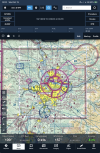
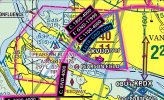
The actual sectional, the FAA product, doesn’t always tell the whole story. Look at Pearson Field KVUO. According to the Sectional it is in Class G Airspace. But it is not. It is in a Class E Surface Area.
1760423145520.png
 
The actual sectional, the FAA product, doesn’t always tell the whole story. Look at Pearson Field KVUO. According to the Sectional it is in Class G Airspace. But it is not. It is in a Class E Surface Area.

What am I missing? The dashed maroon line on the FAA chart represents a surface-level Class E extension protruding from the Class C.
 
What am I missing? The dashed maroon line on the FAA chart represents a surface-level Class E extension protruding from the Class C.
That is not a Class E Surface Area Extension to a Class C Surface Area. The one out to the Northeast is. But the one to the West is the KVUO Class E Surface Area. They don’t depict the whole thing on the Sectional Chart. That is why it appears to be an Extension. Based on just looking at the Chart, it depicts that area the Airport is in is Class G below 700 AGL. This is what the boundaries of the KVUO Class E Surface Area actually are.

1760461244112.png
 
They don’t depict the whole thing on the Sectional Chart. That is why it appears to be an Extension. Based on just looking at the Chart, it depicts that area the Airport is in is Class G below 700 AGL. This is what the boundaries of the KVUO Class E Surface Area actually are.
Are you sure about that? It's not want I'm seeing.
- Right around and to the north of KVUO is a carve out of the Class C Airspace as a SFRA from the Surface to 1,099ft. Shown with the outer blue line with the inward small blue lines around the airport.
- Area under the outer ring of Class C to the West is the Class E extension for the Airport, the lines I think you're talking about on the Sectional.

But if you're saying there is Class E to the Surface right at the Airport (inner ring of the CCA), I'm not see it on the Sectional or with what FF depicts. So you might question whomever told you there was Class E right around the Airport, I think they may have believed the SFRA was Class E and I do not believe it is.

Let me know if you find some sort of FAA document or something that states it. It is an interesting mix of Airspace.
 
Are you sure about that? It's not want I'm seeing.
- Right around and to the north of KVUO is a carve out of the Class C Airspace as a SFRA from the Surface to 1,099ft. Shown with the outer blue line with the inward small blue lines around the airport.
- Area under the outer ring of Class C to the West is the Class E extension for the Airport, the lines I think you're talking about on the Sectional.

But if you're saying there is Class E to the Surface right at the Airport (inner ring of the CCA), I'm not see it on the Sectional or with what FF depicts. So you might question whomever told you there was Class E right around the Airport, I think they may have believed the SFRA was Class E and I do not believe it is.

Let me know if you find some sort of FAA document or something that states it. It is an interesting mix of Airspace.
No one told me, I looked it up when I saw the Chart didn’t make sense. It was after the Temporary Tower that was there a few years was closed. Here is the Surface Area from the 7400.11K. https://www.faa.gov/documentLibrary/media/Order/FAA_Order_JO_7400.11K_Basic_dtd_9_15_25.pdf

ANM OR E2 Vancouver, WA
Pearson Field, WA (lat. 45°37'14''N., Long. 122°39'23''W.)
That airspace extending upward from the surface bounded by a line beginning at lat. 45°36'06''N.,long. 122°46'29''W.; to lat. 45°38'27''N., long. 122°46'19''W.; to lat. 45°40'21''N., long.
122°44'08''W.; to lat. 45°39'49''N., long. 122°33'23''W.; to lat. 45°34'51''N., long. 122°33'53''W.; thence to the point of beginning.

The Part 93 Special Air Traffic Rule has nothing to do with what the Class of Airspace is.

The entire area around Portland is 700 AGL Class E Airspace. Everything below that is Class G except for where E is taken down via Surface Areas at PDX, VUO, TTD, HIO and UAO. So VUO is in Class E, but that is not what the Chart depicts. It says the sky over VUO is G to 700, E to 1100, C to 4000 and E above that.

1760514708411.png
 
Last edited:
No one told me, I looked it up when I saw the Chart didn’t make sense. It was after the Temporary Tower that was there a few years was closed. Here is the Surface Area from the 7400.11K. https://www.faa.gov/documentLibrary/media/Order/FAA_Order_JO_7400.11K_Basic_dtd_9_15_25.pdf

ANM OR E2 Vancouver, WA
Pearson Field, WA (lat. 45°37'14''N., Long. 122°39'23''W.)
That airspace extending upward from the surface bounded by a line beginning at lat. 45°36'06''N.,long. 122°46'29''W.; to lat. 45°38'27''N., long. 122°46'19''W.; to lat. 45°40'21''N., long.
122°44'08''W.; to lat. 45°39'49''N., long. 122°33'23''W.; to lat. 45°34'51''N., long. 122°33'53''W.; thence to the point of beginning.

The Part 93 Special Air Traffic Rule has nothing to do with what the Class of Airspace is.

The entire area around Portland is 700 AGL Class E Airspace. Everything below that is Class G except for where E is taken down via Surface Areas at PDX, VUO, TTD, HIO and UAO. So VUO is in Class E, but that is not what the Chart depicts. It says the sky over VUO is G to 700, E to 1100, C to 4000 and E above that.
What you says the chart depicts is not what the chart depicts. The sectional chart does not show VUO in Class G. There is a Class E surface area beginning to its west which continues until it abuts the Class C surface area. It does not show the Class E surface area ending prior to VUO as you are interpreting.
 
Jeppesen came out with their own version of sectionals some time back (15 years, maybe?). I think they were sold for only a brief time, which was too bad because they were much better than government sectionals.
They did as part of their EFB app Jeppview also. Ran that on a Motion tablet. When they say don't take a hard drive above 18,000', they mean it...
 
What you says the chart depicts is not what the chart depicts. The sectional chart does not show VUO in Class G. There is a Class E surface area beginning to its west which continues until it abuts the Class C surface area. It does not show the Class E surface area ending prior to VUO as you are interpreting.
Ok. It doesn’t show the Dashed Magenta line following the Inner Circle line around, so I’ll buy that.
 
The actual sectional, the FAA product, doesn’t always tell the whole story. Look at Pearson Field KVUO.

So, going back to the topic of relying on an EFB's aeronautical layer to display information omitted from the FAA sectional: Foreflight's aeronatical overlay depicts the outer boundaries of the surface-level Class E in the same place as the FAA sectional, without depicting the inner boundary which is overlapped by the surface-level Class C.

It's kind of interesting the way they define the surface-level Class E in the document you linked, but it makes no operational difference once you fly across the boundary defining the surface-level Class C, does it?

IMG_5171.jpeg
 
So, going back to the topic of relying on an EFB's aeronautical layer to display information omitted from the FAA sectional: Foreflight's aeronatical overlay depicts the outer boundaries of the surface-level Class E in the same place as the FAA sectional, without depicting the inner boundary which is overlapped by the surface-level Class C.

It's kind of interesting the way they define the surface-level Class E in the document you linked, but it makes no operational difference once you fly across the boundary defining the surface-level Class C, does it?

View attachment 146186
Read post 148 above. I was wrong about how to view the Sectionals depiction. Operationally speaking the only effect could be Cloud Clearance and Visibility requirements. IF it was G below 700, which it isn’t, you could operate VFR Clear of Clouds with 1 Mile Visibility down there during daytime. It wouldn’t change any communication requirements.
 
So, going back to the topic of relying on an EFB's aeronautical layer to display information omitted from the FAA sectional: Foreflight's aeronatical overlay depicts the outer boundaries of the surface-level Class E in the same place as the FAA sectional, without depicting the inner boundary which is overlapped by the surface-level Class C.

It's kind of interesting the way they define the surface-level Class E in the document you linked, but it makes no operational difference once you fly across the boundary defining the surface-level Class C, does it?

View attachment 146186
Click on it and it only highlights the extension outside the C. Makes no mention of the coincidental airspace within. IIRC, there are other coincidental airspaces that are charted similarly, with the more restrictive airspace taking precedence.
 
Read post 148 above. I was wrong about how to view the Sectionals depiction. Operationally speaking the only effect could be Cloud Clearance and Visibility requirements. IF it was G below 700, which it isn’t, you could operate VFR Clear of Clouds with 1 Mile Visibility down there during daytime. It wouldn’t change any communication requirements.
Reminds of the carve-out of KCLM’s E surface airspace for KNOW, which ostensibly allows each to operate under their local reported weather, versus being bound to that of the other, 4nm away.
 
Right. The document linked above is interesting from the standpoint of seeing how the sausage is made, but the exact inner confines of the surface level Class E make no operational difference when you're in the airplane and looking at the sectional.

I suspect the designers of the airspace placed those lat/long coordinates on the extended border of the desired Class E extension knowing they would be well inside the overlying Class C, just so they wouldn't have to define a dozen individual lat/longs along the oddly shaped boundary like this:

IMG_5172.jpeg

They never expected the surface-level Class E to be utilized in the absence of the Class C, with a bunch of dudes overflying PDX on 1200 codes.
 
No one told me, I looked it up when I saw the Chart didn’t make sense.
I'll have to look later when I get a chance. My super quick look and conversion of the Lat/Longs to go into FF did not come up with anything usable. But what I looked at before has the Class C going to the surface everywhere inside the Inner Ring with the exception of the the SFRA from the Surface to 1,099ft.

And you mentioned a Temporary Tower, so is the cutout of your Lat/Long from that "Temporary" Tower, which would now make it void if the Tower is no longer in operation. They put in a Temporary Tower every summer near me (it's now permanent), and they changed the Airspace every summer when it was in operation via NOTAM.
 
I'll have to look later when I get a chance. My super quick look and conversion of the Lat/Longs to go into FF did not come up with anything usable. But what I looked at before has the Class C going to the surface everywhere inside the Inner Ring with the exception of the the SFRA from the Surface to 1,099ft.

And you mentioned a Temporary Tower, so is the cutout of your Lat/Long from that "Temporary" Tower, which would now make it void if the Tower is no longer in operation. They put in a Temporary Tower every summer near me (it's now permanent), and they changed the Airspace every summer when it was in operation via NOTAM.
The cutout was already there. The Tower was there for about a year when the South runway at PDX was closed for construction. That forced the Heavy’s which usually used the South runway to use the North runway. Straight ins to 10L go right smack dab over the numbers of 08 at VUO. There were Wake Turbulence Advisory issues so they put a Tower there until the South runway at PDX opened back up. Another thing that was happening is TCAS RA’s. They were happening more than just occasionally. That is what not climbing above 700 while on the extended centerline of VUO’s runway is about.
There was a time before all this stuff started when the airspace at VUO was a Class D Surface Area. I think there was one other in the country like it, that didn’t have a Tower at the airport. The Tower Frequency listed was at PDX Tower. Today when you call Pearson Advisory per the SATR, you are talking to a Controller at PDX Tower. That Controller and CTAFing traffic share 119.0
 
The cutout was already there.
I don't know about before, but I do see where they marked out a potential Class E in September per the JO 7400.11K you referenced. But there currently is no Class E under the Inner Ring of the Class C.

Appendix E in the document starts out with "...Generally, if the airspace is not Class A, Class B, Class C, or Class D, and it is controlled airspace, it is Class E airspace..." But there is Class C there so that is why you do not see any indication of the Class E on the Sectional or in FF (or any other EFB), as it does not exist. Now if for some reason the PDX Tower shut down, that would mean the Class C would go away and then the Class E would exist.

So under the Inner Ring you have Class C to the Surface AND, because they can co-exist, you also have the SFRA. The current SFRA is set to expire 02/14/26, but it looks like they've renewed it multiple times, so my guess is they will continue to do so.
 
I just received a notice that the charts have been corrected

Republication of Digital VFR Sectional Aeronautical Charts Effective October 2, 2025

"Aeronautical Information Services has republished the entire series of Digital VFR Sectional Aeronautical charts effective 2 OCT 2025 to correct inadvertent issues with the color of multiple features on the initial publication that resulted from an internal process change."

How quickly they get incorporated into websites like SkyVector and EFBs is somehting we'll have to see,
 
How quickly they get incorporated into websites like SkyVector and EFBs is somehting we'll have to see,
Interesting question. I just sent FF and SkyVector emails and asked. Let's see if I get a reply.

UPDATE: Just heard back from FF. The new Sectionals will be release as a normal cycle update, they will not push out an early DB update.
 
Last edited:
I display the print sectional chart because at this time of year, I'm flying open cockpit in insulated motorcycle gloves that don't work well with a touchscreen and I like that the info blurb next to an airport displays field elevation and frequencies without having to click anything.
I keep a touchscreen stylus on a lanyard for when I'm wearing gloves.

90% of VFR only rated pilots don’t remember how to use a VOR receiver / indicator, let alone determine position based on a Victory airway.
I haven't flown an airplane with a working VOR in 40 years, but I still remember how to use it. Now if you asked me to demonstrate how to use the LCD VOR on my handheld, that's another matter...
 
Back
Top