- Joined
- Sep 11, 2019
- Messages
- 2,886
- Display Name
- Domenick
Flying_Keys posted this FAA report a problem link in post #4.


Thanks for posting this. I made a comment on the apparent degradation to safety that this change promises. The inability to distinguish between Class B airspace boundaries and Victor Airways without closely studying the chart is a massive problem. VFR pilots should be able to determine their proximity to controlled airspace with just a quick glance at their tablets so their main visual focus remains on the view outside the cabin.

And after getting your Foreflight Briefing, you are also contacting Flight Service (FSS) to determine a Military Training Route (MTR) is active before flying through or near it right?Umm... Didn't your Ground School or your Primary CFI go over this? Victor Airways are on the Sectional for "Situational Awareness" for higher traffic routes. So if you happen to be flying between the the VORs that have an Airway, you need to pay attention while climbing or descending. And yes, ATC should be moving the IFR traffic since they are talking to them, but you still should keep your eyes open.
As for the Military Routes... Pending what you fly, those military planes fly a lot faster than you. So you may not see them coming before they're right on you. Best action, if you do need to cross one is to do it perpendicular. This will minimize the time crossing the Military Route. And if they're not charted, how would the VFR pilot know to take extra precaution.
What's service volume have to do with showing where Victor Airways are located on a Sectional.You might also want to read up on the new VOR service volumn
 And although I can't tell you when the last time I used a VOR was. I can tell you that Victor Airways are still assigned to this day.
Why so defensive? Did you design the new charts yourself?And after getting your Foreflight Briefing, you are also contacting Flight Service (FSS) to determine a Military Training Route (MTR) is active before flying through or near it right?
90% of VFR only rated pilots don’t remember how to use a VOR receiver / indicator, let alone determine position based on a Victory airway. You might also want to read up on the new VOR service volumn.

Cool! I'm one of the 10%!...90% of VFR only rated pilots don’t remember how to use a VOR receiver / indicator, ...
My guess is there are more VFR pilots out there like you that do actually know how not only VORs work, but why the Airways are shown. Even those that don't actually have a VOR in their plane.Cool! I'm one of the 10%!
Good reminder to replace those handheld batteriesI remember how to use one, but there’s none in the plane. I do have VOR tracking on the handheld that I rarely carry.

And now we know why I rarely carry it...Good reminder to replace those handheld batteries
On my very first long X-country (New Orleans to Seattle), I still had two working VORs, and a set of paper sectionals. I also brought a laptop running a rudimentary GPS moving (sort of) map (TopoUSA--DeLorme eventually bought it and trashed it). I set it on the rear seat, but I didn't trust the newfangled GPS tech. I had a co-pilot on that flight--a guy who could hold altitude and course.My guess is there are more VFR pilots out there like you that do actually know how not only VORs work, but why the Airways are shown. Even those that don't actually have a VOR in their plane.

Which I failed.The sectional now looks like the color blind test

I think it was discussed here before but when I went for my medical last month they asked if I've ever taken the color blind test thingy. when I said yes, they said good, you don't have to do that again. so I got that going for me, which is nice.Which I failed.

Also "fixed" could mean a lot of things.....FYI - I spoke with Paul at AOPA this afternoon. He said AOPA has been in touch with the FAA about the issue and that it will be fixed as soon as the .gov opens for business again.
So I'm guessing late 2026.....

Make the current edition a collectors item, love it. Thanks to all who advocated!FYI - I spoke with Paul at AOPA this afternoon. He said AOPA has been in touch with the FAA about the issue and that it will be fixed as soon as the .gov opens for business again.
So I'm guessing late 2026.....
In relation to the charts, the FAA, or .gov at large?Also "fixed" could mean a lot of things.....
In relation to the charts, the FAA, or .gov at large?

A fellow pilot made an Aeronautical Inquiry about this to the FAA and, to their credit, they quickly responded:
Thank you for your inquiry. Starting with the Aug. 7 edition, FAA Aeronautical Information Services implemented an internal process change to the way the FAA Sectionals, TACs, and Flyway charts are produced. This was intended to be a process change on our side to make the printing operation more efficient, and the intent was to do this with no change to the quality of the printed or digital versions of the charts. However, we agree that the colors and/or densities for the October 2nd edition are not sufficient, and we are working on improving our process and will implement a fix as soon as possible. Considering that we are in shutdown status, I cannot offer a timeline for when this may be resolved.

Also "fixed" could mean a lot of things.....


Just this week, I flew VFR along the Chicago lakefront. The controllers turned me down for any service - likely a result of the ongoing government shutdown. So I was entirely on my own, threading between multiple airspaces while trying to stay close to the shoreline. The extra task of distinguishing between Victor airways and airspace boundaries only heightened the workload and tension.
There's a vfr flyway corridor along the lakefront. It keeps you well below airspace along the shore. Added bonus, it doesnt use the same crap color scheme as the new sectional.Just this week, I flew VFR along the Chicago lakefront. The controllers turned me down for any service - likely a result of the ongoing government shutdown. So I was entirely on my own, threading between multiple airspaces while trying to stay close to the shoreline. The extra task of distinguishing between Victor airways and airspace boundaries only heightened the workload and tension.
There's a vfr flyway corridor along the lakefront. It keeps you well below airspace along the shore. Added bonus, it doesnt use the same crap color scheme as the new sectional.


The geographical data in combination with the aeronautical information is invaluable. EFBs usually have similar layers, but I have yet to see them approach the quality of the (previous versions) of a sectional. Obstacles as well. The EFB doesn’t come close to showing the necessary info at a glance.I wonder if raster charts are just on the way out. We could just have a continuously updating data stream?
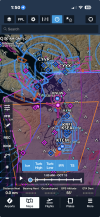
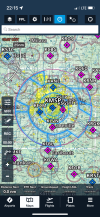
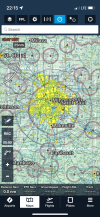
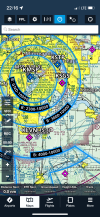
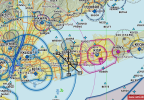
Numerous "before and after" screenshots attached, depicting without and with the Aeronautical layer depicted in Foreflight. I never really turn it off, but it would be cool if the FAA charts were fixed.It’s been mentioned several times so far, but what is an “aeronautical layer”? It seems odd that aeronautical software would have a separate layer for aeronautical stuff. What is it?
The enginerds couldn't figure out a better name for itIt’s been mentioned several times so far, but what is an “aeronautical layer”? It seems odd that aeronautical software would have a separate layer for aeronautical stuff. What is it?
You're right, you should never turn off the Aeronautical layer. Kind of the whole point of the EFB.under what scenarios would you turn off the aeronautical layer that provides the greater contrast for controlled airspace?
The Aeronautical layer in Foreflight is basically the digital replacement for the Sectional. Much cleaner, can be zoomed in or out, text is always oriented correctly, MUCH less clutter. (I'm assuming G Pilot is similar.)It’s been mentioned several times so far, but what is an “aeronautical layer”?
They’re great for focusing on the airports in the flight plan, but they don’t do a lot of good when you’re trying to identify an airport that’s not on your flight plan. Or to quickly look up names, freqs, altitudes, and runway lengths of nearby airports. How about isogonic lines? Special chart notes? Wilderness areas and national parks/monuments? Parachute activity, gliders, etc?The Aeronautical layer in Foreflight is basically the digital replacement for the Sectional. Much cleaner, can be zoomed in or out, text is always oriented correctly, MUCH less clutter. (I'm assuming G Pilot is similar.)
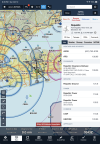
The first pic below is what my ForeFlight screen always looks like. I picked FRG as an example to show the various airspaces, VORs, etc. around there. Second pic is if I want info on FRG. There's more info if I scrolled down in the column showing, then there are all the tabs to pull up more info. All the info that's on the Sectional and then SOOOOO much more.
View attachment 146111View attachment 146112
My guess is you have not really taken the time to learn how to use the Aeronautical layer. All of the things you say you can't identify are either on the Aeronautical layer already or you just Tap or Press on them. The info "drawer" (box) on the left of the second picture has everything you need to know about FRG. Press/Hold your finger ANYWHERE on the map and a drawer will open with a list of EVERYTHING near where you pressed. It could be Airports, Waypoints or Nav Aids and you can view a list of All or just Airports if you want.They’re great for focusing on the airports in the flight plan, but they don’t do a lot of good when you’re trying to identify an airport that’s not on your flight plan. Or to quickly look up names, freqs, altitudes, and runway lengths of nearby airports. How about isogonic lines? Special chart notes? Wilderness areas and national parks/monuments? Parachute activity, gliders, etc?
One can tell way more about the contour of the terrain, slope, and each and every draw and ridge on the sectional versus what we get on the EFB. That may be crucial for some, just depends on what type of flying a person does.
Some people are not enslaved to FF or GP.Better question is why are some people still displaying the PRINT Chart on their EFBs?
I use FF all the time and am well aware of the drawer. All the things I listed specifically are inferior to the sectional or missing entirely. I’m not saying it doesn’t have value, but for certain things, the sectional is better. PJA’s are useful except they blend really well against certain terrain - would be slightly better in conjunction with a symbol.My guess is you have not really taken the time to learn how to use the Aeronautical layer. All of the things you say you can't identify are either on the Aeronautical layer already or you just Tap or Press on them. The info "drawer" (box) on the left of the second picture has everything you need to know about FRG. Press/Hold your finger ANYWHERE on the map and a drawer will open with a list of EVERYTHING near where you pressed. It could be Airports, Waypoints or Nav Aids and you can view a list of All or just Airports if you want.
I'd take a closer look at how FF works before saying it can't do things that it does very well.