
You are using an out of date browser. It may not display this or other websites correctly.
You should upgrade or use an alternative browser.
You should upgrade or use an alternative browser.
The new sectional charts look awful and are hard to read
- Thread starter ultrarunner
- Start date


- Joined
- Oct 16, 2019
- Messages
- 8,868
- Location
- Atlanta / Marietta
- Display Name
- Vintage Snazzy (so my adult children say)
- Home Airfield
- KPUJ
I'd say these new charts could double for the color blind dot test, but heck even those have more contrast.
Clip4
Touchdown! Greaser!
What you posted notwithstanding, why would you use a sectional chart vs the terminal area chart (TAC) for navigating PHL area? When I look at the TAC on Skyvector everything is quite clear.I'm surprised to hear that.
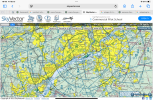
Looking at this section near KPHL, it's clear to you where all the different bravo shelf sections start/end, where the delta lines for for KPNE is and such?
The old charts you could just glance at them for half a second and it's crystal clear -- bold blue line markers that stood out against airways/hashed delta lines/etc.
With these it is not at all clear (to me) without studying the chart for a minute.
View attachment 145720
EDIT, this is the analogy for how I see it. Here's two identical line charts.
I see no advantage whatsoever to the low-contrast color/opacity scheme to the higher contrast.
View attachment 145721
Last edited:

hindsight2020
Final Approach
matching opacities with victor routes. Wild work.
Clip4
Touchdown! Greaser!


NorthEast Ohio
Pre-takeoff checklist
- Joined
- Jul 4, 2020
- Messages
- 253
- Display Name
- NorthEast Ohio
What is a wing X?
and how much is it gonna cost me?
"an AMU here, an AMU there, and pretty soon you're talking about real money"
Nauga, probably
and how much is it gonna cost me?
"an AMU here, an AMU there, and pretty soon you're talking about real money"
Nauga, probably
What is a wing X?
and how much is it gonna cost me?
Not as much as an X-wing

- Joined
- Mar 15, 2016
- Messages
- 5,585
- Display Name
- Ari
The post office in my town moved to a new location a few years ago, a former car dealership’s shop. They built an entirely new parking lot around the building. And if the people they hired to design the parking lot weren’t on the take from the local body shops, then I’m a monkey’s uncle. It is simply not possible to generate that high a probability of fender benders by mistake. Even as an intentional thing, it’s impressive. It wins the gold medal for designing a dangerous trap disguised as a public service.matching opacities with victor routes. Wild work.
The new sectionals’ rendering of victor airways and class B airspace gets the silver medal in the category.
Bronze would go to SNL’s Pet Chow brand rat poison, if it were real.
Clip4
Touchdown! Greaser!
You fly airplanes an worry about money? Seriously?What is a wing X?
and how much is it gonna cost me?
"an AMU here, an AMU there, and pretty soon you're talking about real money"
Nauga, probably

A MAN ONLY HAS SO MANY AMUs!You fly airplanes an worry about money? Seriously?
Main thing is I'm not switching EFBs (unless absolutely necessary) to accommodate bad decisions by the FAA
Clip4
Touchdown! Greaser!
One thing is certain, the FAA won’t change to save you AMUs. So either you switch, adapt to the new format, not fly hoping the FAA changes the format or fly away from congested airspace.A MAN ONLY HAS SO MANY AMUs!
Main thing is I'm not switching EFBs (unless absolutely necessary) to accommodate bad decisions by the FAA
You are not wrong!One thing is certain, the FAA won’t change to save you AMUs. So either you switch, adapt to the new format, not fly hoping the FAA changes the format or fly away from congested airspace.
What EFB are you using now? I use ForeFlight and haven't had the Sectional layer turned on since about a week after I got it and realized it was more a hinderance than a gain... After flying with the Sectional for decades.Main thing is I'm not switching EFBs (unless absolutely necessary) to accommodate bad decisions by the FAA
And not so much your comment, but I've just read someone else comment about not being able to see the Class B real well on their EFB. Probably with any of the better EFBs you should be able to turn on their version of FF's Aeronautical layer and all the Airspace will be highlighted.

edessa
Pre-takeoff checklist
- Joined
- Mar 4, 2014
- Messages
- 394
- Location
- Highland Heights, OH
- Display Name
- edessa
- Home Airfield
- KBKL
Clip4
Touchdown! Greaser!
There is nothing today that prohibits the private sector from taking the data compiled by the FAA, altering the symbology, and publishing charts, Jeppesen has been doing that for a rather long time for instrument charts and it’s an industry standard in the commercial flight world. These charts are not common in recreational GA because Part 91 pilots won’t pay the premium for them. The low demand for sectional charts de incentives the private sector from applying similar solutions, not the govt.In order to incentivize demand for private sector solutions, public sector solutions must first be en****tified.
Clip4
Touchdown! Greaser!
Which problem did you report? The simplest chart solution would have been to remove the Victor Airways because no one flying VFR today is flying Victor Airways nor is ATC assigning Victor Airways to VFR. Additionally, with VOR decommissioning, many of these Victor airways will not be usable below 5000 ft agl.Problem reported to FAA.
The new chart designer seems fond of pastels.
Who is paying any attention to military routes? What risk mitigation are you utilizing when crossing these routes? Maybe it’s past time for these to go too.
The training solution is to educate pilots that sectional charts are a poor choice for navigation in complex airspace.
Last edited:
Umm... Didn't your Ground School or your Primary CFI go over this? Victor Airways are on the Sectional for "Situational Awareness" for higher traffic routes. So if you happen to be flying between the the VORs that have an Airway, you need to pay attention while climbing or descending. And yes, ATC should be moving the IFR traffic since they are talking to them, but you still should keep your eyes open.The simplest chart solution would have been to remove the Victor Airways because no one flying VFR today is flying Victor Airways
As for the Military Routes... Pending what you fly, those military planes fly a lot faster than you. So you may not see them coming before they're right on you. Best action, if you do need to cross one is to do it perpendicular. This will minimize the time crossing the Military Route. And if they're not charted, how would the VFR pilot know to take extra precaution.
ateamer
En-Route
- Joined
- Dec 19, 2007
- Messages
- 2,982
- Location
- Port St. Lucie, FL
- Display Name
- ateamer
- Home Airfield
- FD88
Jeppesen came out with their own version of sectionals some time back (15 years, maybe?). I think they were sold for only a brief time, which was too bad because they were much better than government sectionals.

- Joined
- Dec 5, 2010
- Messages
- 6,582
- Display Name
- GeorgeC
That thought had crossed my mind as well.The simplest chart solution would have been to remove the Victor Airways because no one flying VFR today is flying Victor Airways nor is ATC assigning Victor Airways to VFR.

Half Fast
Touchdown! Greaser!
- Joined
- May 7, 2016
- Messages
- 21,193
- Location
- Central Florida
- Display Name
- Half Fast
- Home Airfield
- KGIF
Hmmmmm......
This seems to be EFB dependent. I just updated charts on my iPad in both iFly and FltPlan Go. The charts look fine in iFly, same high contrast as always. But when I look at the same chart in FltPlan Go, I see the low contrast everyone is complaining about. In FltPlan Go, the lines depicting the Orlando bravo are the same blue and the same faintness as the victor airways, making the chart difficult to read.
Whatever the FAA changed, it seems to only effect certain EFB software.
This seems to be EFB dependent. I just updated charts on my iPad in both iFly and FltPlan Go. The charts look fine in iFly, same high contrast as always. But when I look at the same chart in FltPlan Go, I see the low contrast everyone is complaining about. In FltPlan Go, the lines depicting the Orlando bravo are the same blue and the same faintness as the victor airways, making the chart difficult to read.
Whatever the FAA changed, it seems to only effect certain EFB software.
Half Fast
Touchdown! Greaser!
- Joined
- May 7, 2016
- Messages
- 21,193
- Location
- Central Florida
- Display Name
- Half Fast
- Home Airfield
- KGIF
Just checked SkyVector. Same low contrast.
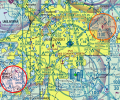
iFly iOS 13.3.53, current cycle.Hmmmmm......
This seems to be EFB dependent. I just updated charts on my iPad in both iFly and FltPlan Go. The charts look fine in iFly, same high contrast as always.…
HOU

ORL

Half Fast
Touchdown! Greaser!
- Joined
- May 7, 2016
- Messages
- 21,193
- Location
- Central Florida
- Display Name
- Half Fast
- Home Airfield
- KGIF
iFly iOS 13.3.53, current cycle.
HOU
ORL
Y'know, I'm running an older version of iFly, 12.2.2, because I have an older iPad and it can't run the latest iFly. But it takes chart updates just fine and works perfectly. Looks like something between the chart update and the latest SW version.
Whenever I can get to my hangar, I'll check my 740b and see if it shows the problem.




- Joined
- Mar 2, 2005
- Messages
- 16,628
- Location
- Southeast Tennessee
- Display Name
- This page intentionally left blank
Only if aeronautical is turned on.In ForeFlight you can have it highlight airspace boundaries. Choose your VFR options, then select the boundaries icon.
View attachment 145767
View attachment 145768
Half Fast
Touchdown! Greaser!
- Joined
- May 7, 2016
- Messages
- 21,193
- Location
- Central Florida
- Display Name
- Half Fast
- Home Airfield
- KGIF
Just tried my 740b and it looks fine. Seems like this is only a problem with the newer OSs or SW loads. It’s not limited to iOS, as FltPlan Go on my Android phone also looks like crap.

- Joined
- Dec 1, 2011
- Messages
- 181
- Display Name
- Mike
Thanks for the link.
Problem report submitted.
Aeronautical layer should ALWAYS be turned on in FF. It's the Sectional that so many of us turn OFF!!Only if aeronautical is turned on.

And all kidding aside, I am serious that you should always have the Aeronautical layer on, kind of the whole point of FF.

Rcmutz
Pattern Altitude
Problem report submitted.

Sierra1
Pre-takeoff checklist
In ForeFlight you can have it highlight airspace boundaries. Choose your VFR options, then select the boundaries icon.
View attachment 145767
View attachment 145768
Wasn’t the shading of the Delta darker blue before in ForeFlight? I thought it was a darker shade of dashes that stood out more on the highlight. Maybe it was the color of the airspace below the highlight that made it stand out more.
Last edited:

jimhorner
Line Up and Wait
- Joined
- Oct 28, 2012
- Messages
- 949
- Location
- Santa Clara, California
- Display Name
- Jim Horner
- Home Airfield
- KSJC
I guess in my mind, why is the blue for the B airspace so close in color and tone to the victor airways dissecting it? If you look at the new LAX TAC, I can clearly see the Charlie airspace and its purple/magenta contrast. However, finding the Bravo is a significant challenge. Take a look at Philly TAC....Holy Smokes! You tell me how easy it is to discern what inbound blue is the Airway from the Bravo on that chart?? That is the issue from my perspective. The Bravo should not get lost in the chart like this. It didn't previously, and now, it does. ESPECIALLY in the more complicated airspaces where you have multiple airports, and non traditional circular Bravo airspace segments. LAX being a great example.
Exactly. Here's a section of SFO airspace. Really hard to see the difference between Class B boundaries and victor airways. I've submitted a report to the link above.


Shepherd
Final Approach
- Joined
- Nov 24, 2012
- Messages
- 5,569
- Location
- Hopewell Jct, NY
- Display Name
- Shepherd
- Home Airfield
- KPOU
Paper.
S OF A B!
I didn't realize my entire post disappeared.
What I was trying to type was this:
I got 2 paper sectionals. One from a subscription service and the other I picked up at an FBO.
They are different shades of whatever they are supposed to be.
The one from the FBO is NOT the same colors as the one from the subscription service, and neither of them match an old sectional I keep around from a year ago.
S OF A B!
I didn't realize my entire post disappeared.
What I was trying to type was this:
I got 2 paper sectionals. One from a subscription service and the other I picked up at an FBO.
They are different shades of whatever they are supposed to be.
The one from the FBO is NOT the same colors as the one from the subscription service, and neither of them match an old sectional I keep around from a year ago.
Last edited:

Chris Mixon
Pre-takeoff checklist
- Joined
- Oct 27, 2022
- Messages
- 105
- Display Name
- Chris Mixon
- Home Airfield
- KIYA
This is the way. I use the FF aeronautical layer and only trigger on the VFR or IFR low if I am looking for something specific to the chart like a defined hold, etc...What EFB are you using now? I use ForeFlight and haven't had the Sectional layer turned on since about a week after I got it and realized it was more a hinderance than a gain... After flying with the Sectional for decades.
And not so much your comment, but I've just read someone else comment about not being able to see the Class B real well on their EFB. Probably with any of the better EFBs you should be able to turn on their version of FF's Aeronautical layer and all the Airspace will be highlighted.
Half Fast
Touchdown! Greaser!
- Joined
- May 7, 2016
- Messages
- 21,193
- Location
- Central Florida
- Display Name
- Half Fast
- Home Airfield
- KGIF
I submitted a report, but I’m sure whoever reads such things is on furlough right now.
- Joined
- Dec 1, 2011
- Messages
- 181
- Display Name
- Mike
… and for whoever designed and approved these awful changes to TAC and sectional charts, with luck their furloughs might become permanent.I submitted a report, but I’m sure whoever reads such things is on furlough right now.


- Joined
- Sep 11, 2019
- Messages
- 2,886
- Display Name
- Domenick
But not before they undo their changes!… and for whoever designed and approved these awful changes to TAC and sectional charts, with luck their furloughs might become permanent.
