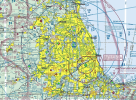
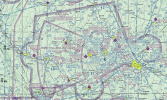
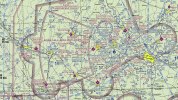
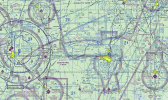
The new sectional charts look awful and are hard to read

ultrarunner

Filing Flight Plan
Joined
Nov 12, 2023
Messages
28
Display Name
ultrarunner
Earlier, I thought adsbexchange VFR charts looked bad. They always look bad, though, so I didn't think much of it. Later, I opened ForeFlight, and magically before my eyes the VFR chart refreshed. Oh neat, new design, I thought. However, I quickly realized that readability was significantly worse.

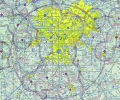
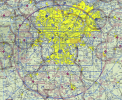
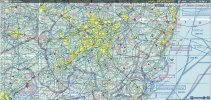
Some of these bravos are terrible. For example, Philly is indecipherable.

I'm sure these are all generated programmatically, so what do we think? Mistake? Intentional?
 

Attachments

  • pw6rvwO.jpeg
    pw6rvwO.jpeg
    1.8 MB · Views: 194
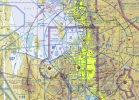
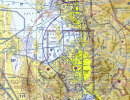
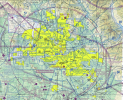
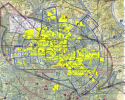
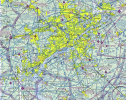
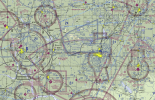
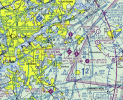
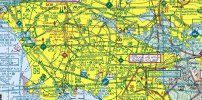
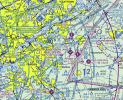
As of the October 2nd edition, the colors on the sectionals have changed, and not for the better. Class C has been made lighter and looks very similar to class E (700). Restricted areas, class bravo, and victor airways are all a very similar shade and are hard to tell apart from one another.

The airport information fonts are harder to read in general. Non-towered are very hard to read against the 7000' and above ground shade, and the towered airports and obstruction info is very hard to read against the new yellow shade of the cities.

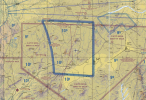
The terrain colors have been re-shaded with less contrast and the mountains look awful. Contours have been darkened and are very noisy.


(edit - added old charts to the right of the new charts for comparison)

1759465852486.png 1759466208416.png


1759465925305.png 1759466308836.png


1759465969675.png 1759466416518.png

But hey, you can really see the edge of the class E (1200) in New Mexico!

1759465945080.png
 
Last edited:
Oh my god:

1759467269519.png

This has got to be a joke

(edit: the opacity of the blue shades over the yellow turn everything green. It's so bad)
 
Last edited:
Yeah, I don't know how I feel about the super light shading. It seems like someone just took the boundary lines of B/C airspace and decreased the opacity by 50%.

I don't see much difference in the restricted areas, though. Maybe they look less blue and more turquoise? Though that could just be my eyes playing tricks on me.
And I don't fly enough around mountains to really a difference in the contours.

1759467489013.png
 
Last edited:
Yeah, I don't know how I feel about the super light shading. It seems like someone just took the boundary lines of B/C airspace and decreased the opacity by 50%.

I don't see much difference in the restricted areas, though. And I don't fly enough around mountains to really a difference in the contours.
I think the restricted areas are now closer to the shades of the others and are harder to see against the terrain.

current: 1759468094399.png prev: 1759468154450.png

current: 1759468239528.png prev: 1759468388498.png
 
That’s freaking terrible and does not contribute to safety in any way. Whomever approved that needs to answer for that
 
I think the restricted areas are now closer to the shades of the others and are harder to see against the terrain.

current: View attachment 145703 prev: View attachment 145704

current: View attachment 145705 prev: View attachment 145706
Yeah, I went and looked at older ones. I left commentary at that link you posted (thanks for sharing).

I can totally see pilots missing some of the smaller carveouts inside the B airspace where it's now a faint line with faint text.
For instance, east of Philadelphia by the south jersey KYAY airport in the screenshot you posted -- it's hard to tell without really looking hard what is an airway, what is a bravo airspace section, and what the pertinent altitudes are. That faint shading really does not work well at all.
1759468908212.png

EDIT: the phrase that comes to mind with these changes is "(bad) solution in search of a problem"
 
It looks like there is a duplicate thread addressing this:
 
I use the Aeronautical layer and only occasionally look at the Sectional (try it for a while, you'll probably like it better - IMHO).

I just now turned on the Sectional layer to see, and quite honestly, I don't see much of a difference from what I remember. I'm traveling now and my other iPad at home has probably not updated. If I remember, I'll try and take a look before it updates and see how different the side-by-side views look.
 
I see what you're saying about the images you posted. But I'm looking at my Sectional layer (which I seldom use) and I don't see anything like you do. If there is a difference, it is very subtle on my iPad. By any chance do you have some "vibrant" setting turned on?

I have a second iPad at home that I think is turned off and has not updated. I'll take a look in a few days to see if I see much difference between the current download on the iPad I have with me and the last release on the other iPad.
 
I see what you're saying about the images you posted. But I'm looking at my Sectional layer (which I seldom use) and I don't see anything like you do. If there is a difference, it is very subtle on my iPad. By any chance do you have some "vibrant" setting turned on?

I have a second iPad at home that I think is turned off and has not updated. I'll take a look in a few days to see if I see much difference between the current download on the iPad I have with me and the last release on the other iPad.
No, I’ve looked at this in several charting apps across multiple devices as well as the digital .tif files directly from the FAA (which I compared against old ones). Even if the colors aren’t showing it for you, you should be also able to see the difference in the font they’re using for text.
 
wow!

but it seems to be in keeping with the current fashion of things...signs and labels everywhere now seem to be printed with very low contrast.
and yeah, I'm old so I'm just noticing it more... Still, I think there has been a change
I just recently replaced our in-wall oven. had to order it because stores don't stock many of them, so I was unable to see it before delivery.
All the buttons have a small grey font printed on a glossy black glass panel.
I definitely need to grab my readers to see the buttons!
 
you should be also able to see the difference in the font they’re using for text.
Okay, I'll look at the text too when I get home.

On the FF Website, the Sectional fonts actually don't look bad.
 
Okay, I'll look at the text too when I get home.

On the FF Website, the Sectional fonts actually don't look bad.
It’s not all of them - but I have noticed some are harder to read, not just by the color alone. I’ll have to do some comparisons to validate what I’m noticing.
 
I 100% expected this to be a typical POA whinging about change thread, but that's an objectively bad change. People will miss things. Even with a bit of experience with graphic design, I can't figure out what goal they were trying to achieve with this...
 
Funny interaction with AOPA just now. I was speaking with a rep asking how AOPA feels about this and if they have any desire to pressure the FAA to correct (yes, I realize AOPA does have issues, but had to start somewhere). The guy on the phone was like,"Whats the problem? I see a nice bold class 'B' airspace....Wait....WHOA! My chart just updated. Holy cow! This is bad!"

Got a chuckle. We looked at LAX area. How can I find 'C' easily, but 'B' is a total loss at this point. They were going to run it up their chain, but he did feel it was warranted after we browsed a couple of areas.
Just my two cents.
 
I 100% expected this to be a typical POA whinging about change thread, but that's an objectively bad change. People will miss things. Even with a bit of experience with graphic design, I can't figure out what goal they were trying to achieve with this...
Yeah, I can accept change is part of life, but this is pretty egregious and has an high potential to cause violations or worse. I haven’t heard any explanation of why or even notice that these changes were coming.

The only possible reference I could find was this:https://www.faa.gov/air_traffic/fli...25-01_DPN_VFR_Chart_Tile_Service_Aug_2025.pdf - maybe someone tweaked something to improve that? But wow, no feedback period from us, the end users.

Either way, you’d think an all-up change like this would end up in the chart notices, but other than that possible blurb above, nothing. I don’t see any mention of this in the aeronautical chart meeting agenda, either. It almost makes me wonder if it was a mistake.

The last of their biannual meetings was canceled, but they actually meet again next week, so sending timely feedback using the reporting link I sent above is crucial to get this issue… on the map.
 
Funny interaction with AOPA just now. I was speaking with a rep asking how AOPA feels about this and if they have any desire to pressure the FAA to correct (yes, I realize AOPA does have issues, but had to start somewhere). The guy on the phone was like,"Whats the problem? I see a nice bold class 'B' airspace....Wait....WHOA! My chart just updated. Holy cow! This is bad!"

Got a chuckle. We looked at LAX area. How can I find 'C' easily, but 'B' is a total loss at this point. They were going to run it up their chain, but he did feel it was warranted after we browsed a couple of areas.
Just my two cents.
Thank you for bringing it to the attention of professional groups. We need more of that - quickly, as the next chart meeting takes place next week.
 
I’d also highly recommend filing an ASRS report if this causes any sort of operational navigational issue.
 
I just submitted a report on that link, thanks for sharing. It looks awful, almost like they're trying to see if I'm color blind or not... Class B lines are green when over cities and very faint. Very easy to confuse them with victor airway lines... who the hell thought this was a good change?
 
Guys, I am old and without my reading glasses I don’t see the huge safety issues you claim. If you are using a tablet, reducing the brightness does address some of the issues you claim.

In the mean time, the FAA is shut down and the staff gutted from DOGE. I wouldn’t be expecting changes to occur any time soon. The reduction of ink used on the paper chart product was probably considered cutting waste.
 
Last edited:
Guys, I am old and without my reading glasses I don’t see the huge safety issues you claim. If you are using a tablet, reducing the brightness does address some of the issues you claim.
I'm surprised to hear that.

Looking at this section near KPHL, it's clear to you where all the different bravo shelf sections start/end, where the delta lines for for KPNE is and such?
The old charts you could just glance at them for half a second and it's crystal clear -- bold blue line markers that stood out against airways/hashed delta lines/etc.

With these it is not at all clear (to me) without studying the chart for a minute.
1759509827990.png

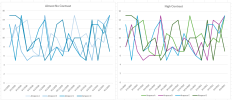
EDIT, this is the analogy for how I see it. Here's two identical line charts.
I see no advantage whatsoever to the low-contrast color/opacity scheme to the higher contrast.
1759510594023.png
 
Last edited:
Guys, I am old and without my reading glasses I don’t see the huge safety issues you claim. If you are using a tablet, reducing the brightness does address some of the issues you claim.

In the mean time, the FAA is shut down and the staff gutted from DOGE. I wouldn’t be expecting changes to occur any time soon.
Changing brightness does nothing to address the contrast issues of the class bravo airspace.
 
I guess in my mind, why is the blue for the B airspace so close in color and tone to the victor airways dissecting it? If you look at the new LAX TAC, I can clearly see the Charlie airspace and its purple/magenta contrast. However, finding the Bravo is a significant challenge. Take a look at Philly TAC....Holy Smokes! You tell me how easy it is to discern what inbound blue is the Airway from the Bravo on that chart?? That is the issue from my perspective. The Bravo should not get lost in the chart like this. It didn't previously, and now, it does. ESPECIALLY in the more complicated airspaces where you have multiple airports, and non traditional circular Bravo airspace segments. LAX being a great example.
 
Seems like a bad change and I hope it gets fixed.

I'm increasingly of the opinion that Sectionals are useful for planning but their inherent weakness (cramming every possible thing into a single image) makes them inferior to VFR/IFR aeronautical map layers in GP or FF during flight (unless you're using pilotage, I suppose). Far better to have clearly visible boundaries and dynamic display of only pertinent airspace, terrain, obstacles, and aircraft, in my opinion.

I love Sectionals (I'm the guy who will have one up on a wall) but trying to use that cluttered, low-contrast mess doesn't seem wise while flying.
 
Back
Top