Never do a firmware update Unless you must

bbchien

Touchdown! Greaser!
Joined
Feb 13, 2005
Messages
14,531
Location
Bolingbrook, IL
Display Name
Bruce C
Home Airfield
1C5
So today at 07:30 we launched for CHI->Orlando. We got out before the clag closed in and just at the KY border, the GI275 linked to the AP "lost sync with heading data" to the top GI275. So I had heading information (top GI 275) but no DG, and of course, a G500 AP which then reverts to roll mode.

Silly me for accepting that software update, the day prior to a long cross country. Of course to the south we had icing clag down to 1400agl. It booted perfectly for the 14 minute trip from the dealer back to base…yesterday.

The installer really wanted to say "it works fine" ....but then found the message.
A upgrade removes all your config. So then they have to reconfig. all over again.

The pilot decided he had had enough. Turned around and came home.
 
Last edited:
As someone who spent half my life in software, I never update anything if it's working properly.

I believe 100% of updates have nothing to do with users requesting those specific updates.
 
In the data center world we've been dealing with unreliable updates since the beginning of updates. It's just the way the world works. So they get tested on test systems first, then for critical systems they get rolled out to some first, others later. It's not perfect, see the crowdsrike/microsoft debacle, but mostly it works. Better than upgrading everything all at once.
 
Some rules to follow:
If updating 1 box, update them all, mismatches of firmware can cause issues.
Never update unless the firmware has been available for 30 days, that should be enough time for any bugs to be found.
Never update right before a trip, always schedule a test flight to check everything out.
Always be on auxiliary power and have batteries fully charged, a shutdown during update process can brick the box.
 
In the data center world we've been dealing with unreliable updates since the beginning of updates. It's just the way the world works. So they get tested on test systems first, then for critical systems they get rolled out to some first, others later. It's not perfect, see the crowdsrike/microsoft debacle, but mostly it works. Better than upgrading everything all at once.
In the data center world I came from, we did the same thing. Exhaustive research and testing on standalone "test" systems prior to scheduling the real thing.

I recently upgraded my G5 after barely researching it, and I failed to run a test upgrade on any of my spare Bonanza V35s. and I'm paying the price now, even if is is a very small price.

But as to never upgrading unless necessary, I don't agree with that either. I've had systems that were running fine for years and never touched. But at some point it does become necessary and you are so far behind with updates that the upgrade becomes a gargantuan task of researching hundreds of updates and resolving even more "little" glitches that would have been trivial if done on periodic upgrade schedule. At that point, you are often at the point that you just need to replace or rebuild the entire system.
 
outside aviation, my favorite is printers. As far as I can tell, the one and only thing they do is block the latest round of third party cartridge/toner that overcame the previous firmware update.
Come to think of it, I have never seen a printer update resolve any problem I had.
 
A upgrade removes all your config. So then they have to reconfig. all over again.
Arguably something, perhaps, that your installer should have known and prepared for. Sounds like the update wasn't a software issue, but an installation issue. Agree that wiping settings every time there is an update is hardly an ideal situation, and I'm unclear why it would be necessary to do that.

Was there a post-maintenance check flight? Or was launching on the long CC the first flight after the maintenance? I'm a big fan of the "mechanic flies with you after maintenance" paradigm.
 
So today at 07:30 we launched for CHI->Orlando. We got out before the clag closed in and just at the KY border, the GI275 linked to the AP "lost sync with heading data" to the top GI275. So I had heading information (top GI 275) but no DG, and of course, a G500 AP which then reverts to roll mode.

Silly me for accepting that software update, the day prior to a long cross country. Of course to the south we had icing clag down to 1400agl. It booted perfectly for the 14 minute trip from the dealer back to base…yesterday.

The installer really wanted to say "it works fine" ....but then found the message.
A upgrade removes all your config. So then they have to reconfig. all over again.

The pilot decided he had had enough. Turned around and came home.
I don’t own your system and I certainly am not a software guy, but I would have expected the lost configuration with the update and your Garmin dealer should have to.
 
As someone who spent half my life in software, I never update anything if it's working properly.

I believe 100% of updates have nothing to do with users requesting those specific updates.
Yep. The ones that annoy me are the mandatory updates where you don't have a choice. :mad:
 
I have a friend who works in cyber security...and I know enough to be dangerous. In today's world of "The Internet of Things" firmware updates - even for your printer are vitally necessary for your security. Nefarious actors, especially in nations trying to steal technology will leverage any vulnerability connected to your home wifi. Trust me...it's much uglier than most will let on. Occasionally I will look at my wifi logs and note brute force attack attempts from actors in Russia, China, India, etc.

For clarity in case someone has never heard the term: The term "Internet of Things" refers to all the little devices around your house that now use wifi...your doorbell, thermostat, your e-picture frame, your refrigerator, washer/dryer, light controller, the infotainment system in your car...anything that has wifi capability that isn't otherwise a computer in the traditional sense. When I check my listings, I have over 13 such devices.
 
Related: My bank in Mexico requires a reauthorization process every time you upgrade their mobile app. They also can't send authorization texts to a US number and I only have a US phone now that I'm living in Wisconsin. So if I want/need to update the app, I have to get on a zoom with my buddy in Arroyo Cruz and chat with him as they send authorization codes to his phone and relays them to me.
 
Related: My bank in Mexico requires a reauthorization process every time you upgrade their mobile app. They also can't send authorization texts to a US number and I only have a US phone now that I'm living in Wisconsin. So if I want/need to update the app, I have to get on a zoom with my buddy in Arroyo Cruz and chat with him as they send authorization codes to his phone and relays them to me.
Can you get a Mexican number through something like voip.ms?
 
outside aviation, my favorite is printers. As far as I can tell, the one and only thing they do is block the latest round of third party cartridge/toner that overcame the previous firmware update.
HP is notorious for this. My HP printers are so old, they don't have the requirement to connect to the Internet, so I can use any cartridges I want. Needed a new printer, so I bought Brother.

I still have Win7 running on an old HP laptop when I need MS Project or Access.

My iPhone XR is still running iOS 18, my iPad Mini 6 (I use for flying) is also on iOS 18, my laptop is running Sonoma MacOS 14 and I regret with a vengeance that I updated my day-to-day iPad Mini 7 to iOS 26. I loathe and despise "liquid glass". Who thought that was a good idea? Did they do any substantial usability testing? Is this why Tim Cook retired because he made such a stupid decision to deploy it?

The university will be updating all university-owned hardware over the summer. Once again, I'm delighted I use no university resources other than the network and printers.

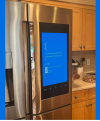
Do we really need refrigerators that require a computer? Here's the BSOD (yes, it runs Windows)

1777739903955.png
 
Lots of good info. I also work in cyber. I never patch my own personal printers, but I also never have their wifi enabled, or enable them to connect to the Internet themselves. It's a standard and reasonable protocol to specifically isolate some systems that are too old to patch, or that you're intentionally deciding not to patch. But...if you go that route you have to make sure they really don't have any connection to or from the outside. The stuxnet attack, funny enough US against Iran years ago, made that bit clear.

Anything that has wifi Internet you should keep updated, but you also shouldn't have anything wifi connected that you'd be embarrased or concerned if the info it contains or the controls involved were posted on a public internet site somewhere...because there's a good chance they probably are. Similarly anything that could affect the safety of your home. Remote warning for flooding? Great. Remote control that could start a flood? Not such a good plan. Outside door camerea? Great. Camera of the kid's room? I wouldn't. Vendors often brag about how great their security is, but I've never seen one I'd trust.

Part of the reason for wifi internet connectivity is gather and sell information about you, part is to lock you into viewing your appliance as something you own but still subscribe to, and they sell it to you because of the convienence of being able to adjust it from work or whatever. Well, I don't need to adjust or control my washing machine/toaster/freezer/etc from work. Ever. But...back to original topic, if you're going to fly IFR, you do have to keep the GPS in the plane updated. They've got you there. But I don't need to do a firmware upgrade on my TV.

Sorry for the long ramble. Internet and wifi security aren't quite perpetual motion machines in the certainty of their failure, but it's pretty close.
 
A firmware update bricked my GDL 50. Garmin just shrugged and said buy a new one.

I fall in the middle on updates. If you don't do 'em once in a while, eventually things don't work. But running out to update every time a device gets a minor update is also a risk.

If you have multiple devices, I would say scheduled updates of everything once a year makes sense. Get all devices done, give the whole system a good function test in VFR flight, then leave it alone til the next annual.
 
HP is notorious for this. My HP printers are so old, they don't have the requirement to connect to the Internet, so I can use any cartridges I want. Needed a new printer, so I bought Brother.
Epson does it with every firmware update. I learned the hard way, but I learned.
 
For clarity in case someone has never heard the term: The term "Internet of Things" refers to all the little devices around your house that now use wifi...your doorbell, thermostat, your e-picture frame, your refrigerator, washer/dryer, light controller, the infotainment system in your car...anything that has wifi capability that isn't otherwise a computer in the traditional sense. When I check my listings, I have over 13 such devices.

I don't have a single applicance that even has a network connection of any kind (nevermind has wifi). One smart TV uses an ethernet cable to connect to my home intranet. Tivo boxes and apple TV boxes have wired connections (no wifi). One printer has wifi, but it's off because I believe the wired connection is more reliable/stable.

I have one device that has wifi on (I won't name the device) and I suspect that there is no way to remotely control it or even pull status. Even my brand spanking new garage door opener (installed 30 April) doesn't have wifi. I don't even connect my phone to my car.

I guess I'm an unusual nerd/geek.
 
Bob, those like you are getting fewer and farther between. The device you mention, however isn't about controlling that device necessarily but using a vulnerability within its programming to port through to the rest of your network.
 
Bob, those like you are getting fewer and farther between. The device you mention, however isn't about controlling that device necessarily but using a vulnerability within its programming to port through to the rest of your network.

yup - but part of a security posture is to evaluate risk vs cost. And part of security is to make it hard enough that the bad guy will hit an easier target. Kind of like not needing to outrun a bear, only needing to outrun your companion. air gaps are awesome.

If a nation-state is really really really interested in breaking into a specific residence, then that's pretty much all she wrote. (it's not like hollywood/tv/movies where the good guys or bad guys wail away on the keyboard for a few seconds and VOILA they are in).
 
If your GI 275 wasn't configured after the update, how did it work / function at all?
 
I've been a Linux user been since Linux was invented. I always update my system. If something breaks, it is very easy to roll back.
Commercial software comes with limitations on your ability to roll back, especially if it is an older unsupported system. I ran into a major issue with VMware. I had a Windows 98 client running for a specific equipment. I updated VMware, then some hardware components in the client didn't work, but I could not roll it backward because the host had updated a bunch of drivers that made the it impossible to roll back. If I could find all the original installation discs (floppy discs), then it could be rebuilt, but I don't have them. All of this rendered a $50k perfectly working equipment become a brick.
 
isn't about controlling that device necessarily but using a vulnerability within its programming to port through to the rest of your network.
That's what VLAN's are for. You let the device use the Internet to call out but isolate it from the rest of your network.
 
outside aviation, my favorite is printers. As far as I can tell, the one and only thing they do is block the latest round of third party cartridge/toner that overcame the previous firmware update.
Hmm. Can't find a toner cardtridge on my GI-275s.... LOL.

The software guys @ J.A. figured it out. Two switches "Lost sync to #1GI 275". sigh.
 
Got a notice from Garmin about upgrading software on my GI 275s. Asked my local Avionics shop about it, and he said “don’t”. He said wait 6 months or so for the update to get “de bugged”. Not what I was expecting, but my Garmins are working well, so I’ll take his advice for now.
 
Agree that wiping settings every time there is an update is hardly an ideal situation, and I'm unclear why it would be necessary to do that.
Can't speak to OP's box, but I have an Avidyne IFD that's been around long enough for a few major software upgrades. Some of the updates have made substantial changes to how the settings work, such that it was fairly obvious that there was no reasonable way to preserve settings across the different software versions.
 
unfortunately there are vendors that are unbelievably lazy - it's just easier for them to reset everything. I despise version "updates" that don't honor simple things, especially things that have NOTHING to do with the update (e.g., if I have bluetooth off and wifi off, for the love of God don't turn them on, leave them off you lazy SOBs)
 
unfortunately there are vendors that are unbelievably lazy - it's just easier for them to reset everything. I despise version "updates" that don't honor simple things, especially things that have NOTHING to do with the update (e.g., if I have bluetooth off and wifi off, for the love of God don't turn them on, leave them off you lazy SOBs)

Well ... that depends on whether the update was for you or them.
 
unfortunately there are vendors that are unbelievably lazy - it's just easier for them to reset everything. I despise version "updates" that don't honor simple things, especially things that have NOTHING to do with the update (e.g., if I have bluetooth off and wifi off, for the love of God don't turn them on, leave them off you lazy SOBs)
What I don't like more than that is when they reset the "synch" selections. My wife and I each have our iphones and ipads and have them set up the way we like. Every once in a while, after an upgrade, one of us will find something changed. For instance, with Foreflight I might make a change to a flight plan on my Ipad. It will show up on her Ipad and then I have to remember all the steps to turn it off again.
 
Can you get a Mexican number through something like voip.ms?
I moved to Mexico 15 years ago and things have surely changed, but in the olden days those services didn't handle text messages reliably or at all.

Since then basically everything has switched to WhatsApp anyway, except for my bank. It's really not a big deal to chat with Pio and get the activation codes on the occasion that the bank forces an update.

I still spend a lot of time in Mexico, since we own some rental properties there, so if I were going to do anything I'd just get a Telcel esim and have a real connection.
 
Arguably something, perhaps, that your installer should have known and prepared for. Sounds like the update wasn't a software issue, but an installation issue. Agree that wiping settings every time there is an update is hardly an ideal situation, and I'm unclear why it would be necessary to do that.

Smart shops back up config on a card, then check to see if it has to be restored after updates.

My shop keeps the config card for each install
 
My steam shower has an Android tablet (waterproof, sort of interesting) that controls it. The company who made it sold out to Delta faucet and they dropped the app that lets you turn it on remotely. However, they did have the protocol published so I was able to write a silly C program to push the buttons. Next up, to write an Alexa skill, which would be more useful for me than the app had been.
 
My steam shower has an Android tablet (waterproof, sort of interesting) that controls it. The company who made it sold out to Delta faucet and they dropped the app that lets you turn it on remotely. However, they did have the protocol published so I was able to write a silly C program to push the buttons. Next up, to write an Alexa skill, which would be more useful for me than the app had been.
That's what I call reverse engineering! You should post that to GitHub, I'm sure others have this problem and aren't knowledgeable enough to code in C.
 
My steam shower has an Android tablet (waterproof, sort of interesting) that controls it. The company who made it sold out to Delta faucet and they dropped the app that lets you turn it on remotely. However, they did have the protocol published so I was able to write a silly C program to push the buttons. Next up, to write an Alexa skill, which would be more useful for me than the app had been.
1781572137598.png
 
We bought a new Vizio TV a couple weeks ago. I've been a sort of loyalist to the brand for quite some time because you can't really beat the bang for the buck. Imagine my surprise when I turned the TV on for the first time and went through the setup, that I could NOT complete setup and therefore could not use the damn thing until I linked my new Vizio TV to a Walmart account!
 
could not use the damn thing until I linked my new Vizio TV to a Walmart account!
So now WalMart knows everything you watch? I wonder if they have the ability to give you specific WalMart ads based on your profile?
 
We bought a new Vizio TV a couple weeks ago. I've been a sort of loyalist to the brand for quite some time because you can't really beat the bang for the buck. Imagine my surprise when I turned the TV on for the first time and went through the setup, that I could NOT complete setup and therefore could not use the damn thing until I linked my new Vizio TV to a Walmart account!

That's why I buy computer monitors and not TVs. Also... I don't even let my phone connect to my wifi. No way in hell I'm letting a fridge or toaster do it.
 
Back
Top