NA: What's wrong with my laptop?

FORANE

En-Route
Joined
Mar 7, 2013
Messages
4,457
Location
TN
Display Name
FORANE
Home Airfield
0a9
Dell Latitude 7490
Windows 11 pro
64-bit operating system, x64-based processor
Intel(R) Core(TM) i7-8650U CPU @ 1.90GHz 2.11 GHz
western digital sn560e 2TB drive

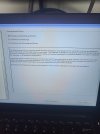
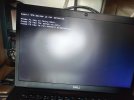
I leave this laptop running 24/7. Frequently when left on after a few nights I come back to it to find this screen in the pic. F1 always results in proper bootup. Whats wrong with it? IMG20250426161228.jpg
 
TPM stands for Trusted Platform Module and is a security feature. It is required equipment for Win11. Can you get into your BIOS?
 
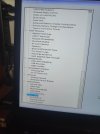
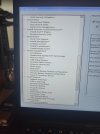
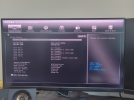
This is the bios, correct?IMG20250427100948.jpgIMG20250427101236.jpgIMG20250427101740.jpg
 
No, that's in Windows; BIOS is the pre-boot environment. Try F2 when you get the screen in the OP and look around for a way to turn TPM back on. Replace the clock battery while you're at it.
 
That is BIOS. I mainly work on HPs, so I'm less familiar with Dells. TPM might be in Security or Secure Boot. Ensure it's enabled. If no TPM is detected (and TPM is a chip somewhere on the motherboard), the laptop will need physical repair. Theoretically, a trace may have been damaged by corrosion or a controller damaged by heat. <-- Pure theory, pure guesswork.
 
No, that's in Windows; BIOS is the pre-boot environment. Try F2 when you get the screen in the OP and look around for a way to turn TPM back on. Replace the clock battery while you're at it.
F2 during startup got me to that screen.

Here's the subcategories expanded:
IMG20250427104547.jpgIMG20250427104628.jpgIMG20250427104609.jpg
 
Under post behavior I think I have the option to bypass the startup warning.IMG20250427104306.jpg
 
It could happen if both TPM firmware and BIOS are not at the latest version. Any recent BIOS updates?

Or...
1745764429473.png
 
It could happen if both TPM firmware and BIOS are not at the latest version. Any recent BIOS updates?

Or...
View attachment 140372
I have not updated the bios. Not sure if I have the latest version. Mine is listed as 1.42.0 Dell site lists the latest bios as 1.3.3 I still cannot locate the TPM in the bios.
 
lenovo bricked my monitor brightness (drivers) and cooling fan (stuck in MAX AB lol) with some of their BIOS updates. Had to go to an older firmware to get the behavior to stop. All in the name of planned obsolescence, save me overlord Xi, I submit to your fist as long as the trains run on time..... /s(ish)
 
Thanks, went there and found many files to update but none resolved my issue. TPM is not found.
Where is the last place you saw it?

Seriously though - on a desktop PC I would try to reset the BIOS by using the jumper on the motherboard or by removing the CMOS battery for a minute. Is this a laptop where you are able to remove either the main or the CMOS battery? If so, do that for a couple minutes and put back in. If not, see if there's a 'reset to defaults' option in the BIOS or similar which will soft-force it to do the same.
 
Thanks, went there and found many files to update but none resolved my issue. TPM is not found.
Here's a different Dell Support Page--check out the column on the right hand side. This thing with TPM seems to be a pervasive problem. I dread going to Windows 11.
https://www.dell.com/community/en/conversations/search?q=tpm device is not connected

Somebody also said you can buy a part and plug it in: https://www.dell.com/community/en/c...a8de8adb0d?commentId=647fa306f4ccf8a8de8c3ebf
 
With a graphical interface? What a country...
Yeah, a lot of them are very fancy now, with GUIs, mouse support, and stuff like graphs where you can set fan speeds based on temperatures by clicking and dragging on points on the line, etc

Not your grandfather's UEFI
 
methinks the process of accessing the motherboard in OPs laptop, might be the modern car equivalent du jour of removing the entire cab to get to the tranny/dismount the engine to get to the alternator type of thing. Not planned obsolescene though...of course not. Digressing.

OP, according to my parasocial friends @ reddit (people still thanking the guy 5 years later):
1745781546199.png

Hope that helps.
 
methinks the process of accessing the motherboard in OPs laptop, might be the modern car equivalent du jour of removing the entire cab to get to the tranny/dismount the engine to get to the alternator type of thing. Not planned obsolescene though...of course not. Digressing.

OP, according to my parasocial friends @ reddit (people still thanking the guy 5 years later):
View attachment 140383

Hope that helps.
Hmmm, I unplugged the power, shut down the laptop, left it off for 2 minutes, and started it back up a few times. The issue hasn't recurred so far. It was doing it every time I shut down. Very strange. Maybe it's fixed, don't know. I owe you a beer. Let me know when your in the neighborhood and I'll make good on it.
 
methinks the process of accessing the motherboard in OPs laptop, might be the modern car equivalent du jour of removing the entire cab to get to the tranny/dismount the engine to get to the alternator type of thing. Not planned obsolescene though...of course not. Digressing.

OP, according to my parasocial friends @ reddit (people still thanking the guy 5 years later):
View attachment 140383

Hope that helps.
Bookmarked!
 
Go ThinkPad or go home.

Just got a T480s for $130. Added 1tb SSD and it's a solid dev platform. Not earth shattering but definitely useable.
 
Maybe this isn't it, but just in case. Sometimes boot doesn't work reliably if the first part of the drive, spinny or solid state, doesn't always read correctly. Sometimes a power cycle will make it better. Sometimes it'll get worse and then stop booting. If the master boot record, or whatever the current equivalent is, doesn't read, it could be tough or impossible to read the drive. So all that said, maybe back up your important data to an external device or cloud if you haven't in a while.
 
Back
Top