Moving to digital logbook

SkyHog

Touchdown! Greaser!
Joined
Feb 23, 2005
Messages
18,510
Location
Middle of nowhere Texas
Display Name
Everything Offends Me
Home Airfield
KLUD
I'm old. I get it. I also love technology, but to date still use paper logbook as my primary logbook. More and more, I'm seeing instructors asking if I use ForeFlight for a logbook - and I do, but not as my official log. To me, my concern is that when push comes to shove and I have to prove that an entry was signed, I can flip to the page and the signature is there. I know you can do that with a digital logbook, but what happens when ForeFlight goes out of business 5 years from now and I have to export everything and migrate to a new platform (or revert back to paper) - will the exported log actually show a signature that I can point to, or is that signature gone forever?

I was burned once before on a digital logbook, which is when I made the shift to MyFlightBook (unfortunately, I have not yet found any instructors that use or are willing to sign up for an account to digitally sign there, so ForeFlight is the only real option for me) - when I was burned before, I just exported everything and thankfully still had all my signatures on paper...
 
I'm old. I get it. I also love technology, but to date still use paper logbook as my primary logbook. More and more, I'm seeing instructors asking if I use ForeFlight for a logbook - and I do, but not as my official log. To me, my concern is that when push comes to shove and I have to prove that an entry was signed, I can flip to the page and the signature is there. I know you can do that with a digital logbook, but what happens when ForeFlight goes out of business 5 years from now and I have to export everything and migrate to a new platform (or revert back to paper) - will the exported log actually show a signature that I can point to, or is that signature gone forever?

I was burned once before on a digital logbook, which is when I made the shift to MyFlightBook (unfortunately, I have not yet found any instructors that use or are willing to sign up for an account to digitally sign there, so ForeFlight is the only real option for me) - when I was burned before, I just exported everything and thankfully still had all my signatures on paper...
Digital logbooks are good if you have a paper logbook to go with it. A digital logbook is good for convenience, but every once in a while you should copy over the entries from the digital logbook over to the paper copy in case the digital logbook company goes out of business (or has a server crash, etc).

Your instructor might not love signing twice, but they'll understand why.
 
As for the paper Logbook, I still have one and still use it for all CFI signatures. I truncate some of the flights into group entries, but they are all there as a backup. Just no need to waste a lot of lines in the Logbook when just burning holes in the sky. :D

As for ForeFlight, it will allow you to manually download your data, or you can opt to get it emailed to you monthly, as an Excel .CSV file to keep on your computer. This type of file can be imported into most other Digital Logbooks. Some may take it directly just as an import, others may take a little tweaking of the data, but this file format is perfect for working with various other programs. The file could also just be saved as a regular Excel spreadsheet, so you could just keep using it as an Excel Logbook. So no worries in loosing the data.

Pending how many Logbook entries you have, you may or may not want to add all of them into ForeFlight. I'd at least start with either this year or last year, pending how long that will take you. There are also a couple of companies that will do it for you if you want to pay (I should have gotten into that biz). But pending what different types of planes you fly (only SEL or also multi so seaplane) you can make one or two general entries for the totals up to whatever start data you picked, then put the individual fights in after that. Personally I wanted all the Comments and to be able to look up where I stopped on my first X-US flight, etc. So I slowly chipped away at it until all the flights were entered. And I found it MUCH easier to do it on the computer vs. the iPad.

Here's one link from FF on how to do the conversion from Paper to Digital Logbook.
https://foreflight.com/blog/from-paper-to-portable-with-foreflight-logbook
 
I use Foreflight and it works great for the most part. I have to tweek it occasionally. It will add the same flight twice, or sometimes it groups two flights into one. I just keep Foreflight open for all flights.
 
I use Foreflight and it works great for the most part. I have to tweek it occasionally. It will add the same flight twice, or sometimes it groups two flights into one. I just keep Foreflight open for all flights.
Do you Track Log with the Auto Start/Stop? And do you have it on both an iPad and iPhone???? You might want to switch to Manual Start/Stop. You'll also find your Time is much more accurate since FF guestimates the Taxi Time.
(Add to your Prestart and Shutdown checklists: Start the engine, Start Tracking. Stop the engine, Stop Tracking.)
 
Two points in reverse order.
MyFlightBook (unfortunately, I have not yet found any instructors that use or are willing to sign up for an account to digitally sign there,
I have been using MFB for almost 20 years and have not come across that problem. Like Foreflight, the instructor can sign your electronic logbook with a finger or stylus. For remote signatures, the "account" is merely to capture enough information to minimally verify the signer. I have both types in my logbook from instructors who do not use MFB.
I know you can do that with a digital logbook, but what happens when ForeFlight goes out of business 5 years from now and I have to export everything and migrate to a new platform (or revert back to paper) - will the exported log actually show a signature that I can point to, or is that signature gone forever?
No, with current technology, digital signatures are associated with the digital record that has been signed. The best you can get from an export is a graphic or other indication that the document was at some point digitally signed. But it's frankly something I don't worry about.

I don't share @AnotherAviationGeek's concern either. The last entry in my paper logbook was seven years ago and that's only because it was the last time a CFI preferred not to sign digitally (the only reason I used paper logging at all since 2016).
 
I don't share @AnotherAviationGeek's concern either. The last entry in my paper logbook was seven years ago and that's only because it was the last time a CFI preferred not to sign digitally (the only reason I used paper logging at all since 2016).
The risk for one of the platforms crashing or getting hacked is never zero. Chance favors the prepared!
 
Do you Track Log with the Auto Start/Stop? And do you have it on both an iPad and iPhone???? You might want to switch to Manual Start/Stop. You'll also find your Time is much more accurate since FF guestimates the Taxi Time.
(Add to your Prestart and Shutdown checklists: Start the engine, Start Tracking. Stop the engine, Stop Tracking.)
That probably is the issue. If I went to manual, I’m pretty sure I’d forget to start it! On the other hand, I’m not a professional pilot, so I don’t need it to be super accurate!
 
If I went to manual, I’m pretty sure I’d forget to start it!
Maybe. But once you've done it for a while, it should be more like muscle memory. Maybe get it in your head you CAN NOT start the plane if you have not already started your Track Log.

Kind of like those flashes you still get to this day when you go to do something you knew Grandma was watching you do. :D
 
The risk for one of the platforms crashing or getting hacked is never zero. Chance favors the prepared!
That risk definitely exists, just as it does for paper logbooks. If anyhting, the risk and consequences of loss is arguably worse for paper. I lost count years ago of the number of lost or stolen logbook threads that I've come across - and they were all about paper. I even had a friend with a lost logbook who tracked down lots of former instructors to recreate such things as his complex and HP endorsements.

I'll use MFB as the example. All my old paper endorsements and been scanned and uploaded. The data (and those pictures) can be downloaded into an excel spreadsheet or as a csv whenever the user wants. Personally, I pay the small annual donantionware donation and get the data "pushed" to my choice of cloud storage. And once a year, I print to a pdf that looks like a traditional logbook. I have not come across many who backup their paper logbooks (which has to be done manually) with that kind of regularity.

Those lost paper logbook threads always pointed out the FAA's guidance on lost logbooks. They pre-date computerized logs but I realized when I first started eLogging as a backup in the mid-1990s, that my DIY electronic recordkeeping would be great to satisfy the FAA if I lost the paper.
 
Two points in reverse order.

I have been using MFB for almost 20 years and have not come across that problem. Like Foreflight, the instructor can sign your electronic logbook with a finger or stylus. For remote signatures, the "account" is merely to capture enough information to minimally verify the signer. I have both types in my logbook from instructors who do not use MFB.

No, with current technology, digital signatures are associated with the digital record that has been signed. The best you can get from an export is a graphic or other indication that the document was at some point digitally signed. But it's frankly something I don't worry about.

I don't share @AnotherAviationGeek's concern either. The last entry in my paper logbook was seven years ago and that's only because it was the last time a CFI preferred not to sign digitally (the only reason I used paper logging at all since 2016).
Ok - this sign with finger/pen thing is new to me - I thought the only option for signature was to send the request to them and have them use their account to remote log it....where do I find the option to obtain signature in MyFlightBook within the app where they can sign it with a finger or stylus - this is an intriguing option!
 
Ok - this sign with finger/pen thing is new to me - I thought the only option for signature was to send the request to them and have them use their account to remote log it....where do I find the option to obtain signature in MyFlightBook within the app where they can sign it with a finger or stylus - this is an intriguing option!
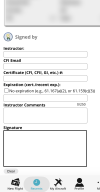
When the entry is otherwise complete, on the flight creation/edit screen, there is a "Sign" icon at the bottom of the page. When you click that you come to a page with instructors. "Add New," and you come to a page where you are verifying the the person you are asking to sign is actually the person signing. The page after that looks like this.

1786556957774.png
 
I log all my flights in a google spreadsheet. I keep signatures in my original paper logbook from 1993. I do not think I have ever actually had to SHOW a signature in 33 years. Maybe for my PPL checkride?
 
I log all my flights in a google spreadsheet. I keep signatures in my original paper logbook from 1993. I do not think I have ever actually had to SHOW a signature in 33 years. Maybe for my PPL checkride?
The only required signatures are for dual received and endorsements. I can think of three times they will be looked at.
• The appropriate ones will definitely be be looked at for checkrides.​
• Rental aircraft.​
• The FAA is investigating your pilot deviation.​
 
Excel version in Jepp format. You own it, can make as many copies as wanted, not tied to any service or program that may or may not exist in the future and requires no subscription.
 
The risk for one of the platforms crashing or getting hacked is never zero. Chance favors the prepared!
You can go to Foreflight.com and download your logbook into Excel. I do this every couple of months as a backup.
 
I was burned once before on a digital logbook, which is when I made the shift to MyFlightBook (unfortunately, I have not yet found any instructors that use or are willing to sign up for an account to digitally sign there, so ForeFlight is the only real option for me) - when I was burned before, I just exported everything and thankfully still had all my signatures on paper...
I am a CFI who has used MyFlightBook since 2012. For my personal records I also keep a paper logbook. I don't take ForeFlight on every flight, and don't log any of my time there, but my Android phone has MFB on it, very convenient, since I fly lots of different airplanes.
 
That risk definitely exists, just as it does for paper logbooks. If anyhting, the risk and consequences of loss is arguably worse for paper. I lost count years ago of the number of lost or stolen logbook threads that I've come across - and they were all about paper. I even had a friend with a lost logbook who tracked down lots of former instructors to recreate such things as his complex and HP endorsements.

I'll use MFB as the example. All my old paper endorsements and been scanned and uploaded. The data (and those pictures) can be downloaded into an excel spreadsheet or as a csv whenever the user wants. Personally, I pay the small annual donantionware donation and get the data "pushed" to my choice of cloud storage. And once a year, I print to a pdf that looks like a traditional logbook. I have not come across many who backup their paper logbooks (which has to be done manually) with that kind of regularity.

Those lost paper logbook threads always pointed out the FAA's guidance on lost logbooks. They pre-date computerized logs but I realized when I first started eLogging as a backup in the mid-1990s, that my DIY electronic recordkeeping would be great to satisfy the FAA if I lost the paper.
"I have not come across many who backup their paper logbooks (which has to be done manually) with that kind of regularity."

But of course you know I'm in the minority. Each year when I finish my taxes, everything (that hasn't already been scanned) gets scanned. Gets burned onto multiple DVDs that are stored in various places including off-site. Yes, I'm paranoid. Candidly, my flying logbooks are the least of my worries. The airplane logbooks, on the other hand, are more important than anything else including the deed to the house. I can call the county and get another copy of the deed. Aint no place to get logbook replacements other than what the FAA has.
 
The safest location for records is the cloud. Use your phone to scan your aircraft logs to pdf and upload to Google drive or iCloud. It will be there long after we are gone.
 
I switched to using the foreflight logbook last year so I'd be on the same platform as my instructor and when I (hopefully) become a CFI I'll be on the most common one. Makes it easier to do the electronic signatures.

The feature to use tracklogs and create draft logbook entries from them is handy but you have to check them over. I usually go to my tracklogs first and edit them(I often forget to tap the icon to stop recording after a flight and sometimes it keeps recording my "flight" long after I've shutdown and left the airport). I've also found it doesn't always correctly record takeoffs and landings so make sure to check that when you're converting them to logbook entries. You also still have to manually tell it to log certain things like cross country hours, PIC time, etc... you can tap it auto-fill it but again just make sure you're looking and not blindly accepting the draft.

There's an option to have your logbook emailed to you as a spreadsheet on a regular basis, I have that going to my gmail so it's effectively backed up to the cloud on a regular basis. As for moving to another electronic logbook platform most of them allow importing a spreadsheet from other platforms. You may have to fiddle with the fields/data to make it work though. Also certain things like say signatures may not transfer so it's a good idea to keep a paper backup of things like endorsements.
 
Do you Track Log with the Auto Start/Stop? And do you have it on both an iPad and iPhone???? You might want to switch to Manual Start/Stop. You'll also find your Time is much more accurate since FF guestimates the Taxi Time.
(Add to your Prestart and Shutdown checklists: Start the engine, Start Tracking. Stop the engine, Stop Tracking.)

This is a pet peeve of mine. Foreflight logbook hours using automatic logging can be anywhere from slightly off to grossly off, depending on the length of your taxi and startup/shutdown routines. I ALWAYS have to adjust the times when flying with a student who uses FF logbook. It's that bad.

That probably is the issue. If I went to manual, I’m pretty sure I’d forget to start it! On the other hand, I’m not a professional pilot, so I don’t need it to be super accurate!

Just pretty sure? You are GOOD! I can guarantee I would forget to start it.

Sure, but the "risk" is zero. If you forget to manually start/stop, you just enter the times in manually at the end like you would have done in any paper logbook, or electronic logbook before GPS tracking became a thing.
 
Sure, but the "risk" is zero. If you forget to manually start/stop, you just enter the times in manually at the end like you would have done in any paper logbook, or electronic logbook before GPS tracking became a thing.
That's true, but for me that just means, "don't bother." It's not worth a checklist item, especially since I need to record the Hobbs time for the club dispatch log anyway.
 
Sure, but the "risk" is zero. If you forget to manually start/stop, you just enter the times in manually at the end like you would have done in any paper logbook, or electronic logbook before GPS tracking became a thing.
I’m not a commercial pilot, so the risk is zero letting Foreflight do it. I go back and check the entries and delete or change anything that looks off.

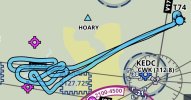
Also, my flights are a little different than most people. I like having a recording of our flight path, which entering it manually won’t have. For instance, this photoshoot. I take a screenshot, then delete it from my logbook since I was not PIC.
IMG_1152.jpg
 
I like having a recording of our flight path, which entering it manually won’t have. For instance, this photoshoot. I take a screenshot, then delete it from my logbook since I was not PIC.
The recording and the logbook functions are independent. Foreflight records my flights automatically, but the only thing I use its logbook function for is signing off on other people's dual and giving them endorsements.
 
Last edited:
The "risk" of leaving auto-recording on is also zero. If you remember to hit record, great! If you forget, hopefully the auto-recording will grab it.

I don't use it to auto-log flight time, though. Lots of more accurate/reliable methods for that.
 
You can go to Foreflight.com and download your logbook into Excel. I do this every couple of months as a backup.
You can set ForeFlight to automatically email you a file monthly, and I highly recommend that anyone who uses it does that. https://plan.foreflight.com/logbook and click "Settings", then scroll down to Auto-Export to set it up. You can get it in CSV/Excel, PDF, or both. I wouldn't do only PDF... Do CSV or both.
 
Once a week or so, I record the Hobbs. Then I grab my flights from Flightaware for that period, enter them in my online spreadsheet, and prorate the elapsed hobbs time based on the FA flight times. It's a bit rudimentary but I find the ritual a bit relaxing. One of these days I'll see about setting up an AI agent to do the work.
 
This is a pet peeve of mine. Foreflight logbook hours using automatic logging can be anywhere from slightly off to grossly off, depending on the length of your taxi and startup/shutdown routines. I ALWAYS have to adjust the times when flying with a student who uses FF logbook. It's that bad.
I actually just looked at the FF documentation again today and I think they have *supposedly* made it better. But you're in a better position to see if that's true with your students.

What they're saying now (don't know when it was changed) is "...a logbook entry is automatically recorded or estimated as the time of the first recorded GPS/data point, up to 30 minutes before takeoff..." So I'm reading that to mean as long as your Taxi and Runup were not more than 30 minutes ago, they go back that far and use the GPS track. In theory, that should mean they now get your Taxi and Runup time. On landing they give you up to 15 minutes, but they are not as clear on if it is based on GPs movement or not.

If you have any students that use the Auto Start/Stop the next couple of days, it will be interesting to see if the accuracy has changed.
 
I actually just looked at the FF documentation again today and I think they have *supposedly* made it better. But you're in a better position to see if that's true with your students.

What they're saying now (don't know when it was changed) is "...a logbook entry is automatically recorded or estimated as the time of the first recorded GPS/data point, up to 30 minutes before takeoff..." So I'm reading that to mean as long as your Taxi and Runup were not more than 30 minutes ago, they go back that far and use the GPS track. In theory, that should mean they now get your Taxi and Runup time. On landing they give you up to 15 minutes, but they are not as clear on if it is based on GPs movement or not.

If you have any students that use the Auto Start/Stop the next couple of days, it will be interesting to see if the accuracy has changed.

I don't know if that method has changed at all.

In my experience it is ALWAYS over-logging. As in, you start engines at 8 and shut down at 9, that's 1 hour and is the absolute largest logical, and common, amount of flight time that could be recorded. Meaning no other logging method can be greater than that, but many will be less than that (such as wheels-up to wheels-down, or block time, or tach time). But yet for a flight like that Foreflight will typically log about 1.2.

By "first recorded GPS/data point", what does that mean? To me, it seems to mean "when the system is powered on", which might mean the ADS-B receiver or something else, who knows. Because Foreflight typically doesn't have any problem with not logging the drive to the airport or time while you're opening the hangar door, etc.

But regardless, in most light GA airplanes, there's not much time between powering things on and starting the engine. So that's probably not the source of the error.

The "up to 15 minutes after landing", though, seems suspect to me. I bet it pretty much just means "we add 15 minutes to your landing time and call it good". Because how would it know when you've finished your taxi? And that would equal the approximately 0.2 over-logging that I've seen again and again.
 
I don't know if that method has changed at all.
As it was explained to me way back when, FF would "guestimate" the Taxi time with some algorithm. So that's why I thought it was always off unless your airport just happened to fit perfectly into that algorithm.

It sounds like it is now using the first GPS movement point, which would be the obvious way to do it. That's why I'd be curious to know what you see now vs in the past.
 
In my experience it is ALWAYS over-logging. As in, you start engines at 8 and shut down at 9, that's 1 hour and is the absolute largest logical, and common, amount of flight time that could be recorded. Meaning no other logging method can be greater than that, but many will be less than that (such as wheels-up to wheels-down, or block time, or tach time). But yet for a flight like that Foreflight will typically log about 1.2.

By "first recorded GPS/data point", what does that mean? To me, it seems to mean "when the system is powered on", which might mean the ADS-B receiver or something else, who knows. Because Foreflight typically doesn't have any problem with not logging the drive to the airport or time while you're opening the hangar door, etc.

But regardless, in most light GA airplanes, there's not much time between powering things on and starting the engine. So that's probably not the source of the error.

The "up to 15 minutes after landing", though, seems suspect to me. I bet it pretty much just means "we add 15 minutes to your landing time and call it good". Because how would it know when you've finished your taxi? And that would equal the approximately 0.2 over-logging that I've seen again and again.
IME, it's reasonably accurate about the beginning of the flight log. I'm not sure if it's noticing that it connects to my GTX345 and using the start time of the first GPS point it gets from the panel, but it seems to be pretty good.

The opposite could be said for the end. It seems like they add 15 minutes after touchdown, period. It never takes me that long to taxi to parking and shut down. I generally edit my track logs down to the point at which we stop moving in the jet (where we shut down almost immediately upon stopping) and down to the point at which I take a picture of my flight time and totalizer in the Mooney as that's the last thing I do before shutdown.
 
Just exported my logs from Garmin PIlot, second time this year. keep copies in the cloud, local computer and my SmartWatch
 
Just exported my logs from Garmin PIlot, second time this year. keep copies in the cloud, local computer and my SmartWatch
What, no print out?!?! :p :cheerswine:

(I'm also a firm believer in backups!)
 
As it was explained to me way back when, FF would "guestimate" the Taxi time with some algorithm. So that's why I thought it was always off unless your airport just happened to fit perfectly into that algorithm.

It sounds like it is now using the first GPS movement point, which would be the obvious way to do it. That's why I'd be curious to know what you see now vs in the past.

I didn't have any idea that used it before about 2 years ago, so I have no idea before that. It seems to have been pretty much the same in the last couple of years though.

The problem of course, would be "how does it determine first movement?". I mean, your iPad is "moving" constantly - to the hangar, loading up the plane, oops got to run into the FBO for a minute, pulling the plane out of the hangar, etc, on and on. And many of these are at similar speeds to taxiing. Although if you are connecting to an ADSB receiver, that certainly does indicate a strong likelihood that you're actually in the plane now. But an ADSB receiver isn't required for the logbook functionality.
 
IME, it's reasonably accurate about the beginning of the flight log. I'm not sure if it's noticing that it connects to my GTX345 and using the start time of the first GPS point it gets from the panel, but it seems to be pretty good.

The opposite could be said for the end. It seems like they add 15 minutes after touchdown, period. It never takes me that long to taxi to parking and shut down. I generally edit my track logs down to the point at which we stop moving in the jet (where we shut down almost immediately upon stopping) and down to the point at which I take a picture of my flight time and totalizer in the Mooney as that's the last thing I do before shutdown.

This matches with my hypothesis. The client I most often fly with who uses FF logbook is about a 5 minute taxi from the runway on landing. So that leaves 10 extra minutes, which is roughly 0.2, so that matches my experience.
 
Back
Top