EFB chart VFR format

Which is better?

  • Vector

  • Raster


Results are only viewable after voting.
Raster, because it matches the official chart published by the FAA, and my online planning tools.

Vector charts are also official charts published by the FAA.
 
Last edited:
WHY would you want Raster? Better question, WHY would you even suggest Raster?????
 
WHY would you want Raster? Better question, WHY would you even suggest Raster?????
No risk of "dynamic decluttering."

The correct answer isn't in the choices, but has been said here already: BOTH.

But if having to pick between the two, I'd give a narrow edge to raster, only because my prior boating history included repairing/replacing a couple of props specifically because poorly designed vector charts did not highlight hazards at particular zoom levels. In a boat, that's an expletive. In a plane, it might be a pilot deviation, or your life.
 
I think it partially depends in whose vector, but generally, raster if I have a choice. I think for me it’s just decades of familiarity. I find the Sectionals tell me at a quick glance what I have to stare at a vector to look for.

IFR, different story.
 
But if having to pick between the two, I'd give a narrow edge to raster, only because my prior boating history included repairing/replacing a couple of props specifically because poorly designed vector charts did not highlight hazards at particular zoom levels. In a boat, that's an expletive. In a plane, it might be a pilot deviation, or your life.
I'm not making the connection between a bad chart and it being the fault of it being a vector chart? A bad chart is a bad chart.

But you're okay zooming in and not being able to read the text. Or zooming in and there being WAY to much information there and you can't turn on/off what you need and don't need?
 
Which don't?
The FAA creates all the Sectional Charts as raster based. I know ForeFlight just releases what they get from the FAA and I would "assume" all the other EFBs do the same thing.

ForeFlight's Aeronautical layer is vector based and it what I fly with 99% of the time. (FF is not very good at naming rivers, mountains, etc., so sometimes I'll turn on the Sectional if I want to look up a name.)
 
I’m strictly VFR, and most of the time I prefer the raster, and I display track up. It better depicts what I’m seeing outside, showing roads, lakes, towns, etc., that I’m using for pilotage. If I need to be careful about avoiding some particular piece of airspace, like the edge of a bravo or something, I’ll sometimes switch to vector as those boundaries are easier to see.
 
Last edited:
There seems to be a misconception that Foreflight and others produce their own vector maps, which are less official or less accurate than sectional raster charts. This is not the case. It is the same data.

The FAA publishes the National Airspace System Resource (NASR) database on a 28 day subscription basis. This data is used by EFB apps to generate vector maps. The FAA also uses the NASR to produce sectionals and other charts, and ATC products.
 
The FAA also creates and publishes the vector data that Foreflight and other apps display.
Data to create a vector map, yes. But I do not believe the FAA releases an actual vector based chart of any kind. But if you're saying there is now also a vector based chart from the FAA, I'd love a link to get more information on this.

FF generates their vector based Aeronautical layer from this DB, but agin, not a FAA released vector chart that is downloaded into FF like the raster based Sectional, TAC, Enroute, etc., charts.
 
There seems to be a misconception that Foreflight and others produce their own vector maps, which are less official or less accurate than sectional raster charts. This is not the case. It is the same data.
I’m not sure there’s a misconception.

Data source is the same? Sure.

One more “official”? There’s really no such thing. And I really haven’t see anyone challenge that.

One more “accurate”? Well, since there are some user options about which elements/overlays to display, you could be missing things. Whether missing the depiction of a surface feature you switched off is a measure of “accuracy” is a good question.

Produce their own? I think they do. You and I paint a picture of the same house. Same “data.” Different choices. They make design choices. Decisions about what data to display. What appears and disappears with zooming. The vector charts on different EFBs (and, for that matter, avionics) even look different.
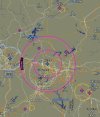
IMG_3903.jpeg

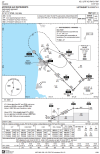
IMG_3904.jpeg
 
Where is the second chart from?
Sky Demon. Very popular European EFB that added a lot of support for US this past year. It has some minimal IFR capabilities, but is primarily a VFR EFB. I did some beta testing for them.

In terms of this thread, it’s vector only. Non-raster.
 
I lean to Aeronautical, aka Vector in ForeFlight.

The traditional VFR Raster charts from the Amish period of aviation were printed on paper, and had to contain a lot of information because there was no other way to provide it. With today's technology, you don't have to have the map presenting everything it can and most of what you don't want at the time.

With the ForeFlight, I use Aeronautical/Vector and choose and pick what information I want to see. For example, I click on the airport symbol and pull up the information I need if in the air (current weather, etc.) or if on the ground (Notams, TFRs, etc.)

In the air, I want simple. I don't want a map cluttered with information I don't need, such as if runway is lighted, length of runway, etc. I've already check that out on the ground. If I do need it for some reason, I can pull it up.
 
iPad: Raster with north up (for all the detail and so I can read the text)
Panel Mounted Area 760: Vector with track up (less clutter and a vertical track line means I am going in the right direction)

This configuration really bothers one of the instructors I fly with as he is strictly a north up guy, but I have no issues having the two different orientations displayed in the cockpit.
 
North up or Track up? Yes

When in route, I do North Up. When approaching the airport, I switch to Track Up. Keeps it simple - the runway I see on the screen is running left to right, matches how I want to enter the pattern, etc.
 
Sky Demon. Very popular European EFB that added a lot of support for US this past year. It has some minimal IFR capabilities, but is primarily a VFR EFB. I did some beta testing for them.
Very nice. Wonder if they'll continue to work on their US IFR capabilities?

 
Very nice. Wonder if they'll continue to work on their US IFR capabilities?
As you can see from this snip from their website, even in Europe, it's marketed for VFR flight, so I kind of doubt it.

1789922420787.png

The small IFR piece is basically, the inclusion of instrument approach plates. That follows their European model as well. I think that's less about IFR use that to have reference options. (Personally, I love the option to view European approach plates, but that's just my IFR geekitude.
1789923287966.png

It's actually quite good. Like iFly, it runs (almost?) identically on iOS, Android, and Windows. Also, like iFly, the interface is a bit different. Unlike iFly, as I mentioned, no raster charts. But most of the bells and whistles one would need for VFR flight are there.
 
The FAA also creates and publishes the vector data that Foreflight and other apps display.
Do they? They produce extensive aeronautical data information (airports, fixes, obstructions, etc... ) that these companies develop technology to display, but I've never see anyhing approaching an FAA vector chart product.
 
Do they? They produce extensive aeronautical data information (airports, fixes, obstructions, etc... ) that these companies develop technology to display, but I've never see anyhing approaching an FAA vector chart product.

Google NASR. The FAA publishes all airspace information as ESRI shapefiles, which are vector maps.

FF, iFly, Pilot, AvareX, etc all subscribe to NASR, download the airspace overlay charts every 28 days, and display them on an open source base map. Their software adds options for formatting and selectively displaying the vector items, as well as embellishments such as nav, etc.

The word "chart product" is meaningless if you try to limit it to a flat image file. A vector map is by definition a dataset, which can be displayed by any capable GIS viewing platform.

The FAA makes the vector map. FF displays it. No different than a raster map.
 
The FAA publishes all airspace information as ESRI shapefiles, which are vector maps.
Ah, no.... I do not believe a "ESRI shapefile" has ever been considered a chart or map. It is a file that contains all of the data to create a map or chart.

If you have these files, how do you view them? And what is the description of the program you're using to display them? I believe you'll see it is a program that uses the data to create an image, but the shapefile is not really a map or chart that can be distributed. ForeFlight probably has their version of a code to deal with this data, same as Garmin and the other EFB providers have their own. So they are the one creating the map or chart, not the shapefile.
 
So how is the software viewer used to display vector shapefile data different than the software viewer used to display raster GeoTIFF data? And why does one qualify as a "chart" or a "map" while the other does not?
 
So how is the software viewer used to display vector shapefile data different than the software viewer used to display raster GeoTIFF data? And why does one qualify as a "chart" or a "map" while the other does not?
I think you may have just told us that ForeFlight produces their own charts.

A “chart” or a “map,” regardless of medium, is a presentation of data. A Sectional (whether on paper or a stream of data) is a presentation of the NASR data for the purpose of VFR flight at a certain scale. A TAC presents it another way. A LIFR yet another. ForeFlight, Pilot, iFly, etc in still others. Actually, an EFB presents it in as many ways as there are viewing/clutter/declutter options.

“Chart” vs “map” in this case is semantics. Might as well ask, “why is a paper depiction of a section of the United States a “map” or a “chart” depending on whether you got it at an FBO or from the AAA.
 
The difference is that a raster map file defines the color and intensity of each pixel (dot) in the grid that covers the map area. It will display exactly as it was created, with blue or magenta airport symbols, yellow shaded cities, etc., regardless of the viewer used. There is no further embedded information except the latitude and longitude of the corners.

The files defining a vector map, OTOH, describe the features (airports, navaids, topographic features, etc., and their locations) in a database. The software developers writing the viewing software can choose how to display the information. The displayed map is created by the viewing software from the database.
 
Is FltPlanGo raster-only? I don’t use it but keep it in mind in case I fly to Canada since it has their VFR charts for free.
 
Back
Top
