Rogue, hallucinating A.I.?

FastEddieB

Touchdown! Greaser!
Joined
Oct 14, 2013
Messages
11,865
Location
Lenoir City, TN/Mineral Bluff, GA
Display Name
Fast Eddie B
Home Airfield
Big T Airport (80TN)
I recently discovered how powerful A.I. apps can be in modifying and improving photos. I may post a few prior recent examples that worked really well.

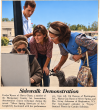
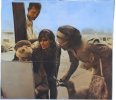
But one has me scratching my head, and a bit concerned. I have a scan of an old newspaper article from the late 1960’s. It’s a local paper and the photo had me and an old girlfriend looking at an artist at a sidewalk art show:

55539575525_10f451603d_z.jpg


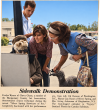
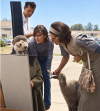
Seemed like a prime candidate to improve upon a bit, so I asked Gemini to simply crop the original to just the photo and to colorize it:

55538162187_7f65fb6574_z.jpg


I find it bizarre that it would add people, and completely change the artist’s position. The poor little dog actually changed color as well. I can understand getting the dog’s color wrong, but the other alterations seem bizarre, with the A.I. going far beyond what it was instructed to do. Maybe some ambiguity in my command, but still very, very odd to me.
 
I find it bizarre that it would add people, and completely change the artist’s position
I was told in the case of photo rendering, once the image is scanned if the AI model can't match components of that scan to its available database(s) it will substitute known values unless programmed otherwise. Try turning that photo into a video and see what it does.
 
Like some people I have met, AI is well educated but stupid. It typically won't ever admit to not knowing something, and will just make "shtuff" up when it feels like it. As a non-human, it probably finds nothing unusual about seeing two exact copies of the same person in a photo.

Try:
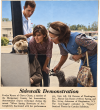
"Crop to just the photo, colorize, and improve the focus and clarity. Don't make any other changes. Don't add people or detail that's not already there, just give me the same photo that looks better and is in color, like the original would have before being printed in the newspaper." It got the dog kind of funky, but the rest is closer.

1789907944783.png
 
Last edited:
Thanks. I guess I just assumed it would stay as close as possible to the original without asking. I’m new at this and still learning.

To Bell206: I don’t seem to have access to video prompts in unpaid Gemini. Feel free to try it and see what you come up with.
 
I played around with that a while back. I think I was probably using chatgpt. It was weird as I went through several corrective iterations
I didn't have any photos of my daughter wearing a shirt with the logo of the college she's attending (FSU). So I uploaded several photos of her so that it would have a strong basis, and asked for it, and change the background to be some noteworthy place on campus.
The first image was pretty good but I tried to tweak it through several iterations.... I don't know, went roughly like this
change the logo on the shirt to one that says Florida State University, and make the sky blue
add some clouds
....and each time it would change other things... a slightly different pose, her hair would be different, etc....
so a few more iterations such as
yes I like that pose, but now make the shirt long-sleeved and I can no longer read the sign behind her
...it would fix some of those things and break others

It was odd. Her face still looked like her but it wasn't. Subtle little things, some that only someone close to her would notice... the smile was now off, nose wasn't hers...stuff like that

So I asked it, and it told me that it does not really remember the original photos that were uploaded after the first try. It just takes the current draft and tweaks it with best guesses. I found that if I could upload the original image(s) again and just start over but with a different prompt, Then I would get something closer to what I wanted, but it would never really recreate the things about the very first draft that I did like, each draft would be something significantly different.... but polishing my prompt through practice let me land on something close to what I wanted.

It's a powerful tool, that takes a whole new skill set that kids today need to learn.
 
To Bell206: I don’t seem to have access to video prompts in unpaid Gemini. Feel free to try it and see what you come up with.
I told chatgpt that it was for POA and this is what it came up with:

1789925313010.png
 
To Bell206: I don’t seem to have access to video prompts in unpaid Gemini. Feel free to try it and see what you come up with.
There are a number of free AI video generators on line where you can play with it.
 
I recently discovered how powerful A.I. apps can be in modifying and improving photos. I may post a few prior recent examples that worked really well.

But one has me scratching my head, and a bit concerned. I have a scan of an old newspaper article from the late 1960’s. It’s a local paper and the photo had me and an old girlfriend looking at an artist at a sidewalk art show:


Seemed like a prime candidate to improve upon a bit, so I asked Gemini to simply crop the original to just the photo and to colorize it:

55538162187_7f65fb6574_z.jpg


I find it bizarre that it would add people, and completely change the artist’s position. The poor little dog actually changed color as well. I can understand getting the dog’s color wrong, but the other alterations seem bizarre, with the A.I. going far beyond what it was instructed to do. Maybe some ambiguity in my command, but still very, very odd to me.
Most engines are heavily reliant on prompting. Give it an inch and it will take a foot. You gotta think of it as a hyperactive kid with an overactive imagination. Limit that with strict prompting. The first two results I put in. One left the fold marks. There was a third where it forgot the sky on the left side. Still,left the old lady with furish stuff on her face over and over.

After fighting about the lady not being a dog and intricately telling it it was an older lady lookimg down, magically it worked

IMG_9373.png
 

Attachments

  • IMG_9366.png
    IMG_9366.png
    2.3 MB · Views: 14
  • IMG_9365.png
    IMG_9365.png
    2.4 MB · Views: 14
Last edited:
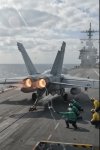
There is a lot of wrong in there. Wing rotated 90 degrees off. No horizontal tail. No cockpit. No right gear. And more.

nah.... the AI just went ahead and dissassembled the aircraft to make it easier to paint. Yeah, that's what it is...
 
Pull UP, pull UP!
 
This cat shot is going to hurt a little more than usual.
I didn't realize we had gotten the "short Cat" takeoff improved that much. And we don't even have the curved up ramp like the Brits!
 
I've seen numerous photo historians complain about how bad AI is when they just want the original photo retouched.

One trick to try when working with AI is do NOT say "improve" be sure to tell it you want it "retouched" and the "quality of the ORIGINAL image improved if possible."
 
I've seen numerous photo historians complain about how bad AI is when they just want the original photo retouched.

One trick to try when working with AI is do NOT say "improve" be sure to tell it you want it "retouched" and the "quality of the ORIGINAL image improved if possible."
Or “leave it the same except,…..” then describe the change in explicit detail. Or if it screws something up tell it to make a “surgical edit” of that one thing. AI tends to run amuck, and bad prompts are only part of the issue.
 
Or “leave it the same except,…..” then describe the change in explicit detail.
And yes... there is a lot of that discussion too.

I think the original should always be available, but if it's faded, has water damage, etc., etc., etc., then I personally am not opposed to having AI crate a copy that looks like it originally did. Basically restoration not change, but not having to do the restoration on the original. Then it stays the way time has changed it with it's own history.
 
Most engines are heavily reliant on prompting. Give it an inch and it will take a foot. You gotta think of it as a hyperactive kid with an overactive imagination. Limit that with strict prompting. The first two results I put in. One left the fold marks. There was a third where it forgot the sky on the left side. Still,left the old lady with furish stuff on her face over and over.

After fighting about the lady not being a dog and intricately telling it it was an older lady lookimg down, magically it worked
Well... other than the woman's left arm (how many sleeves is that?) and the fact that she's got her hand through the dog's sinus cavity, from the side.
 
Well... other than the woman's left arm (how many sleeves is that?) and the fact that she's got her hand through the dog's sinus cavity, from the side.
Yeah I gave up cleaning it up as it was taking too much time lol. If it was my project I would keep cleaning it up.
 
FLUX.1 Kontext to colorize (~8 minutes), RealESRGAN to upscale (~1 minute).

GeorgeC,
and the right tool for the job

kontext.jpg
 
Last edited:
I find it bizarre that it would add people, and completely change the artist’s position. The poor little dog actually changed color as well. I can understand getting the dog’s color wrong, but the other alterations seem bizarre, with the A.I. going far beyond what it was instructed to do. Maybe some ambiguity in my command, but still very, very odd to me.
Remember the scene in The Fly (1986) where the baboon got teleported for the first time? The telepod did what it was programmed to do, just not quite what was intended ;)
 
Back
Top