Garmin Pilot 'geo-referenced' approach plates question

Turbo6ta

Filing Flight Plan
Joined
Oct 24, 2025
Messages
8
Location
Florida
Display Name
Ron
I am ex-military and it's been a long time since I flew in the military (or civilian for that matter)

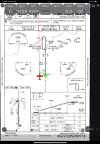
I understand that in the Garmin Pilot 'standard' plan, you can view approach plates as static charts (like the paper 'FLIP' approach plates we used when flying in the military). However, with the Garmin Pilot 'premium' plan, you can view geo-referenced approach plates - i.e: see your aircraft’s actual position moving on the plate via your iPad.

Since I never have used an electronic (iPad) approach plate, for me, would it really be worth the extra money it costs for the Garmin 'premium' plan just to get the geo-referenced option of actually seeing where my aircraft is located during an ILS, etc ?

I also looked at the ForeFlight app for an iPad, and I don't even think it comes with any approach plates at all when purchasing the cheaper 'Starter' app from them, let alone, ForeFlight is more expensive than Garmin.

Thanks for any info ... Ron
 
Last edited:
I am ex-military and it's been a long time since I flew in the military (or civilian for that matter)

I understand that in the Garmin Pilot 'standard' plan, you can view approach plates as static charts (like the paper 'FLIP' approach plates we used when flying in the military). However, with the Garmin Pilot 'premium' plan, you can view geo-referenced approach plates - i.e: see your aircraft’s actual position moving on the plate via your iPad.

Since I never have used an electronic (iPad) approach plate, for me, would it really be worth the extra money it costs for the Garmin 'premium' plan just to get the geo-referenced option of actually seeing where my aircraft is located during an ILS, etc ?

I also looked at the ForeFlight app for an iPad, and I don't even think it comes with any approach plates at all when purchasing the cheaper 'Starter' app from them, let alone, ForeFlight is more expensive than Garmin.

Thanks for any info ... Ron

Depends. The geo referenced position also applies to the airport diagram, so if you want mark up your diagram for a visual reminder of the taxi route you can watch the blue dot follow your markup as it approaches the hot spot / hold short / whatever threat is next up.

What I find really useful are Garmin’s SmartCharts…a really new feature (launched in late May) that lets you remove unnecessary info from the plate based on your approach category, IF/IAF, and conditions. Also a much better layout than what’s available on the .gov or jepp plates. For me, that’s the killer feature that has me switching from android & iFly to Garmin at the end of my current subscription.

FF offers a similar function, just not as refined in my opinion.

Depending on what navigator you have in your panel, GP may be easier (or not) to integrate than FF.

Now, keep in mind you may want to spend a lot of time exploring whatever EFB you use because the wealth of info available is mindblowing compared to your previous life.
 
Both Garmin Pilot and Foreflight (and pretty much every other EFB out there - including several freebies) come with approach plates. And the upper levels of both GP and FF have the approach plates georeferenced (s0 do some of those freebies)

Most consider the georeferenced ones a great aid to situational awareness. OTOH, for others, they are nice but not a big deal. That can depend on personal preference, other equipment in the airplane, etc.

Both apps have a free trial. I'm pretty sure Garmin Pilot one comes with the georeferenced charts; I don't recall about Foreflight, but trying even one of them should tell you fairly quickly whether its' something you want to pay extra for.
 
From Google:

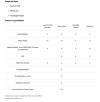
Garmin Pilot Standard
  • Flight planning, saving, and filing
  • Interactive aeronautical maps
  • Comprehensive aviation weather and data layers
  • Static approach plates (basic view)
  • Airport and FBO data
  • Basic flight planning tools on the maps page
Garmin Pilot Premium
  • Includes all Standard features plus:
  • Geo-referenced FliteCharts: See your aircraft's position on approach plates
  • Synthetic Vision: Provides a virtual 3D view of terrain and obstacles
  • Terrain and Obstacle Alerts: Provides visual and audio alerts for potential hazards
  • SafeTaxi Airport Diagrams: Detailed airport diagrams with taxiway information
  • Chart Overlays on Map: Overlay charts directly on the moving map
  • SmartCharts: Tailor terminal procedure charts to your flight
  • Icing Forecasts: Includes graphical icing forecasts
  • Database Concierge: Automatically updates databases on compatible Garmin avionics
  • Graphical Weight and Balance: Calculate aircraft weight and balance
  • View Jeppesen Electronic Charts: Includes the ability to view Jeppesen charts with a separate subscription
 
Thanks everyone for your input ... It looks like I could get by just fine with the cheaper Garmin Pilot 'Standard' app, but the 'Premium' upgrade version might be worthwhile even though it costs twice as much. Anyway, I am glad they came up with these apps that work well with an iPad that has a built-in GPS (cellular) ... No more hauling a wheelbarrow full of Jep charts out to the airplane every time you go flying.

BTW ... I haven't purchased an aircraft yet, but looking to buy a nice Cessna 210 with low time on the engine and prop, and all ADs complied with.
 
Thanks everyone for your input ... It looks like I could get by just fine with the cheaper Garmin Pilot 'Standard' app, but the 'Premium' upgrade version might be worthwhile even though it costs twice as much. Anyway, I am glad they came up with these apps that work well with an iPad that has a built-in GPS (cellular) ... No more hauling a wheelbarrow full of Jep charts out to the airplane every time you go flying.
You may discover that, even at a premium subscription level, it will be less expensive and far more convenient than paper charts. And if cost is a big issue, I'm sore someone will point out there are free ones out there, including one from Garmin.

These apps also work well without a built-in GPS. You can check the current thread about this. Many of us made a decision along the way that the use of an external GPS unit would be a better choice - and most of the newer ones also give you ADS-B weather and traffic, or we are flying aircraft with avionics that will feed that all that data to the EFB.

Enjoy your return to aviation!
 
Money is not a problem, but if I can get by fine with the $100 per year version, I just can't see spending $200 ... just the principal of the thing.

I am looking forward to getting back into flying. I have about 6,000 hours, but have not flown in the last 17 years .... I am happy that I at least passed my class 3 flight physical a couple of weeks ago. That's 'step 1' for me. ...:)
 
Last edited:
If the plane you haven't bought yet has a Garmin panel that makes buying a onepak or pilotpak make sense, the premium upgrade is free.
 
I am ex-military and it's been a long time since I flew in the military (or civilian for that matter)

I understand that in the Garmin Pilot 'standard' plan, you can view approach plates as static charts (like the paper 'FLIP' approach plates we used when flying in the military). However, with the Garmin Pilot 'premium' plan, you can view geo-referenced approach plates - i.e: see your aircraft’s actual position moving on the plate via your iPad.

Since I never have used an electronic (iPad) approach plate, for me, would it really be worth the extra money it costs for the Garmin 'premium' plan just to get the geo-referenced option of actually seeing where my aircraft is located during an ILS, etc ?

I also looked at the ForeFlight app for an iPad, and I don't even think it comes with any approach plates at all when purchasing the cheaper 'Starter' app from them, let alone, ForeFlight is more expensive than Garmin.

Thanks for any info ... Ron
if you are gonna fly ifr, YES. Absolutely worth it
 
I'm sure someone will point out there are free ones out there, including one from Garmin.
Let me take the bait and fulfill your prophecy.

I use Avare and don’t subscribe to Garmin or FF. I use an 8” Samsung tablet on the yoke. The tablet’s internal GPS works just fine.

Having georeferenced approach plates is a great enhancement. Having a georeferenced airport diagram at a big field is VERY nice.

Consider using an Android tab to try it out and see if you like it. (I haven’t tried AvareX but I understand that version works on Apple stuff).
 
I also looked at the ForeFlight app for an iPad
I'm a ForeFlight user and I am 99% sure that even the "Starter" subscription come with Approach Plates. But just like G Pilot, it does not have geo-referenced plates.

It is kind of like Pepsi and Coke, different people like one over the other. But if you go by the number of Users... FF is obviously the winner. And I believe both have a 30day trial period, so maybe get both and compare. This way you can also confirm if the Plates are there or not. :D But since the data is free from the Gov., I can't see why they wouldn't be there since the Enroute Charts, etc., are.

If you want to find out before loading FF on your iPad, you can always contact them: [email protected]
 
Last edited:
FltPlanGo is free and has georeferenced plates. It’s a pretty simple way to see what you think about them. I use FltPlanGo but I’m pretty much just a recreational pilot that doesn’t rack up too many hours anymore. If I was more serious I would look at GP or FF for the additional features. I use a Redbird sim once in a while for an approach or two. That sim uses a Bluetooth GPS to send positioning info to a tablet. I always seem to have trouble with that connection, so nearly every time I use the sim I don’t have georeferenced plates. It forces better situational awareness on me. In the plane, for real, I like it. And at an unfamiliar airport getting a taxi diagram with my position marked on it is nice.
 
I am ex-military and it's been a long time since I flew in the military (or civilian for that matter)

I understand that in the Garmin Pilot 'standard' plan, you can view approach plates as static charts (like the paper 'FLIP' approach plates we used when flying in the military). However, with the Garmin Pilot 'premium' plan, you can view geo-referenced approach plates - i.e: see your aircraft’s actual position moving on the plate via your iPad.

Since I never have used an electronic (iPad) approach plate, for me, would it really be worth the extra money it costs for the Garmin 'premium' plan just to get the geo-referenced option of actually seeing where my aircraft is located during an ILS, etc ?

I also looked at the ForeFlight app for an iPad, and I don't even think it comes with any approach plates at all when purchasing the cheaper 'Starter' app from them, let alone, ForeFlight is more expensive than Garmin.

Thanks for any info ... Ron

If you’re going to be flying instrument approaches, get the georeferenced charts. The real value of an EFB isn’t just that it provides a digital map - it’s that it can show your live position on that map. An EFB that only displays a passive chart without indicating where you are is essentially just a PDF (or TIFF) viewer.

As others have noted, there are plenty of free options that work perfectly well unless you specifically need all the extra features. I used to use Garmin Pilot, but eventually switched to Avare. The switch had nothing to do with cost - in fact, I contribute to the Avare project more than what I used to pay for the GP subscription.

Going back to my original point: 90% of an EFB’s utility is in showing your current position on a chart (both terminal procedures and Sectionals). Everything else is nice to have - but not essential.
 
I was looking on the Avare website and it looks like Avare is used with an android cellphone. I do have an android cellphone, but with my old eyes, reading anything on it while flying is not going to work well for me in the cockpit.

I noticed that they are coming out with Avare X now ... Can Avare X be loaded into an iPad (Gen 9) with WiFi + Cellular and 256GB ? ... The iPad I have has a 10.2" screen and would work well in a Cessna 210 cockpit.
 
I was looking on the Avare website and it looks like Avare is used with an android cellphone. I do have an android cellphone, but with my old eyes, reading anything on it while flying is not going to work well for me in the cockpit.

I noticed that they are coming out with Avare X now ... Can Avare X be loaded into an iPad (Gen 9) with WiFi + Cellular and 256GB ? ... The iPad I have has a 10.2" screen and would work well in a Cessna 210 cockpit.
Avare X works on my iPad 10th Gen. I used the standard Avare on an Android tablet for many years. The X version has some differences that I’m still getting used to.

I do not have the internal GPS in this iPad. On the ground it uses the cell network, or something. In the plane I can pair it with the GNS for positioning and traffic. But I use FlightPlnGo normally.

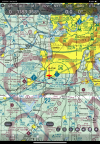
Here’s a screenshot of a sectional and approach plate.

Edit: I realized it’s been a long time since I used AvareX in flight, now I’m trying to remember if there were any issues getting traffic, wx, and GPS. I think it worked out, pair with the GTN using Bluetooth, set AvareX to use the new input source, and I think it just worked.

IMG_0127.pngIMG_0128.png
 
Last edited:
Matthew ... Thanks

Yup, looks like everything is there
 
Last edited:
Avare X works on my iPad 10th Gen. I used the standard Avare on an Android tablet for many years. The X version has some differences that I’m still getting used to.
Have they changed the flight planning function to be able to input a string of airports and, for IFR, perhaps copy and paste a common route?
 
pair with the GTN using Bluetooth, set AvareX to use the new input source, and I think it just worked.
Wait, the GTN can talk with AvareX? I thought it was only Garmin products + ForeFlight.
1761419936755.png
 
Have they changed the flight planning function to be able to input a string of airports and, for IFR, perhaps copy and paste a common route?
That flight planning is something I still haven’t figured out. I end up clicking on an airport and adding it to the plan. It’s different from the old version. I installed it when I got the iPad, got frustrated, and started using FPGo. Someone not used to the classic Avare might do better at it.
 
Have they changed the flight planning function to be able to input a string of airports and, for IFR, perhaps copy and paste a common route?
I think I found it. There was a page I didn’t see how to access.

You can type in identifiers.

View attachment 146540
I can confirm. I was able to cut&paste a string of identifiers from Skyvector into that input field with "Create As Entered" transferring everything into the flight plan.

I was also able to enter 2 airports and "Create IFR Preferred Route" populated a bunch of intermediate waypoints. I'm not sure what algorithm it used, though.

"Show IFR ATC Routes" either didn't work or it worked slower than my patience allowed.
 
If you plan on flying IFR, the georeferenced approach plates are worth every penny for the added SA. And the price difference is about 10 min of flying time in a 210. Just get Foreflight and be done with it.
 
If you plan on flying IFR, the georeferenced approach plates are worth every penny for the added SA. And the price difference is about 10 min of flying time in a 210. Just get Foreflight and be done with it.

Yes! Why pay less when u can pay more with FF!?!
 
Yes! Why pay less when u can pay more with FF!?!

Because in the scheme of things, $100 is a rounding error on the annual budget of running a 210. Having something reliable that isn't some 3rd tier android app that should work properly, maybe, is pretty much necessary.
 
If you are buying databases for a Garmin suite in your plane, you pay ~ $100 for base GP and get the premium upgrade for $0, so it's $100. If you aren't buying Garmin DB's it's about $200. Still less than FF I believe.
You can get geo referenced approach plates on GP for $100 less than the equivalent on FF?
 
You can get geo referenced approach plates on GP for $100 less than the equivalent on FF?
Not really. Current pricing for lowest plan with georeferenced approach charts and taxi diagrams. (I have both apps)
Garmin Pilot "Premium": $210​
Foreflight "Essential": $250​
​
 
Not really. Current pricing for lowest plan with georeferenced approach charts and taxi diagrams. (I have both apps)
Garmin Pilot "Premium": $210​
Foreflight "Essential": $250​
​
Yup ... that's exactly what I see when I go to both the ForeFlight and Garmin Pilot websites.
 
It may have been mentioned but Garmin Pilot works great on Android, missing a couple features from the ios version.

I backup the ipads with my s24 phone. thinking about somehow velcroing it to the panel so i can use it simultaneously. btw you can use like 3 devices with gp at the same time.

As it's android, i'd stick to "Samsung" products, pref the galaxy line.
 
I've had georeferenced Jepp plates since I got my instrument rating (well before actually) via the MX20 ChartView feature. It's very handy. Much as I like my autopilot, having a moving map with referenced position you couldn't get out of my cold dead fingers.
 
It may have been mentioned but Garmin Pilot works great on Android, missing a couple features from the ios version
I use GP on both platforms. “A couple” is a major understatement.

FIFY :p
It may have been mentioned but Garmin Pilot works great on Android, missing it has a couple features from the ios version.
 
I use GP on both platforms. “A couple” is a major understatement.

FIFY :p
I use both constantly i really only notice a minor difference, most notable, maybe new smart charts. If I may ask, what major features do you see missing?

also, Not sure how i feel about smart charts, looks really nice but with everything already being georeferenced i just never bother to use it
 
I use both constantly i really only notice a minor difference, most notable, maybe new smart charts. If I may ask, what major features do you see missing?

also, Not sure how i feel about smart charts, looks really nice but with everything already being georeferenced i just never bother to use it

Unless something has changed in the past nine months or so, GP Android cannot load a procedure into the flight plan at a minimum, and that’s been the single largest reason I have not adopted it. That problem is overshadowed by the lack of SmartCharts. I feel Garmin is defrauding purchasers with the current Android offering of Pilot.

SmartCharts provided me the convincing feature to adopt both an iPad and GP for my EFB. I (again) tested GP SmartCharts and FF’s version on a borrowed iPad over the summer for the type of flying I do and came to the conclusion it was time to retire Android as the EFB. For me, this was not done lightly as I dedicate a tablet solely to EFB usage.
 
Back
Top