Garmin Axis - Replacement/Upgrade for G3X

Pinecone

Final Approach
Joined
May 24, 2022
Messages
5,059
Location
MD
Display Name
Pinecone
Home Airfield
0W3

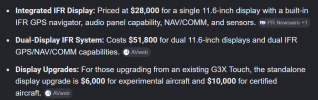
11.6" and 8" displays that are the same cutout/holes/footprint as the current G3X Touch displays. My avionics shop says a swap from G3X touch to Asix displays would be less than a day.

Come as basic display or with integrated IFR GPS, and can include integrated comm and nav. So you could totally eliminate the radio stack.
 
View attachment 153233

Just to save people the google fu trouble, since this place has a penchant for burying the lead.
A little bit more pricing info:
 
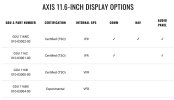
Aircraft Spruce lists the display-only GDU 116BX, which is the experimental, VFR GPS, display-only option, at $4,980. The G3X Touch part, GDU 460, is $4,735. If you go to the all-in-one units, they cost less than the equivalent G3X Touch + GTN Xi + GMA 245R setup, or about the same if you get an 8" MFD to ride next to your 11" PFD.

It looks like the AXIS screens can run Database Concierge, although I wonder if they can talk to other avionics with Database Sync (so you can update just one place and let the panel share the update to other devices). Either way, it would be faster to update than the 15-20 minutes it takes each G3X Touch screen to install from an SD card. And if you went with the built-in navigator version and a single screen, you'd have a single place to update databases rather than several, anyhow. Database updates on the G3X Touch are, hands-down, the worst part of that system, including using the horrible Garmin desktop software and then hoping your plane's battery can still start the engine after draining it for a half hour to update the panel.

If I were building my panel from scratch today, I think I would go with an 11" AXIS all-in-one plus a remote Comm 2, the necessary bits and bobs to have the EIS strip and remote transponder, the autopilot control head, and a G5 backup instrument.
 
It looks like the AXIS screens can run Database Concierge, although I wonder if they can talk to other avionics with Database Sync (so you can update just one place and let the panel share the update to other devices).
GI 275s can already do this, so it's hard to imagine that the AXIS doesn't have the capability. When I was browsing the materials for how it would interface with my own avionics, I saw that Garmin has said that the AXIS panel can be used for frequency changes on GNC 215 and can be used to modify flight plans on the GNX 375 due to "tight integration", so it seems that they've made a solid effort to ensure that at least all of the Garmin avionics can talk to each other.

For my part, I'm currently running three GI 275s (AI, HSI, EIS), a GNX 375, a GNC 215, and a GFC 500. Sounds like I could put the certified VFR/comm version in the plane, keep a GI 275 as the back-up, and sell the remaining two GI 275s and my KX 155 nav/comm to defray the cost, retaining the GNX 375 for GPS/transponder/ADSB and the GNC 215 as a physical radio I can use in case the display craps out. The Cherokee C has a fairly tall center stack, so it's possible I could eventually put an 8" MFD AXIS in there if I sell another arm and leg.

On the other hand, I sort of like the round-dial look and back-up steam gauges I have, so I'm not in a big hurry.
 
My G3X has remote comm, TXP, ADS-B in/out, EIS, and auto pilot. All controlled on my 10” GDU. Remote boxes are small and easy to hide. Is integrated easier? Yes, until one function breaks and the entire unit has to go out for service.
 
Last edited:
The G3X lacks an Ethernet / HSDB connection. That is how Database Sync works. G3X ecosystem LRUs only talk to each other by CAN bus and RS-232, neither of which would be a great way to transfer approach plates, en route charts, and sectionals. I didn’t look at the Axis install manual yet to see if it has pins for HSDB.

Meanwhile, I’m roasting my face off waiting for my database update to complete so I can fly. And my second SD card that I prepared last night didn’t trigger the MFD to update, so I’ll have to do that one later.
 
My G3X has remote comm, TXP, ADS-B in/out, EIS, and auto pilot. All controlled on my 10” GDU. Remote boxes are small and easy to hide. Is integrated easier? Yes, until one function breaks and the entire unit has to go out for service.
The flip side is that internal wiring is much less likely to fail than external harnesses.

Pros/cons weighing is left to the reader.
 
honestly i'm hoping i can get a used g3x inexpensively. agree these are nice but as i have 2 navigators, 2g5s, transponder, audiopanel and dme, unless i just want to burn money, i just need a basic unit and an adahrs unit.
also one of my navigators is a gnc355, so i already get alot of the new nice to haves. database concierge, would be nice but i've never had database issues so have nothing to compare
 
Anyone notice the HDMI port on the back? Install an EFIS camera?
 
That's annoying.
For sure.

I think a lot of people's ideal would have been one 11.6" IFR-GPS/NAV/COM plus one 8" VFR-GPS/COM. Most of those same people might have settled for one 11.6" IFR-GPS/NAV/COM plus one 11.6" VFR-GPS/COM. But no, it's gotta be dual 11.6" IFR-GPS/NAV/COM or deal with remote boxes.
 
looking at the installation docs, it seems i'd might be able to have the 11.6 pfd AND retain my 2xG5, that seems cool. if you removed all the engine instruments from my plane, the 2xg5 would fit perfectly in-place of the fp/mp and tach, which is perfectly positioned in front of the copilot seat
 
For sure.

I think a lot of people's ideal would have been one 11.6" IFR-GPS/NAV/COM plus one 8" VFR-GPS/COM. Most of those same people might have settled for one 11.6" IFR-GPS/NAV/COM plus one 11.6" VFR-GPS/COM. But no, it's gotta be dual 11.6" IFR-GPS/NAV/COM or deal with remote boxes.
Indeed. Given that most of us already have an IFR-certified GPS unit, it seems that it would have made sense to have a comm and/or nav-comm version VFR version for an upgrade path. I'm curious why they decided to lock the radio option to the IFR unit. Someone go to the tent and ask them at Osh!
 
Indeed. Given that most of us already have an IFR-certified GPS unit, it seems that it would have made sense to have a comm and/or nav-comm version VFR version for an upgrade path. I'm curious why they decided to lock the radio option to the IFR unit. Someone go to the tent and ask them at Osh!
I just asked that question over on VAF. Garmin has been very responsive in answering questions in the Axis thread so hopefully they’ll respond to this one as well.
 
Honestly it doesn’t cost as much as I thought it would judging by the prices on the Sarasota website. Seems to be the old saying was to charge the unit cost for installation but I would say this speeds up installs up a little bit anyhow..

Wonder if the 750/650 prices will lower any, or even 275’s for that matter.
 
Aircraft Spruce lists the display-only GDU 116BX, which is the experimental, VFR GPS, display-only option, at $4,980. The G3X Touch part, GDU 460, is $4,735. If you go to the all-in-one units, they cost less than the equivalent G3X Touch + GTN Xi + GMA 245R setup, or about the same if you get an 8" MFD to ride next to your 11" PFD.
For certified, these are the prices:
11.6" w/IFR GPS/Nav/Com/Audio Panel $23,400
11.6" w/IFR GPS/Com/Audio Panel $18,400
11.6" w/VFR GPS $9,600
8" w/VFR GPS $6,600

So, I guess you could say that you're getting an IFR GPS, Com radio, and audio panel for $8,800; and the Nav radio is $5K (!). FWIW, a GNC 355 GPS/Com and GMA 35 remote audio panel cost $11,690 so that $8,800 difference is pretty good. No clue why they tack on $5K just for a nav radio though...

It looks like the AXIS screens can run Database Concierge, although I wonder if they can talk to other avionics with Database Sync (so you can update just one place and let the panel share the update to other devices).
The Axis can do Database Concierge and Database Sync.

The G3X lacks an Ethernet / HSDB connection. That is how Database Sync works. G3X ecosystem LRUs only talk to each other by CAN bus and RS-232, neither of which would be a great way to transfer approach plates, en route charts, and sectionals. I didn’t look at the Axis install manual yet to see if it has pins for HSDB.
Yep. Axis takes the existing CANbus and RS-232 that the G3X Touch had, and it adds ARINC 429 and HSDB.
 
11.6" w/IFR GPS/Nav/Com/Audio Panel $23,400
So, I guess you could say that you're getting an IFR GPS, Com radio, and audio panel for $8,800; and the Nav radio is $5K (!).
On the other hand, that's the equivalent of a GTN750xi, a GMA345 and a pair of GI275 ($21k + $2.5k + 2x$4.7k) so I guess you could say that you're getting $9.6k discount.
No clue why they tack on $5K just for a nav radio though...
But the wiring to the HSI and audio panel are free.
 
These new offerings explain Dynon's eagerness to announce their pending upgrade of the Skyview to integrated IFR GPS function.

I like this stuff. Assuming Garmin will not sell these systems for install in certificated aircraft by other than Garmin dealers. For this reason (and I like the product), I think there's a Dynon system in my future.

But: choices - choices are good, and the more-integrated units save a lot of install and configuration complexity and (one hopes) cost, less harness-building.
 
Indeed. Given that most of us already have an IFR-certified GPS unit, it seems that it would have made sense to have a comm and/or nav-comm version VFR version for an upgrade path. I'm curious why they decided to lock the radio option to the IFR unit. Someone go to the tent and ask them at Osh!
I forgot to ask the Garmin guy at the tent when I was playing with an Axis panel. I did ask one of the owner of SteinAir which is a huge avionics dealer in the E-AB world and he said the non-certified (aka non-TSO’d) displays would not receive the integrated nav/com or IFR GPS. He didn’t say why exactly, but I gathered from the conversation that Garmin sees the E-AB crowd preferring to opt for a cheaper solution to obtain the same functionality of the integrated certified displays via remote mount radios and an external IFR navigator. After pricing it out I tend to concur, but I haven’t settled on a specific architecture for my own panel upgrade as I want to spend sometime digging into the LRU connections and potential failure modes in order to determine which LRUs make since for me.
 
Last edited:
I forgot to ask the Garmin guy at the tent when I was playing with an Axis panel. I did ask one of the owner of SteinAir which is a huge avionics dealer in the E-AB world and he said the non-certified displays would not receive the integrated nav/com or IFR GPS. He didn’t say why exactly, but I gathered from the conversation that Garmin sees the E-AB crowd preferring to opt for a cheaper solution to obtain the same functionality of the integrated certified displays via remote mount radios and an external IFR navigator. After pricing it out I tend to concur, but I haven’t settled on a specific architecture for my own panel upgrade as I want to spend sometime digging into the LRU connections and potential failure modes in order to determine which LRUs make since for me.
Thanks for the feedback!
 
grr, of course i purchased my brand new gnc355a, last year. smh. someone ask garmin to give me a 13k discount ont he axis gps/com version
 
For this reason (and I like the product), I think there's a Dynon system in my future.
That was a big reason we went Dynon. You might be lucky enough to have their autopilot be an option. I'm eagerly awaiting their navigator. And will be first in line to get a pa32 ap if ever approved.

But yes. I like competition
 
I gave the Axis systems one heck of a workout later in the week at OSH, and also managed to corner a Garmin employee who'd put the install manual on his phone so he could answer the level of questions I was asking (for the most part anyway :rofl:). I played around mostly with the 11" + radio stack + 8" and the dual 11" setups for the most part, as those are the possibilities for me.

I've gotta say, I expect a lot from Garmin, but I think they have set themselves a new standard with these things. Super impressed. And most likely about to be super broke.

For those of you who don't like touchscreens, they did a really good job of allowing you to use the knobs for almost everything. The only thing I found that I wanted to use a knob for and couldn't was to zoom the traffic widget when the PFD was in full screen mode.

Just a few of the things that I learned:

* You can put in a second ADAHRS for a second display, but it must be a different model than the first so as to prevent any software/hardware bugs in the ADAHRS from taking down the whole system. The first ADAHRS is the GSU 25D at $4000, the second has to be the GSU75 at $10,500. You can also use a GI275 or G5 as a backup.

* You can get flap and trim indications on the PFD on certified aircraft now! It requires the GAD 27 Electrical Interface Adapter ($825).

* If you have GFC500 autopilot and a GI275 as your backup, you still cannot do autopilot failover if the Axis fails because the GI275 must be connected to the Axis via HSDB and *not* CAN bus, and GFC500 connects only via CAN bus so they won't talk. :( If you have a G5 as your backup, it can fail over because the G5 doesn't do HSDB so is still connected to the CAN bus. I'm guessing that they made the decision to connect the GI275 via HSDB so that it can participate in Database Sync, but this is probably my biggest disappointment with the Axis since I already have the GI275.

* The data bars along the top of the displays are completely configurable. Remote mounted radios/txp/audio panel type controls must appear on at least one display if the Axis is what controls them, but with two displays you can pick and choose what goes where and you can have things on both displays if you'd like. Any space that isn't taken up by controls becomes data fields. There's a max of 8 data fields, but you can have a few controls up and still have 8 data fields.

* Same configurability extends to other areas - For example, if you have the EIS and multiple displays, you can choose which display gets the primary engine indications, including "both" if you'd like.

* Dedicated "EMER" button at the bottom, plus the ability for an on-screen EMER button... And what this does is really cool. It's not just Smart Glide, though it does incorporate that. When you hit EMER you get:
1) A pop-up window that offers you the option to activate Smart Glide, LVL, or a 180º turn.​
2) A map that is automatically zoomed to encompass your best glide ring.​
3) Buttons that can stick the nearest tower/CTAF in Com1, 121.5 in Com2, and 7700 in the transponder (if appropriately equipped - Otherwise it just shows the information so you can enter it manually if needed).​
​
Smart Glide (which can also be activated immediately with an external button, or a long press on the EMER or -D> buttons) immediately puts a flight plan in to the nearest/best airport, activates the autopilot in IAS (set to Vg) and Nav modes (IAS and ROL if there's no airports within glide range), and bugs the altitude of the airport it's navigating to.

A final, undocumented feature I found: When you hit EMER, the flight plan to the best airport is created regardless of whether you activate Smart Glide. It doesn't flash the MSG button, but if you go into Messages -> New FPL you'll find it there.​
​
Overall, it seems like they really thought through how to help you out as best they can given what is installed, without creating extra distraction. Well done.​

* You can choose to have the skid/slip indicator be the little bar as it's been in most glass panels, or you can show a ball if you'd like.

* Available widgets currently: Map, Flight Plan, Weather, Traffic, Nearest, and G-Meter.
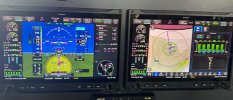
IMG_5214 2.jpeg
Above, you can see the best widget configuration on the PFD (mine, natch!): Nearest, Flight Plan, and Traffic. You can also see that there's still a lot of duplicated controls in the top data bar. Below, I've fixed up the data bar some, removing most of the controls from the second display so that there are lots more data fields available. That display shows the max number of data fields available (8) even with the nav radios and EMER button visible. Unfortunately I managed to get the scheduled message blocking the HSI data block on both! Also, note the flap and trim indications left of the HSI and below the airspeed indicator in both pics.
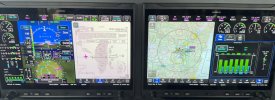
IMG_5222 2.JPG
Of course, I've really loaded up the displays here - You can make this MUCH simpler if that's your thing. I've got the HSI Map active, three MFWs, AP/FD on, SVT, most of the display options except the flight path boxes (as much as I liked playing Pilotwings on the Nintendo when I was younger, that's a bit much even for me). I probably should have taken a pic with a simpler setup, but where's the fun in that? ;)

Happy to try to answer questions if anybody's got 'em.

 
If you have GFC500 autopilot and a GI275 as your backup, you still cannot do autopilot failover if the Axis fails because the GI275 must be connected to the Axis via HSDB and *not* CAN bus, and GFC500 connects only via CAN bus so they won't talk. :( If you have a G5 as your backup, it can fail over because the G5 doesn't do HSDB so is still connected to the CAN bus.
Is both a GI275 and a G5 a possibility?
Happy to try to answer questions if anybody's got 'em.
Does it still have the analog 6-pack mode from the G3x?
 
Is both a GI275 and a G5 a possibility?
Not sure right offhand, it'd depend on what else is connected and where (and how!). It can do more than the G3X Touch, which only had CAN bus and RS-232 while the Axis adds HSDB and ARINC 429.

I would think so, since if it's connecting via CAN bus which is a daisy-chain architecture it would just be another unit in the chain if you had a GFC500 for example.

Looking through the Axis install manual, I can't see anything that precludes both a G5 and a GI275, but they do specify that there be no more than one of each of them. What would the use case be for having both along with an Axis display?

Does it still have the analog 6-pack mode from the G3x?
Why? :dunno:

That's a helluva lot of money to spend to get what you used to have on a screen.

And it appears, based on a search of the Pilot's Guide, that Garmin agrees - The answer is no. At least, not in the current iteration of the software.
 

I could see it helping a guy transition from a six pack to glass.

If you have GFC500 autopilot and a GI275 as your backup, you still cannot do autopilot failover if the Axis fails because the GI275 must be connected to the Axis via HSDB and *not* CAN bus, and GFC500 connects only via CAN bus so they won't talk. :(

Well, that sucks. I currently have dual GI 275's and the GFC 500.

As I also have a GTN 650 and a GNC 355, the only AXIS I would get would be the "standard" VFR without the radios, IFR whatnot. I believe - could be wrong - that the GTN and GNC could be controlled from the AXIS, although I'm not sure exactly how I'd use that. But would that standard "VFR" Axis display be able to bring up approach plates, etc.? Maybe you'd still be running a tablet in the plane with ForeFlight/Garmin Pilot, etc.

The display looks great, very clear, nicely laid out; they had a 182 with the AXIS installed that I checked out. I can see that its much crisper than the G3 display.
 
Last edited:
I could see it helping a guy transition from a six pack to glass.
I could see that being a crutch. There's nothing about having the six pack on glass that helps the transition, it just allows you to have the glass while not really transitioning to it.

I believe - could be wrong - that the GTN and GNC could be controlled from the AXIS, although I'm not sure exactly how I'd use that.
I'm not sure the VFR one would, and the flight plan sync from the GTN would only work if it's an Xi.

But would that standard "VFR" Axis display be able to bring up approach plates, etc.?
Yes.

The display looks great, very clear, nicely laid out; they had a 182 with the AXIS installed that I checked out. I can see that its much crisper than the G3 display.
Yup. That's why we didn't install the G3X, it was clear that it was going to be replaced by something much nicer looking.
 
I'm not sure the VFR one would, and the flight plan sync from the GTN would only work if it's an Xi.

I might have an "out" in this case. My GNC 355 is synced to my GTN 650xi, so it seems the Flight Plan would appear on the Axis. If the Axis doesn't control the GTN xi, that's OK. I would actually still want to compartmentalize all of that work in the center stack as it is now.

Yup. That's why we didn't install the G3X, it was clear that it was going to be replaced by something much nicer looking.
Smart move. I was planning on adding a third GI 275 for an EIS, but maybe next year I should skip that and just get the Axis and engine probes and put the EIS on the Axis???? Dang........ so many ways to spend money on something I really don't have to have but would be really be nice to have. :cool:
 
I admit,I’m giving serious thought to upgrading my G3 to the Axis. I played with the Axis at the Garmin tent and I like it and think it’s worth the $$ to me. Quicker response, higher resolution and contrast, new features. For me it’s 6 new wires plus the unit itself. Easy peasy.
 
I admit,I’m giving serious thought to upgrading my G3 to the Axis. I played with the Axis at the Garmin tent and I like it and think it’s worth the $$ to me. Quicker response, higher resolution and contrast, new features. For me it’s 6 new wires plus the unit itself. Easy peasy.
Experimental?
 
* If you have GFC500 autopilot and a GI275 as your backup, you still cannot do autopilot failover if the Axis fails because the GI275 must be connected to the Axis via HSDB and *not* CAN bus, and GFC500 connects only via CAN bus so they won't talk. :(

Wait - right now, the GI275 can drive the GFC 500. I assume the Axis and GI275 would be synced. What if you just continued to drive the GFC500 with the GI275? Anything you do on the AXIS would flow to the GI275 and then onto the GFC 500.

Your GI275 would then be your Primary (as it is now), with the AXIS technically being a MFD that also shows and does everything it would do if it was technically the PFD.
 
Back
Top