Altimeter bugs?

fiveoboy01

Pattern Altitude
Joined
Apr 21, 2013
Messages
2,336
Location
Madison, WI
Display Name
Dirty B
Home Airfield
KMSN
Anyone use them? Good, bad, ugly, not necessary?

I don't find myself forgetting MDA/DA often and the plate is right there with the altitude highlighted... but maybe not the worst idea to have it marked on the altimeter...?

Trying to decide if I want to shell out $50 for one. I've got the Cyber Monday itch:)
 
Anyone use them? Good, bad, ugly, not necessary?

I don't find myself forgetting MDA/DA often and the plate is right there with the altitude highlighted... but maybe not the worst idea to have it marked on the altimeter...?

Trying to decide if I want to shell out $50 for one. I've got the Cyber Monday itch:)

I have one... and yes it's useful. Helps me to remember assigned altitudes ("runway heading 3000 expect 5000 in 10 minutes" has me bugging 3000), pattern altitudes, MDA's etc.

But no way I shelled out $50. I got one of these $12 ones from Sportys.
 
And if you are a DYI-er, you can make your own out of a cup hook.

See this post from AOPA's forum
 
I thought about 1 during IR training. I did drift a couple times re-verifying the DA on some ILS approaches. Just decided to pay attention and do a brief out loud to remember DA/MDA. If I could remember 10+ phone numbers, addresses and such pre-smart phone, I can remember 1 number for a few minutes.
 
I was looking at those two, but the $50 style is somewhat different. They have 3 marks... 500 above, 200 above, and a mark at DA/MDH. You can rotate the bezel around. To me they seem a bit less obtrusive than the suction cup ones. Not sure I'm ready to drop $50 yet though. Maybe I need more convincing:)

https://www.sportys.com/pilotshop/altitude-alert-indicator-2-3-4-in-dia.html
 
Never used em. I just look at my scratch pad for what I'm assigned. And on approaches I call out, 3400 for 1200, 3200 for 1200, 2400 for 1200, etc
 
The end answer is, to each his own.

Get it... if you like it, good.

But I also do Ed's method of saying, "I just crossed XXXXX, my next fix is YYYYY and I can descend to ZZZZ." or, "I'm on final. Descending through XXXX for YYYY min. Missed approach procedure is _______". And I repeat the process as I cross each fix on the plate.
 
I used one of the tripple marked ones during training and thought it was marginally useful. Then I had the Aspen installed and haven't touched the altimeter bug since...
 
I was looking at those two, but the $50 style is somewhat different. They have 3 marks... 500 above, 200 above, and a mark at DA/MDH. You can rotate the bezel around. To me they seem a bit less obtrusive than the suction cup ones. Not sure I'm ready to drop $50 yet though. Maybe I need more convincing:)

https://www.sportys.com/pilotshop/altitude-alert-indicator-2-3-4-in-dia.html

One of the planes I fly has this. I really like it. Definitely not necessary, but it helps with situational awareness of minimums. I found it particularly helpful in the (admittedly uncommon) case where the DA/MDA changes from what you originally briefed or what is on the chart. Simply turn it to the new value and don't worry about confusing the numbers. Of course, if you set it wrong or forget to set it, it does more harm than good.

I tried using it for en route altitudes, but that didn't seem to work well for me.

I don't know how it connects, but if it's as simple to plug in as it sounds, $50 seems absurdly overpriced.
 
\__[Ă”]__/;1955846 said:
I don't know how it connects, but if it's as simple to plug in as it sounds, $50 seems absurdly overpriced.

they are just held on with glue
 
I was looking at those two, but the $50 style is somewhat different. They have 3 marks... 500 above, 200 above, and a mark at DA/MDH. You can rotate the bezel around. To me they seem a bit less obtrusive than the suction cup ones. Not sure I'm ready to drop $50 yet though. Maybe I need more convincing:)

https://www.sportys.com/pilotshop/altitude-alert-indicator-2-3-4-in-dia.html

So, the the green-yellow-red bugs easily rotate, as a group, behind an auxiliary ring that's pressed onto the altimeter's existing bezel?
 
for $3.99.....I'd use these. :D

1561905-2.jpg
 
No, I don't use them, nor would I want them on my plane.

Just not needed and extra clutter and expense.
 
I don't use them. I'll usually write down the altitude if I'm not flying something with an altitude select.
 
I have one... and yes it's useful. Helps me to remember assigned altitudes ("runway heading 3000 expect 5000 in 10 minutes" has me bugging 3000), pattern altitudes, MDA's etc.

But no way I shelled out $50. I got one of these $12 ones from Sportys.

Ditto. Suction cup bug works great. Only falls off once a year. :thumbsup:
 
Anyone use them? Good, bad, ugly, not necessary?

I don't find myself forgetting MDA/DA often and the plate is right there with the altitude highlighted... but maybe not the worst idea to have it marked on the altimeter...?

Trying to decide if I want to shell out $50 for one. I've got the Cyber Monday itch:)
If you are feeling really rich, you could get one of these:

http://www.p2inc.com/skybuddy.asp

It does heading and altitude, but for a hefty $300.

I'd never spend the money on that, but the airplane I'm buying has one already installed, so I suppose I'll make use of it.
 
Interesting unit.

The install would probably cost me more than the box:)
 
Interesting unit.

The install would probably cost me more than the box:)
Probably, but you can use it portable.

That said, it is an awful lot of money for something that can be accomplished with a pencil and scratch pad. I'd probably never use it if it didn't come with the airplane.
 
Now that's a picture of overkill. Not even an alerter function saying your nearing, at, or deviated from your altitude. And $300 will cover lots of pencil and pads of paper
 
Now that's a picture of overkill. Not even an alerter function saying your nearing, at, or deviated from your altitude. And $300 will cover lots of pencil and pads of paper

Agree, as soon as I saw it didn't even have an annunciator or anything I thought it was too much.

Of course if it did have an alert of some sort, it would need to be connected to your altimeter or transponder I'd assume. Then it would cost 10 grand:lol:
 
Now that's a picture of overkill. Not even an alerter function saying your nearing, at, or deviated from your altitude. And $300 will cover lots of pencil and pads of paper
Ain't that the truth! First time I saw it on a photo of the panel, I had to look it up to see what the heck it was. I was amazed that someone would pay that much to have it added to an already very capable panel.
 
Anything that works is good, something simple like this might just save you.:yes:
 
Not everyone is an APOA member.

Then for those amongst this classification...

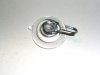
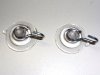
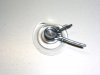
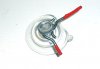
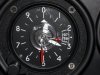
My local Lowe's didn't have the right kind of suction-cup cuphook; they only had ones with all plastic parts that wouldn't have worked correctly. So of course I turned to Amazon and ordered cuphooks yesterday. They arrived today, a day early, so I spent about 30 minutes fooling around with them, as illustrated by the pictures.

I stopped by the hangar after picking up my dog Jake from doggie day care. The red acrylic paint is still a bit tacky so I didn't try to adjust the hands to any meaningful position. But I think the last picture illustrates how it will look.

The next test will be to try it in flight and see if I like it. If yes, then cool. If not, I'm out a very few bucks and about a half hour. One possible problem concerns adding a second hand to the bug. to make the hands, I straightened out two cuphooks, cut them to length and filed the ends to eliminate sharp points. I then had to put two into a channel on the suction cup that is clearly meant for one.

At first, turning either one would force the other one out of the channel. I solved that by tightening the ends. Then they were hard to turn, which obviously isn't good for something that's supposed to be easy to use. I solved that, mostly, by using some spray silicone lubricant.

If it turns out to be awkward, it would take about 60 seconds to remove one of the hands and just have a single hand so if this doesn't work well then that would be my next step.

It was fun little project. I hope it works out. Thanks to JohnK for the idea and to Wayne Bower for the idea of having two hands.​
 

Attachments

  • bug1.jpg
    bug1.jpg
    49.4 KB · Views: 21
  • bug2.jpg
    bug2.jpg
    70.4 KB · Views: 20
  • bug3.jpg
    bug3.jpg
    54.7 KB · Views: 22
  • bug4.jpg
    bug4.jpg
    37.8 KB · Views: 25
  • bug5.jpg
    bug5.jpg
    115.8 KB · Views: 32
If it turns out to be awkward, it would take about 60 seconds to remove one of the hands and just have a single hand

I just use a single hand, as most of the flying I did was in the system. That said, if I wanted to be reminded of 2500, I'd just point it at the half tick between the 2 and 3.
 
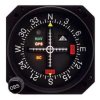
One of the better tricks I learned from a corporate pilot was to use the ring on your CDI for altitude reminder.
(This is when navigating with anything other than VOR's of course which is about 100% of the time I am flying).

I have gotten in the habit to just move my right hand up and twist heading bug then CDI for Altitude before read back of heading & altitude changes.
 

Attachments

  • MD200306.jpg
    MD200306.jpg
    21.2 KB · Views: 21
Hmm. Interesting. Further report wanted after you try it out.

That post wasn't mine. It was something I read about on the AOPA forum many years ago. I use the $12 one from Sportys.
 
I don't use it, but not sure why I don't; I do use the heading bug . . .funny thing is, I have an AP that'll track the course. . .
 
Back
Top