
- Joined
- Oct 16, 2019
- Messages
- 8,855
- Location
- Atlanta / Marietta
- Display Name
- Vintage Snazzy (so my adult children say)
- Home Airfield
- KPUJ
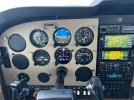
Now the fun part of getting up to speed with all of this.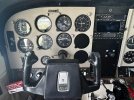

This is true haha. What I really like is the altitude capture and how intuitive it is to use. When things get especially busy or you get some changes that ramp up the mental workload the altitude capture is a real asset.Nice! The 500 autopilot just feels like cheating-especially flying an approach.
Would have to change the ADI config from a 4 in 1 to a 3 in 1. Should be an easy change for the shop to make.Is there a way to remove the horizontal heading tape from the AHRS GI275?
Ah, has to be an installer. ThanksWould have to change the ADI config from a 4 in 1 to a 3 in 1. Should be an easy change for the shop to make.

From my notes to myself about this:Ah, has to be an installer. Thanks
It doesn’t require any special unlocks as @Llewtrah381 noted. I just generally avoid sending folks in to config mode on the 275’s… It seems to me that it’s a lot easier for folks to accidentally change random config on than other Garmin hardware due to the limited screen size.Ah, has to be an installer. Thanks
Yes, the current heading (and selected heading) will still appear on the HSI, it will just no longer appear on the ADI when switching from 4-in-1 to 3-in-1.If I turn off the heading tape should I assume the GFC 500 AP will still get the heading information it needs?
Don't enter a flight plan? Piece of black electrical tape?Can you also edit the data fields in the HSI? I don’t really need the ETE, distance to next way paint, etc. I’d rather those be blank.
The autopilot - I think - didn't like the ADHRS set to 3 in 1. I'll experiment / practice more another day.Yes, the current heading (and selected heading) will still appear on the HSI, it will just no longer appear on the ADI when switching from 4-in-1 to 3-in-1.
What made you want to retain your standby indicators? Just a personal preference?Now the fun part of getting up to speed with all of this.View attachment 140011View attachment 140012
Personal preference mostly. Zero cost to keep them, and a back up to a back up is always nice.What made you want to retain your standby indicators? Just a personal preference?
Looks really nice!
Great answer!Personal preference mostly. Zero cost to keep them, and a back up to a back up is always nice.
I've always scanned with a six pack, and this makes things easier if I skip back to that by habit. Good double check never hurts. AND..... the larger indicators are a bit easier on these eyes vs perhaps when I was 20 something.
I’m not an expert but I don’t think that’s going to be the case. I think the HSI 275 is the GPSS one driving the AP, not the AI one. I have mine in 3-in-1 and the AP works fine.The autopilot - I think - didn't like the ADHRS set to 3 in 1. I'll experiment / practice more another day.
I love the new GI275 update that includes the G force!I’m not an expert but I don’t think that’s going to be the case. I think the HSI 275 is the GPSS one driving the AP, not the AI one. I have mine in 3-in-1 and the AP works fine.
BTW: as in another (1-post) thread I did, apparently 3-in-1 now adds a G meter to the AI display and is an option for the configurable field (upper left-ish) on the HSI page.
I think the HSI 275 is the GPSS one driving the AP, not the AI one.
I probably said that wrong. I think they both play a role, at least for my Century (Piper) AP: the AI tells the AP what to do to level the wings and the HSI tells it where to go via GPSS.Interesting. I had thought the ADHR was the driver since it can tell the AP how to level the wings, how to roll and pitch, etc. I do know that if the ADHR fails the HSI unit takes over, so perhaps it uses its redundancy as the primary AP driver.

Thank you for trusting us with your audio panel. I think you'll appreciate the dual BT capability and the ease of use. Looks great in your panel.Now the fun part of getting up to speed with all of this.View attachment 140011View attachment 140012
Big thanks to PS for taking the time to answer my questions last year when picking what to get, as well as the helpful hints on what to do with the old PAR 200B. I was able to make a good deal based on the information you all gave me.Thank you for trusting us with your audio panel. I think you'll appreciate the dual BT capability and the ease of use. Looks great in your panel.
Mark


