Thoughts on Garmin vs Bendix/King

turbosuper

Pre-takeoff checklist
Joined
Aug 3, 2021
Messages
130
Display Name
turbosuper
After 25 years of flying with a Bendix/King KMD550, KLN94, KX165A, KDR610 XM, I upgraded to a Garmin GTN 750Xi, GPS 175, GI 275 MFD/CDI, GDL 69 XM. This was driven by the KLN94 not being a WAAS GPS, which means I could not even do an ILS at my local airport because it requires RNAV 1-GPS. There is not much choice in avionics and I suppose Garmin is the best choice, but I have lost features such as:

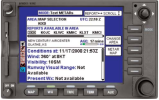
KMD550 displayed graphical METARs as two colored blocks, with the top block being sky condition and the bottom visibility.

KMD550 displayed the age of the METAR so at a glance you knew how old it was. The GTN shows age for PIREPs, but not METARs.

KMD550 had a banner on the bottom of the map screen showing current position i.e. "5NM NW of XYZ" no mental math needed converting radials.

KMD550 XM Nexrad radar seemed to be rendered better than on the GTN. On the GTN XM and ADS-B Nexrad both look blocky.

KLN94 allowed entering the altimeter pressure and setting an altitude so that you got an audible warning 1,000' prior to and at set altitude. To get this feature back I would need to purchase a GI 275 attitude indicator.

KMD550 had a much better layout for navigating METARs and TAFs, one button press brought up the METAR page with your destination METAR and a list of about 10 other nearby airports across the top of the screen. You could view them by just using the joystick and scrolling left or right. You could also change to airports along your route or nearest you. On the GTN I need to open the waypoint screen, enter an airport ID and then select to view the weather. This same process must be redone to select another airport to veiw weather. If I want to see nearby airport weather at my destination I need to scroll there on the map and touch the airport I want to see, bring up the weather with a few presses and repeat for other airports. The KMD550 was the clear winner for easy viewing of weather.

Garmin could add these features with a software upgrade, which would bring back my 25 year old funtionality.
 
After 25 years of flying with a Bendix/King KMD550, KLN94, KX165A, KDR610 XM, I upgraded to a Garmin GTN 750Xi, GPS 175, GI 275 MFD/CDI, GDL 69 XM. This was driven by the KLN94 not being a WAAS GPS, which means I could not even do an ILS at my local airport because it requires RNAV 1-GPS. There is not much choice in avionics and I suppose Garmin is the best choice, but I have lost features such as:

KMD550 displayed graphical METARs as two colored blocks, with the top block being sky condition and the bottom visibility.

KMD550 displayed the age of the METAR so at a glance you knew how old it was. The GTN shows age for PIREPs, but not METARs.

KMD550 had a banner on the bottom of the map screen showing current position i.e. "5NM NW of XYZ" no mental math needed converting radials.

KMD550 XM Nexrad radar seemed to be rendered better than on the GTN. On the GTN XM and ADS-B Nexrad both look blocky.

KLN94 allowed entering the altimeter pressure and setting an altitude so that you got an audible warning 1,000' prior to and at set altitude. To get this feature back I would need to purchase a GI 275 attitude indicator.

KMD550 had a much better layout for navigating METARs and TAFs, one button press brought up the METAR page with your destination METAR and a list of about 10 other nearby airports across the top of the screen. You could view them by just using the joystick and scrolling left or right. You could also change to airports along your route or nearest you. On the GTN I need to open the waypoint screen, enter an airport ID and then select to view the weather. This same process must be redone to select another airport to veiw weather. If I want to see nearby airport weather at my destination I need to scroll there on the map and touch the airport I want to see, bring up the weather with a few presses and repeat for other airports. The KMD550 was the clear winner for easy viewing of weather.

Garmin could add these features with a software upgrade, which would bring back my 25 year old funtionality.
Thoughts on Garmin vs BK? Well, I'm in a multiyear process of spending all of my free cash ripping BK stuff out of my airplane for a reason. I think the last straw was being quoted $9600 for an overhaul exchange trim servo for my KFC-150. That's "FU" pricing. Or maybe it was the godawful UI on the KSN 770. Or maybe it was being repeatedly told that the KI-300 was going to ship "in Q4" (it finally did, on the fifth year!)

Honeywell/BK is a sad shadow of its former self and pretty much all of their current products are garbage.

Now, I see that the 550 had some interesting and useful features that you list above. Why not make a feature request to Garmin?

FWIW, some of those features seem to have been picked up on the EFB side of things - For example, ForeFlight can do the "5nm NW of XYZ" thing. Same with the list of METARs nearest a particular airport.
 
Most of that functionality is done by the G3X, I only use my GTN 650 for navigation, maybe if I had the bigger 750 I would use it for weather monitoring.
Nowadays most pilots use their iPad for weather, etc. anyway.
 
Distance and Bearing is a user field on GTN. "nearest " button gets you airports to paint a picture of weather at airports. Get an ipad to connect to your Garmin stuff with Foreflight or Garmin Pilot and everything your describing is dead nuts easy.
 
I agree with the sentiments of the OP. The thoughtfulness of the old Bendix King team is clear to me as a former KLN-94 user. Despite the obvious technological advancements of the GTN series, I still find the KLN-94 to be more intuitive and efficient in many respects. While the ability to fly WAAS approaches is a valuable upgrade, I miss the simplicity of cycling through waypoints without looking—just by pulling out and rotating the inner knob. Many of the features the OP describes aren’t just about whether Garmin Pilot or the GTN can display this information, but rather how it’s presented to remain easily recognizable in a busy and possibly turbulent cockpit.

I think it would be great if Garmin tapped into some of the ideas brought up by the OP.
 
Thoughts on Garmin vs BK? Well, I'm in a multiyear process of spending all of my free cash ripping BK stuff out of my airplane for a reason. I think the last straw was being quoted $9600 for an overhaul exchange trim servo for my KFC-150. That's "FU" pricing. Or maybe it was the godawful UI on the KSN 770. Or maybe it was being repeatedly told that the KI-300 was going to ship "in Q4" (it finally did, on the fifth year!)

Honeywell/BK is a sad shadow of its former self and pretty much all of their current products are garbage.

Now, I see that the 550 had some interesting and useful features that you list above. Why not make a feature request to Garmin?

FWIW, some of those features seem to have been picked up on the EFB side of things - For example, ForeFlight can do the "5nm NW of XYZ" thing. Same with the list of METARs nearest a particular airport.
Speaking of KSN 770, I requested the install manual for that box and BK/Honeywell offered a PDF copy for $19,000. A call confirmed that wasn't a pricing mistake. I declined.

Sounds like the KMD550 was a good device.
 
BK spent too much time resting on their laurels,counting on customer loyalty does not work in the modern day avionics world
 
The thoughtfulness of the old Bendix King team is clear to me as a former KLN-94 user. Despite the obvious technological advancements of the GTN series, I still find the KLN-94 to be more intuitive and efficient in many respects.
All the same stuff is there, it's just different. I've only ever had Garmin, and I find all the things the OP wanted to do, easy. Having said that, I'd likely struggle on BK. A bit like Mac vs PC or iPhone vs Android. It does require reading the manual or looking at some of the training videos that are available. Data fields are nearly all user selectable and I have found many other pilots that have flown with me didn't know those menus were there. There are also some short cuts that are in the manual, but unless you use them, they aren't intuitive. Once you use them, you kind of forget how you used to do it. For example in the NAV screen, which I have up en-route, a touch on the magenta next fix takes you directly to the flight plan page. There's numerous things like that. Finding a CFI or other expert that knows how to make all that stuff sing are hard to find. @midlifeflyer and a few others on POA have excellent knowledge of how it all works.

Not knocking BK, just pointing out that features don't need to be added if they are already there.
 
There's a couple of things. Mainly, the 550 was strictly a display device, not a GPS or FMS. So much of it's functionality was, as @flyingcheesehead pointed out, picked up by EFBs. It really was a great when coupled with the KLN94. The KLN 94 predated the GNS 430/530 by a couple of years and, as I recall, was the first GPS navigator with a dedicated PROC button.

@turbosuper, thoughts on "vs"? Any transition of equipment is going to entail a sense of "why doesn't it have this?" or "how do I do that?" Heck, when I bought mu last 3 cars, I had that sense when I bought my last three cars!

Overall, I agree with @Hang 4's comments. In the typical aircraft set up most everting you are asking for will be there in one form or another. And there's a whole bunch of stuff that has increased both capability and situational awareness over the past 40 years. It's just a matter of learning something new. And like beauty, "intuitive" is often in the eye of the beholder and usually means "what I am used to." Even sticking with modern equipment, I'm repeatedly asked whether I like the GTN or the IFD better. I can usually point to specific things that I think one does better than the other but on balance, they are just different approaches to the same problems.
 
Not knocking BK, just pointing out that features don't need to be added if they are already there.

Again, it is not a matter of features being present or absent. It is a matter of UI efficiency.

I am a proficient user in both systems I’ve owned. Quantitatively, it takes less steps to perform many common functions on the KLN than it does on my Garmin. The features are there and more, but it does take more inputs from the user.

It is difficult to compare a system from the 90s to the present day, but if one has used both I think that there is a certain genius and passion that existed in the old BK team as compared to the Garmin team that is certainly diligent but feels a little bit more square.
 
most of what OP cited was METAR or weather related... as already suggested an iPad solves that problem for less than a grand. almost every EFB can handle ads-b weather.
 
I agree with the sentiments of the OP. The thoughtfulness of the old Bendix King team is clear to me as a former KLN-94 user. Despite the obvious technological advancements of the GTN series, I still find the KLN-94 to be more intuitive and efficient in many respects. While the ability to fly WAAS approaches is a valuable upgrade, I miss the simplicity of cycling through waypoints without looking—just by pulling out and rotating the inner knob. Many of the features the OP describes aren’t just about whether Garmin Pilot or the GTN can display this information, but rather how it’s presented to remain easily recognizable in a busy and possibly turbulent cockpit.

I think it would be great if Garmin tapped into some of the ideas brought up by the OP.
You understand exactly what I am saying.
 
This was driven by the KLN94 not being a WAAS GPS, which means I could not even do an ILS at my local airport because it requires RNAV 1-GPS. There is not much choice in avionics and I suppose Garmin is the best choice, but I have lost features such as:
Ummm... NO!!! You can't do an ILS Approach with ANY GPS device. Your GTN has both GPS and an ILS/LOC/VOR receiver in it and that's why you can do the ILS Approach now. Be sure you work on this with your CFI(I) as you learn your new panel.
 
Ummm... NO!!! You can't do an ILS Approach with ANY GPS device. Your GTN has both GPS and an ILS/LOC/VOR receiver in it and that's why you can do the ILS Approach now. Be sure you work on this with your CFI(I) as you learn your new panel.
The approach plate has a note for the ILS showing RNAV 1-GPS required. So without that equipment you cannot do the ILS.
 
1000002765.png
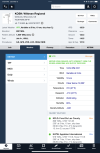
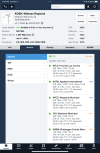
This shows the ease of use on a KMD550 to get weather. One press of the WX button brings up this page, then using the joystick you can move to any of the airports listed horizontally. In less than a second you can scroll to the next closest airport.
 
Distance and Bearing is a user field on GTN.
Only to destination airfield, not to the nearest. And this is one of the fields I keep up on my map on the GTN, very useful anyway.

"nearest " button gets you airports to paint a picture of weather at airports.
That's nearest to your current location, not to the destination where you'd probably also want to be able to check weather... And it does not show the weather on the first screen, you have to tap the airport and then tap "Wx Data".

Get an ipad to connect to your Garmin stuff with Foreflight or Garmin Pilot and everything your describing is dead nuts easy.
Kinda... But it is different and will take some time to adjust.

Speaking of KSN 770, I requested the install manual for that box and BK/Honeywell offered a PDF copy for $19,000. A call confirmed that wasn't a pricing mistake. I declined.
:rofl: Yeah, that sounds about right. It's like they actively hate customers, though a $19K PDF is another level worse than my $9600 used trim servo.
Oh, and dealers. Local avionics shop was a BK dealer, and he said they wanted him to sell $1M+ in new BK hardware *per year* to keep it, but none of his customers wanted their stuff. So, they rescinded his authorization to work on anything, even made him return all the copies of the manuals necessary to do it legally. He doesn't much care, since he's a Garmin dealer and does quite well with that.

I think BK has four dealers left now... And I seriously don't know how they sell ANYTHING or how they're making any money at all. They certified a whole retrofit glass panel for King Airs... I've never heard of one being installed though! That's a lot of $$$ down the drain.

All the same stuff is there, it's just different. I've only ever had Garmin, and I find all the things the OP wanted to do, easy.
Not all of it, especially how the OP described. For example, the ceiling and visibility both being graphically represented simultaneously.

I love how Honeywell rebadged an Avidyne IFD and called it "AeroNav".
Well, after blowing all the money certifying stuff that nobody wants, one year they realized they didn't have any products and so they started running off and buying up others' products and forming partnerships so that they could form this whole "AeroNav" line. It's not like that stuff works any better together because they slapped a new name on the front, and it's not like it serves the end user to buy something with that name on it, but I guess it justifies the booth at Oshkosh to somebody, maybe?

It is difficult to compare a system from the 90s to the present day, but if one has used both I think that there is a certain genius and passion that existed in the old BK team as compared to the Garmin team that is certainly diligent but feels a little bit more square.
You do know where the group that founded Garmin came from, don't you?

View attachment 138867
This shows the ease of use on a KMD550 to get weather. One press of the WX button brings up this page, then using the joystick you can move to any of the airports listed horizontally. In less than a second you can scroll to the next closest airport.
This is where an EFB like ForeFlight excels. Just go to the airport page and hit "Weather":

IMG_1053.PNG

No additional touches to see the first few airports nearest the one you chose in the lower right, or you can merely scroll down to see the nearest 10:

IMG_1054.PNG

Better yet, you can look at all of them at the same time with no additional touches required.
 
So, because the BK group moved to Garmin and put their avionics venture on the path to their ensuing success and because Foreflight is available, then the OP who has no point? I am sure the OP, who has a very well equipped avionics suite, knows how to get weather from an EFB. Perhaps, the gap here lies elsewhere.
 
I guess you guys like the text, I prefer a graphical interface:

a4b3353e08d4d019d747f7dab991b01c.jpg
 
Ummm... NO!!! You can't do an ILS Approach with ANY GPS device. Your GTN has both GPS and an ILS/LOC/VOR receiver in it and that's why you can do the ILS Approach now. Be sure you work on this with your CFI(I) as you learn your new panel.
He’s talking about specific approaches which require GPS even if the primary is an ILS. There are a number of them (and other ground-based procedures, including SIDs and STARs) around, by design, amendment, and NOTAM.
 
Only to destination airfield, not to the nearest. And this is one of the fields I keep up on my map on the GTN, very useful anyway.


That's nearest to your current location, not to the destination where you'd probably also want to be able to check weather... And it does not show the weather on the first screen, you have to tap the airport and then tap "Wx Data".


Kinda... But it is different and will take some time to adjust.


:rofl: Yeah, that sounds about right. It's like they actively hate customers, though a $19K PDF is another level worse than my $9600 used trim servo.

Oh, and dealers. Local avionics shop was a BK dealer, and he said they wanted him to sell $1M+ in new BK hardware *per year* to keep it, but none of his customers wanted their stuff. So, they rescinded his authorization to work on anything, even made him return all the copies of the manuals necessary to do it legally. He doesn't much care, since he's a Garmin dealer and does quite well with that.

I think BK has four dealers left now... And I seriously don't know how they sell ANYTHING or how they're making any money at all. They certified a whole retrofit glass panel for King Airs... I've never heard of one being installed though! That's a lot of $$$ down the drain.


Not all of it, especially how the OP described. For example, the ceiling and visibility both being graphically represented simultaneously.


Well, after blowing all the money certifying stuff that nobody wants, one year they realized they didn't have any products and so they started running off and buying up others' products and forming partnerships so that they could form this whole "AeroNav" line. It's not like that stuff works any better together because they slapped a new name on the front, and it's not like it serves the end user to buy something with that name on it, but I guess it justifies the booth at Oshkosh to somebody, maybe?


You do know where the group that founded Garmin came from, don't you?


This is where an EFB like ForeFlight excels. Just go to the airport page and hit "Weather":

View attachment 138873

No additional touches to see the first few airports nearest the one you chose in the lower right, or you can merely scroll down to see the nearest 10:

View attachment 138872

Better yet, you can look at all of them at the same time with no additional touches required.
I do not see this option in Garmin Pilot and since Foreflight does not run on Android I cannot use it. Besides I spent all this money on panel mount units, it should be able to do what the 25 year old units could.
 
You can do most of the things but just not the same interface. Current Windows OS is not anything like the 2000 version.

You want a MFD, but it will be more graphical interface, no joystick, touch screen interface, you can go with a panel mount 660 to save money.

236593bb8eedcdaf47f57bed22ccdeea.jpg


But if you want a 25 year old interface, then you need to keep the 25 old box.
 
The main thrust of this discussion is getting too religious for me.
Perhaps my title was not the best, it really was not meant to be a discussion of what brand is better. I am just saying how I lost features with my new equipment. I read somewhere that Garmin intended the GTN 750 to replace the KMD550/KLN94 combo and since the 750 is the same size that might be true. I did not need to recut my panel, it was a perfect fit. I think the GTN 725 is actually the replacement for those Bendix/King units.
 
Perhaps my title was not the best, it really was not meant to be a discussion of what brand is better. I am just saying how I lost features with my new equipment.
And my post was not intended to suggest Garmin was superior. I think you can get nearly all you want, just in a slightly different way. Another way to think about it might be to think in terms of what you are trying accomplish vs the tool to get it done. Want to build situational awareness of the weather en-route - Garmin Pilot with radar and METAR enabled in the map layer. Need a position relative to a VOR - GTN Nearest>VOR - list with bearing and distance comes up. Yes it's two touches vs a dedicated button, but how often do you need it?
IMG_B2BEC2EED6D9-1.jpeg

I would agree if you are transitioning from a unit with one way to do stuff to a completely different one it can be frustrating. I did a IPC with a CFII who was complaining about entering frequencies with the touch screen in turbulence. I showed him how to do it with the knobs. He had no idea that could be done. I had never entered a frequency with the touch screen and completely understood why it would be a PITA after watching him do it. When I did my instrument rating, that CFII showed my a bunch of short cuts that I had no idea existed, in spite of reading the manual over and over again.
 
And my post was not intended to suggest Garmin was superior. I think you can get nearly all you want, just in a slightly different way. Another way to think about it might be to think in terms of what you are trying accomplish vs the tool to get it done. Want to build situational awareness of the weather en-route - Garmin Pilot with radar and METAR enabled in the map layer. Need a position relative to a VOR - GTN Nearest>VOR - list with bearing and distance comes up. Yes it's two touches vs a dedicated button, but how often do you need it?
View attachment 138878

I would agree if you are transitioning from a unit with one way to do stuff to a completely different one it can be frustrating. I did a IPC with a CFII who was complaining about entering frequencies with the touch screen in turbulence. I showed him how to do it with the knobs. He had no idea that could be done. I had never entered a frequency with the touch screen and completely understood why it would be a PITA after watching him do it. When I did my instrument rating, that CFII showed my a bunch of short cuts that I had no idea existed, in spite of reading the manual over and over again.
Since you brought up radios, yes using the knobs is better except the long press to switch standby to active(too long). Also if you have 8.33 khz spacing set, it takes longer to scroll through frequencies. On the KX165A it only goes through the 8.33 if you pull the knob out.
 
In regards to the suggestions that an EFB tablet makes up for the loss of functionality, does that mean I should have saved the money and only got a GPS 175? The tablet connects to that also.
 
Since you brought up radios, yes using the knobs is better except the long press to switch standby to active(too long). Also if you have 8.33 khz spacing set, it takes longer to scroll through frequencies. On the KX165A it only goes through the 8.33 if you pull the knob out.
Turn the knob to tune, touch the active frequency on screen to flip/flop. Didn't even know a long press would do that and agree that would be a pain. Can't speak to 8.33 as I don't fly anywhere that uses it. The "pull" hack seems like a good one.
 
The approach plate has a note for the ILS showing RNAV 1-GPS required. So without that equipment you cannot do the ILS.
Into KXID? (Image in your next post.) If so, I'm not seeing it on my plates. Are you flying for a company that has specific requirements?

And this would be specific for the arrival to the ILS. My point was, once there, you can't continue if you only had a GPS. So if you only had an RNAV-1 capable GPS, you would not be able to fly the Approach. You still need the receiver for the ground based LOC and GS.
 
Into KXID? (Image in your next post.) If so, I'm not seeing it on my plates. Are you flying for a company that has specific requirements?

And this would be specific for the arrival to the ILS. My point was, once there, you can't continue if you only had a GPS. So if you only had an RNAV-1 capable GPS, you would not be able to fly the Approach. You still need the receiver for the ground based LOC and GS.
He’s talking about specific approaches which require GPS even if the primary is an ILS. There are a number of them (and other ground-based procedures, including SIDs and STARs) around, by design, amendment, and NOTAM.
As @midlifeflyer explains above.
 
In regards to the suggestions that an EFB tablet makes up for the loss of functionality, does that mean I should have saved the money and only got a GPS 175? The tablet connects to that also.
That's a good question. Only you can answer it. The overall issue for you seems to be the absence of certain MFD functions you are used to accessing in a certain way from the KMD 550. The movement to a smaller unit takes even more capability away, even the larger screen display of the 750. Whether that would satisfy you is above my pay scale (I broke my crystal ball and accidentally burned my Tarot cards :D)

Aside from that, like the KLN 94, the GPS175 is a very capable GPS-only unit, although now you have WAAS. But if you still have VLOC capability, and your VLOC box feeds the GI275, I guess it could have been an option, leaving the moving map/weather and traffic display capabilities to the tablet.
 
So, because the BK group moved to Garmin and put their avionics venture on the path to their ensuing success and because Foreflight is available, then the OP who has no point? I am sure the OP, who has a very well equipped avionics suite, knows how to get weather from an EFB. Perhaps, the gap here lies elsewhere.
That was not at all my point. But, to some extent this is just a "getting used to the new gear" issue. If what you want is a KLN94 and a KMD550, then there'd be no reason to upgrade to the Garmin stuff. There's a million things the Garmin can do that the King stuff can't. :dunno:

Garmin can certainly do better on their UI, no doubt about that.

I would agree if you are transitioning from a unit with one way to do stuff to a completely different one it can be frustrating. I did a IPC with a CFII who was complaining about entering frequencies with the touch screen in turbulence. I showed him how to do it with the knobs. He had no idea that could be done. I had never entered a frequency with the touch screen and completely understood why it would be a PITA after watching him do it. When I did my instrument rating, that CFII showed my a bunch of short cuts that I had no idea existed, in spite of reading the manual over and over again.
Yep... And it takes time to learn all this stuff with a new box.

In regards to the suggestions that an EFB tablet makes up for the loss of functionality, does that mean I should have saved the money and only got a GPS 175? The tablet connects to that also.
Only you can answer that! Personally, while I lived with the iPad and a KLN89B (no MFD, no color, no map, etc) for several years, and the GPS175 did not exist when I replaced my GPS, I am still very happy with my GTN750 and I really like the big screen in the panel. I use the iPad less now, but I still use it. I hope to go to full glass within a few years, but I know I'll still be using the iPad then - After all, I've used a three-screen G3000 and *still* used the iPad for some things! They're all tools, and each tool has things it's better at than others.
 
Garmin’s not the only game in town; a Dynon/Avidyne combo has it’s own features and issues. Then there’s Aspen on the display side.
 
Only to destination airfield, not to the nearest. And this is one of the fields I keep up on my map on the GTN, very useful anyway.
At least on the G3X I make one of my bearing pointers to NRST and it points to the nearest airfield and the data block gives distance.
 
At least on the G3X I make one of my bearing pointers to NRST and it points to the nearest airfield and the data block gives distance.
Still not quite as easy as what the OP wanted, which is to parrot the text at the bottom of the KMD550. With the bearing pointer, you have to expend a little bit of brainpower figuring out where the tail of the bearing pointer is pointing.
 
At least on the G3X I make one of my bearing pointers to NRST and it points to the nearest airfield and the data block gives distance.
Oooh, that's a great idea! And I learned a new one too, more below:
Still not quite as easy as what the OP wanted, which is to parrot the text at the bottom of the KMD550. With the bearing pointer, you have to expend a little bit of brainpower figuring out where the tail of the bearing pointer is pointing.
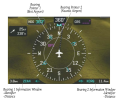
Ah, but it is. Note his comment about the data block. Here's a pic from the manual:

Screenshot 2025-03-10 at 11.33.26 PM.png
So, you don't have to "expend a little bit of brainpower figuring out where the tail of the bearing pointer is pointing", you just look at the data block for the pointer.

But here's where I learned something. The G3X Touch has not only a "nearest airport" option but a "best airport" option for the bearing pointers!

The "best airport" is defined as "the airport within the Glide Range Ring that is considered the best option for a landing" based on these criteria:

1) Must be within glide range as determined by user entered glide performance, altitude and direction of flight, airport elevation, and wind velocity
2) Expected flyover altitude - Airports with 1000' or greater margin take precedence.
3) Hard surface runways
4) Runway lengths
5) Runway alignment into the wind

That's a great feature!
 
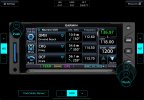
I use the GTN nearest page:

86cdca0cf597a82146e23090e786b491.jpg


I think the presentation is better.
But you're also then missing out on all of the other information the GTN can give you.

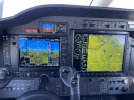
One of the things I disliked about going from the G1000 (which operates like a GNS series) to the G3000 (which operates like the GTNs) was the loss of the small windows on the PFD for things like flight plan, timers, etc... The one I used all the time was Nearest Airports (lower right of PFD here):

IMG_9776.jpg

Note the traffic window in the lower left too... The G3000 couldn't do either of those, but it could split the PFD so it had an MFD window on one half. You could put traffic there if you wanted. The NRST stuff, though, is all on one of the little touch screens, and one of those touch screens always has to be on the radios, so if you wanted to change anything on the big displays, bye bye NRST. It was enough of a pain that I rarely had it up. :(
 
Screenshot 2025-03-10 at 11.33.26 PM.png

So, you don't have to "expend a little bit of brainpower figuring out where the tail of the bearing pointer is pointing", you just look at the data block for the pointer.
Yes you do. The data block only tells you the the distance, identifier and which bearing pointer. You still have to look at the tail of the bearing pointer to determine the cardinal direction. In this case, are you 11.4nm NE of KCRQ? Or is it ENE? Maybe you got the head and tail confused, so it could be SW. Or is it WSW? Still not as easy as parroting the bottom of a KMD550.
285418001357735500.jpg

"I am 6.5 NW of the RZS VORTAC"

(from the tone of the message, it sounds like the OP is wanting to use the info to relay to ATC)
 
Back
Top