Ringtones from downloaded file

I use garageband. Once you import the file, there's an option to generate ringtone files.
 
Huh. When did Apple start allowing DIY ringtones?
 
I think since like forever
Nah, I remember when I switched to a company iPhone from Android phones I was peeved because you couldn't make your own ringtones.

Of course I'd been using bagpipes for my ringtone, so maybe it was just me they wouldn't allow it for.
 
Nah, I remember when I switched to a company iPhone from Android phones I was peeved because you couldn't make your own ringtones.

Of course I'd been using bagpipes for my ringtone, so maybe it was just me they wouldn't allow it for.

I dunno, I’ve had my custom ring tone (pull up!) prob for 10 years or so which seems like forever to me.
 
Yes I’m bored & feeling sophomoric.

I was able to dl these audio files (mp3), but can’t figure how to make them ringtones on my iphone 15 Pro

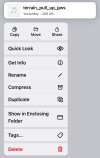
Save to Files.
In Files, long press to being up the menu.
Select Share.
Select More/
Select Use as Ringtone. That adds it to your list of available ringtones to assign in Settings or Contacts, if you want it associated with a specific person.

Edit:If you are using Garage Band, it may be more direct. In my case, they were my Android ringtones, so I just transferred and assigned them.
 
Last edited:
I dunno, I’ve had my custom ring tone (pull up!) prob for 10 years or so which seems like forever to me.
I have that one. Another is (supposedly) from a 688 attack sub (“Officer of the deck, submerge the ship! … Dive! Dive! (whoop! whoop!) Dive! Dive!”). It’s a little too long, though, with the commands being passed along through the chain of command, but it does get your attention.

I asked my nephew, a sub guy, about it and he said, “Yeah, that’s about right.”
 
I have that one. Another is (supposedly) from a 688 attack sub (“Officer of the deck, submerge the ship! … Dive! Dive! (whoop! whoop!) Dive! Dive!”). It’s a little too long, though, with the commands being passed along through the chain of command, but it does get your attention.

I asked my nephew, a sub guy, about it and he said, “Yeah, that’s about right.”

This is one I have set for when my parents call. They aren’t thrilled with it.

 
A guy I used to know had one, a very grumpy voice saying, “It’s the wife.” Surprisingly, he had that one tied to his wife’s number.
 
I dunno, I’ve had my custom ring tone (pull up!) prob for 10 years or so which seems like forever to me.
IIRC, in the early days, you could only get ringtones from the iTunes music store, which shuffled it into the "considered harmful / never pay attention to this again" bucket, along with many other basic things that Apple chooses to not get right ;)
 
My phone's email notification is a bosun's whistle. I was at a store just outside of the Army's Fort Lewis when I got an email. Got some hard looks from youngish men with short haircuts, until I explained, "Star Trek fan....."

Ron Wanttaja
 
IIRC, in the early days, you could only get ringtones from the iTunes music store, which shuffled it into the "considered harmful / never pay attention to this again" bucket, along with many other basic things that Apple chooses to not get right ;)
That was one of the things that drove me to Android. I had a considerable music library on my Desktop, and apparently couldn't transfer them to an iPhone.

Ron Wanttaja
 
Save to Files.
In Files, long press to being up the menu.
Select Share.
Select More/
Select Use as Ringtone. That adds it to your list of available ringtones to assign in Settings or Contacts, if you want it associated with a specific person.

Edit:If you are using Garage Band, it may be more direct. In my case, they were my Android ringtones, so I just transferred and assigned them.
Thanks Mark
I didn't know about the long press, the More>
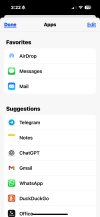
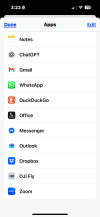
However when I get to that point, "Use as Ringtone" is not an option.
Several of my apps are offered but no UaR.
 
Thanks Mark
I didn't know about the long press, the More>
However when I get to that point, "Use as Ringtone" is not an option.
Several of my apps are offered but no UaR.
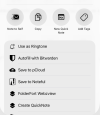
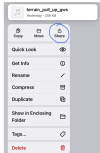
Hmmm. If you have selected an audio file, you should see:

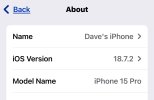
Picture is from a 15 Plus running iOS26

1764363925457.png
 
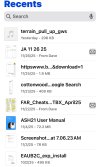
The audio file, in “Files”:

IMG_2179.jpeg

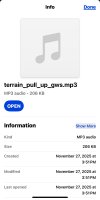
showing it’s an mp3:

IMG_2181.jpeg

Long press; option to Share:


IMG_2180.jpeg

Pressing the More button gets all these options
None are Ringtone:(IMG_2182.pngIMG_2183.png
 
Last edited:
Beats me. There one step missing from your pic sequence, but that might just mean you didn’t take the screenshots. When I touch Share
1764368400273.png I’m getting a different screen - the one I showed above,

This is pretty new to me too. My first iPhone.
 
Beats me. There one step missing from your pic sequence, but that might just mean you didn’t take the screenshots. When I touch Share
View attachment 147639 I’m getting a different screen - the one I showed above,

This is pretty new to me too. My first iPhone.
I agree, we are seeing different results when share is clicked
 
I dunno, I’ve had my custom ring tone (pull up!) prob for 10 years or so which seems like forever to me.
The first time I tried it was on an iPhone 4, so probably 2011-ish. If I remember right, there was some convoluted process involving iTunes which I refused to use for various reasons, and was verboten on corporate phones anyway. I tried a couple of things and eventually just kind of wrote it off. Now that there's a simple way to do it, I'm not really sure I care any more.
 
Something happened between upgrading my wife and my iPhones over the years with the tune that rang her phone when I called just disappeared. The classic theme song from Clint Eastwood's "The Good, the Bad, and the Ugly" went away... don't think she misses it.

 
Back
Top