[NA] What are you using for external digital storage?

SixPapaCharlie

May the force be with you
Joined
Aug 8, 2013
Messages
17,547
Display Name
First Officer 6PC
I have a 5 bay DROBO appliance for archiving and storing everything so my kids can find it in the attic and throw it away when I die.
It is no longer supported and slow as dog ****.

I want to get something much faster that can store 20-ish TB of data but can be expanded to handle more if needed and should have redundancy in the event of a drive failure.

Anyone have a recommendation for an affordable solution (< $1,000) where I can connect it to my router and be shared amongst the computers at the house?
I want something where I can pull it back to my computer with some sort of speed. The Drobo is slooooooooooow.

Before you say it, nothing in the cloud. I need (want) an on prem solution. Get off my lawn and all that...
 
I do the Synology thing - just a two drive solution, but I don't have much video so my data needs are modest (8TB under RAID 1). It's fast and easy.
 
I built my own TrueNAS box several years ago (back when it was still called FreeNAS) for far less than $1000, even with an enterprise-grade mobo and ECC memory. I use it for backups and as a media server, and it's worked great.

Drawbacks are the learning curve (I'm average-joe tech savvy, but not a Unix/Linux or network guru) and keeping it up to date (the core NAS functionality is easy to maintain, but any add-ons like the media server function will add complexity). I will admit that I'm currently stuck a few revs behind because of horror stories from folks trying to get my exact media server config working with a new, substantially-overhauled TrueNAS version that doesn't yet fully/correctly support what I currently have.
 
Another vote for Synology. Wrote a check for 40TB worth and haven't looked back. NAS was not one of the things that made my beer taste better, so I outsourced it.
 
I'm planning on TrueNAS. Right now I'm using external HDDs and Backblaze for cloud backup just in case the house burns down. From what I understand that solution will still work with TrueNAS since Backblaze backs up anything connected to a given PC/Mac, including network or external drives.
 
It really is a pick your poison decision.

Building a file server from a 4 - 5 year old machine from some company's tech refresh is worth evaluating as it still has some level of support from the manufacturer. If able to digest Linux for the OS, this reduces the many layers of overhead from WinDoze. Reason for the file server route is that the OS can run on a RAID 1 array on just two drives, and then you can size the remaining bays with additional drives as needs change and technology makes larger drives (presuming the server can still work with the new drives).

Will also need to plan for upgrades over time as tomorrow's OS's might not talk with today's storage architecture. This seems like a 20 year cycle. Or, just keep the device isolated from the Internet which lowers concerns of external penetration and lowers need to keep-up with the latest OS.

No matter what the final solution, a good backup plan is priceless. If the data fits within USB drive capacity, an external USB drive might work as they are into the TB range. I know that there are 16 TB USB drives available and have not checked into whether they are past 20 yet. If the external USB drive will work, get two and rotate them to lower risk of data loss.
 
Storage is expensive right now, I suggest finding a way to reuse the Drobo's drives. Synology has a good solution, but there are some pretty good cheaper NAS options available from companies like Ugreen.

I would suggest finding something with at least 2.5G networking and M.2 cache support to get some extra speed. Even if your current network doesn't support faster networking, I haven't heard a serious mention of a Drobo in 10 years, so you would be well served to find something forward looking.
 
I have a 7 year old 2-bay Synology (DS218+) and have been deciding what to do since I need more space now that I have stared ripping all of our video media. Synology ticked everyone off last summer by announcing they would only support Synology branded drives. Then quickly back tracked for the non rack mount versions. Thus many are now anti-Synology.

I really don't want to spend the time to figure out how to build my own with TrueNAS right now. Ubiquity isn't quite there yet with their NASs. I don't trust the new options from UGREEN and the like. I went ahead and just ordered a 4 bay Synology DS425+ plus 1 additional 12TB drive to add to the 2x 12s I have in the DS218+*.

I already backup critical personal data from the NAS to the cloud. I also bought a single 20TB drive** to put into the DS218+ that I will use locally to backup the media I can re-rip from disks but would prefer not to from the new DS425+. This summer I plan to move it to a 2nd house in the family that has a decent broadband connection so it's an offsite backup. This should work for another 5 years or so or until I want to play with something like TrueNAS.

Something to keep in mind: AI first came for all the memory, then the SSDs, now it has come for the HDDs. Western Digital has announced they have committed all production into at least 2027 so you cant find them on Amazon or your favorite retailer. Segate drives are also becoming scarce. And the prices have gone up considerably. If you haven't priced storage in a while be prepared. This is one of the reasons I decided to go ahead and update now.

* I'm using Synology SHR mode which for 2 disks is RAID 1 - drive mirroring. When I add the 3rd SHR will move to RAID5. Yes there are tradeoffs.
**Yes the DS218+ is old and the hardware could fail and with a single drive it fails, I loose my off-NAS backup. I am okay with this since critical data will remain backing up to the cloud and if/when it fails and I am happy with how the offsite backup is going I'll get a new NAS and probably a 2nd 20TB drive for the offsite.
*** Yes I have a method planned to migrate data. Which is put the 20TB drive into an external enclosure, backup the current NAS to it. Once that is done and verified, put the 2 current drives into the new NAS, run Synology migration tool. Then add 3rd 12TB drive. Then, format the 20TB and put it in the old NAS and setup as a backup target for the new one
****Flame suit on for feedback from the more experienced techies on the forum
 
A couple of 4-bay Synology boxes I bought cheap and repaired/refurbished. I don't have much need for that kind of storage, I just like messing around with it. RAID 5 because I can and a NUT UPS monitor for both on a pi which cost little outside of multiple clumps of hair.
I also infrequently dump important stuff onto cheap USB external drives which get stashed someplace obvious and then I forget where I put them.

Nauga,
saving his raisins for Sunday
 
Lousy timing. I use a TrueNAS box with one of my older server machines. It's been rock solid and not too much fiddling. Most common things are one-click adds (like adding *arr downloaders, openvpn termination, tailscale, etc etc)

Storage and RAM are like double what they were 8 months ago. You can keep an eye on reddit's datahoarder sub or pcpartpicker and wait for a deal. They've been scarce lately :/

When family peeps ask me i tell them to get a synology, but that company is getting weird and greedy lately, their "we only support our branded hard drives" stunt was super lame. If I was asked today I'd probably say get a QNAP and expect it to be quirky.
 
Disclaimer - this data is 5+ years old.

When I was part of a team tasked to find a portable NAS solution for a group to use for serious mapping work at field locations off the Internet, we picked a QNAP unit. From memory, it could use simple drives, had encryption that was easy to use, simple to use, and the teams liked it. I think it emulated an SMB share over the network, and again from memory you'd use a USB key to unlock it on startup. Once it was powered down the data was unreadable until the key was attached to it again after start.
 
Last thing I had (at work) was a Synology, and I *really* liked it. I'm very disappointed to hear about their branded drive stunt - clearly there is some, uh, non-customer-centric thinking going on over there, which is too bad - The Synology was not just a NAS, it could easily be set up as a media server, in-house cloud server, and all kinds of other stuff. We had it not only backing up internally, but also backing up our Google cloud. I was really impressed by it. Of course, $$$.

We also had lots of Ubiquiti stuff. I liked that a lot but they didn't do NAS yet. I'll have to look into it. Of course, their primary issue is that they make all this really cool hardware that has a lot of promise, but then the software isn't quite as good as the promise and before they get around to bringing it up to where the potential of the hardware is, SQUIRREL!!!! New product sucks all their resources away from improving the previous product and it never quite gets all the way there. I guess that's what happens when you have a networking company that then gets into security, door locks, phone systems, solar controllers, car chargers, electronic kiosks, NAS, ... Holy crap guys, pick a lane and stick to it for a second. Their rackmount NAS stuff looks just like their NVRs, so maybe they were able to put more effort into the software... Their non-rackmount NAS looks weird though - All of the drives go in the bottom???

I'm sure interested in a reasonably priced solution that doesn't suck, so thanks for posting the thread!
 
I have had good luck with Synology NAS DiskStations over the years.

Nerdy Details
I have two 4-drive machines (similar to the newer DS925+). One is about 9 years old, the other is 5 years old. I use RAID5, and if/when a disk starts to have problems (e.g., sectors start failing) the box will send out an email informing you of the issue. You can then, if necessary, hot-swap in a new drive (assuming you are using RAID5 or similar).

Synology boxes can be expanded by replacing the existing drives with larger hard drives or SSDs, but, I think only the "+" models can be expanded using a Synology "DX" expansion unit. The expansion unit (with 5 drive bays) connects via the eSATA port on the DiskStation. I've never used an expansion unit.

I currently use RAID5 with four 4TB drives. I connected a 20TB external drive (USB3) to the DS for backup. The Synology NAS contains a backup app, so it's easy to setup to do scheduled backups. You can even backup to a cloud service. That said, I don't use cloud backup for my NAS data--I guess I'm waiting for my office to catch fire and lose all of my data before I relent and pay for a cloud service. Oh yeah...I'm pretty sure you can backup data to another Synology NAS over the internet...hopefully to an office that does not catch on fire at the same time as your main office.

-- Jim
 
Ok, so I think I will look for a Synology solution. I am familiar with their enterprise $olution$ but didn't think that they might have consumer grade solutions as well.

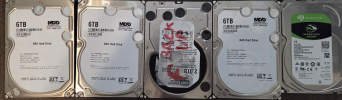
I may have some life in the Drobo. So I have a 10 year old 5 Bay Drobo box that makes a lot of noise, goes slow, and seems to struggle. What I didn't realize (or remember) is that some dumbass put 2 old PC drives in the box that are not intended to be in there. I don't recall doing this but I suspect this might be part of the issue.

I powered it down just to pull the drives and see what I am working with.
What the heck was I thinking? I am pulling the 2 misfits out to see if I see any improvements.


1772534259066.png
 
I don't know or have a solution for your question...but this does make me reflect on all the time I wasted all those years trying to keep up with backups, and rotating hard drives off-site. I have a single external drive bay and I used to periodically run a backup of my photos and data. I kept a copy at work, another stashed in my camper which is parked in a storage lot away from my house, I think I kept another in a firebox at home, and maybe another copy somewhere....and I really never did it on any set schedule or plan, only just "when I thought about it", I'd run a backup and change out one of those copies at random

One day it dawned on me... It's mostly about the digital photos.... and most of those are just duplicates and crappy pics where I'd snap three or five images of the kids standing in front of some "landmark" just in case someone's eyes were closed in one of them....
and nobody is going to want most of those pictures anyway
so I decided that cloud-based backup is good enough for me

I've got thousands of pictures of my kids
My parents probably have hundreds of pictures of my sister and me....that we never look at
and we probably have one or two pictures in total of my great-grandparents.... and while it would be cool to have a few more, those one or two photos seem to be enough
and I have zero pictures of my great-great-grandparents. Yes it would be cool to see what they looked like, not having them hasn't really been a noticeable problem for me....

Since I had that realization, I take far fewer pictures + I do a much better job of deleting the bad shots. When we go on a trip or there's some event where I feel the need to take pictures, I try to either delete the extras and bad shots either right away or I try sit down and do it daily
 
Re the photos.
I agree. I have no idea why I (and seemingly the human population) takes a million photos of everything never to be looked at.
I have terabytes of video that I will never look at all because other video guys tell me to archive everything and never delete it incase I need it later.
Never happens.

My wife does a cool thing where every vacation, she picks her favorites and makes "real" books out of them. Pictures go in the books along with a narrative about the "adventure".
I hope these don't get tossed when we die. I would loved to have something like this from my grandparents, great grand parents, etc.

1773066684060.jpeg

1773066730347.jpeg
 
Executed my Synology DS218+ to DS425+ migration this weekend. Went very smoothly - Synology has the migration process down and besides time it went wasn't complex. I did the "HD Migration" option which is backup current NAS onto external drive and config, move drives to new NAS, let it become the old NAS. Then I added a 3rd 12TB drive and had it scale the array. Backup and integrity check of the 8TB on the old NAS took 36h. Migration of HDs took about 15 mins. Adding a drive to the array took another 24h or so. Not unexpected since it was going from RAID 1 to RAID 5.
 
My wife does a cool thing where every vacation, she picks her favorites and makes "real" books out of them.
This. I do the same, cull through a ton of pics and select 30-60 to be printed. Good chance the cool ones will outlive you.
Same reason why I still keep paper logs for flying and diving.
 
I do the Synology thing - just a two drive solution, but I don't have much video so my data needs are modest (8TB under RAID 1). It's fast and easy.
4-bas DS413 Synology here. I’ve replaced all the drives once over 12 years of ownership. I’ve got 8TB in there now, but it can grow by simply throwing bigger disks in there.
 
Just an observation on the photos. To some people, they look at photos and they see a photo of someone they know or knew and see that it's from a different time. Same with objects that they owned. For some people, though, they look at a photo, or hold an old object in their hands and it can take them back in time. Like a flashback, but in a good way. They can recall all the feelings and sensory inputs that they had back then, almost as if they were actually back there. I can do that maybe a little bit, for some people it's a lot deeper.

Picked up that thought watching a car show, and a guy named Shorty said that these old cars, it's not about the cars to some people, it takes them back in time. They become a kid again in that moment.

Anyway, re the backups, if they're important it's good to have something off-site or cloud too, in case the house does a Dorothy thing like in the movie.
 
One day it dawned on me... It's mostly about the digital photos.... and most of those are just duplicates and crappy pics where I'd snap three or five images of the kids standing in front of some "landmark" just in case someone's eyes were closed in one of them....
and nobody is going to want most of those pictures anyway
so I decided that cloud-based backup is good enough for me

I've got thousands of pictures of my kids
My parents probably have hundreds of pictures of my sister and me....that we never look at
and we probably have one or two pictures in total of my great-grandparents.... and while it would be cool to have a few more, those one or two photos seem to be enough
Hopefully your cloud backup still includes your photos. There may not be much difference between 10,000 photos and a dozen of the right ones, but there's a massive difference between a dozen and zero.

Since I had that realization, I take far fewer pictures + I do a much better job of deleting the bad shots. When we go on a trip or there's some event where I feel the need to take pictures, I try to either delete the extras and bad shots either right away or I try sit down and do it daily
Oof. I could spend until the day I die deleting photos and still not have them pared down. I know exactly one person who goes through all his photos within 24h, deletes the bad ones, adds metadata, and does quick edits. Very few people are that disciplined.

There is an opportunity for AI here to group the similar photos, maybe even recommend the best one in the group. Verify with human, and delete the others - Or even store some compressed information about the differences.

Re the photos.
I agree. I have no idea why I (and seemingly the human population) takes a million photos of everything never to be looked at.
I take pictures of EVERYTHING. Prices in stores to price-shop, fuel and time on the airplane after every leg, funny license plates, random cool things I see, and all the stuff normal people take pictures of.

There's definitely a top 1% that I keep going back to, but I do look at other pictures in the vicinity, or sometimes I'll go through a fair number of them while I'm looking for something. It's fun to see what life was like at a particular time. I expect that in the event someone goes through my library after I die, only a tenth of a percent will be kept, and maybe they'll laugh at how cheap things were back then...

My wife does a cool thing where every vacation, she picks her favorites and makes "real" books out of them. Pictures go in the books along with a narrative about the "adventure".
I hope these don't get tossed when we die. I would loved to have something like this from my grandparents, great grand parents, etc.
Ooh, that is super cool! Great idea!

My mom has emailed us pictures and narratives from some of my parents' bicycling adventures. I've thought it would be cool to put them in a more usable format.

I've also wondered what things will look like after death. It's too easy to lose/delete a digital footprint, and these memories of life can definitely be very interesting to future generations. I've traced a couple of paths worth of ancestors and there are already some amazing stories, but I'd love to know more about what life was like for them.

 
My parents probably have hundreds of pictures of my sister and me....that we never look at

I have no idea why I (and seemingly the human population) takes a million photos of everything never to be looked at.

Consider getting a digital photo frame, or some other device that will cycle through your photos on the cloud and display them.

One of the best quality-of-life investments I've made was by happenstance. I got a Google Nest Hub on a whim during a Black Friday sale several years back. Thought I'd use it for voice control of my thermostat and some of my lights. And I do.

But when it's just sitting there, it cycles through my Google Photos archive. Regularly pops stuff up from ~15 years ago that I'd completely forgotten about. Includes a little caption in the corner with the date and location that's helpful for the thousands of times I've thought, "When/where was that??"

I can't tell you how many times that little gizmo has surprised me and made me smile.

Get one. Thank me later.
 
Save me from an internet rabbit hole, please? What does Synology bring to the table that a Ubuntu machine with RAID doesn’t? It’s got samba, zfs, duplicati backup to the cloud, docker, etc. Mainly because my Ubuntu NAS is getting long in the tooth and I should figure swapping with like or trying something else.
 
Save me from an internet rabbit hole, please? What does Synology bring to the table that a Ubuntu machine with RAID doesn’t? It’s got samba, zfs, duplicati backup to the cloud, docker, etc. Mainly because my Ubuntu NAS is getting long in the tooth and I should figure swapping with like or trying something else.
In my reply I said that, "NAS was not one of the things that made my beer taste better, so I outsourced it."

I have little enough time to do the things I need to do already. I don't have nearly enough time to do all the things I want to do. Building a cheaper solution out of enclosures, a linux box or whatever all seemed extremely likely to take way more time than Synology, which promised to be plug and play. I was willing to pay more for plug and play. When I got the Synology box, I plugged the hard drives into the bays, plugged it into the network, ran their little app to say how I wanted it configured and was done. It was plug and play. So now I'm recommending it.

Someone who values money more or likes to twiddle with things may well make a different decision. For me, at this point in my life, the modest money premium was worth it to buy some time back for other things. FWIW, I work in a supercomputer center and have been doing PB scale data things for nearly 30 years. Building a solution is easily within my skillset. But these days I prefer to spend my free time flying and editing videos about my adventures.
 
Save me from an internet rabbit hole, please? What does Synology bring to the table that a Ubuntu machine with RAID doesn’t? It’s got samba, zfs, duplicati backup to the cloud, docker, etc. Mainly because my Ubuntu NAS is getting long in the tooth and I should figure swapping with like or trying something else.

Synology is the macos version. Turn it on, choose friendly icons and english words associated with what i want to do, then forget it exists.

I run truenas which is the middle ground prosumer "don't need to think deep thoughts about this shiz, just hold deep opinions and trust it'll get there" UI + nerdy knobs for tuning or trying something spicy. I happily install linux distros all day long, but this is my comfortable option and I've been pleased with it. Freeware for trying. I don't have to remember when I last did an apt update :)
 
Consider getting a digital photo frame, or some other device that will cycle through your photos on the cloud and display them.

One of the best quality-of-life investments I've made was by happenstance. I got a Google Nest Hub on a whim during a Black Friday sale several years back. Thought I'd use it for voice control of my thermostat and some of my lights. And I do.

But when it's just sitting there, it cycles through my Google Photos archive. Regularly pops stuff up from ~15 years ago that I'd completely forgotten about. Includes a little caption in the corner with the date and location that's helpful for the thousands of times I've thought, "When/where was that??"

I can't tell you how many times that little gizmo has surprised me and made me smile.

Get one. Thank me later.
We got one of those skylight calendars which is probably one of the best purchases we made in the last 3 years with respect to keeping the household organized and it has a photo slideshow that my wife keeps heavily populated.

We all do find ourselves stopping and staring at it anytime some photo of something memorable from the past pops up.
 
Save me from an internet rabbit hole, please? What does Synology bring to the table that a Ubuntu machine with RAID doesn’t? It’s got samba, zfs, duplicati backup to the cloud, docker, etc.
If you are comfortable using Linux and already have the necessary software/hardware for a RAID, I'm thinking that Synology doesn't bring much to the table for you. Synology's DiskStation Manager OS for the NAS is built on Linux, I think.

Synology's NAS units are full-featured and plug-and-play. The UI is browser-based, and it is very easy to use to control/configure the NAS. Other NAS boxes may be similarly designed and may even be nicer than what Synology offers, but I have only ever used Synology NAS boxes over the years, and I have been happy with them.
 
If you are comfortable using Linux and already have the necessary software/hardware for a RAID, I'm thinking that Synology doesn't bring much to the table for you. Synology's DiskStation Manager OS for the NAS is built on Linux, I think.

Synology's NAS units are full-featured and plug-and-play. The UI is browser-based, and it is very easy to use to control/configure the NAS. Other NAS boxes may be similarly designed and may even be nicer than what Synology offers, but I have only ever used Synology NAS boxes over the years, and I have been happy with them.

My Synology DS233 has been sitting on the floor in my office waiting for me to install the HDDs and set it up on my network. I finally got around to it today. The printed documentation is just a pictogram that shows you how to install the drives, plug it in and turn it on. Then it points to a QR code for an app download which had me chasing my tail with creating new accounts, downloading more apps and then leaving me unable to log onto anything or see my NAS in my file directory.

After finally giving up on the whole iPhone app thing, I resorted to Google which led me to an online user manual (the whole dang book!). The user manual FINALLY pointed me to a IP address for the DSM, which then actually allows me to login with the original username and password I had set up in the beginning.

Now, going through the setup process reminds of trying to figure out all of the settings and features of my first digital SLR camera, an old Nikon D40.

I once considered myself a bit of a techie back in the day, I was the go to guy for DOS, Windows, and Dbase as well as a PC garage builder, back before you could just buy components on Amazon.com and throw them together in a couple of hours. Now I feel like a little bit of a dunce.
 
Yeah, an off the shelf solution is going to be a little more expensive than homemade, but
I once considered myself a bit of a techie back in the day, I was the go to guy for DOS, Windows, and Dbase as well as a PC garage builder, back before you could just buy components on Amazon.com and throw them together in a couple of hours. Now I feel like a little bit of a dunce.
My bet is that you have selective memory on what you used to do, and we all had more patience with tech things before the Internet. I distinctly remember a guy in an office giving me a hard time for following a printed list of instructions for a server upgrade in his office, until I explained that I wrote them. Because the Novell documentation for a 2.x to 3.x server upgrade was just wrong...it either left out a step or had a step in the wrong order, and if you followed them verbatim you'd wreck the system. So anyway, my bet is you ran into similar with Dos/Windows, but after the 3rd one you did it was so simply you forgot the learning curve.

Guessing based on experience.
 
Storage is expensive right now, I suggest finding a way to reuse the Drobo's drives. Synology has a good solution, but there are some pretty good cheaper NAS options available from companies like Ugreen.
I really don't want to spend the time to figure out how to build my own with TrueNAS right now. Ubiquity isn't quite there yet with their NASs. I don't trust the new options from UGREEN and the like. I went ahead and just ordered a 4 bay Synology
Well...

I like(d) Synology, but I don't like the way it looks like they're thinking (own-brand drives only) even if it isn't enforced (yet).
Ubiquiti tends to have wonderful hardware and never-quite-got-there software, but my experience with some of their other stuff (networking, security cameras, VOIP, door access, solar control) has been pretty good.
I know nothing about UGreen or other options one might find on Amazon.

Does anyone here have any experience with UGreen, Ubiquiti, or anything that *isn't* Synology or TrueNAS?

After some PMs here I'm also very curious about Synology's BeeStation.
 
Now, going through the setup process reminds of trying to figure out all of the settings and features of my first digital SLR camera, an old Nikon D40.
Yeah...there is a lot that you can configure your NAS to do! Feel free to PM me if you need some help. I'm not a super expert, but I am pretty familiar with how to set things up. Synology has a pretty decent user forum as well: https://community.synology.com

I like(d) Synology, but I don't like the way it looks like they're thinking (own-brand drives only) even if it isn't enforced (yet).
I didn't know that Synology was restricting drives to ones that they have approved! Sheesh! Based on your comment, I did a Google search about the drive restricting and I found the info. HOWEVER, I also found out that, recently, Synology seems to be backing down from the (IMHO, unfriendly) stance. YAY! Check out: https://kb.synology.com/en-us/DSM/tutorial/Drive_compatibility_policies
 
I've been poking around to see if this is a path I want to take or not. We don't have terabytes worth of photos, and iCloud handles that at a cost that doesn't make me flinch. As a long time Linux guy, I'm not afraid of the work to set things up - but I'm not looking for more hobbies. I wouldn't mind a media server that's easy enough to use that it will actually get used, though.

Just as a lab experiment I set up an unused little NUC-size box with Linux and Jellyfin, to see if it would be practical to reduce the mass of DVDs we have on shelves. Of course that leads to looking at sonarr and radarr... mostly sonarr, to reduce the number of streaming services we subscribe to just to get one or two series.

Someone who is more familiar with this stuff correct me if I'm wrong, but I'm guessing that using *arr to grab shows and movies from Usenet and Bittorrent is illegal as hell and would probably require a VPN to keep our ISP from cutting us off.
 
Based on your comment, I did a Google search about the drive restricting and I found the info. HOWEVER, I also found out that, recently, Synology seems to be backing down from the (IMHO, unfriendly) stance. YAY! Check out: https://kb.synology.com/en-us/DSM/tutorial/Drive_compatibility_policies

When companies retreat from an attempted cash grab like that, unless the damage-control press release includes "...and the MBAs who thought this idiot scheme up have had their heads placed on pikes in the company HQ garden", then I assume it is only a matter of time until they try again, either in an obvious or non-obvious way.
 
then I assume it is only a matter of time until they try again, either in an obvious or non-obvious way.

That's the nice thing about a NAS, it's pretty easy to pivot if needed. Most of the money is in the drives anyway. I went with Synology because I wanted an easy and simple solution - figuring if they pull any crap down the line, I'll just migrate the drives to somewhere else.
 
Save me from an internet rabbit hole, please? What does Synology bring to the table that a Ubuntu machine with RAID doesn’t? It’s got samba, zfs, duplicati backup to the cloud, docker, etc. Mainly because my Ubuntu NAS is getting long in the tooth and I should figure swapping with like or trying something else.
The short answer is I don’t need to speak nerd to make it do its thing.
 
Well...

I like(d) Synology, but I don't like the way it looks like they're thinking (own-brand drives only) even if it isn't enforced (yet).
Ubiquiti tends to have wonderful hardware and never-quite-got-there software, but my experience with some of their other stuff (networking, security cameras, VOIP, door access, solar control) has been pretty good.
I know nothing about UGreen or other options one might find on Amazon.

Does anyone here have any experience with UGreen, Ubiquiti, or anything that *isn't* Synology or TrueNAS?

After some PMs here I'm also very curious about Synology's BeeStation.
If you get a BeeStation, please give us a PIREP. The cloud interface looks interesting.
 
Back
Top