Jumpy Amps JPI 930

BigghHauss78

Pre-Flight
Joined
Aug 15, 2025
Messages
55
Display Name
BiggHauss
PoA Et Al.,
I just upgraded a panel and went to a fully TSO'd JPI EDM 930 install like I had done on my previous 182. Just had two test flights, and during each flight my AMPs would bounce all over the place. At some points going +85 to -100 and so forth rapidly and without rhyme. Eventually it happens so extreme that the EDM eventually 'X's out the amps gauge and stops reporting data. I contacted JPI, and they said it was classic 'loose/corroded wire' symptoms. I went through the entire AMPs wire setup (JPI D-sub to fuse, fuse to shunt, from shunt to fuse, to fuse back to JPI D-Sub) as well as all the related connections for the Shunt itself and everything is tight as a drum. It's a 1981 182R, and not showing any corrosion or anything of the sort.

I'm at a loss here and not sure what next steps are. My mechanic is trying to figure out a plan of attack and I thought I might put it to the forum to see what the consensus is. Plane Power Alternator, Lamar Voltage Regular (all new within last year). Upgraded all my breakers to pulpable Klixon's type this spring. Also we added an Electroair EIS at the same time with push button panel, and had replaced the remaining mag with a freshly overhauled unit. Battery is solid and in good order.

Any ideas??? How to troubleshoot? Isolate possible issues? The advice of 'check your wiring' I feel is not very helpful, nor realistic, so need a starting point.
Thanks!
 
So... without being there and actually seeing with my own eyes how jumpy the indication is, it feels like it could be electromagnetic interference on the harness from the shunt to the JPI.

JPI shunts usually put out 50mV for full scale deflection, so you'd need to make a little test rig to generate such a low voltage. Let me know if you need some guidance on that.
The idea is that you'd need to input a constant voltage to the JPI and monitor its behavior during engine runs. If it's all steady and stable, then you have an issue with the actual shunt and its connections. If it's still jumping all over the place, your harness is picking up interference and you'll have to re-route it or shield it better.
 
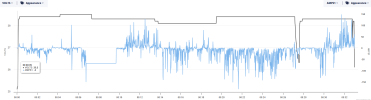
Here is the most recent flight download snip I took form the Savvy interface (seems easier than EzTrends). The flat line is where the JPI decided to turn off the gauge, and then it comes back online after a certain amount of time. Take off was around the 18minute mark.

Would be open to to your test apparatus setup.

Just to help add, the shunt is mounted over on top of the glove box behind the panel, along with two fuse holders called out for in the install manual. The 930 is in the Top Left position on the Co-Pilot panel so fairly close. Above the shunt, is mounted my WX-950, but it's been off this entire time as weather has been nil. I don't have alot of other wires in this area as the connector for the stormscope is way towards the back, while the shunt is immediatley behind the panel on the glove box. Behind the shunt is installed the controller for the Electroair EIS. So from the panel going backwards, it's shunt, fuse holders, then EIS controller.

Going to and from the shunt lugs are my two heavy wires, one coming from somewhere off the bus/master/ALT, and the other going up through the firewall to the solenoid. Sorry if I'm not entirely sure of the correct terms, but visually can see it routed this way. This heavy wire passes through the same bulkhead hole that my JPI sensor harness routes. My mechanic has done may of these installs prior, so I feel the routing is correct given my setup. And this is not really that much different form my previous 930 install but without the EIS in the mix, and I never had this issue with that install.

I sent this info to Savvy, Electroair, my Mechanic as well as JPI. They all are looking for possible ideas, but I know there is tremendous knowledge on this board as well, hence my post.
Thanks!


1758645536293.png
 
I went through the entire AMPs wire setup (JPI D-sub to fuse, fuse to shunt, from shunt to fuse, to fuse back to JPI D-Sub) as well as all the related connections for the Shunt itself and everything is tight as a drum.
By "went through" was this a visual and tactile check only? Given your volts are steady it does appear to be an indication issue.
Perhaps disconnect the amp sense wire at a convenient place near the JPI and at the shunt, then connect an ohmmeter to each end and perform a wiggle test of the wire harness by shaking it and watching the meter display for changes? You may have a kinked wire with internal damage?
 
"Went Through" means I opened up the panel, got both eyes and fingers on the wires and connections. Checked all the crimps, connectors, nuts and screws. Felt for movement or play in all of that. Followed wires to/from both the Dsub connectors, as well as heavy wires to from the shunts. Checked wire routing for chaffing, running to parallel, etc. I will do another visual for any crimps, etc, but nothing comes to mind.

I'm wondering if its the fuses or fuse holders themselves?? They are blade style connections for the wires on each side of the holder, and use traditional glass fuses dropped in between two friction blades on each end of the fuse. This setup means there are possibly 4 connections in question: To fuse, from fuse x2. Mechanic just used two single fuse holders and fuses to go to/from the shunt to read amps. All seemd pretty basic and typical. Perhaps those are the culprit? JPI only calls out amp rating for those fuses, but doesn't specify any specific fuse type or holder. My mechanic is the one who used the single fuse holders previously and never had issues prior. It's all typical aviation wire, crimps, etc. with the correct hardware, shrink wrap. Nothing seems to be compromised our out of the norm here.

JPI did remark that, the way they calculate amps, really makes it susceptible to wire related issues. The slight bit of corrosion, or slightly loose connection can cause the amps to read erratic. It's just so hard to figure out if its picking this up at the shunt and its associated wiring, or if that is relaying an issue somewhere else in the airplane.

I appreciate the ideas! Thank you.
 
This heavy wire passes through the same bulkhead hole that my JPI sensor harness routes.
So, a wire that carries 50 thousands of a volt is routed next to a wire that carries 60 amps? That is not good in my book. Combine that with some bad shield grounds and you can get a lot of interference coupling on that sensor wire.

Here is the most recent flight download snip I took
I assume the time scale is minutes.
That's some active amp trace. With the volts being stable, I don't think the problem is connections at the shunt, but they're always worth double-checking.


Reading your description, it sounds like your shunt is on the engine side of the firewall?

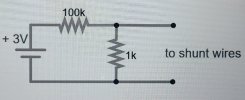
The set-up to test things would involve disconnecting the sense wires from the shunt, and connecting a 25 milivolt signal across them.
You'd need a 3V coin cell with a holder (or one that has pins you can solder to), one 100 Kohm resistor and one 1 Kohm resistor. Connect per the diagram below. That should give you a constant 30 mV, which, depending on your shunt type, should indicate 36 or 60 amps.
1758649850481.jpeg
 
Thanks for the ideas. I spent some further time on the phone today with JPI Tech Support and he felt the same, that the connections at the shunt aren't the problem. He gave me quite a few things to check, but also shared they have seen this issue manifest in a few different ways with some of their other airplanes and installs. They've seen issues stemming from a faulty fuse holder on the signal wire to the JPI, to a bad starter solenoid at the firewall, a bad master battery contactor, to corrosion in, on or around battery wires and their terminals. We also went over my install and it is in line with their manual. Specifically, for my aircraft, from a terminal on the starter solenoid to my master switch thru the shunt. That is the heavy wire coming off the firewall, and this setup matches what Cessna originally had as well as this configuration is setup as an ammeter which my aircraft had prior. He suggested to start with the starter solenoid first since its immediately up stream from from the shunt, and then work back towards the battery. The reason he focused this direction is that we ruled out the Master Switch since I just put a new one in at the same time we did the EIS install. Seemed like a low probability item given it's fresh. I may also swap out my fuse holders to a different style just to rule them out.

JPI also shared they had an aircraft that exhibited the same issues and turns out their was a hint of corrosion inside the starter solenoid contacts that caused the same type of erratic amp readings, much like mine. So the problem can also be hidden inside the solenoid or contactor itself and only exhibit issues when its engaged. I'm sharing all this info with my mechanic. I'm just not sure the best way to test a solenoid to even determine if it is a corrosion issue.

Regarding the routing: I had a 700 and then 730, and now 930 all routed the same way and never had major issues with my sensors giving me erratic readings. Not saying it can't happen, nor won't happen, I just haven't seen it show in any of the data off those systems. But maybe I had some shielding or something.

Thanks for the info above. Gives me some more things to think about. I appreciate the ideas.
 
Quick update for those that are following: I went out yesterday, pulled the Co-Pilot panel, and wired in a new set of in line fuse holders for the sensor wires at the shunt. I also just went through, hit all heavy wire connections with a little sand paper, and then really tightened things down as best as I possibly could. Drug the airplane out, fired it up and my Amps were rock solid! So, turns out there must have been something lose in the prior setup as it seems completely solid now.

I appreciate all the suggestions and ideas. Really helped me zero in on where I should spend my efforts. Thank you.
 
Back
Top