Is there really no way to add column to foreflight pdf??

SkyHog

Touchdown! Greaser!
Joined
Feb 23, 2005
Messages
18,511
Location
Middle of nowhere Texas
Display Name
Everything Offends Me
Home Airfield
KLUD
The Pdf export from Foreflight mind numbingly does not include Complex or High Performance columns.

Is there really no way to update the Pdf to include that and exclude columns I don't need, like Ground Given and Dual Given, or Sim Flight?
 
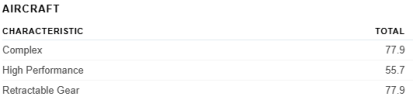
Look closer at the summary at the top of the page.

Since the Aircraft is HP, Complex or both, all the time you have in those aircraft would be HP and/or Complex, so no reason to have a column. That's why they give you total hours at the top.
 
Look closer at the summary at the top of the page.

Since the Aircraft is HP, Complex or both, all the time you have in those aircraft would be HP and/or Complex, so no reason to have a column. That's why they give you total hours at the top.
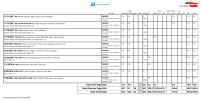
In the experience report, that's correct. But in both the 2 page and the 1 page export of the logbook, there's nothing of that sort:

For example -
1791209903166.png1791209931857.png

At the top and bottom of that export, there's nothing that would indicate any complex or HP time, despite that page having both...
 
In the experience report, that's correct. But in both the 2 page and the 1 page export of the logbook, there's nothing of that sort:

For example -
View attachment 155480View attachment 155481

At the top and bottom of that export, there's nothing that would indicate any complex or HP time, despite that page having both...

Since the 182 is a high performance airplane, every flight in that airplane is high performance. So on a 1.5 hour flight, stating that 1.5 was high performance is redundant. The only reason to want those numbers is when filling out an insurance application, or a job application, or something like that, and that is easily done. So I don't see any additional value in making it a column.

What I don't understand is why your Foreflight screenshot bothers to show ASEL and AMEL time, for the same reason. There are no two-engine Cessna 182s that I am aware of, so it's an unnecessary column.

The rest of the columns vary by flight, so they are important to separate out. Night, IFR, XC, etc. But high perf/complex (and ASEL/AMEL) do not vary in that airplane.

MyFlightBook does the same thing. @EricBe , the MFB developer, put this in his FAQ:

How can I log high-performance/tailwheel/turbine/complex time?

You do not need to explicitly record high-performance/tailwheel/turbine/complex time in MyFlightbook. Since this is an attribute of an airplane (more accurately, of an aircraft make/model) used in a flight, it is implicit in that flight.

So, for example, simply recording time in, say, a Bonanza will add to your high-performance and complex time, and recording time in a Stinson will add to your tailwheel time.
 
Since the 182 is a high performance airplane, every flight in that airplane is high performance. So on a 1.5 hour flight, stating that 1.5 was high performance is redundant. The only reason to want those numbers is when filling out an insurance application, or a job application, or something like that, and that is easily done. So I don't see any additional value in making it a column.

What I don't understand is why your Foreflight screenshot bothers to show ASEL and AMEL time, for the same reason. There are no two-engine Cessna 182s that I am aware of, so it's an unnecessary column.

The rest of the columns vary by flight, so they are important to separate out. Night, IFR, XC, etc. But high perf/complex (and ASEL/AMEL) do not vary in that airplane.

MyFlightBook does the same thing. @EricBe , the MFB developer, put this in his FAQ:

​

Your point about ASEL/AMEL kind of proves my point, but so does every time column - is it expected any anyone reviewing a logbook know from the plane type automatically whether its Complex, High Performance, etc.? What if I have time in both a Lance and a Cherokee Six? Both PA32, but one is complex, and one is not....Using the same logic of "it doesn't matter, because its right there," can't the same be said for showing XC time, as the takeoff/landing spots define the Cross Country time...

Seems ForeFlight should absolutely allow for customizing columns...

MyFlightBook does include it, if requested to:
1791216953998.png
 
Btw - I should probably explain why I'm concerned about this - I'm trying really hard to get away from paper logbooks. I figure the safest way to do that is to periodically print digital logbooks and retain a 3 ring binder or something with a physical copy somewhere safe, but use the digital logbook as my exclusive logging place (right now I dual-log everything, well, really triple log as I use both MyFlightBook and ForeFlight).

When trying to print out the ForeFlight logbook for this purpose, I realized the columns don't match - which is fine, if it at least represents the same data somehow. I don't know that having to read each entry to find which planes are high performance is really the best way to demonstrate the number of High Performance hours I have, when a simple column that totals it per flight makes it super quick - even if there were some representation that just said "HP," "Complex," "Tailwheel," etc. would work as pointed out above, the total flight time would then be considered fully part of that type of airplane.

If I can't represent the digital data in a physical form, totally and completely, I don't know that I'll be ready to make that leap yet, even though I really want to.
 
In the experience report, that's correct. But in both the 2 page and the 1 page export of the logbook, there's nothing of that sort:
You can send them a Feature Request I guess. But the report you showed is basically what you see in a paper Logbook, which does not have HP or Complex columns either. At least, none that I've seen.

Remember there is no N1234 3hr Complex, 5 hrs HP. But you might Log N1234 5 hrs XC, 1hr Actual. The aircraft either is or isn't HP and/or Complex, so that's why they have you look in the Experience Report.


ADDED: And I just saw your other post as to why you're doing it. Again, no need for it to be in the columns as you have the number in the Experience Report and you have the Aircraft in the "pages" you get in the Complete Logbook Reports. And I get some people need to send that report to a potential employer, which you'd add the Experience Report to, but other than that, there's really no need. As for your backups, I wouldn't bother printing anything. In FF I'd use the Export function and save the .CSV file. If you really like to have multi copies you can save a copy locally and then put a copy on your Google Drive, Dropbox, etc. FF will also Email you a copy monthly if you want. I don't know that I'd keep all the emails, but a good backup plan would be something like the last 6 months all of them. June 30th & Dec. 31 for 2 years Then just the Dec. 31 for however far back you want. (But remember all that data is still in your current Logbook, so it's copies of copies of copies that really aren't needed.)
 
Last edited:
You can send them a Feature Request I guess. But the report you showed is basically what you see in a paper Logbook, which does not have HP or Complex columns either. At least, none that I've seen.

Remember there is no N1234 3hr Complex, 5 hrs HP. But you might Log N1234 5 hrs XC, 1hr Actual. The aircraft either is or isn't HP and/or Complex, so that's why they have you look in the Experience Report.


ADDED: And I just saw your other post as to why you're doing it. Again, no need for it to be in the columns as you have the number in the Experience Report and you have the Aircraft in the "pages" you get in the Complete Logbook Reports. And I get some people need to send that report to a potential employer, which you'd add the Experience Report to, but other than that, there's really no need. As for your backups, I wouldn't bother printing anything. In FF I'd use the Export function and save the .CSV file. If you really like to have multi copies you can save a copy locally and then put a copy on your Google Drive, Dropbox, etc. FF will also Email you a copy monthly if you want. I don't know that I'd keep all the emails, but a good backup plan would be something like the last 6 months all of them. June 30th & Dec. 31 for 2 years Then just the Dec. 31 for however far back you want. (But remember all that data is still in your current Logbook, so it's copies of copies of copies that really aren't needed.)
I thought about printing the CSV exports but that doesn't have either the signature or other details for endorsements.
 
Btw - I should probably explain why I'm concerned about this - I'm trying really hard to get away from paper logbooks. I figure the safest way to do that is to periodically print digital logbooks and retain a 3 ring binder or something with a physical copy somewhere safe, but use the digital logbook as my exclusive logging place (right now I dual-log everything, well, really triple log as I use both MyFlightBook and ForeFlight).

When trying to print out the ForeFlight logbook for this purpose, I realized the columns don't match - which is fine, if it at least represents the same data somehow. I don't know that having to read each entry to find which planes are high performance is really the best way to demonstrate the number of High Performance hours I have, when a simple column that totals it per flight makes it super quick - even if there were some representation that just said "HP," "Complex," "Tailwheel," etc. would work as pointed out above, the total flight time would then be considered fully part of that type of airplane.

If I can't represent the digital data in a physical form, totally and completely, I don't know that I'll be ready to make that leap yet, even though I really want to.
Of course you are free to want what you want, I get that and have no problem with it. What works for me might not work for you.

But I think that when going from paper to electronic, it is helpful to change your mindset on some things. For example, many of the things we manually tracked in paper logbooks just don't need to be done in electronic form, and HP/Complex/ASEL/AMEL are great examples of this. As @M20K mentioned, most (all?) paper logbooks that I've seen don't include a HP or Complex column. Most people who want one use a blank column and write their own header. But think of "what is the purpose for doing so?" The purpose is to be able to know how many HP/Complex hours you have - the purpose is NOT to keep an easily visible running total, that's just the method we had to use with paper to get there.

With an electronic logbook, if you want to know how many HP or Complex hours you have, you just get it off the Summary, or Totals, or whatever that page is called on your logbook of choice. You don't have to enter it for each flight because it's already a characteristic of the airplane, and so there isn't (to me), any benefit to displaying it in a column.

You mention that you want a quick way to demonstrate the number of HP hours you have, and that's already built in - the Totals page. The same page you'd look at to see how many 182 hours you have, or instrument hours, or hours in the last year, etc. You don't use the individual column entries to figure that out with an electronic logbook, there's no need to do that. And of course you can do more complicated queries like "how many instrument hours in a 182 in the last 90 days during XC flight at night" if you like.

Like I said, it is a little bit of a mental switch, but once you do make that switch, you'll see that electronic logbooks are so much easier for so many things (like insurance applications and IACRA forms)!
 
Last edited:
I thought about printing the CSV exports but that doesn't have either the signature or other details for endorsements.
Again, I get what you're saying, but I don't see the point. When have you been asked to show your signed Logbook?

My real endorsements and checkride signatures are actual signatures in old paper Logbooks. And for a long time even though there were "digital Logbooks" you really couldn't do a signature in them or the CFI you were using for an IP didn't use the EFB you were using. So even to this day I get any BFRs, IPs, etc., etc., signed off in a paper Logbook. Do I sign each page... Nope, haven't done that for decades as it is an old rule. If something were to happen and I needed to turn in my Logbook, the first thing they'd get would be a copy of my FF Logbook. Unlikely, but if they wanted to see signatures, they'd get a PDF of the scan of my Logbook and sending that PDF to them via email would basically be my legal pronouncement that this was a legal scan of my Logbook. So different mind set for Digital vs Paper, tossing in what was done 50 or 100 years ago with the signatures vs today with electronic records (scans or digital) being accepted.
 
Again, I get what you're saying, but I don't see the point. When have you been asked to show your signed Logbook?

My real endorsements and checkride signatures are actual signatures in old paper Logbooks. And for a long time even though there were "digital Logbooks" you really couldn't do a signature in them or the CFI you were using for an IP didn't use the EFB you were using. So even to this day I get any BFRs, IPs, etc., etc., signed off in a paper Logbook. Do I sign each page... Nope, haven't done that for decades as it is an old rule. If something were to happen and I needed to turn in my Logbook, the first thing they'd get would be a copy of my FF Logbook. Unlikely, but if they wanted to see signatures, they'd get a PDF of the scan of my Logbook and sending that PDF to them via email would basically be my legal pronouncement that this was a legal scan of my Logbook. So different mind set for Digital vs Paper, tossing in what was done 50 or 100 years ago with the signatures vs today with electronic records (scans or digital) being accepted.
Maybe I'm missing the point as an old fuddy duddy (which blows my mind - I used to be the young guy insisting that the old people get with the program and use technology, here at POA even!)...lets said I went to get my tailwheel endorsement tomorrow, and I'm purely digital. The way I'd do that would be to get the endorsement digitally signed within ForeFlight. When using ForeFlight, great, it shows. I can print it out, too, so it shows, even with the signature! That's great also. But I can't do both print it and have it show all the columns I have in my current paper logbook - I'd have to use the CSV export for that and that only contains a representation that indicated it was signed by someone, not the actual signature.

But then, when ForeFlight goes Tango Uniform, as all digital platforms eventually do - how do I prove that I have my tailwheel endorsement if I can't print out the endorsement any longer? Say I ground loop my plane and the NTSB comes a knocking - am I supposed to tell them "no, no, you don't actually need to see the endorsement, just know that it existed at some point in a digital platform." If I have to use a paper logbook to capture that endorsement, then I have to maintain a paper logbook anyway.

What I am hoping to see is a PDF export function from ForeFlight that allows me to pick which columns are exported, and it contains the actual print outs of the endorsements I received using the platform. I could run the export every month or two and just add the new pages to the printed version I keep in some locked case somewhere should the day come that I ever need to prove what I have earned.

MyFlightBook is very, very close to what I want - I just wish there was an easier integration between it and ForeFlight since ForeFlight's logbook seems feature lacking in this regard.
 
Of course you are free to want what you want, I get that and have no problem with it. What works for me might not work for you.

But I think that when going from paper to electronic, it is helpful to change your mindset on some things. For example, many of the things we manually tracked in paper logbooks just don't need to be done in electronic form, and HP/Complex/ASEL/AMEL are great examples of this. As @M20K mentioned, most (all?) paper logbooks that I've seen don't include a HP or Complex column. Most people who want one use a blank column and write their own header. But think of "what is the purpose for doing so?" The purpose is to be able to know how many HP/Complex hours you have - the purpose is NOT to keep an easily visible running total, that's just the method we had to use with paper to get there.

With an electronic logbook, if you want to know how many HP or Complex hours you have, you just get it off the Summary, or Totals, or whatever that page is called on your logbook of choice. You don't have to enter it for each flight because it's already a characteristic of the airplane, and so there isn't (to me), any benefit to displaying it in a column.

You mention that you want a quick way to demonstrate the number of HP hours you have, and that's already built in - the Totals page. The same page you'd look at to see how many 182 hours you have, or instrument hours, or hours in the last year, etc. You don't use the individual column entries to figure that out with an electronic logbook, there's no need to do that. And of course you can do more complicated queries like "how many instrument hours in a 182 in the last 90 days during XC flight at night" if you like.

Like I said, it is a little bit of a mental switch, but once you do make that switch, you'll see that electronic logbooks are so much easier for so many things (like insurance applications and IACRA forms)!
But....how is that any different than any other entry in the logbook - for example, if all I really need to know is how many hours of each type I actually have, why not just forego the logbook completely and just include dates and tailnumbers of each flight, with a totals column by type later. I never have to prove how many hours I actually have on any given day, just have to represent that I have them.

There's a point where consolidation goes too far - and I think part of that is that there's no way to look at an entry and see that its Complex, without having to cross reference that entry against another table that shows the tailnumber and whether its considered Complex. Maybe I don't need the number of hours since they'd equal total time, but there should be some indicator on the line item of the flight that the plane is a complex plane.
 
lets said I went to get my tailwheel endorsement tomorrow, and I'm purely digital. The way I'd do that would be to get the endorsement digitally signed within ForeFlight. When using ForeFlight, great, it shows. I can print it out, too, so it shows, even with the signature! That's great also. But I can't do both print it and have it show all the columns I have in my current paper logbook - I'd have to use the CSV export for that and that only contains a representation that indicated it was signed by someone, not the actual signature.
My bad on the signature, I was thinking YOUR signature at the bottom of the page.

For you Endorsement Signatures, they are in the PDF. But again, no column needed for the Tailwheel time. On the Web, go into your FF Logbook, then Settings. In the middle of the page below Actual Instrument, Simulated Instrument, IFR, Holds you'll see in blue Add New Field. Click on that and a Custom Field will appear. Fill in Tailwheel and change the Type from the default of Text to Hours.
Similar in the App: Go into the Logbook Settings and find Configure Fields and in that section scroll down to the bottom to Add Custom Field in green.

When you make a new Logbook entry towards the bottom there will be a Tailwheel entry with the typical little suggested time box. When you run the Experience report, it will also be down lower on the page, but your Tailwheel time will be there. You can create a Custom entry for just about anything you want to keep track of.
 
My bad on the signature, I was thinking YOUR signature at the bottom of the page.

For you Endorsement Signatures, they are in the PDF. But again, no column needed for the Tailwheel time. On the Web, go into your FF Logbook, then Settings. In the middle of the page below Actual Instrument, Simulated Instrument, IFR, Holds you'll see in blue Add New Field. Click on that and a Custom Field will appear. Fill in Tailwheel and change the Type from the default of Text to Hours.
Similar in the App: Go into the Logbook Settings and find Configure Fields and in that section scroll down to the bottom to Add Custom Field in green.

When you make a new Logbook entry towards the bottom there will be a Tailwheel entry with the typical little suggested time box. When you run the Experience report, it will also be down lower on the page, but your Tailwheel time will be there. You can create a Custom entry for just about anything you want to keep track of.
Yep, I did all that. But it doesn't show in the 2 page or 1 page export :(

I guess it is what it is.

MyFlightBook does what I need. I was just really hoping to have one less tool to track it.
 
But....how is that any different than any other entry in the logbook - for example, if all I really need to know is how many hours of each type I actually have, why not just forego the logbook completely and just include dates and tailnumbers of each flight, with a totals column by type later. I never have to prove how many hours I actually have on any given day, just have to represent that I have them.

I'm not really sure what you mean here. Each flight, after all, is simply an entry into a database with the relevant details of the flight totaled for future use. You have to get the data in there somehow.

There's a point where consolidation goes too far - and I think part of that is that there's no way to look at an entry and see that its Complex, without having to cross reference that entry against another table that shows the tailnumber and whether its considered Complex. Maybe I don't need the number of hours since they'd equal total time, but there should be some indicator on the line item of the flight that the plane is a complex plane.

Perhaps I am being dense, but it's not intentional. I fail to see why you feel it's important, on each entry where you flew a PA-24, to indicate in some additional way that it was in a complex airplane. Of course it was a complex airplane, all PA-24s are. If you want the total complex time, that is readily accessible, but in what scenario would you need to look at a specific entry and know (without looking at the airplane model) whether it was complex or not? I'm just not seeing the use case for that. Now, if you wanted to see only flights in a complex airplane, that's an easy query for any logbook to perform. So if you wanted to know "when was the last time I flew a complex airplane", that's a simple query and may meet your needs.

If you give me a better idea of a scenario where you need to find this information, perhaps I/we can show you how an electronic logbook can meet that need.
 
I'm not really sure what you mean here. Each flight, after all, is simply an entry into a database with the relevant details of the flight totaled for future use. You have to get the data in there somehow.


Perhaps I am being dense, but it's not intentional. I fail to see why you feel it's important, on each entry where you flew a PA-24, to indicate in some additional way that it was in a complex airplane. Of course it was a complex airplane, all PA-24s are. If you want the total complex time, that is readily accessible, but in what scenario would you need to look at a specific entry and know (without looking at the airplane model) whether it was complex or not? I'm just not seeing the use case for that. Now, if you wanted to see only flights in a complex airplane, that's an easy query for any logbook to perform. So if you wanted to know "when was the last time I flew a complex airplane", that's a simple query and may meet your needs.

If you give me a better idea of a scenario where you need to find this information, perhaps I/we can show you how an electronic logbook can meet that need.
The Pa24 is a good example - it's high performance. But if it were a 180 model it wouldn't be...

Remember, the paper backup assumes the database is gone. But thankfully I have a paper backup to fall back on. So without the entry, how do I know which of my Pa24 time was HP and which wasn't? All I know is I have 600 hours of high performance but no way of indicating when I got it, or where I used it, or if my total is actually correct unless I cross reference another paper export of a table of planes and it's characteristics.

Another example - I have PA32 time. Is it complex? It's definitely High Performance, but only complex if it's a Lance or a Saratoga. If it's a Cherokee Six it's not.
 
The Pa24 is a good example - it's high performance. But if it were a 180 model it wouldn't be...

Remember, the paper backup assumes the database is gone. But thankfully I have a paper backup to fall back on. So without the entry, how do I know which of my Pa24 time was HP and which wasn't? All I know is I have 600 hours of high performance but no way of indicating when I got it, or where I used it, or if my total is actually correct unless I cross reference another paper export of a table of planes and it's characteristics.

Another example - I have PA32 time. Is it complex? It's definitely High Performance, but only complex if it's a Lance or a Saratoga. If it's a Cherokee Six it's not.
Ah, so it's the backup issue you're worried about. That's a fair consideration. For me, I use myflightbook, and have my logbook backed up to my Google Drive account every night in .csv format. I do not keep a backup paper version of any kind. If MFB were to go under, I would just import my backup into another logbook app, no loss of information. Or even just open it up in Excel, same data.
 
The Pa24 is a good example - it's high performance. But if it were a 180 model it wouldn't be...
So what?:p N1234 would be in your Logbook Aircraft as a HP aircraft. N5678 would be in your Logbook Aircraft as a non HP Aircraft. From there you have your basic numbers in the totals or you can run a report on just N1234 if you want. This is why we're not getting at all why you think you need the column. (Not jumping all over you, just don't know if you're getting it.)

With a Digital Logbook, I really don't see a single reason to have an HP or Complex Logbook column. And actually, I see it as an error point in your totals if you put in the wrong number, forget to put in a number. Right now, all of the HP, Complex, TIAA, etc., info is based on the N# and then entered into the appropriate, behind the scenes or hidden, database column when you enter a flight into your Logbook with that N#. That's it, done. And it appropriately shows up in the right place in your Experience Report... which shows your "experience" in different FAA designated areas (as well as numbers we like to see).

But do send the Feature Request into FF Support. Be sure to get some friends to also send in a (very similar) Feature Request as one or two won't do anything. You probably need five or more for it to make it on their radar.
 
So what?:p N1234 would be in your Logbook Aircraft as a HP aircraft. N5678 would be in your Logbook Aircraft as a non HP Aircraft. From there you have your basic numbers in the totals or you can run a report on just N1234 if you want. This is why we're not getting at all why you think you need the column. (Not jumping all over you, just don't know if you're getting it.)

With a Digital Logbook, I really don't see a single reason to have an HP or Complex Logbook column. And actually, I see it as an error point in your totals if you put in the wrong number, forget to put in a number. Right now, all of the HP, Complex, TIAA, etc., info is based on the N# and then entered into the appropriate, behind the scenes or hidden, database column when you enter a flight into your Logbook with that N#. That's it, done. And it appropriately shows up in the right place in your Experience Report... which shows your "experience" in different FAA designated areas (as well as numbers we like to see).

But do send the Feature Request into FF Support. Be sure to get some friends to also send in a (very similar) Feature Request as one or two won't do anything. You probably need five or more for it to make it on their radar.
I'm not sure if I'm coming across right here - I know how a digital logbook works (and, I've been around technology and databases for a few decades at this point as well) - problem isn't how to use a digital logbook. If I never needed paper again, I wouldn't care if the column showed or not for the exact reasons you mentioned here.

The question is - what do you do when the digital logbook disappears. That's where the printed version comes in handy. Why else would ForeFlight have a PDF export - it would only really be used when the digital logbook is unavailable, and it should function as a paper logbook would (I can't query a piece of paper).

In other words - can you show me a demo on how to look at a piece of paper that contains the following (and only the following) - and tell me if this flight was High Performance or Complex (or both)?

1791325732307.png1791325746900.png

And in the experience report -
1791325955319.png
1791325918507.png
 
Last edited:
Ah, so it's the backup issue you're worried about. That's a fair consideration. For me, I use myflightbook, and have my logbook backed up to my Google Drive account every night in .csv format. I do not keep a backup paper version of any kind. If MFB were to go under, I would just import my backup into another logbook app, no loss of information. Or even just open it up in Excel, same data.
Yeah - I used to do the same - I also keep a photocopy of my physical paper logbook. But I lose the signatures by CFIs if I use the CSV export for anything new. Its why I still maintain a paper logbook alongside this as I work through my instrument rating - I'd much rather just toss the paper logbook into the firesafe and go digital only with the capability to print new pages, retaining all of the information I need (signatures, endorsements, and complex/HP time).
 
The question is - what do you do when the digital logbook disappears.
Again, that's what backups are all about. Unlikely you'll loose anything unless we have a giant EM pulse that destroys all computers. And at that point, you'll have a lot more things to worry about.

As you mentioned, the PDF has a copy of those signatures you've had a CFI do in your EFB. And I hope you have a PDF of the scans of your old paper Logbooks. Also Export the very generic .CSV file from your ForeFlight Logbook. This can be imported into pretty much any other Digital Logbook either directly or with very little modifications.

Keep a copy of these files on you home computer and then upload a copy to your Google Drive, which you probably have even if you don't know it. If you don't, create a Google Email Account and you'll have a Google Drive. Or you can use Microsoft a free Dropbox Acct or whatever you want if you have some other cloud/online acct. But store those locally and in the cloud.

Every so often, Export a new .CSV file from FF to keep your current numbers up to date. Any time you get a new Signature (Flight Review, new Certification, IPC, etc.), create a new PDF copy with the signature. You can keep a few of these, but remember the latest one should have all the info that's in the prior ones. But yes, I have a few extra copies going back a few years in case there is an unknown issue with the data.

And... I'm *hoping* you do at least occasional backups of your home computer. A good time to do it would be right after you update any of these files.

At this point you are as backed up as you probably need to be. If something destroys both your local and cloud files AND the files in FF's servers, your Logbooks are going to be the least of your worries.

Oh yeah... And then there are the CFIs you've flow with that will have their records or at least will attest to the fact they gave you multiple Flight Reviews or whatever. Or, you just go take one flight and get Current and be done with it. :p
 
Of course you are free to want what you want, I get that and have no problem with it. What works for me might not work for you.

But I think that when going from paper to electronic, it is helpful to change your mindset on some things. For example, many of the things we manually tracked in paper logbooks just don't need to be done in electronic form, and HP/Complex/ASEL/AMEL are great examples of this. As @M20K mentioned, most (all?) paper logbooks that I've seen don't include a HP or Complex column. Most people who want one use a blank column and write their own header. But think of "what is the purpose for doing so?" The purpose is to be able to know how many HP/Complex hours you have - the purpose is NOT to keep an easily visible running total, that's just the method we had to use with paper to get there.

With an electronic logbook, if you want to know how many HP or Complex hours you have, you just get it off the Summary, or Totals, or whatever that page is called on your logbook of choice. You don't have to enter it for each flight because it's already a characteristic of the airplane, and so there isn't (to me), any benefit to displaying it in a column.

You mention that you want a quick way to demonstrate the number of HP hours you have, and that's already built in - the Totals page. The same page you'd look at to see how many 182 hours you have, or instrument hours, or hours in the last year, etc. You don't use the individual column entries to figure that out with an electronic logbook, there's no need to do that. And of course you can do more complicated queries like "how many instrument hours in a 182 in the last 90 days during XC flight at night" if you like.

Like I said, it is a little bit of a mental switch, but once you do make that switch, you'll see that electronic logbooks are so much easier for so many things (like insurance applications and IACRA forms)!
Bingo! The purpose of a dedicated column is human-generated pencil-and-paper math. The computer doesn't need that! Indeed - per-page totals serve no purpose in the electronic world either (but alas, old habits die hard, even if they are completely mooted). See my rants on printing at https://myflightbookblog.blogspot.com/2018/09/printing-from-electronic-logbooks.html.
 
The question is - what do you do when the digital logbook disappears. That's where the printed version comes in handy. Why else would ForeFlight have a PDF export - it would only really be used when the digital logbook is unavailable, and it should function as a paper logbook would (I can't query a piece of paper).

You are complaining about a first world problem. What do you do if someone steals your paper logbook or you lose it tomorrow? I've seen that one happen to a friend back in the day when almost no one logged digitally. Not fun at all. He probably did more than nbecessary to recreate most of it.

I know exactly what happens if my digital logbook application disappears. I take the most recent csv backup (I get them daily) and do what I need with the data.

I don't need to know whether a specific flight was complex or HP or both without looking elsewhere. That was optional logging to begin with.

Why else would ForeFlight have a PDF export? Because that's what people want to see. As Tevya might say, "Tradition!" (I do it too, once a year.)

BTW, on yours, that flight you pulled out was in a Cherokee 6 or fixed gear Saratoga. High performance. Not complex.

Edit: One more comment. Why does MFB allow for additional columns but not FF? MFB is a dedicated logbook. FF's is an addon to the app's primary function. It's existence and it's capabilities are entirely customer driven. Get enough people (I don't know how many) who to want the ability top break things down more and it will happen.
 
Last edited:
BTW, on yours, that flight you pulled out was in a Cherokee 6 or fixed gear Saratoga. High performance. Not complex.
That is correct - but how can you tell? Does the complex Saratoga have a different indicator?

I've decided to stick with MFB, so the feature matters not, but geniunely curious if I'm missing something.

BTW - to your point about what if someone stole the logbook - the answer is "I've got the photocopied backups, which includes all of the data, including signatures and custom columns, in my safe." With the ForeFlight logbook, that option does not exist if it goes away.
 
Bingo! The purpose of a dedicated column is human-generated pencil-and-paper math. The computer doesn't need that! Indeed - per-page totals serve no purpose in the electronic world either (but alas, old habits die hard, even if they are completely mooted). See my rants on printing at https://myflightbookblog.blogspot.com/2018/09/printing-from-electronic-logbooks.html.
how does one turn off the per-page totals when printing from MFB? Trying to adopt as best a set of practices as I can (except for not including complex/high performance columns).
 
That is correct - but how can you tell? Does the complex Saratoga have a different indicator?
32R
I've decided to stick with MFB, so the feature matters not, but geniunely curious if I'm missing something.

BTW - to your point about what if someone stole the logbook - the answer is "I've got the photocopied backups, which includes all of the data, including signatures and custom columns, in my safe." With the ForeFlight logbook, that option does not exist if it goes away.
Backup.
1792180426688.png

I don’t use FF’s logbook. Two reasons.
1. I don’t want to tie myself to a particular EFB.
2. I’ve been an MFB user since 2006, 2 years before FF appeared on the iPad and 10 years before FF added a logbook.
 
That is correct - but how can you tell? Does the complex Saratoga have a different indicator?
Of course, PA-32-301 vs PA-32R-301 if I got the Saratoga model right. Then of course there's the turbo models like PA-32-301T and PA-32R-301T.

If you're just using the FAA Aircraft Type Designators like PA32, well then yes there is the P32R but remember that the FAA Aircraft Type Designators are more for ATC use to identify relative performance levels of aircraft, not to break down engine size and other equipment options. So in your logbook you should be using (IMO) the more descriptive aircraft model number, not the type designator.

But really, in a logbook the complex/high performance/glass cockpit/turbo/whatever is tied to the aircraft tail number itself. You could have a 210hp 172 or something with an aftermarket turbocharger system or a 152 that was converted to tailwheel, and neither the type designator nor the model number would necessarily change. So the tail number is what's important, digital or paper.
 
Of course, PA-32-301 vs PA-32R-301 if I got the Saratoga model right. Then of course there's the turbo models like PA-32-301T and PA-32R-301T.

If you're just using the FAA Aircraft Type Designators like PA32, well then yes there is the P32R but remember that the FAA Aircraft Type Designators are more for ATC use to identify relative performance levels of aircraft, not to break down engine size and other equipment options. So in your logbook you should be using (IMO) the more descriptive aircraft model number, not the type designator.

But really, in a logbook the complex/high performance/glass cockpit/turbo/whatever is tied to the aircraft tail number itself. You could have a 210hp 172 or something with an aftermarket turbocharger system or a 152 that was converted to tailwheel, and neither the type designator nor the model number would necessarily change. So the tail number is what's important, digital or paper.
Good news there is that my digital logbook does have that clarity and distinction. My old paper logbook does not - I just used "PA32" and "PA28" instead of "PA-32R-301"/"PA32-260" and "P28R-201" and "PA28-180" etc.

I hadn't considered that being an indicator...I could back my way into it that way I suppose.

Thankfully, MFB is a much better logbook option than FF.
 
32R

Backup.
View attachment 155733

I don’t use FF’s logbook. Two reasons.
1. I don’t want to tie myself to a particular EFB.
2. I’ve been an MFB user since 2006, 2 years before FF appeared on the iPad and 10 years before FF added a logbook.
Ah - but again - that backup doesn't contain the fidelity I was referencing.

With you on MFB - I've decided to start using the digital signatures there since it will actually let me export the data the way I need.
 
I hadn't considered that being an indicator...I could back my way into it that way I suppose.
I know in FF and I assume in any Digital Logbook the change would not take long at all. You would just be going into the Aircraft and changing the individual planes by N# to the correct designation.

So all the plain PA32s you leave along and only find the N# for the PA32Rs, etc. to change. And in FF (again, I'll assume the others too) if it is a plane you'll never fly again, you can just change it in the Logbook Aircraft. If it is one you're still flying, I'd change it in both the main Aircraft and the Logbook Aircraft entries.
 
Last edited:
I've decided to start using the digital signatures there since it will actually let me export the data the way I need.
I’m not sure what that means. What’s the connection between the digital signatures and the data exports?
 
I’m not sure what that means. What’s the connection between the digital signatures and the data exports?
Proof that the signatures exists and is valid. Foreflight goes away, and all I have is the printed version of any endorsements or instructor signatures.

Both include digital signatures in the Pdf, but only MFB seems to have avoided the Apple trap of "do it our way, and only our way" regarding what fields can be included.
 
Both include digital signatures in the Pdf,
Pull up the pdf and open the signature panel. You won't find any digital signatures.

Yes, in MFB (I haven't looked at FF), you will find a graphic that indicates the original electronic record was digitally signed. That's just a graphical representation that indicates to the viewer that the original electronic record (the electronic logbook) was digitally signed. It is itself not a digital signature.
 
how does one turn off the per-page totals when printing from MFB? Trying to adopt as best a set of practices as I can (except for not including complex/high performance columns).
Go to Logbook->Print View, click the Print button, then click to open a printer-optimized view of your logbook. Then on the Layout tab, choose "Continuous" for flights-per-page. You can also add complex and high-performance columns there if you like and choose a wide variety of additional customization options.
 
Pull up the pdf and open the signature panel. You won't find any digital signatures.

Yes, in MFB (I haven't looked at FF), you will find a graphic that indicates the original electronic record was digitally signed. That's just a graphical representation that indicates to the viewer that the original electronic record (the electronic logbook) was digitally signed. It is itself not a digital signature.
Beg to differ??

From foreflight (I did a test entry since I currently have no signed entries in foreflight):
1792356015615.png

From MyFlightBook:
1792356397864.png
 
Pull up the pdf and open the signature panel. You won't find any digital signatures.

Yes, in MFB (I haven't looked at FF), you will find a graphic that indicates the original electronic record was digitally signed. That's just a graphical representation that indicates to the viewer that the original electronic record (the electronic logbook) was digitally signed. It is itself not a digital signature.
That's a very subtle but super important point, so I want to emphasize it: the signature (digital or wet ink) ONLY exists in its original form.

If it was ink on dead tree and you lose that logbook, you've lost the signature. If you had a photocopy of that, then you have proof of the existence of the signature, but it's not the signature itself. (Fortunately, that's generally good enough, or you can have a subsequent attestation of some sort that affirms that the original signature was valid, but again, that's not the original signature.)

It's similar in the electronic world: if an instructor signs a flight on electronic logbook X, then only X can guarantee that the signature is in fact valid. So if you export from X to a new electronic logbook Y, then Y CAN NOT validate that the original signature was valid. The original signature is still on X; Y can only record the existence of the signature.

To be a little more concrete: if you have a signed flight in ForeFlight, nobody other than ForeFlight can validate that the signature is true and correct, that it wasn't tampered with, that it was done by the CFI who it purports actually signed it. So if you export it to MyFlightbook, MyFlightbook could (in theory) prove that ForeFlight says the signature is valid***, but it would have to take ForeFlight's word for that (and, for that matter, ForeFlight has no incentive to provide such a validation service). Ditto if you export from MyFlightbook to ForeFlight.

So it's the subtle distinction between "this is a valid signature" and "this is a valid representation of a signature that was done somewhere else" - you're can validate the representation, but you can't necessarily validate the underlying signature.

This is a lot of angels-on-the-head-of-a-pin, and as a practical matter, I've yet to ever hear someone have an issue if they lose a logbook. But it is an argument for keeping original records.

E.g., I have PDF scans of all of my old primary training (paper) logbooks. In MyFlightbook, when I imported those flights, I put "[Signed by John Doe, CFI #12345 Expiration 10/31/2002]" or similar into the comments for the flight (i.e., REFERENCING the signature), and I have the PDFs themselves uploaded to MyFlightbook (under endorsements), so that if someone asks to see the original signature from John Doe, I can do that. And that's always been more than good enough. But neither of those is the actual signature - the actual signature is sitting in (now dry) ink on dead trees on a bookshelf in my house.

For years, I've recommended that people do something along these lines. There are comfortably into 6-figures of MyFlightbook users, and I've never had anybody have an issue around this...

***Cryptographically, you could imagine this being done with ForeFlight exporting a copy of the signed flight that is signed with Foreflight's private key; any recipient - with a public key that corresponds to that public key - could decrypt it and prove therefore that it was in fact encrypted by ForeFlight, and if you trust ForeFlight you could trust that the signature is probably what it purports to be. But that's proving that it came from ForeFlight, not proving that it's true and correct.

 
That's a very subtle but super important point, so I want to emphasize it: the signature (digital or wet ink) ONLY exists in its original form.

If it was ink on dead tree and you lose that logbook, you've lost the signature. If you had a photocopy of that, then you have proof of the existence of the signature, but it's not the signature itself. (Fortunately, that's generally good enough, or you can have a subsequent attestation of some sort that affirms that the original signature was valid, but again, that's not the original signature.)

It's similar in the electronic world: if an instructor signs a flight on electronic logbook X, then only X can guarantee that the signature is in fact valid. So if you export from X to a new electronic logbook Y, then Y CAN NOT validate that the original signature was valid. The original signature is still on X; Y can only record the existence of the signature.

To be a little more concrete: if you have a signed flight in ForeFlight, nobody other than ForeFlight can validate that the signature is true and correct, that it wasn't tampered with, that it was done by the CFI who it purports actually signed it. So if you export it to MyFlightbook, MyFlightbook could (in theory) prove that ForeFlight says the signature is valid***, but it would have to take ForeFlight's word for that (and, for that matter, ForeFlight has no incentive to provide such a validation service). Ditto if you export from MyFlightbook to ForeFlight.

So it's the subtle distinction between "this is a valid signature" and "this is a valid representation of a signature that was done somewhere else" - you're can validate the representation, but you can't necessarily validate the underlying signature.

This is a lot of angels-on-the-head-of-a-pin, and as a practical matter, I've yet to ever hear someone have an issue if they lose a logbook. But it is an argument for keeping original records.

E.g., I have PDF scans of all of my old primary training (paper) logbooks. In MyFlightbook, when I imported those flights, I put "[Signed by John Doe, CFI #12345 Expiration 10/31/2002]" or similar into the comments for the flight (i.e., REFERENCING the signature), and I have the PDFs themselves uploaded to MyFlightbook (under endorsements), so that if someone asks to see the original signature from John Doe, I can do that. And that's always been more than good enough. But neither of those is the actual signature - the actual signature is sitting in (now dry) ink on dead trees on a bookshelf in my house.

For years, I've recommended that people do something along these lines. There are comfortably into 6-figures of MyFlightbook users, and I've never had anybody have an issue around this...

***Cryptographically, you could imagine this being done with ForeFlight exporting a copy of the signed flight that is signed with Foreflight's private key; any recipient - with a public key that corresponds to that public key - could decrypt it and prove therefore that it was in fact encrypted by ForeFlight, and if you trust ForeFlight you could trust that the signature is probably what it purports to be. But that's proving that it came from ForeFlight, not proving that it's true and correct.
With contracts we usually include language that indicates that photocopies of the signature with full context are considered to be enforceable as the original signature (wording varies, of course).

Certainly there's a similar solution here somewhere...
 
That's a very subtle but super important point, so I want to emphasize it: the signature (digital or wet ink) ONLY exists in its original form.

If it was ink on dead tree and you lose that logbook, you've lost the signature. If you had a photocopy of that, then you have proof of the existence of the signature, but it's not the signature itself. (Fortunately, that's generally good enough, or you can have a subsequent attestation of some sort that affirms that the original signature was valid, but again, that's not the original signature.)

It's similar in the electronic world: if an instructor signs a flight on electronic logbook X, then only X can guarantee that the signature is in fact valid. So if you export from X to a new electronic logbook Y, then Y CAN NOT validate that the original signature was valid. The original signature is still on X; Y can only record the existence of the signature.

To be a little more concrete: if you have a signed flight in ForeFlight, nobody other than ForeFlight can validate that the signature is true and correct, that it wasn't tampered with, that it was done by the CFI who it purports actually signed it. So if you export it to MyFlightbook, MyFlightbook could (in theory) prove that ForeFlight says the signature is valid***, but it would have to take ForeFlight's word for that (and, for that matter, ForeFlight has no incentive to provide such a validation service). Ditto if you export from MyFlightbook to ForeFlight.

So it's the subtle distinction between "this is a valid signature" and "this is a valid representation of a signature that was done somewhere else" - you're can validate the representation, but you can't necessarily validate the underlying signature.

This is a lot of angels-on-the-head-of-a-pin, and as a practical matter, I've yet to ever hear someone have an issue if they lose a logbook. But it is an argument for keeping original records.

E.g., I have PDF scans of all of my old primary training (paper) logbooks. In MyFlightbook, when I imported those flights, I put "[Signed by John Doe, CFI #12345 Expiration 10/31/2002]" or similar into the comments for the flight (i.e., REFERENCING the signature), and I have the PDFs themselves uploaded to MyFlightbook (under endorsements), so that if someone asks to see the original signature from John Doe, I can do that. And that's always been more than good enough. But neither of those is the actual signature - the actual signature is sitting in (now dry) ink on dead trees on a bookshelf in my house.

For years, I've recommended that people do something along these lines. There are comfortably into 6-figures of MyFlightbook users, and I've never had anybody have an issue around this...

***Cryptographically, you could imagine this being done with ForeFlight exporting a copy of the signed flight that is signed with Foreflight's private key; any recipient - with a public key that corresponds to that public key - could decrypt it and prove therefore that it was in fact encrypted by ForeFlight, and if you trust ForeFlight you could trust that the signature is probably what it purports to be. But that's proving that it came from ForeFlight, not proving that it's true and correct.
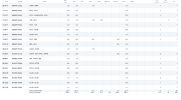
Also - I've challenged our lawyers a few times on the concept of "wet ink being the only valid representation of a physical signature" without that language - while the lawyers insist it is true, I have not yet found any case law that would support that a copy of a signature (with full context of what was originally signed) is not a valid signature....I would then argue that the graphical representation that both ForeFlight and MFB display for signatures are as valid as the ink signature in a paper logbook.
 
As another data point to possibly assuage your concern about flight review endorsements and such:

The last endorsement I have in a paper logbook is from 2022, and it is a flight review and IPC endorsement from some insurance training I received.

I also have zero electronic endorsements of sign-offs for anything since in my MFB logbook, not even flight reviews or IPCs.

But I am still legal.

I have had flight reviews and IPCs since then (quite a few actually), but the sign-offs for those are provided in a separate document. In most of these the "endorsement" was provided by CAE or FlightSafety as a result of passing recurrent simulator training in the form of a training report and a "Pro Card". This is perfectly legit and well established.

This is to say that even if you don't have a paper logbook and your CFI doesn't want to provide an electronic signature for some reason, they can still provide the endorsement in a separate form.
 
Back
Top