Have Garmin GTX345 ADS-B in and out, but don’t know how to display traffic to mini iPad

Subsonicflight

Filing Flight Plan
Joined
Feb 18, 2026
Messages
27
Display Name
Stanton
Do I need a separate and Independent ADS-B In receiver to use FlyQ or ForeFlight? Comments and recommendations appreciated.

 
I have a GTX345 and use a Mini. But I use Garmin Pilot, so I can't speak to your apps. But I am pretty sure the answer is no, you should not need a separate receiver.

But something changed some months algo where my iPad no longer connects with the GTX automatically. I have to manually make it connect each flight. An annoyance, but takes 15 seconds to fix.

I would start with making sure your iPad is paired and connected with the GTX.
 
What else do you have in the panel? We need to know to give you a better answer.

But if you have other Garmin devices:
- Do you have a GTN? If so, per the STC, the Bluetooth was disabled in the GTX-345. To get traffic and Wx you'd need a Flight Stream (FS) 510 SD Card or 210 mounted behind the panel.
- Do you have a GNX375/GNC355/GPS175 or a GI-275? If so, you'd connect via Bluetooth to that device. (Not sure if the GTX345 BT has to be disabled with these devices, but my guess is it was.)

No clue if you have an Avidyne IFD, but probably the same.

If you have a six pack... check with your shop, the BT should be enabled if there is not something else in the panel where Garmin said to disable it.
 
We owned a C340 with GNS 530W and GTX 345 without any Flight Stream. Using GP and our iPads connected using BT to the 345, we had traffic, weather etc. on the iPads.
 
What else do you have in the panel? We need to know to give you a better answer.

But if you have other Garmin devices:
- Do you have a GTN? If so, per the STC, the Bluetooth was disabled in the GTX-345. To get traffic and Wx you'd need a Flight Stream (FS) 510 SD Card or 210 mounted behind the panel.
- Do you have a GNX375/GNC355/GPS175 or a GI-275? If so, you'd connect via Bluetooth to that device. (Not sure if the GTX345 BT has to be disabled with these devices, but my guess is it was.)

No clue if you have an Avidyne IFD, but probably the same.

If you have a six pack... check with your shop, the BT should be enabled if there is not something else in the panel where Garmin said to disable it.
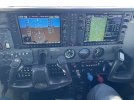
Stock 2006 Cessna T182T - here’s what it has:

● Garmin G1000 Avionics Package● GDU-1040 PFD● GDU-1040 MFD● Garmin GMA-1347 Digital Audio Panel w/Marker Beacon/Intercom● Dual GIA-63 NAV/COM/GPS With Glidescope 1 & 2● Garmin GTX345R ADS-B In & Out Transponder● GEA-71 Engine/Airframe Computer● GRS-77 AHRS - Attitude and Heading Reference System● GDC-74 Air Data Computer● WX-500 Stormscope● King KAP 140 2 Axis Autopilot with Altitude Preselect● GDL-69A XM Weather/ Radio● Auxiliary Stereo Input Jack● Avionics Circuit Breaker Panel● Single Engine Driven Vacuum Pump System● Magnetic Compass● Pitot System - Heated● Static System● Alternate Static Source● Audible Stall Warning System - Heated● Avionics Cooling Fans
 
I have this setup.

You have to pair the GTX-345 to your iPad via bluetooth, been a while since I did mine but this video looks right.


IIRC, ForeFlight will find it right away once paired and you should get traffic and weather data, might have to open up the layers and turn traffic and radar on but it's pretty straightforward.
 
My last plane had a separate ADSB in receiver that was WiFi connected to iPad mini seven
 
Garmin G1000 Avionics Package
You might check with your avionics shop, or call Garmin Aviation Support. But I'm wondering if the G1000 requires the BT to be disabled in the GTX, same as the GTN.

So you'd need an FS510 (SD Card) or check to see if you can also use an FS210.

Really makes you wonder about Garmin when they didn't add BT to EVERYTHING!! Since the iPad was invented, everyone knew it, or something like it, would be used in the cockpit.
 
Did you pair your iPad to the 345? Do they show as connected via Bluetooth in your settings app?

If so, whether you're using ForeFlight or Garmin Pilot, the next troubleshooting step is the same: Go to More -> Devices and see if it shows up there.
 
I have this setup.

You have to pair the GTX-345 to your iPad via bluetooth, been a while since I did mine but this video looks right.


IIRC, ForeFlight will find it right away once paired and you should get traffic and weather data, might have to open up the layers and turn traffic and radar on but it's pretty straightforward.
Thank you for this. I’ll try a Bluetooth connection tomorrow. Here is what my panel looks like.
 

Attachments

  • IMG_4474.jpeg
    IMG_4474.jpeg
    3.1 MB · Views: 9
Did you pair your iPad to the 345? Do they show as connected via Bluetooth in your settings app?

If so, whether you're using ForeFlight or Garmin Pilot, the next troubleshooting step is the same: Go to More -> Devices and see if it shows up there.
Not yet paired. I was looking on Wi-Fi for a signal when it appears I should be looking on Bluetooth. Thank you.
 
Yes Bluetooth. You should see a Bluetooth name like GTX345-XXXXX populate in your new devices list.

Traffic shows in either Foreflight or Garmin Pilot.
 
Pretty sure that you can only use the GTX-345 ADSB In with Garmin Pilot or ForeFlight. Garmin has a proprietary ADSB data in stream, which I'm pretty sure has only been licensed to ForeFlight. FlyQ won't work - Or at least it doesn't for me.


(Edited to correct spelling that autocorrect corrected incorrectly)
 
Last edited:
Pretty sure that you can only use the GTX-345 ADSB In with Garmin Pilot or Firelight. Garmin has a proprietary ADSB data in stream, which I'm pretty sure has only been licensed to ForeFlight. FlyQ won't work - Or at least it doesn't for me.
Works for me with both ForeFlight and Garmin Pilot. Get traffic and weather just fine. Used FF for many years and just recently switched to Garmin Pilot
 
I have that exact setup, used with foreflight. Good video posted in post #6. WIth foreflight once paired, you immediatey show the data on the I-pad mini Moving Map- no additional steps.
 
Last edited:
I have that exact setup, used with forefliglht. Good video posted in post #6. WIth foreflight once paired, you immediatey show the data on the Ipad mini Moving Map.
I'm pretty sure Darryl meant ForeFlight. Not sure why he put "Firelight" lol. But yes, Garmin Pilot and Foreflight are the only two EFBs licensed for use with ADS-B In on a GTX 345.
 
I'm pretty sure Darryl meant ForeFlight. Not sure why he put "Firelight" lol. But yes, Garmin Pilot and Foreflight are the only two EFBs licensed for use with ADS-B In on a GTX 345.
Yeah...autocorrect sometimes gets things wrong.
 
Pretty sure that you can only use the GTX-345 ADSB In with Garmin Pilot or ForeFlight. Garmin has a proprietary ADSB data in stream, which I'm pretty sure has only been licensed to ForeFlight. FlyQ won't work - Or at least it doesn't for me.


(Edited to correct spelling that autocorrect corrected incorrectly)
Spot on. To use something non ForeFlight or Garmin Pilot, you will need an ADSB In source that uses the "open system". I have a Stratus 3 that does that just fine.
 
So have you had a chance to take another flight? Figure out what the issue/conflict is that's keeping you from getting ADS-B data from a source in your plane?
 
So have you had a chance to take another flight? Figure out what the issue/conflict is that's keeping you from getting ADS-B data from a source in your plane?
Yes, but no joy. Only tested in the hangar. Bluetooth works and Fly Q connects, but no traffic displays. Didn’t try it in flight today. The G1000 MFD shows traffic, so my iPad is stowed away. G1000 display is so crude compared to my tablet, but it works. Rght now I’m just doing familiarization flights. Looks like I might have to use another receiver after all.
 
Last edited:
@Subsonicflight For whatever reason your last post is coming across as a quote from a prior post that I can't find. But... I did see that in your first post you had said Fly Q or ForeFlight, but though someone had already said that Fly Q wont' work (unless it has recently changed). You need to be using ForeFlight or G Pilot to get ADS-B data from the GTX 345.

Also, if you're on the ground, and worse if you're in a hangar, you're probably not receiving ADS-B data. Some airports you'll get ADS-B Out/In (plane to plane) traffic and in you may even get full ADS-B data. But at most airports you will not get ADS-B data until you're up high enough in the air to receive the ground station transmission. When I was back east and flying in relatively flat terrain, it was just above the tree line. In more hilly or mountainous terrain, you might have to get a lot higher before you start to receive the ADS-B transmission.

EDIT: Fixed where I said "TIS-B" before when I meant to just say ADS-B Out/In traffic from other planes. (Thx @Jon Wilder for the catch.)
 
Last edited:
Seattle avionics website posted an article saying they get a lot of questions on the GTX 345 and using FlyQ. The short answer is you must use an additional open source receiver. As stated above, only Garmin Pilot and ForeFlight are currently licensed for direct interface to the GTX 345. I sent an email to Garmin to let them know I personally thought they could do a lot to further their Goodwill image to the GA community if they would open that interface to all applications.
 
Also, if you're on the ground, and worse if you're in a hangar, you're probably not receiving ADS-B data. Some airports you'll get TIS-B (plane to plane) traffic and in you may even get full ADS-B data. But at most airports you will not get ADS-B data until you're up high enough in the air to receive the ground station transmission. When I was back east and flying in relatively flat terrain, it was just above the tree line. In more hilly or mountainous terrain, you might have to get a lot higher before you start to receive the ADS-B transmission.
You receive Air-to-Air ADS-B traffic data anytime you're within line of sight range of ADS-B compliant aircraft. Only ADS-R traffic, FIS-B weather, and TIS-B traffic come from the ground stations.
 
I see traffic around airports hundreds of miles away. I think traffic also comes from the towers as well as line of sight aircraft.
 
You receive Air-to-Air ADS-B traffic data anytime you're within line of sight range of ADS-B compliant aircraft.
Dang, good catch. Didn't mean to say ADS-B and TIS-B, but force of habit when so many people say they can't get their "Internet" traffic when flying. :D
 
You can also use FLTPlanGO to see traffic from the GTX345. It’s free right now.
 
Back
Top