GDL50 Port Outlet type?

PiaggioPilot

Filing Flight Plan
Joined
Sep 18, 2023
Messages
2
Display Name
Harry Freeman
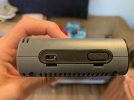
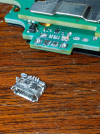
I am having the hardest time figuring out what cable I need to buy to charge my GDL50. I lost the cable that it came with but everywhere I look online (including customer support from Garmin) says I just need a micro USB cable to charge it. However, my GDL50 doesn't have a microUSB port. I fly a Piaggio and they directed me to buy the cable with the cigarette lighter end however, we only have USB ports in our cockpit. I feel like it shouldn't be this difficult to find out what cable I need to buy for this port. As you can see in the picture of my 50, that is not a micro usb port. Appreciate any help on this.

IMG_2068.jpg
 
that is a broken off port.

You can either charge using the Garmin data cable on the opposite side, or have it re-soldered. I have done my port 3x now and have just given up, it's not a durable design and garmin won't fix it.

I've used those phone repair iFixit type businesses for the repairs. They lasted a number of months each time and was under $100. I like soldering but this is beyond my skill level. Those places see it all the time.
 
Last edited:
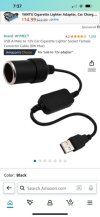
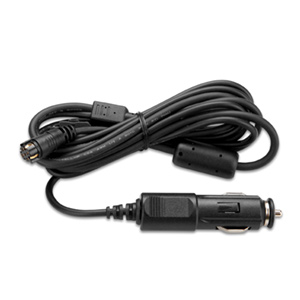
Garmin cable, adapter to fit it to your power port. Mine are tucked under the panel. Easy peasy.
 

Attachments

  • IMG_1919.jpg
    IMG_1919.jpg
    38.2 KB · Views: 11
that is a broken off port.

You can either charge using the Garmin data cable on the opposite side, or have it re-soldered. I have done my port 3x now and have just given up, it's not a durable design and garmin won't fix it.

I've used those phone repair iFixit type businesses for the repairs. They lasted a number of months each time and was under $100. I like soldering but this is beyond my skill level. Those places see it all the time.
Do you know if they sell a data cable with USB end? Or regular power plug end?
 
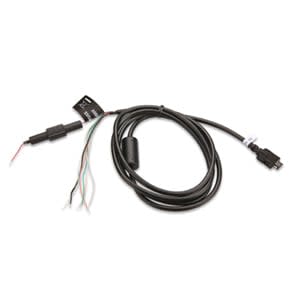
I am aware of the bare-wire version and the "cigar lighter" adapter version, which I use. Both are ridiculously priced around $75 or so.

I havne't seen the bare-wire for sale in awhile, but it's out there I bet.

This is the one I use:


This is the garmin spec page for the hardwire version:

 
I have done my port 3x now and have just given up, it's not a durable design and garmin won't fix it.
I know it would be unclean, but can you just solder a couple of wires to the board, strain relieve them, run them out of the case, and connect them to a port on a breakout board on the outside? Won't address the root cause, but you can turn a $100 fix into a $10 fix...
 
I know it would be unclean, but can you just solder a couple of wires to the board, strain relieve them, run them out of the case, and connect them to a port on a breakout board on the outside? Won't address the root cause, but you can turn a $100 fix into a $10 fix...

Haha, get out of my head. :) I've been considering a USB-C pigtail like this and soldering it up


and if I send my box in for yet another repair, it's going to be something like this, with slack inside of the box, and the cord sheath taking the strain instead of the board connector. Timely since mine is currently broken yet again.


Truth is, now that Garmin Pilot supports stratus, I am using my GDL50 less and less. It's rare I train in a plane without an ADS-B solution available anymore, and mine has a stratux in the nose that I am finally using.
 
:D I bought a usb-c pigtail of dubious quality and have tried to solder it twice to the mainboard, no joy so far. I even ran pull-down resistors to ground to draw PD charge via usb-C. The strain relief was awesome compared to the porcelain micro-usb port that it shipped with.

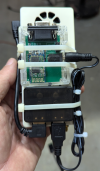
I'm trying to figure out my next move with the thing. Until then, the Stratus 3 serves. I have bought a series of nifty electronics tools and toys, though, so I'm only in the hole another $200 trying to implement the $10 fix to my $950 brick :D
 
I'll just leave this here.

 
It used to bug me that ships power was 12v, while my Stratux and Bluetooth-RS232 adapter are 5v. I didn't want to have to install another TSO cigar lighter or USB port. Then I realized I could zip tie a 12v-USB converter to the Stratux and connect to it with a DC jack so it is portable. Total cost 10 bucks.

Screenshot_20250821-195748.png
 
I'll just leave this here.


That adafruit board is tempting.
 
I'll just leave this here.

That article is missing a few details. For one, 12v was in the 1.0 spec but was removed in 2.0. However, the 3.0 spec added in an optional programmable power supply mode (PPS) so you can get get 12v from there, but I don't know that I'd want to count on 12v from just any rando USB-C port.

Also, 5A requires a cable with an E-marker chip. You can only get 3A from straight copper.
 
It used to bug me that ships power was 12v, while my Stratux and Bluetooth-RS232 adapter are 5v. I didn't want to have to install another TSO cigar lighter or USB port. Then I realized I could zip tie a 12v-USB converter to the Stratux and connect to it with a DC jack so it is portable. Total cost 10 bucks.

View attachment 144331
Do you ever get any second dates with that setup? :biggrin:
 
Do you ever get any second dates with that setup? :biggrin:

Don't laugh. I have it Velcroed under the panel with remote antennas, so it stays cool. WAAS GPS, ADS-B In, and pushes Nav data from my EFB to the HSI and EDM. Beat that for 200 bucks.
 
I tried a few different anker pd supplies, but I can't get 12V out, only 5/9/15/20. Harrumph!
 
I tried a few different anker pd supplies, but I can't get 12V out, only 5/9/15/20. Harrumph!
I warned you as such... (post #14). Your bricks are either PD3.x without the optional PPS or they are PD2.0.
 
Hm. One of them was an Anker Nano II, which is advertised as supporting PPS.
 
Then I guess the trigger doesn't support PPS. It is optional, after all.
 
It claims to be 3.0 :dunno: I'll have to forego a cup of coffee and try another brand of trigger...
 
Updated link. Found one that does PPS and groks with the anker. Now I can use an expensive usb cable as an extension cord. Hooray! :mad2:
 
Would something like this work for charging only, assuming one didn't connect the RS232 lines GDL Charging DIY The current (see what I did there) price for the connector and strain relief at Mouser or Digi-Key is less than $13
 
Yeah, the idea is to be able to power/charge the gdl-39 off usb-c.
 
Yeah, the idea is to be able to power/charge the gdl-39 off usb-c
Yeah, the idea is to be able to power/charge the gdl-39 off usb-c.
From what I can tell the method I linked to above would not use usb-c but the data port on the other side hardwired with that Hirose Electric ST40X-18S-CV(30) 18 pin connector. I'm currently using a usb cable to power my GDL50 but need to hit the on/off button after it powers up because it goes into standby mode, thinking it's being powered by a wall charger. I would like to avoid that step but so far haven't fabricated a new direct power cable for the data port instead of using the micro usb port.
 
Back
Top