Worldwide trade
Pre-Flight
Looking at RealSimGear and also Redbird for a BATD home simulator (C-182) or are there any other suggestions? Thanks for any comments.


Yeah, that's more or less true, but even for currency, if you are going to work on proficiency, having a mockup as close to your real airplane as you can has some benefits.There’s only one reason to fork over for a BATD and it has no relationship to avionics replication.

I have a RedBird G1000 TD which models a 172. It doesn’t fly anything close to like what my RV-10 flies like. The RedBird is generally harder to fly so I like that since training becomes harder than the real thing. The fact I have a non-touch G3X and not a G1000 in my panel is not much of an issue because Garmin products have similar operating logic and I got my instrument behind a G1000 so am pretty familiar.Yeah, that's more or less true, but even for currency, if you are going to work on proficiency, having a mockup as close to your real airplane as you can has some benefits.
One of the funniest things about the Redbird emulations is that its analog panel has what may be the only KAP140 in existence with native GPSS.
No question that one of the best things about training devices is that they are harder to fly. Add the lack of biofeedback in the desktop TD models means when you hand fly them you really have to be up on your scan. So regardless of the avionics emulation, they are extremely valuable. Most of the airplane are glass, but the one I take on most longer trips is analog. I always do an analog TD2 session before a trip in it.The RedBird is generally harder to fly so I like that since training becomes harder than the real thing. The fact I have a non-touch G3X and not a G1000 in my panel is not much of an issue because Garmin products have similar operating logic and I got my instrument behind a G1000 so am pretty familiar.
Quite honestly, something very similar is true for full-motion simulators. It just involves incorrect and/or conflicting biofeedback.Add the lack of biofeedback in the desktop TD models means when you hand fly them you really have to be up on your scan.

I know. It didn’t at one time. It was fixed in both 11 and 12, I forget when, but my name is in the release notesMark's (@midlifeflyer's) fix for "Cleared straight in" (i.e. select the Hold, CLR, Ent) works just fine (just confirmed) in X-Plane 12 with both the stock C172/G1000 and the Aerobask DA50RG.

All that’s going on is that it’s not a Garmin G1000 and it wasn’t programmed to do everything a Garmin does. It’s not the only one. I haven’t made a list but I’m never surprised anymore when I come across one.I’m gonna try that when I get home and see if I can figure out what’s going on.
Ahh ok. That’s MS and LockMart then as the Redbirds run PD3.All that’s going on is that it’s not a Garmin G1000 and it wasn’t programmed to do everything a Garmin does. It’s not the only one. I haven’t made a list but I’m never surprised anymore when I come across one.


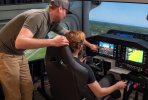
We use the RealSimGear setup with XPlane 11. Works pretty well, considering the price.
View attachment 143263
See... for Cirrus, Cessna, Piper, Diamond:It does. Do you have BATD approval for that device? If so what’s you’re setup?
 realsimgear.com
See... for Cirrus, Cessna, Piper, Diamond:
FAA Approved Flight Training Devices
Explore the full range of RealSimGear's FAA Approved Training Devices. Offering ultra-realistic high fidelity systems for any Cirrus, Cessna, Piper, and Diamond.
Yep, it's a PD3 emulation issue.Ahh ok. That’s MS and LockMart then as the Redbirds run PD3.

Yes. Pretty much setup as you see in the image. The only thing not shown is the instructor station. We've had it for 2-3 years now.It does. Do you have BATD approval for that device? If so what’s you’re setup?
I have the Simionic hardware bezels and don't recommend them for simulators. The app logic for the flight sim is in the app and requires drivers to interface. The last time I used it, it didn't interface well to either XP11 or MSFS. The worst offense was that when disengaging the autopilot, you would be severely trimmed up to the point of stalling. In moving I haven't had it on in a while.if you have an iPad, there's a G1000 PFD and a companion G1000 MFD app by Simionic that does OK.

I noticed that during my last RedBird session. The club had upgraded the Redbird system and in the process purchased a C-172 G1000 overlay panel. This panel was configured for the G500 autopilot and not the older G1000/KAP140 configuration.The issue with Redbird is that its G1000 is close to but not quite a real G1000. It's not a huge problem, since the basic buttonology is the same, but it means that certain things don't work quite right. The other issue is an airframe-specific one - since the G1000 is an OEM product, different airframe manufacturers choose different presentations.
I don't know how Real Sim Gear handles either issue.

What sorts of differences? Assuming, of course, you have the gear to exercise all the functions (ie, GTN for VNAV)...Just a technical FYI, @BillTIZ. That autopilot is not a GFC500. It’s a GFC700. Many functions are similar but there are a few differences, even in the real ones.
Part of the issue is that G1000s are not completely uninform from airframe manufacturer to airframe manufacturer. So a 700 may work differently in a Cirrus Perspective than in a Diamond. But two examples.What sorts of differences? Assuming, of course, you have the gear to exercise all the functions (ie, GTN for VNAV)...
Heh... I've seen THAT one be different in the same doggone airframe on different days (GFC700). Sometimes after you armed VNAV the light above the button would start blinking within 5 miles and you'd have to push it again to get it to really arm so it'd engage. Other days it'd just go about its business. Never did figure out what other conditions led to one or the other!VNAV in the GFC700 (at least in some earlier iterations) requires you to be within 5 miles of the vertical waypoint in order for arm to move to engage (I have a video where I demonstrate this in a Diamond G1000); GFC500 does not.
