
I'm new to the Skyview and just learning how to properly work it's features. I just tried a RNAV GPS LPV approach for the first time on the skyview fed by Garmin GTN650xi. After reaching the IAF within the prescribed altitude limits I was expecting to see cross hairs. Instead I saw the lateral guidance only. After a while of fumbling I noticed the tiny glideslope indicator to the right of the HSI. To be frank, it sucks. I would like the option to display needles superimposed over the attitude indicator. Am I missing something here? A setting the can be changed perhaps?

You are using an out of date browser. It may not display this or other websites correctly.
You should upgrade or use an alternative browser.
You should upgrade or use an alternative browser.
Dynon Skyview glideslope indicator needle
- Thread starter FORANE
- Start date
Yes, the "chicklet" on the right of the CDI. Yes, the flight director was on. The autopilot was on and following lateral course but did not descend. I did try hitting VNAV before and after the chicklet appeared but it did not descend. The chicklet was at the bottom of the scale so I was above the glideslope.If you’re referring to the chiclet on the right of the CDI, I can’t recall if there’s a way to display that as a needle, but I can check the documentation later tonight.
Have tried turning the flight director on?

Jesse Saint
Line Up and Wait
- Joined
- Nov 18, 2018
- Messages
- 950
- Display Name
- Jesse Saint
You need to have a CDI for crosshairs. With an HSI, you can’t have crosshairs because the whole “loc” needle rotates. All HSI’s have a separate glideslope indicator off to the side. HSI is tons better than a CDI for situational awareness.

Learnin’ to fly…
Pre-takeoff checklist
- Joined
- Apr 11, 2023
- Messages
- 236
- Display Name
- Learnin’ to fly…
Yes, this is how it displays(chicklet). If you select vnav, the FD’s will reflect the GS
I would not get in this habit. The flight directors are great, but they are a representation of what the autopilot would do. Not as fast, accurate, or reliable as the HSI, and if you forget to press VNAV, the FD’s are going to give you guidance for whatever altitude you have bugged.
I would not get in this habit. The flight directors are great, but they are a representation of what the autopilot would do. Not as fast, accurate, or reliable as the HSI, and if you forget to press VNAV, the FD’s are going to give you guidance for whatever altitude you have bugged.
Learnin’ to fly…
Pre-takeoff checklist
- Joined
- Apr 11, 2023
- Messages
- 236
- Display Name
- Learnin’ to fly…
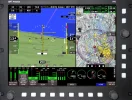
Not that I am aware of (other than the flight directors).I am accustomed to this style yellow needles popping up. Not an option with the Dynon?View attachment 140509
In HDX, the crosshairs are tied to the native flight director.
The HSI is receiving from the Garmin, and the GS/vertical guidance is in the bar to the right of the HSI (chicklet).
Pages 70-72 and 224- 225 of the user guide might be helpful.
Last edited:
I'm a simple man, kinda like the Lynyrd Skynyrd song. My brain intuitively understands the CDI crosshairs. Additional info the HSI may provide is of no use if it distracts me in IMC. Does Dynon have an option to change the HSI to CDI?You need to have a CDI for crosshairs. With an HSI, you can’t have crosshairs because the whole “loc” needle rotates. All HSI’s have a separate glideslope indicator off to the side. HSI is tons better than a CDI for situational awareness.
I'm a simple man, kinda like the Lynyrd Skynyrd song. My brain intuitively understands the CDI crosshairs. Additional info the HSI may provide is of no use if it distracts me in IMC. Does Dynon have an option to change the HSI to CDI?
No. You can configure it for DG or HSI. See page 4-21.
You can consider activating the flight path marker (see p. 4-9) instead of the flight director on the PFD, though.

- Joined
- May 25, 2006
- Messages
- 21,999
- Location
- KTTA, North Carolina
- Display Name
- Who you kiddin?
- Home Airfield
- KTTA
Welcome to the world of glass. I know there are those which will display a crosshairs for the VDI rather than a chuckletbit diamond or other indicator on a vertical tape, but they are the exception rather than the rule.
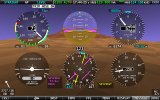
Unless it’s changed, as I recall, the Dynon can display a traditional six pack rather than what has become pretty standard glass.
Unless it’s changed, as I recall, the Dynon can display a traditional six pack rather than what has become pretty standard glass.
Yeah, I've flown behind older generations of Garmin, GRT and Dynon for years. No desire for the 6 pack done in glass. Just would like the simple cross hairs; from a thread on the dynon forum and other threads like here I'm not alone. A HSI, like most tools designed to accomplish more than one task, tend to not be the best at either.Welcome to the world of glass. I know there are those which will display a crosshairs for the VDI rather than a chuckletbit diamond or other indicator on a vertical tape, but they are the exception rather than the rule.
Unless it’s changed, as I recall, the Dynon can display a traditional six pack rather than what has become pretty standard glass.
View attachment 140531
- Joined
- May 25, 2006
- Messages
- 21,999
- Location
- KTTA, North Carolina
- Display Name
- Who you kiddin?
- Home Airfield
- KTTA
…or you get used to it just like you got used to the tapes.Yeah, I've flown behind older generations of Garmin, GRT and Dynon for years. No desire for the 6 pack done in glass. Just would like the simple cross hairs; from a thread on the dynon forum and other threads like here I'm not alone. A HSI, like most tools designed to accomplish more than one task, tend to not be the best at either.
There will be people who will disagree with you about the merits of an eHSI vs an analog HSI vs a CDI when flying an approach.
…Unless it’s changed, as I recall, the Dynon can display a traditional six pack rather than what has become pretty standard glass.
View attachment 140531
It hasn’t. Selectable from the PFD Tools Menu

Agree with you regarding some prefer the HSI. That doesn't preclude Dynon from offering two options.…or you get used to it just like you got used to the tapes.
There will be people who will disagree with you about the merits of an eHSI vs an analog HSI vs a CDI when flying an approach.
Given that airspeed control is paramount in the type I fly, I would still have a separate analog ASI if I had the panel space. I still find the analog ASI faster to spot deviation when attention is concentrated elsewhere.
- Joined
- May 25, 2006
- Messages
- 21,999
- Location
- KTTA, North Carolina
- Display Name
- Who you kiddin?
- Home Airfield
- KTTA
I understand. The first time I flew a G1000, a demo flight, I asked whether I could change the display. I didn’t like it at all and wanted something more traditional.Agree with you regarding some prefer the HSI. That doesn't preclude Dynon from offering two options.
Given that airspeed control is paramount in the type I fly, I would still have a separate analog ASI if I had the panel space. I still find the analog ASI faster to spot deviation when attention is concentrated elsewhere.
Now I train and am equally at home in all of them, even if flying different setups on different days. You are dealing with a single setup for an airplane so I know you will get used to it even if you never like it.