Dell laptop out of memory.

Gary Ward

En-Route
Joined
Jan 16, 2020
Messages
3,639
Location
Lawrenceburg, Indiana
Display Name
Challenger1
Home Airfield
I67
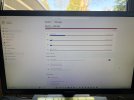
My C drive it appears is full on this laptop. Is there anything I can to clean it up/ remove some stuff?
I don't know much about computers, TIA.IMG_6410.jpeg
 
Start with clicking on "Cleanup Recommendations" in the middle of the screen.
 
Go thru all your applications and see if there are any you don't use. 1/4 of your drive is apps. You can go into the directory, sort by date. Are you really using apps those very old apps?

Next, go pick up an external hard drive - SSD - and do the same thing with the data files - Word, Excel, PowerPoint, PDFs, etc. Are you frequently using those very old files? If not, move them to the external drive. The portable drives are the size of a deck of cards these days and many don't need external power, they plug into the USB port on your computer.
 
Last edited:
C:> delete *.* justkiddingdontdothat
First thing I always do on a new system (windows, linux) is alias the delete and remove command to something else so I don't do something stupid.

alias rm "rm -i" requires confirmation
and
del becomes "del /p" another one that requires confirmation

or I rename del entirely to something I know I won't use accidentally, such as "cramfarkle"
 
Go thru all your applications and see if there are any you don't use. 1/4 of your drive is apps. You can go into the directory, sort by date. Are you really using apps those very old apps?
Well, that also means there are over 100 GB of files somewhere. Gary needs to figure out what those comprise and where they are.
 
First thing I always do on a new system (windows, linux) is alias the delete and remove command to something else so I don't do something stupid.

alias rm "rm -i" requires confirmation
and
del becomes "del /p" another one that requires confirmation

or I rename del entirely to something I know I won't use accidentally, such as "cramfarkle"
am I the only one that says "cramfarkle" multiple times daily? hhmmffff
 
Try running these. Failing that, it’s time for a larger hard drive.

Pcdecrapifier. Yes it’s a real program. Great for after buying a new computer but good to remove crap taking up space

Another is cccleaner.
 
I honestly did not know they still sold computers with drives that small...
 
Go to Google and type in WINDIRSTAT. Then download it and run it. You should have enough room to do that. It will immediately tell you the programs that are using the most space on your drive(s). It has a lot of other capability that you may not be confident using. At least you will be better informed.
 
I just went through this. Turns out my 1tb SSD drive was partitioned into a C drive for the operation system and apps, and there was a D drive for data that was not even being used. I probably forgot about moving personal data over to the D drive when I initially set things up. C drive showed full at 256 GB, the other 750GB was sitting us used on the D drive! :eek:
 
Start with clicking on "Cleanup Recommendations" in the middle of the screen.
I did that at first with no luck. Then today I removed all the cookies from all the different websites and that made my drive all the way full.
So that didn't help.
I don't know what I am doing anymore with computers.
I bought this laptop in 2022 -23 from the A&P college I attended for one semester.
I have been using it full time at home with a monitor, keyboard and mouse.
I guess it's time to replace it? '
Or buy a external drive.
I used to have at least one external drive over the years.
Back around 2000 I built a couple crude computers with ATX cases I think?
Since then I have really fallen behind knowing much about computers.
I remember plugging in extra memory in old computers.
I really appreciate the help here.

No my hard drive is full, nothing to do with memory, right?
 
First thing I always do on a new system (windows, linux) is alias the delete and remove command to something else so I don't do something stupid.

alias rm "rm -i" requires confirmation
and
del becomes "del /p" another one that requires confirmation

or I rename del entirely to something I know I won't use accidentally, such as "cramfarkle"
I, on the other hand, install sdelete (Windows) or shred (linux) as the first thing I always do on a new system. :)
Go thru all your applications and see if there are any you don't use. 1/4 of your drive is apps. You can go into the directory, sort by date. Are you really using apps those very old apps?
Yeah, but Windows is saying it's only 53GB out of 220GB.
No my hard drive is full, nothing to do with memory, right?
In modern parlance, yes, storage and memory are 2 separate things when it comes to software. t
Or buy a external drive.
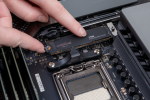
If you know the make/model, it might be possible to upgrade the storage. Many laptops use M2 SSD's that look like this:
1775513928087.png
Remove the screw on the left and then it lifts right out.
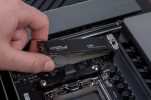
1775513983058.png
Install is the reverse of removal. Of course, you'll need a way to back up and restore, though. That may mean a second PC or an M2-USB adapter. If you go the latter route, you can reformat the old SSD to use as an external drive for things like near-line backup.

 
giphy.gif
 
I, on the other hand, install sdelete (Windows) or shred (linux) as the first thing I always do on a new system. :)

Yeah, but Windows is saying it's only 53GB out of 220GB.

In modern parlance, yes, storage and memory are 2 separate things when it comes to software. t

If you know the make/model, it might be possible to upgrade the storage. Many laptops use M2 SSD's that look like this:
View attachment 151307
Remove the screw on the left and then it lifts right out.
View attachment 151308
Install is the reverse of removal. Of course, you'll need a way to back up and restore, though. That may mean a second PC or an M2-USB adapter. If you go the latter route, you can reformat the old SSD to use as an external drive for things like near-line backup.
Can I send you my laptop?
 
Unfortunately, these days - especially with Windows - 200GB ain't nothin'. My main PC has a 4TB hard drive and I'm using about half of it. Granted, Flight Simulator and a couple other games take up a lot of that space but still...it's really easy to fill a 250GB drive these days. Fortunately, replacing a hard drive for a larger model is pretty easy. Especially if your computer has the capacity for a second drive to be used. Or, you can use an external HDD adapter to set up a new drive and replace one for one. I've done these kinds of operations many times and can give some advice. Shoot me a DM if you'd like.
 
Just ran across this thread. So have you found the issue and fixed it?

And what is in the "Show More Categories" just below Temporary Files and above the Storage Management (the next category)? Based on the picture you showed, drive space would not be the issue as those items only add up to 71.53GB.

It is possible something is in there that is pretty big, so you need to take a look. Also, if you just double click on This PC, does it show the same issue. In theory it will, but if it doesn't then that really says there is something else going on.

And other's joked about deleting everything, but it might not be a bad idea to friend or go to some (WELL ESTABLISHED) repair place and have them pull off all of your data, rebuild the PC and then put your data back onto your HD. Big downside is you need to go back through and reset all of your custom settings (if you have any).
 
Back
Top