CAD Programs - Recommendations?

ArrowFlyer86

En-Route
PoA Supporter
Joined
Jul 17, 2019
Messages
3,285
Location
Around
Display Name
Flight
I've got a budding interest in designing some things for 3d printing, and if that goes well maybe some kind of metal items.
I've seen Solidworks and Fusion as two options. Are one of those appropriate tools to learn? Any advantages to one over the other, aside from the crazy price tags some of them have?

Total newbie, so totally open to recommendations and any warnings on limitations.
 
I would advise using Onshape. It's entirely online, so nothing to download/install, yet for total beginners, as capable as solidworks. Also you can work on your project from anywhere and any computer. It's great for learning and once you outgrow it, you'll move to more advanced software.
 
I've used fusion and inventer. I have autocad LT on perpetual license to make dxf's for my CNC plasma and my laser layout projector. I don't do any 3d printing. Just create step files to get pipe laser cut on rare occasion. Plan on bringing that in house and buy a rotary plasma. I just bought Alibre for that reason. Haven't really spent much time with it. But for me, it will do the job. It's not well known but it's been around a bit. Perpetual license sold me. It also has a sheet metal function that unfolds the part to cut flat and factors in die size and k factor. Plus looks like it models/details fairly well.

A similar program for my industry is advance steel. Autodesk put it in maintenance mode. Which means you can send them 2600 a year and theyre never going to update or add features and will probably kill it off in the near future.

What kind of metal items? More than happy to help out in that way...
 
Last edited:
In a way, software maintenance mode sounds like a dream. I would pay some software vendors extra if they'd let me keep the current version of software as-is :) (*cough microsoft excel *cough). I might be a little salty about writing a check for $2600/yr, though.
Re: metals.. I'll have to get back to you on that. Still doing my research and noodling through different ideas. As a total newbie, I have much to learn about which metals to use and when (and how to cut them, bend them, shape them as a whole... Where to buy them... all that good stuff!).
But I appreciate the offer to drop some knowledge! Hopefully once I fully flesh out a few ideas I can pick your brain on that.
 
In a way, software maintenance mode sounds like a dream. I would pay some software vendors extra if they'd let me keep the current version of software as-is :) (*cough microsoft excel *cough). I might be a little salty about writing a check for $2600/yr, though.

Re: metals.. I'll have to get back to you on that. Still doing my research and noodling through different ideas. As a total newbie, I have much to learn about which metals to use and when (and how to cut them, bend them, shape them as a whole... Where to buy them... all that good stuff!).
But I appreciate the offer to drop some knowledge! Hopefully once I fully flesh out a few ideas I can pick your brain on that.
2600 a year an annual subscription. Or 7800 for a 3 year sub. But they've got a history of killing the product off and since you don't own a physical copy you've got to learn a new program.

As far as metals or projects...I'm a metal fabricator. CNC plasma up to 1"thick, shear any metal from 28 ga aluminum to 3/8 steel plate 12'long. 12' long press brake to bend up to 1/2 plate. I buy material from 6 different vendors depending on if it's stainless, aluminum, steel, grating, etc. My welding gas vendor said I'm the only place in Lake County that sells material to the general public. Not sure if I buy that.

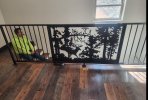
Any questions you got, fire at will. I will absolutely nerd out. Here's a little railing for my buddies new lake house.

IMG_1662.jpeg
 
2600 a year an annual subscription. Or 7800 for a 3 year sub. But they've got a history of killing the product off and since you don't own a physical copy you've got to learn a new program.

As far as metals or projects...I'm a metal fabricator. CNC plasma up to 1"thick, shear any metal from 28 ga aluminum to 3/8 steel plate 12'long. 12' long press brake to bend up to 1/2 plate. I buy material from 6 different vendors depending on if it's stainless, aluminum, steel, grating, etc. My welding gas vendor said I'm the only place in Lake County that sells material to the general public. Not sure if I buy that.

Any questions you got, fire at will. I will absolutely nerd out. Here's a little railing for my buddies new lake house.

View attachment 143735
I think he needs to buy an ironworker, right? :rofl:
 
Fusion. There's a free version that allows you to work on 10 projects at a time, and you can move projects in and out of storage to work on, so it's really not much of a limitation. It's not straightforward by any means, but it seemed more logical than any of the others I tried. The free version is essentially the same software that they charge thousands for with very few limitations. The biggest plus to it is that there's a zillion videos out there showing how to do stuff when you get stuck, and autodesk themselves have some pretty good training videos to get you started. It seems to be the most common software in the "makerspace" by far.

I should add, I tried about 6 programs, and fusion is the only one that would easily give me the file types needed for both my 3d printer slicer program, and send-cut-send.
 
I hear good things about Freecad, though I've never used it. I've been using KeyCreator (formerly Cadkey) for years, though I don't know that I'd recommend it (or any professional CAD program) for an amateur... the learning curve on high end programs can be pretty steep. Along the way I've used Computervision, Cadkey, Autocad, Desktop, Inventor (never was fond of any Autodesk software), Solidworks, Rhino, Unigraphics, Varimetrix, Vellum, and probably a few others I've forgotten. I never liked any of the sketch based parametric modelers (Inventor, Solidworks, etc.), they just fit the way I design. Fortunately when I retired, the company was getting ready to switch to Solidworks so they gave me one of their permanent Keycreator licenses. I won't get updates past the end of the year but I don't care.
 
I think he needs to buy an ironworker, right? :rofl:
I was under the impression he already had a Scotchman and was just trying to come up with an idea how to best use it.

Over on YouTube this guy has a tournament style cad battle that I found oddly entertaining.

 
Last edited:
No matter what you pick, there will be a significant learning curve if you want something capable.

I use FreeCAD for parametric "engineering" style applications / 3D printing. The free or low cost versions of things like Fusion or the EAA deal on Solidworks are good, but the rules tend to change and sometimes what was free isn't. FreeCAD is free opensource and you aren't relying on any cloud anything so as long as you have it downloaded, it will never go away. You can also do some Computational Fluid Dynamics, etc.

If you want to do more free shape artsey kind of sculpting (like grabbing a wad of clay and pulling and pushing) then something like Blender.


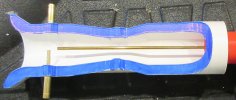
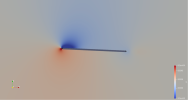
Some examples from FreeCAD...


CropCutaway.JPG1754572882334.png1754573165039.png
 
EAA Members can get Siemens Solid Edge for free! Siemens SolidEdge Its as good as solidworks and your designed parts and assemblies can be 3D printed so you can easily create prototypes.
 
Last edited:
Fusion 360 personal. I got tired of getting jerked around by EAA's changing "offerings" and got my own. I have access to a full license but rarely use it. The personal use license gives me everything I need, which is primarily stl files (for slicing) and g-code (for a router).

Nauga,
tooling along
 
I've got a budding interest in designing some things for 3d printing, and if that goes well maybe some kind of metal items.
I've seen Solidworks and Fusion as two options. Are one of those appropriate tools to learn? Any advantages to one over the other, aside from the crazy price tags some of them have?

Total newbie, so totally open to recommendations and any warnings on limitations.

It depends on the level at which you plan to engage in this activity. If you're going to be transferring files between other industry professionals, then more widely adopted tools like AutoCAD or SolidWorks would be the preferred choice. However, if you're just experimenting on your own, there are plenty of free options available. In my experience, these free tools are just as good as the paid professional versions, aside from their lack of widespread industry adoption. It’s a bit like the Windows vs. Linux debate. Personally, I use Blender. Some might argue that it's not a true CAD tool, but that really depends on who you ask. I use it for hard surface modeling and 3D printing. In my opinion, it's one of the best free 3D tools available.
 
Another vote for Fusion 360. I bounced around from several different options (TinkerCAD, FreeCAD, OnShape, etc.) but couldn't quite get over the hump on the learning curve with them and eventually landed on Fusion and have been happy with it. I've been using it for a couple of years now for 3D printing as well as some furniture/desk designs. I ended up paying for a license so I could create more than one drawing (for cut lists, assembly drawings, etc. - not the 'design' drawing itself) and so I could tinker with the simulation/stress testing capabilities which is kind of neat, but the capabilities of the 'free' version does all of the heavy lifting. Not sure if it's always the case, but after I bought my license (?$150/yr?) I got a note saying I could extend for another year for $75, which I did. One nice-ish thing about it is that you can export directly from Fusion to your slicer which saves a couple of clicks.
 
Thanks everyone! This give me a bit to think about.

My top choice is to select a program for the long haul, not one where I'd have to migrate from it if I decided to do something more complex. I'd rather be limited by my own motivation and creativity than the program. Though I suspect that also means a higher learning curve.

I'm assuming (perhaps incorrectly) that if you used something like fusion personal and needed to add functionality that doesn't come with that version -- you could upgrade your license and unlock the premium features? I'm a long way from that, but pays to plan ahead just in case!
 
I'm assuming (perhaps incorrectly) that if you used something like fusion personal and needed to add functionality that doesn't come with that version -- you could upgrade your license and unlock the premium features? I'm a long way from that, but pays to plan ahead just in case!
That is correct. I'm trying to remember what I needed a pay license for but can't recall - I know there was something but not something I do often. Modeling, path/tool design and g-code gen, and cnc simulation are my main uses and the personal version does all those.

Nauga,
and the path not taken
 
Thanks everyone! This give me a bit to think about.

My top choice is to select a program for the long haul, not one where I'd have to migrate from it if I decided to do something more complex. I'd rather be limited by my own motivation and creativity than the program. Though I suspect that also means a higher learning curve.

I'm assuming (perhaps incorrectly) that if you used something like fusion personal and needed to add functionality that doesn't come with that version -- you could upgrade your license and unlock the premium features? I'm a long way from that, but pays to plan ahead just in case!

Yep. Same app - it's not like you have to learn a new interface or process, etc. if you upgrade to the paid version. In fact, all the 'advanced' buttons and options are there in the app in the free version (with an identifying overlay on the icon so you know it's not available in that version), but when you click them, they give a little blurb about what they do and provide a link to upgrade if you want. Once you upgrade your license, the icon overlays go away and the buttons start working. I will say, though, that there are different levels of 'paid' versions. If you are looking to get into AI-generated designs or high complexity simulations, I think there is another level of license required for that, but I haven't even found a 'pretend' use case for any of that stuff (yet).
 
Fusion 360 personal. I got tired of getting jerked around by EAA's changing "offerings" and got my own. I have access to a full license but rarely use it. The personal use license gives me everything I need, which is primarily stl files (for slicing) and g-code (for a router).

Nauga,
tooling along
Fusion exports gcode?
 
Fusion exports gcode?
Yes, in the Manufacturing workspace. You can set up the tool selection and tool paths for a model and generate the code. There's also a good simulation function in Manufacturing that's available in the personal version (the full-blown simulation workspace is not) so you can test toolpaths.

Sample:
Code:
(ALIGNMENT_JIG)
(T1  D=5.842 CR=0. - ZMIN=-12.43 - FLAT END MILL)
G90 G94 G91.1 G40 G49 G17
G21
(WHEN USING FUSION 360 FOR PERSONAL USE, THE FEEDRATE OF)
(RAPID MOVES IS REDUCED TO MATCH THE FEEDRATE OF CUTTING)
(MOVES, WHICH CAN INCREASE MACHINING TIME. UNRESTRICTED RAPID)
(MOVES ARE AVAILABLE WITH A FUSION 360 SUBSCRIPTION.)

(HOLDDDOWN_HOLES)
M5
T1 M6
S5000 M3
G54
G0 X-178.177 Y456.701
G43 Z15. H1
G1 Z1. F1000.
Z-0.416
G18 G2 X-177.593 Z-1. I0.584 K0.
G1 X-177.301
G17 G3 X-176.802 Y457.2 I0. J0.499
X-178.798 Z-1.137 I-0.998 J0.
...

Nauga,
who is the most dangerous tool in his shop
 
Yes, in the Manufacturing workspace. You can set up the tool selection and tool paths for a model and generate the code. There's also a good simulation function in Manufacturing that's available in the personal version (the full-blown simulation workspace is not) so you can test toolpaths.

Sample:
Code:
(ALIGNMENT_JIG)
(T1  D=5.842 CR=0. - ZMIN=-12.43 - FLAT END MILL)
G90 G94 G91.1 G40 G49 G17
G21
(WHEN USING FUSION 360 FOR PERSONAL USE, THE FEEDRATE OF)
(RAPID MOVES IS REDUCED TO MATCH THE FEEDRATE OF CUTTING)
(MOVES, WHICH CAN INCREASE MACHINING TIME. UNRESTRICTED RAPID)
(MOVES ARE AVAILABLE WITH A FUSION 360 SUBSCRIPTION.)

(HOLDDDOWN_HOLES)
M5
T1 M6
S5000 M3
G54
G0 X-178.177 Y456.701
G43 Z15. H1
G1 Z1. F1000.
Z-0.416
G18 G2 X-177.593 Z-1. I0.584 K0.
G1 X-177.301
G17 G3 X-176.802 Y457.2 I0. J0.499
X-178.798 Z-1.137 I-0.998 J0.
...

Nauga,
who is the most dangerous tool in his shop
Interesting. I always thought gcode was more machine manufacturer specific with different mcode inputs and needed a nesting software intermediary. Whereas NC files were a little different. Just starting to get my feet wet with NC files the next machine will be able to use them.
 
Interesting. I always thought gcode was more machine manufacturer specific with different mcode inputs and needed a nesting software intermediary. Whereas NC files were a little different. Just starting to get my feet wet with NC files the next machine will be able to use them.
Hmmm...Fusion refers to them files as NC files, I just assumed they were g-code based on appearance and command commonality, at least to my relatively unexperienced eye. Or in human, "I could be wrong."

ETA: Regardless of naming, the code works on CNC routers that are controlled by g-code.

Nauga,
who thought he was wrong once but he was mistaken
 
Last edited:
Seems like Fusion is the go-to these days, which is why I decided to learn it.

I'm still really bad at it, but I have glimmers of hope. :rofl:

I do really like the concept of parametric design. Define variables like material thickness, and set measurements based off of them, and then if you decide to use a different material, you only have to update in one spot and the design updates automatically. Pretty cool.
 
Seems like Fusion is the go-to these days, which is why I decided to learn it.

I'm still really bad at it, but I have glimmers of hope. :rofl:

I do really like the concept of parametric design. Define variables like material thickness, and set measurements based off of them, and then if you decide to use a different material, you only have to update in one spot and the design updates automatically. Pretty cool.
Parametric modeling is not unique to Fusion 360 - seems like most packages have some level of parametric capability these days. It does come in handy but can also royally screw things up unless you're rigorous in implementing it. - and I love it.

Nauga,
fretting
 
I do really like the concept of parametric design. Define variables like material thickness, and set measurements based off of them, and then if you decide to use a different material, you only have to update in one spot and the design updates automatically. Pretty cool.
In theory, yes... but everything has to be modeled and constrained correctly, or else you get conflicts and it doesn't work. All the design intent has to be captured correctly from the start, and with a complex design it's not unusual to have to abandon the model and recreate it from scratch several times during the design process to get the mates and constraints to work. Large design changes, particularly when several parts are constrained of a component being removed, can be very messy.

With a non parametric "direct modeler", OTOH, like Keycreator or Creo/Direct, small changes like changing skin thickness may take longer, but large changes are much easier and faster.

A lot comes down to your design style. I have a good friend who approaches engineering very methodically; he thinks things out in advance and refines his design until it's done. I, OTOH, work in a more freeform manner; I try one approach and see where it leads, then chop half of it off and try something else in its place, until I'm satisfied. We may get to the same place in the same time, but the path is very different. He likes a parametric modeler while I prefer a direct modeler. He's also a very good chess player, and I'm not.
 
I do really like the concept of parametric design. Define variables like material thickness, and set measurements based off of them, and then if you decide to use a different material, you only have to update in one spot and the design updates automatically. Pretty cool.
I'll bet you'll really love OpenSCAD.
 
Hmmm...Fusion refers to them files as NC files, I just assumed they were g-code based on appearance and command commonality, at least to my relatively unexperienced eye. Or in human, "I could be wrong."

ETA: Regardless of naming, the code works on CNC routers that are controlled by g-code.

Nauga,
who thought he was wrong once but he was mistaken
NC, G-code, whatever.
Most of the code is generic for a particular application (3 axis mill, 3d printer...). Most.
And, just when you think it is safe...
 
I'll bet you'll really love OpenSCAD.
What I'll really love is when I can figure out the best way to create a space to work inside. One of the things I need to model and build is to take what is now a plain-vanilla closet with sliding doors, and build it into a mud room storage with places for shoes, boots, coats, for everyone, a bench to sit on while putting said things on and taking them off, and some additional storage compartments in the sides for the generic stuff we store in there (vacuum, toilet paper, paper towel, plastic bags, ...). It's going to require some precision to build inside a constrained space so I do want to model it all the "right" way, but it is currently above my Fusion skill level... Mainly because I keep doing things to 3D print which is somewhat different than working with lumber.
 
What I'll really love is when I can figure out the best way to create a space to work inside. One of the things I need to model and build is to take what is now a plain-vanilla closet with sliding doors, and build it into a mud room storage with places for shoes, boots, coats, for everyone, a bench to sit on while putting said things on and taking them off, and some additional storage compartments in the sides for the generic stuff we store in there (vacuum, toilet paper, paper towel, plastic bags, ...). It's going to require some precision to build inside a constrained space so I do want to model it all the "right" way, but it is currently above my Fusion skill level... Mainly because I keep doing things to 3D print which is somewhat different than working with lumber.
With FreeCAD you can actually write Python code to create all the shapes and assemble them into a model of the room.

Just in case regular CAD isn't hard enough.
 
I'll bet you'll really love OpenSCAD.
Tell me more?

While I like the concept of open source software (which I assume is where the "open" comes from here), I tend to avoid it because the UX is usually... Well, let's just say "enthusiast focused." Great if you want to tinker with it and do nutty thing with it, not so great if you're new to it and want it to work to accomplish something in particular.
 
Back
Top