TRSA on Garmin Pilot

sarangan

Pattern Altitude
PoA Supporter
Joined
Jun 7, 2008
Messages
2,261
Display Name
Andrew, CFI-I
On my Garmin Pilot software I am unsure how to look up the frequency for a TRSA when the sectional chart says "See Twr Freq Tab". On a paper chart I know where to find this, but I don't know where it is in the electronic format. I realize that I can look up the approach frequencies from the primary class D airport, but that seems to be a roundabout way. Clicking on the airspace rings brings up nothing. May be that is not all that weird because it is not really a separate airspace (but I am still surprised that nothing came up). I also checked skyvector.com and ran into the same problem. I am specifically referred to the KAZO TRSA. I know what a TRSA is, so that is not my question.
 
I see what you mean. If you are asking how to know which frequency to use based on direction you are arriving from, I see two ways. First, find an outlier airport in your approximate path and see which frequency they have listed for departure or arrival. Second, go all the way to AFD page for the primary airport, and that explicitly tells you what frequency to use based on bearing from airport. I don't see a more direct way to do it. I am on GP on iPad, BTW.
 
On my Garmin Pilot software I am unsure how to look up the frequency for a TRSA when the sectional chart says "See Twr Freq Tab". On a paper chart I know where to find this, but I don't know where it is in the electronic format. I realize that I can look up the approach frequencies from the primary class D airport, but that seems to be a roundabout way. Clicking on the airspace rings brings up nothing. May be that is not all that weird because it is not really a separate airspace (but I am still surprised that nothing came up). I also checked skyvector.com and ran into the same problem. I am specifically referred to the KAZO TRSA. I know what a TRSA is, so that is not my question.
119.2

that's the closest trsa to my home field

but you're better off just tuning in atis
 
On my Garmin Pilot software I am unsure how to look up the frequency for a TRSA when the sectional chart says "See Twr Freq Tab". On a paper chart I know where to find this, but I don't know where it is in the electronic format. I realize that I can look up the approach frequencies from the primary class D airport, but that seems to be a roundabout way. Clicking on the airspace rings brings up nothing. May be that is not all that weird because it is not really a separate airspace (but I am still surprised that nothing came up). I also checked skyvector.com and ran into the same problem. I am specifically referred to the KAZO TRSA. I know what a TRSA is, so that is not my question.

FWIW, Foreflite doesn’t either. Unless they, or Garmin or whatever other apps there are, take the time to go find out the ‘sectorization’ at all the Approach Controls I wouldn’t expect your going to ever see the Freq’s displayed on the their maps like they are on B’s and C’s
 
Last edited:
ForeFlight has a setting for "map touch action," one of the options being to bring the chart to the front with legends. When you tap on an open area in the chart with that setting turned on, it shows the entire sectional you are looking at over the top of any sections it was stitched together with, and the legends will be included. So, for example, tapping on the Minneapolis sectional and then moving the map over to about KLEM, you get the sectional legend information that includes the Fargo TRSA frequency of 120.4.

I don't know if Garmin Pilot has a similar feature. For what it's worth, I don't use it because it's too hard to tap on an open area of the map rather than hitting an airport, intersection, airway, or other piece of data that it will want to pop up for me. And if I want to know the approach frequency, I can just tap on the airport and scroll a bit to Other Frequencies and find it.
 
Click on the airport, then frequency. You should pull up all the approach and departure frequencies there.
Just tried this on GP. Three taps and you're on the frequencies listing. But the 3 shared app/dep frequencies are listed with no preferred bearings. Seems the could have shown that rather easily in the list. I don't see any way to do it graphically though.
 
On my Garmin Pilot software I am unsure how to look up the frequency for a TRSA when the sectional chart says "See Twr Freq Tab". On a paper chart I know where to find this, but I don't know where it is in the electronic format. I realize that I can look up the approach frequencies from the primary class D airport, but that seems to be a roundabout way. Clicking on the airspace rings brings up nothing. May be that is not all that weird because it is not really a separate airspace (but I am still surprised that nothing came up). I also checked skyvector.com and ran into the same problem. I am specifically referred to the KAZO TRSA. I know what a TRSA is, so that is not my question.
To find TRSA frequencies in Garmin Pilot, tap the map to bring up the radial menu, then tap the airspace's icon or name to see a summary with frequencies, or check the dedicated "ATC Facility/Frequency List" on the map's border or the Airport/Facility Directory (AFD)/Chart Supplement for the nearby airport. The TRSA itself looks like a gray area with rings, similar to Class C airspace, and its specific ATC frequency will be listed on the chart or accessible via the map tap.
 
To find TRSA frequencies in Garmin Pilot, tap the map to bring up the radial menu, then tap the airspace's icon or name to see a summary with frequencies, or check the dedicated "ATC Facility/Frequency List" on the map's border or the Airport/Facility Directory (AFD)/Chart Supplement for the nearby airport. The TRSA itself looks like a gray area with rings, similar to Class C airspace, and its specific ATC frequency will be listed on the chart or accessible via the map tap.
I have a feeling he's figured that one out sometime in the past 7.5 years.

But welcome! I know when you join you see some interesting questions you feel you can contribute to, but check the dates to avoid silly replies like this one. :D
 
I'm used to these necro threads being 50% "Ejection Handle Pulled" contributors, so this is refreshing at least :)
 
Haha for what it's worth, I am currently searching for the answer to the same question. I'm planning to switch from FF to GP following FF's massive layoffs, and I am trying to figure out how to see the chart borders that you can find in FF with the "bring chart to front" action. The border has valuable information, such as active time of restricted/alert areas, that I haven't yet found on the GP map. I'm looking and hopefully will figure out how to find this stuff, but it would be great if I could just... see the whole chart. Any new methods that have come about in the last 8 years would be welcome!
 
Haha for what it's worth, I am currently searching for the answer to the same question. I'm planning to switch from FF to GP following FF's massive layoffs, and I am trying to figure out how to see the chart borders that you can find in FF with the "bring chart to front" action. The border has valuable information, such as active time of restricted/alert areas, that I haven't yet found on the GP map. I'm looking and hopefully will figure out how to find this stuff, but it would be great if I could just... see the whole chart. Any new methods that have come about in the last 8 years would be welcome!
Curious, has foreflight lost any functionality that you use regularly
 
Haha for what it's worth, I am currently searching for the answer to the same question. I'm planning to switch from FF to GP following FF's massive layoffs, and I am trying to figure out how to see the chart borders that you can find in FF with the "bring chart to front" action. The border has valuable information, such as active time of restricted/alert areas, that I haven't yet found on the GP map. I'm looking and hopefully will figure out how to find this stuff, but it would be great if I could just... see the whole chart. Any new methods that have come about in the last 8 years would be welcome!
You won't find them in Pilot. Just like ForeFlight, all of that information, adjusted for real-time is located by touching the airspace or in the Airport information pages.

I know that FF accommodated user requests to add the chart borders back in the day, but I figured that 15+ years of EFB use would have decreased users caring about that since it's much easier to find using the EFB itself. I guess I'm wrong about that.
 
I remember when Garmin used to be the big evil greedy corporation.
It's private equity specifically now. They've begun gutting the company while continuing standard price increases.

Curious, has foreflight lost any functionality that you use regularly
Not yet, but laying off the amount of workforce that they did is the first sign of the ens****ification beginning. I don't want to be the frog that stays in the pot while it's slowly brought to a boil. I also try to care about the treatment of employees, when I can.

Edit: profanity
 
You won't find them in Pilot. Just like ForeFlight, all of that information, adjusted for real-time is located by touching the airspace or in the Airport information pages.

I know that FF accommodated user requests to add the chart borders back in the day, but I figured that 15+ years of EFB use would have decreased users caring about that since it's much easier to find using the EFB itself. I guess I'm wrong about that.
I only started flying in 2022, but I guess I am a little old fashioned. That said, unless I am missing something, there IS info that's inaccessible in Garmin Pilot. For example, when I highlight the Cranberry MOA in upstate New York, all I get is its altitude. Missing information which could be found in the chart border is time of use, controlling facility, and frequency. In some other areas, some of this info is present but not others. R-4006 over the Chesapeake Bay lists the altitude, facility, and frequency, but no hours of use. R-4005 right next to it has no info except for altitude.
Maybe having this info available by touch is a feature they are still working on implementing, but it does not appear to be fully ready to go yet with info missing for lots of areas.
 
I only started flying in 2022, but I guess I am a little old fashioned. That said, unless I am missing something, there IS info that's inaccessible in Garmin Pilot. For example, when I highlight the Cranberry MOA in upstate New York, all I get is its altitude. Missing information which could be found in the chart border is time of use, controlling facility, and frequency. In some other areas, some of this info is present but not others. R-4006 over the Chesapeake Bay lists the altitude, facility, and frequency, but no hours of use. R-4005 right next to it has no info except for altitude.
Maybe having this info available by touch is a feature they are still working on implementing, but it does not appear to be fully ready to go yet with info missing for lots of areas.
You are correct. I never noticed the lack of information on restricted areas.
 
I just looked at a bunch of MOA's and Restricted areas around me on iFly and all of them have altitudes, times, controlling agency, and frequencies.

There are a lot of those areas around me in SoCal.
 
Cranberry MOA in upstate New York … information which could be found in the chart border is time of use, controlling facility, and frequency.
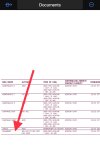
In Garmin Pilot, download sectional legend; then open legend and zoom in to view MOA (or Restricted, Prohibited, Warning, Alert area lists) with altitude, time, controlling agency, and freq.
(sectional chart border)

1. Documents > Catalog > Legends > Sectional Legends > select New York Sectional Legend > Done
2. Documents > Files > open New York Sectional Legend - zoom in
 

Attachments

  • 320FC3D7-C9A5-4CFC-86B3-A60FB289AAF6.jpeg
    320FC3D7-C9A5-4CFC-86B3-A60FB289AAF6.jpeg
    255.8 KB · Views: 8
Last edited:
In Garmin Pilot, download sectional legend; then open legend and zoom in to view MOA (or Restricted, Prohibited, Warning, Alert area lists) with altitude, time, controlling agency, and freq.
(sectional chart border)

1. Documents > Catalog > Legends > Sectional Legends > select New York Sectional Legend > Done
2. Documents > Files > open New York Sectional Legend - zoom in
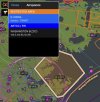
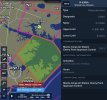
Yes, it’s ultimately available by digging but isn’t the whole idea of an EFB quick, easy access? The Pilot manual describes a system in which Pilot tells you when Restricted Areas are active (red vs orange) and information (apparently only by NOTAM) but application seems haphazard, inconsistent, and incomplete. To illustrate, both of these info boxes are two taps away. First Pilot, then ForeFlight. W95 (seen better on the Pilot snip) is a popular NC Outer Banks destination. If you’re not looking at the detail, I’ll point out that 5306A is active continuously, but shown as inactive on Pilot.

Which do you find more useful for planning a flight there or for calling Cherry Point for flight following or access? I just used the method you described. Heck, I couldn’t remember the area number long enough to find it among the 30 or so in the list on the Charlotte Sectional :D


IMG_3711.jpegIMG_3712.jpeg
 
Yep, I hate to say it, but FF's implementation of this seems to be significantly better currently.
 
Back
Top