Synthetic Vision WingX Pro 7

JohnWF

Pre-takeoff checklist
Joined
Aug 5, 2012
Messages
194
Display Name
John at Salida
I noticed that ForeFlight just announced synthetic vision (SV) for a very modest yearly fee. In response (I guess) Wing X just announced SV for free. If you have WingX perhaps you could help me.

Their web site said to bring up WingX, select data bases and subscriptions, then click on "sync account" - but it doesn't do anything, and SV is not present, and its icon words show grey (meaning not present)

If you have WingX and were able to bring up SV could you tell me how you did it? WingX help is slow or not available a lot of times so I could not go to them on the weekend anyhow.
 
So you have the latest version installed ?

Worked for me first time
 
When I go to VIEW, Synthetic Vision is now there.

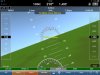
And here's what it looks like on my iPad Mini at home in my living room:

16039534856_a1fd5b8753.jpg


Am I correct in assuming it need ADHRS?
 
Did you select the $49.95 yearly subscription for an Apple download and it was free?
 
OK, thanks...I am trying to update all data bases and see if that is my problem. Again, thanks.
 
When I go to VIEW, Synthetic Vision is now there.

And here's what it looks like on my iPad Mini at home in my living room:

16039534856_a1fd5b8753.jpg


Am I correct in assuming it need ADHRS?
I'll bet you had the ipad horizontal, right? Hold is vertical, and the blue sky will be on top.
 
I'll bet you had the ipad horizontal, right? Hold is vertical, and the blue sky will be on top.

Yes, that was in Landscape (horizontal) but I just tried it in Portrait (vertical) and it still shows inverted.

Remember no AHRS - so maybe that's a feature to warn you of that and not a bug?
 
Thanks fellows...updated data bases, and had latest version put in and SV now works just fine...used simulator to "fly" me through the nearby pass in the Rockies and it worked just fine.

thanks again.
 
Yes, that was in Landscape (horizontal) but I just tried it in Portrait (vertical) and it still shows inverted.

Remember no AHRS - so maybe that's a feature to warn you of that and not a bug?

Not talking about orientation (landscape vs portrait) I'm referring to holding the iPad parallel to the wall instead of parallel to the floor.
 
I think Levil makes the best AHRS devices for the iPad. You can check out what they have to offer here. I use their iLevil SW which also has GPS and ADS-B
http://www.aviation.levil.com/ahrs-g-micro.html

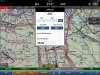
If you your SynthVision screen looks upside down you need to calibrate the altitude adjustment in WingX. On the map screen tap the altitude text in the top line and it will display a box for calibrating your altitude.

You also have to be running the latest release of WingX to get the free SV.
 
When I go to VIEW, Synthetic Vision is now there.

And here's what it looks like on my iPad Mini at home in my living room:

16039534856_a1fd5b8753.jpg


Am I correct in assuming it need ADHRS?
You can use the SynthVision screen without an AHRS unit but it will only display speed, altitude and direction information. To get bank angle and attitude you have to have the AHRS unit. If you select the HUD option on the SV screen and don't have an AHRS to drive it, it will have a big red X through it.

In the picture you posted, you altitude has not been calibrated and the iPad altitude is less than the altitude for your current GPS location. See my post above to calibrate altitude.
 
Last edited:
Here is a sample picture of my AHRS driven SV screen during a turn and descent for landing. This is captured from a 'Rewind' playback. During flight where 'EMY' is displayed in the lower right corner it would be saying 'iLevil'. Also the ADS-B block in the middle bottom area would be green.
 

Attachments

  • image.jpg
    image.jpg
    154.4 KB · Views: 18
Last edited:
I'll bet you had the ipad horizontal, right? Hold is vertical, and the blue sky will be on top.

No you have to calibrate the altimeter. See my post #16 above for instruction and see attached picture. Touch where it says 'Use Ground'. If it is still inverted after that click the + sign in the 100' section.
 

Attachments

  • image.jpg
    image.jpg
    319.3 KB · Views: 12
Last edited:
When I go to VIEW, Synthetic Vision is now there.

And here's what it looks like on my iPad Mini at home in my living room:

16039534856_a1fd5b8753.jpg


Am I correct in assuming it need ADHRS?

You have red carpet in your living room? :D
 
Back
Top