Q routes and the GTN750xi

Davidl13

Pre-takeoff checklist
Joined
Dec 2, 2015
Messages
156
Display Name
Papaco
A couple of days ago, I was flying from KJGG to KBTV on a family adventure taking us from the site of the original English settlement at Jamestown, through Colonial Williamsburg and Yorktown — the site of the decisive battle of the American Revolution — and then north to the von Trapp family lodge in Stowe, Vermont where I am writing this post.

Along the way, ATC gave me a reroute that included Q133.

I had never been assigned a Q-route before, so finding and loading it became a little learning experience in the cockpit.

A Q-route is a high-altitude RNAV airway. Unlike the traditional Victor and Jet airways I was accustomed to, which are built around VORs, a Q-route can be defined entirely by GPS/RNAV fixes.

In my case, I joined Q133 at JAMIE. I initially found myself looking for the VOR that defined the beginning of the airway — except there wasn’t one.

On the Garmin GTN 750Xi, the trick is to first enter the RNAV fix JAMIE, select it in the flight plan, and then load Q133 as the airway from that fix. The GTN then inserts the published sequence of waypoints along the route to the selected exit point.

And unlike what we sometimes imagine when we hear “GPS direct,” an RNAV airway isn’t necessarily a straight line. Q133 follows its own published path through a series of RNAV fixes, zigzagging its way through the airspace just like any other defined airway.

Once I understood what I was looking at, it made perfect sense.

I’d just never encountered one in actual flying before.

I learned something new. And now, you know.
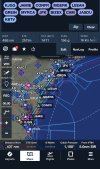
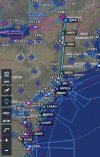
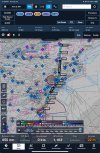
IMG_4476.jpegI’mIMG_4475.jpeg
 
Same thing happened to me years ago for a "T-Route" thru the Houston area.
 
A couple of days ago, I was flying from KJGG to KBTV on a family adventure taking us from the site of the original English settlement at Jamestown, through Colonial Williamsburg and Yorktown — the site of the decisive battle of the American Revolution — and then north to the von Trapp family lodge in Stowe, Vermont where I am writing this post.

Along the way, ATC gave me a reroute that included Q133.

I had never been assigned a Q-route before, so finding and loading it became a little learning experience in the cockpit.

A Q-route is a high-altitude RNAV airway. Unlike the traditional Victor and Jet airways I was accustomed to, which are built around VORs, a Q-route can be defined entirely by GPS/RNAV fixes.

In my case, I joined Q133 at JAMIE. I initially found myself looking for the VOR that defined the beginning of the airway — except there wasn’t one.

On the Garmin GTN 750Xi, the trick is to first enter the RNAV fix JAMIE, select it in the flight plan, and then load Q133 as the airway from that fix. The GTN then inserts the published sequence of waypoints along the route to the selected exit point.

And unlike what we sometimes imagine when we hear “GPS direct,” an RNAV airway isn’t necessarily a straight line. Q133 follows its own published path through a series of RNAV fixes, zigzagging its way through the airspace just like any other defined airway.

Once I understood what I was looking at, it made perfect sense.

I’d just never encountered one in actual flying before.

I learned something new. And now, you know.
View attachment 154350I’
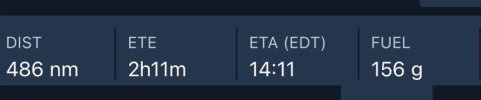
Pro tip: You don't need to enter all the fixes in ForeFlight either. Just type the entry point, the name of the airway, and the exit point:

Screenshot 2026-08-14 at 9.58.25 PM.jpeg

For those who may be unfamiliar - Below 18,000, the RNAV equivalent to the old familiar Victor airways are "T" routes. Above 18,000, V airways and T routes are replaced by Jet (J) airways and Q routes. Most GPS units and EFBs treat all four pretty much the same.
 
As mentioned, no difference entering any airway in that unit. Whether V, T, Q, or J. You give it an entry and an exit.

On the Garmin GTN 750Xi, the trick is to first enter the RNAV fix JAMIE, select it in the flight plan, and then load Q133 as the airway from that fix. The GTN then inserts the published sequence of waypoints along the route to the selected exit point.

It’s not a “trick.” Understand that this is GPS IFR Enroute Navigation 101. The basics of RNAV. T and Q routes have been with us for 20 years now. And Victor airways are literally disappearing almost monthly. Your experience of confusion and the mere fact that you were looking for a VOR rather than a waypoint for a type of route which has been part of the NAS for decades should be an incentive to get some updated training. It shouldn’t take much.
 
The low "V" routes in that area (Greater NYC) are being replaced by "T" routes. Or at least the T's are being assigned by the IBM 360 that does route assignments in that area. As noted above, it's no different using a T in a GTN than a V. (for us low altitude pilots)
 
Or at least the T's are being assigned by the IBM 360 that does route assignments in that area.
Although in theory, T routes were designed with the airspace in mind, they work in practice to varying degrees. around the DC area they are golden. As we get closer to NYC, there seem to be more enroute amendments. Florida seems to be using them more - I got an enroute amendment just a few months ago on a trip to south Florida. In other areas, controllers don’t seem to know what they are. I don’t fly high enough for the Qs, but I suspect that they are more universally reliable.
 
If you are flying with an older navigator like the 540 that does not understand the route segments for victor or t- routes, you can tap the route segment in Foreflight, then expand, and it will list the fixes so you can enter them manually in the Garmin.
 
The 750 makes it easy. Simply enter the entry and exit point and it loads everything in between.
 
The low "V" routes in that area (Greater NYC) are being replaced by "T" routes. Or at least the T's are being assigned by the IBM 360 that does route assignments in that area. As noted above, it's no different using a T in a GTN than a V. (for us low altitude pilots)
You’re giving the FAA too much credit with something as modern as an IBM 360 :)
 
If you are flying with an older navigator like the 540 that does not understand the route segments for victor or t- routes, you can tap the route segment in Foreflight, then expand, and it will list the fixes so you can enter them manually in the Garmin.
I think you meant 530. A "540," which is an Avidyne, understands airways just fine.
 
The 750 makes it easy. Simply enter the entry and exit point and it loads everything in between.
You still need to enter the airway too, otherwise it'll go direct from the entry point to the exit point. So, not quite THAT easy. ;)
 
The 750 makes it easy. Simply enter the entry and exit point and it loads everything in between.
Ummm... Yeah, *IF* you also tell it you'll looking for an Airway, not just puting in the Entry and Exit Wpts. Just putting in those two Wpt will just give you two more Wpts in your existing Route. But it will not actual enter the V, T, J or Q Airway with any other Wpts, turns, etc. that make up the actual Airway.

For the Airway you enter the Entry Wpt, Tap on that Wpt and then Tap on Load Airway. Choose the Airway you want and THEN pick the Exit Wpt.
 
You still need to enter the airway too, otherwise it'll go direct from the entry point to the exit point. So, not quite THAT easy. ;)
Ummm... Yeah, *IF* you also tell it you'll looking for an Airway, not just puting in the Entry and Exit Wpts. Just putting in those two Wpt will just give you two more Wpts in your existing Route. But it will not actual enter the V, T, J or Q Airway with any other Wpts, turns, etc. that make up the actual Airway.

For the Airway you enter the Entry Wpt, Tap on that Wpt and then Tap on Load Airway. Choose the Airway you want and THEN pick the Exit Wpt.
Sigh. Well, obviously you have to input an airway. . .
 
Sigh. Well, obviously you have to input an airway. . .
LOL! I thought those comments were a wee picky too. After all, you do the input exactly the same way and in the same order as it’s given in the clearance.
 
View attachment 154371
“high-altitude RNAV airway“

KA? 421?
I have a 421C Riley turbine eagle, I typically cruise at 24,000 and although I can cruise at 270KTAS, current Starlink max 300mph Ground Speed has me throttle to 250-260 ground speed… and truthfully it’s a more efficient fuel burn speed with very little time penalty
 
As to some who commented, yes I simply loaded the airway from JAIME , and the fixes populated themselves, as I do with any airway routing, I simply had never been assigned a Q route before… perhaps I learned about it at some point, but knowledge unused gets stored in some hidden closet somewhere or forgotten…

The same happens wreath assignments based on VOR, but you have to start from the origin (VOR) even if you were never assigned it… this was much easier

I didn’t test to see what would happen if I intercepted the q route after JAIME, if I could have loaded the airway from any fix along the route… if it is like the VOR garminology, I would need to know the originating fix….

Does anyone know what would happen in the scenario?
 
I didn’t test to see what would happen if I intercepted the q route after JAIME, if I could have loaded the airway from any fix along the route… if it is like the VOR garminology, I would need to know the originating fix….

Does anyone know what would happen in the scenario?
You can enter any fix on the airway as your initial fix. You need to know what fixes are on the airway, but any fix on the airway will work. Enter the fix, press the fix and it gives you the airway option. Add an exit fix and you're done. If you want to get fancy, you can also intercept a leg.
 
You can enter any fix on the airway as your initial fix. You need to know what fixes are on the airway, but any fix on the airway will work. Enter the fix, press the fix and it gives you the airway option. Add an exit fix and you're done. If you want to get fancy, you can also intercept a leg.
Thanks!
 
I didn’t test to see what would happen if I intercepted the q route after JAIME, if I could have loaded the airway from any fix along the route… if it is like the VOR garminology, I would need to know the originating fix….

Does anyone know what would happen in the scenario?
It will depend upon where you join and at what angle. If you fly by JAIME but on approximately the same heading as the route, the GTN will see you fly by it and move to the next Leg. But let's say you intercept the route past JAMIE at maybe a 90 degree angle, or worse, ATC turns you around (for what reason I don't know :D), the GTN might not realize you've passed JAMIE and keep that as the Active Leg.
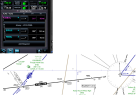
If you get the wrong Active Leg you'll see the distance to Next increasing while the distance to Dest is decreasing. You just need to go into the FP and select and activate the correct Leg you're actually flying.
 
The same happens wreath assignments based on VOR, but you have to start from the origin (VOR) even if you were never assigned it… this was much easier
No you don’t. When loading a Victor airway in the box, you can load from any waypoint on the airway,

I didn’t test to see what would happen if I intercepted the q route after JAIME, if I could have loaded the airway from any fix along the route… if it is like the VOR garminology, I would need to know the originating fix…
As with any other loaded point to point in the flight plan, you can “Actuvate Leg” if any course you are assigned to intercept.

The only real gotcha in this situation is realizing that when it comes to legs, your entry waypoint may be behind you. I use that as a training scenario.
 
No you don’t. When loading a Victor airway in the box, you can load from any waypoint on the airway,


As with any other loaded point to point in the flight plan, you can “Actuvate Leg” if any course you are assigned to intercept.

The only real gotcha in this situation is realizing that when it comes to legs, your entry waypoint may be behind you. I use that as a training scenario.

That is not my experience with Garmin, you need to load the victor airway from the origin VOR in order to assign the correct exit, that is to say, if you are assigned a fix or leg in between 2 VOR points, you load the origin VOR (and not the exit VOR) and then select the assigned exit fix , typically the VOR you are heading toward.. now if you can simply load the same airway from the middle fix itself, that’s great, and thank you, you will have saved me time… I don’t know if that is a more recent feature, but I’ll try it…

Typically I have been assigned an “intercept airway xxx, between 2 fixes” with the VOR ahead as a fix along route… so either way, you have to back up to previous fixes along the airway to
Load the airway and subsequent fixes, regardless of if it is a previous fix (that you were never assigned) or a previous VOR (which you were never assigned) to Load the airway with a correct exit… maybe you are showing me an easier way, I’ll check it out
 
Last edited:
That is not my experience with Garmin, you need to load the victor airway from the origin VOR in order to assign the correct exit, that is to say, if you are assigned a fix or leg in between 2 VOR points, you load the origin VOR (and not the exit VOR) and then select the assigned exit fix , typically the VOR you are heading toward..
How does this fit in with your experience with Garmin? Neither entry nor exit point is a VOR. Give me one of your actual routings and I'll do the same. This is really basic GPS box stuff.

1787057558807.png

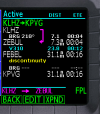
Yes, you other r point is correct. There are situations where the entry point will be behind you so you have a leg to intercept, but it does not have to be a VOR. For example, the clearance I put in the box was a clearance from LHZ, radar vectors to V194... I chose ZEBUL ("behind" LKZ) in case they gave me an intercept before EXULE.
 
Last edited:
How does this fit in with your experience with Garmin? Neither entry nor exit point is a VOR. Give me one of your actual routings and I'll do the same. This is really basic GPS box stuff.

View attachment 154415

Yes, you other r point is correct. There are situations where the entry point will be behind you so you have a leg to intercept, but it does not have to be a VOR. For example, the clearance I put in the box was a clearance from LHZ, radar vectors to V194... I chose ZEBUL ("behind" LKZ) in case they gave me an intercept before EXULE.
I’ll try that next time, I may have simply assumed I needed to trace back to the prior VOR on the map, instead of simply a previous fix on the VOR (I was not assigned) … the real issue I was identifying at the time was I can’t choose the VOR fix I was assigned because you can’t choose the correct exit…. The gps will turn you around.. either way you are not simply programming what ATC gives you, you are looking at maps for prior breadcrumbs,

As for your first question.. I don’t really know what you are asking me…or what it’s related to
 
I’ll try that next time, I may have simply assumed I needed to trace back to the prior VOR on the map, instead of simply a previous fix on the VOR (I was not assigned) … the real issue I was identifying at the time was I can’t choose the VOR fix I was assigned because you can’t choose the correct exit…. The gps will turn you around.. either way you are not simply programming what ATC gives you, you are looking at maps for prior breadcrumbs,

As for your first question.. I don’t really know what you are asking me…or what it’s related to
That is not my experience with Garmin, you need to load the victor airway from the origin VOR
My first question was directed to what you said. That's why at the beginning I recommended some training to get up to speed on the equipment. On the one hand this isn't new stuff. It's basic to GPS units which do airways. Here the same one I did in the GTN in a 20 year old GNS480 (thanks @GMascelli for teaching me the basics of the 480). On the other hand, it's something many pilots don't understand so you are in good company.

1787060667860.png
 
In spite of near 4 years experience with GTN/GFC500/G500xi panels, I am going to Olathe this weekend for a two day training course with Garmin. Although I feel proficient, I know I can be better and also use what is in the panel more effectively and efficiently. Threads like this always help.
 
In spite of near 4 years experience with GTN/GFC500/G500xi panels, I am going to Olathe this weekend for a two day training course with Garmin. Although I feel proficient, I know I can be better and also use what is in the panel more effectively and efficiently. Threads like this always help.
That's good! I preach (rant?) on this subject often. Not enough people treat avionics, particularly what some refer to as "avionics mastery," as something that requires training. It definitely happens, but it's rare for someone to self-teach to that level. Even earning an instrument rating in a TAA leaves a huge gap in avionics operational knowledge.

My list of "GPS Tasks Pilots Don't Know How to Do," all of which are real-world things, is an outgrowth of what I've seen in accident reports, questions from pilots, and in-flight during IPCs and other recurrent instrument training. One of them actually joined the list when three pilots in a row, including a new CFII, screwed up what I though was a pretty basic task. I don't do certificate/rating training anymore. The result is that avionics transitions and basic tweaking of avionics knowledge is easily 80-90% of what I do these days. An IPC always includes at least one of the tasks in my list and I'm no longer surprised when someone I consider a good instrument pilot gets stuck on one.
 
In spite of near 4 years experience with GTN/GFC500/G500xi panels, I am going to Olathe this weekend for a two day training course with Garmin. Although I feel proficient, I know I can be better and also use what is in the panel more effectively and efficiently. Threads like this always help.

I would like to deepen my Garmin panel knowledge, what course are you taking?
 
There are several online courses/videos including a few from Garmin itself. There are several others out there. Go to Youtube and type "garmin gtn" in the search bar.
 
Back
Top