
You are using an out of date browser. It may not display this or other websites correctly.
You should upgrade or use an alternative browser.
You should upgrade or use an alternative browser.
New Jepp chart
- Thread starter murphey
- Start date


luvflyin
Touchdown! Greaser!
- Joined
- May 8, 2015
- Messages
- 17,444
- Location
- Santa Barbara, CA
- Display Name
- Luvflyin
- Home Airfield
- KVUO
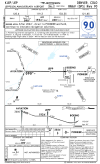
How do I see this? I click it and it says do you want to down load it. I click yes then nothing happens. I’ve been thru this before. Somebody gave me the answer once but I don’t remember.Commemorating 90 years of Jeppesen (now Boeing Global Services) but it'll always be Jepp to us.

Sierra_Hotel
Cleared for Takeoff
- Joined
- Oct 30, 2019
- Messages
- 1,272
- Display Name
- Sierra_Hotel
- Home Airfield
- KLBX
Like this

- Joined
- May 25, 2006
- Messages
- 21,997
- Location
- KTTA, North Carolina
- Display Name
- Who you kiddin?
- Home Airfield
- KTTA
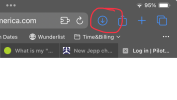
You go to wherever your downloads go. It can be different depending on what you are using. On a PC, it’s your “Downloads” folder. There’s a downloads section in Files on an iPad. Often the browser itself points to it, like Safari on an iPad.How do I see this? I click it and it says do you want to down load it. I click yes then nothing happens. I’ve been thru this before. Somebody gave me the answer once but I don’t remember.
luvflyin
Touchdown! Greaser!
- Joined
- May 8, 2015
- Messages
- 17,444
- Location
- Santa Barbara, CA
- Display Name
- Luvflyin
- Home Airfield
- KVUO
That was it, the down arrow next to the address bar. Clicked it and the Jepp plate came up. But I can’t find ‘Files’ on my IPad, it’s a Mini. I think I deleted or removed it or whatever.You go to wherever your downloads go. It can be different depending on what you are using. On a PC, it’s your “Downloads” folder. There’s a downloads section in Files on an iPad. Often the browser itself points to it, like Safari on an iPad.
View attachment 137941
- Joined
- May 25, 2006
- Messages
- 21,997
- Location
- KTTA, North Carolina
- Display Name
- Who you kiddin?
- Home Airfield
- KTTA
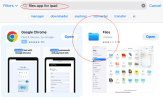
You might want to reinstall the Files app if you removed it. I find it fairly useful. Sometimes I even use it on my Mini to look at a file on my PC.That was it, the down arrow next to the address bar. Clicked it and the Jepp plate came up. But I can’t find ‘Files’ on my IPad, it’s a Mini. I think I deleted or removed it or whatever.
luvflyin
Touchdown! Greaser!
- Joined
- May 8, 2015
- Messages
- 17,444
- Location
- Santa Barbara, CA
- Display Name
- Luvflyin
- Home Airfield
- KVUO
How do I reinstall it? And how can you use an IPad to look at a file on a PC?You might want to reinstall the Files app if you removed it. I find it fairly useful. Sometimes I even use it on my Mini to look at a file on my PC.
- Joined
- May 25, 2006
- Messages
- 21,997
- Location
- KTTA, North Carolina
- Display Name
- Who you kiddin?
- Home Airfield
- KTTA
Like any app. The AppStore.How do I reinstall it?
By connecting it to your PC on the network (sorry, I'm not doing a photo of my connection).And how can you use an IPad to look at a file on a PC?
luvflyin
Touchdown! Greaser!
- Joined
- May 8, 2015
- Messages
- 17,444
- Location
- Santa Barbara, CA
- Display Name
- Luvflyin
- Home Airfield
- KVUO
Oh. I thought it was an Apple accessory. I don’t remember ever installing it. Just getting rid of it. ThanksLike any app. The AppStore.
View attachment 137956
By connecting it to your PC on the network (sorry, I'm not doing a photo of my connection).
- Joined
- May 25, 2006
- Messages
- 21,997
- Location
- KTTA, North Carolina
- Display Name
- Who you kiddin?
- Home Airfield
- KTTA
No just a fairly standard capability of the Files app to connect to other devices on the network. Like Windows Explorer can be set up to connect multiple computers.Oh. I thought it was an Apple accessory. I don’t remember ever installing it. Just getting rid of it. Thanks
MauleSkinner
Touchdown! Greaser!
Sounds like the elephants’ graveyard.You go to wherever your downloads go.