Lightspeed Head Sets - cutting out

Ventucky Red

En-Route
PoA Supporter
Joined
Jan 9, 2013
Messages
2,595
Display Name
Jon
Home Airfield
KCMA
I have a Lightspeed Zulu 3, and unless I have the mic right up to my lips, it does not pick my voice up for transmitting and no one else in the plane hear me. We tried this in two planes, full and no squelch, full and no volume on the audio panel and on the unit itself. We also tested the connections with my old David Clarks and they were five-by-five. So... it has to be the headset. For $900 duckets, one would hope for better performance... right?​
​
Before I pack these up and send them back for a repair, I was wondering if maybe there was a setting I am not catching on the volume control or maybe there is something I can do for the mic boom itself.​
​
Any suggestions?​
​
Bitte/Danke​
​
​
 
Does that headset have a mic gain dial hidden under the foam?
 
Thanks Stewart...

1/8" from your mouth.... auuugggghhhhhhhh!!!!!!!!!!!
 
A very comprehensive manual allowing one to easily use all the features! Are others like that?
 
Check the mic side is facing your mouth. They can get turned around.

Which side faces which side?
I just took the foam muff off the mic to see if it’s turned around. What’s the trick to which side faces forward? It appears symmetrical to me.
 
Which side faces which side?
I just took the foam muff off the mic to see if it’s turned around. What’s the trick to which side faces forward? It appears symmetrical to me.
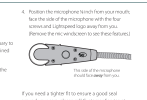
This is from the Zulu 3 manual. Suspect each model has same info in the manual and likely a similar convention.

Screenshot 2025-08-10 at 4.07.11 PM.png
 
That has pretty much been my experience with them. After more than 5 years and 1000 hours on a number of different Zulus, I find that the mic needs to be almost touching your lips to consistently break the squelch. Mic orientation (see above) does make a difference.
 
That has pretty much been my experience with them. After more than 5 years and 1000 hours on a number of different Zulus, I find that the mic needs to be almost touching your lips to consistently break the squelch. Mic orientation (see above) does make a difference.
I wonder if the Zulu 4 (with its longer boom) would help here.
 
Check the mic side is facing your mouth. They can get turned around.
This. The 3 especially likes to turn the mic perpendicular to your mouth. I've taught my family to check that it's square. Both of my 3s do this. My DZ does not for whatever reason.

Also, there is a mic gain adjustment...a tiny little screw/ dial thingy on the mic itself.
 
My only complaint about the DZ is the mic boom. It needs to be close, which I like. But it doesn't stay close cuz the boom is too short.

Luckily with the Zulu 4 boom being longer, I contacted lightspeed and got put on their list to get a longer boom for the DZ
 
Check the mic side is facing your mouth. They can get turned around.
:yeahthat:
The microphone can turn edgewise making it cancel out your voice as well as the background.
The way it works is the front side detects noise to cancel out.
The back side detect the different to filter out your voice
When edgewise it is filtering out your voice also.
Haven't really determined which side is the front or an easy way to tell with the mike muff on. But it doesn't seem to matter much as it is the difference in sound from front to back that seems to make it work well or not?

I have also had to send one back for a mike that complete quit also. Was covered under warranty.

Brian
 
Back
Top