Is it supposed to do this?

dtuuri

Final Approach
Joined
Apr 21, 2011
Messages
5,819
Location
Madison, OH
Display Name
dtuuri
Home Airfield
Homeless, TBD
In Edge, when I click on a thread title the first time in the forum listing, it takes me to the first page. If I browser back to the listing and click it again — it advances to the second page, so I can't reach the first page twice. Each time I try, it goes up another page until the end of the thread. Doesn't do it in Firefox, it goes where I want.
 
In Edge, when I click on a thread title the first time in the forum listing, it takes me to the first page. If I browser back to the listing and click it again — it advances to the second page, so I can't reach the first page twice. Each time I try, it goes up another page until the end of the thread. Doesn't do it in Firefox, it goes where I want.
Sounds weird. I'm not at a machine with EDGE on it right now, but I'll take a look. Is it consistent across all threads?

I thought off the top of my head the default is to jump to the first "unread" message in the thread by default so visiting a page and going back and then visiting it again will take you to another place.
 
it seems when there are NEW posts to a thread you've already been to, it takes you to the latest post. if you've already been in the thread AND there are no new messages, it takes you to page 1. I can't replicate the page 1, page 2, etc....I'm on edge (not the guitar player, the browser)
 
My desktop has all the browsers on it, but I've just got lappy with me.
 
it seems when there are NEW posts to a thread you've already been to, it takes you to the latest post. if you've already been in the thread AND there are no new messages, it takes you to page 1. I can't replicate the page 1, page 2, etc....I'm on edge (not the guitar player, the browser)
That jives with safari for me.
 
it seems when there are NEW posts to a thread you've already been to, it takes you to the latest post. if you've already been in the thread AND there are no new messages, it takes you to page 1. I can't replicate the page 1, page 2, etc....I'm on edge (not the guitar player, the browser)

one exception: if the new post was from an ignored member, then going to the first new post will take you to the top of the page.
 
it seems when there are NEW posts to a thread you've already been to, it takes you to the latest post. if you've already been in the thread AND there are no new messages, it takes you to page 1. I can't replicate the page 1, page 2, etc....I'm on edge (not the guitar player, the browser)

That's how Firefox works for me.
 
Sounds weird. I'm not at a machine with EDGE on it right now, but I'll take a look. Is it consistent across all threads?

I thought off the top of my head the default is to jump to the first "unread" message in the thread by default so visiting a page and going back and then visiting it again will take you to another place.
Taking a second look, I'm logged in on the new post listing, if that makes a difference: https://www.pilotsofamerica.com/community/whats-new/posts/2269281/

Clicking a thread title new to me: https://www.pilotsofamerica.com/community/threads/oshkosh-2025.150227/unread

Takes me to: https://www.pilotsofamerica.com/community/threads/oshkosh-2025.150227/ (the first page)

After browser back to the list and re-clicking the same title, takes me to: https://www.pilotsofamerica.com/community/threads/oshkosh-2025.150227/page-2#post-3599266

Rinse, repeat takes me to: https://www.pilotsofamerica.com/community/threads/oshkosh-2025.150227/page-3#post-3599947

Your ball.
 
Taking a second look, I'm logged in on the new post listing, if that makes a difference: https://www.pilotsofamerica.com/community/whats-new/posts/2269281/

Clicking a thread title new to me: https://www.pilotsofamerica.com/community/threads/oshkosh-2025.150227/unread

Takes me to: https://www.pilotsofamerica.com/community/threads/oshkosh-2025.150227/ (the first page)

After browser back to the list and re-clicking the same title, takes me to: https://www.pilotsofamerica.com/community/threads/oshkosh-2025.150227/page-2#post-3599266

Rinse, repeat takes me to: https://www.pilotsofamerica.com/community/threads/oshkosh-2025.150227/page-3#post-3599947

Your ball.
what does "browser back" mean?
 
that's a horrible way to navigate FORWARD.
That makes no sense, it's a back button. I clicked it to go back to the new thread list. It worked. Next, I wanted to return to the same thread again, same first page, so I clicked the same thread title once again. This time it took me to the second page, not the first. When I repeated the steps, it went to the third page and so on. I only found this happening with threads new to me having multiple pages. I can live with it; I just don't see the logic for it if it's supposed to do that.
 
That makes no sense, it's a back button. I clicked it to go back to the new thread list. It worked. Next, I wanted to return to the same thread again, same first page, so I clicked the same thread title once again. This time it took me to the second page, not the first. When I repeated the steps, it went to the third page and so on. I only found this happening with threads new to me having multiple pages. I can live with it; I just don't see the logic for it if it's supposed to do that.
It thinks you read the entire first page so since it had multiple pages, it took you to the first unread message in the string, which is page two. Since it can't tell what message you stopped reading at, it assumes to take you to the next unread page.
 
It thinks you read the entire first page so since it had multiple pages, it took you to the first unread message in the string, which is page two. Since it can't tell what message you stopped reading at, it assumes to take you to the next unread page.
Logical theory, but it didn't work when I tested it with the "name the baby" thread — it went to the first page again, not page two, on the second click. Using "Microsoft Edge Version 136.0.3240.64 (Official build) (64-bit)". Maybe I didn't stay on the page long enough :dunno:
 
Last edited:
it's simple. stop using the browsers back button to navigate forward. you're navigating outside of the website then blaming the website. using the back button to navigate forward is like running out of gas in your car, then lifting your car and moving it back 10 feet thinking there will be gas in it because you went back. or something like that.
 
it's simple. stop using the browsers back button to navigate forward. you're navigating outside of the website then blaming the website. using the back button to navigate forward is like running out of gas in your car, then lifting your car and moving it back 10 feet thinking there will be gas in it because you went back. or something like that.
?
 
it's simple. stop using the browsers back button to navigate forward. you're navigating outside of the website then blaming the website. using the back button to navigate forward is like running out of gas in your car, then lifting your car and moving it back 10 feet thinking there will be gas in it because you went back. or something like that.
Using the search bar to type a web address. Then clicking on the web address in the search to get to the sitr. Rather than just typing the address in the address bar
 
Using the search bar to type a web address. Then clicking on the web address in the search to get to the sitr. Rather than just typing the address in the address bar
I never use the search bar for addresses nor back buttons to go forward. If @flyingron don't care, neither do I.
 
I'm all for blaming Microsoft for anything from wrecking the economy to destroying the American way of life, and I like this forum, but why would you want to read the same page twice?

I mean a lot of people on here are funny, sometimes even me, but it's not like you're popping up Gunga Din or The Charge of the Light Brigade on here.
 
I never use the search bar for addresses nor back buttons to go forward. If @flyingron don't care, neither do I.
Sorry. Got side tracked with eman's analogy. My dad does the web address search and it drives me bonkers.
 
....My dad does the web address search and it drives me bonkers.
I love hearing my parents try to have a "conversation" with siri (or I think they have alexa). omg talk about driving me insane. "alexa, set an alarm for 5pm" turns into this 5 minute word salad that I'm pretty sure ends with the sound of alexa racking a shotgun and putting it in her virtual mouth.

EDIT: oh, and to bring it back around to this thread, then they blame alexa.
 
In Edge, when I click on a thread title the first time in the forum listing, it takes me to the first page. If I browser back to the listing and click it again — it advances to the second page, so I can't reach the first page twice. Each time I try, it goes up another page until the end of the thread. Doesn't do it in Firefox, it goes where I want.
When you visit the site using Firefox, are you logged into your PoA account? I suspect that you are not, and I further suspect that if you were, you would see the same behavior.

Normal Xenforo (the forum software platform PoA runs on) behavior is to "remember" the most recent thread reply you've displayed in your browser. Further, when you click on a thread title, you are taken to the "first unread response". This "memory" of what you've seen and what's new is maintained at the Xenforo server as part of your account data--it shouldn't matter whether you use a different browser or a different device, as long as you're logged in to your account Xenforo should be able to tell you what's new since your last visit.

So: If you've never opened a thread before, when you click on the thread title you'll be taken to the original post in the thread and it will mark all of the thread replies shown on that first page as "read". If it's a thread with multiple pages of responses, then if you return to the list of posts and click on the thread title again, it will take you to the top of page 2, which is the first "unread" response, and it will mark all the thread replies on that page as "read". Lather, rinse, repeat.

When you get to the last page of a thread, it will mark all those replies as "read". If you leave the site and someone adds a new reply before you come back again, the thread title will show up in the list with a "new" badge next to it to let you know that there are new replies. Example: 1747599207012.png

Click the thread title, and it will take you to the first unread ("new") reply.

One thing to note: Sometimes with threads that have not been touched in a very long time, Xenforo will "forget" which replies you've read. So for instance, if someone replies to a 4-year-old thread, even though you'd read all the original replies 4 years ago, you might still start back over at the original post when you open the thread. I don't know exactly what conditions cause Xenforo to forget that history.
 
but why would you want to read the same page twice?
Maybe I thought I saw @eman post something outrageously funny as the page disappeared and wanted to go back to see if he finally achieved it.
 
When you visit the site using Firefox, are you logged into your PoA account? I suspect that you are not, and I further suspect that if you were, you would see the same behavior.
I recall specifically logging in on Firefox and wondering if that would automatically log me out of Edge. It didn't; I was logged in on both then.
So: If you've never opened a thread before, when you click on the thread title you'll be taken to the original post in the thread and it will mark all of the thread replies shown on that first page as "read".
Does it require a minimum time on the page before this happens? I might have jumped back too soon to register as having read the page on some of my tests. That could explain the inconsistent results I got.
 
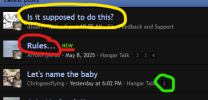
yellow will take you to page 1, red will take you to the latest post, green will take you to that specific page,

1747600322891.png


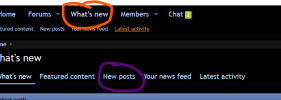
orange will, well, this is where it gets a little weird in xenforo but basically it will list all the recent threads that you've both read and haven't read. I'm 99% in purple, which is just stuff with new posts in it. if I want to find a RECENT thread to go back to that doesn't have recent posts, I can usually find it in what's new (or searching for it)
1747600419187.png


brown is a shtty back BROWSER button unrelated to any specific website that I pretty much only use when I'm on a site and accidentally hit a bookmarked site and want to go back to the site I was just on.

1747600619038.png

understand that the back button, the way it sounds like you're using it, will bring you, uh, back to a PREVIOUSLY LOADED VERSION of that page, it will NOT bring you to the current version of that page, which is why it's mostly a waste and not a recommended way of navigating. it is also, once again, outside the website's navigation. it's like the difference between presenting the page I was on previously (reload the SAME page you were just on) and RELOADING a page, which will show you the most recent version of that page. my poa bookmark points to the what's new/new posts link so every time I click it I go right to threads with new posts. hope this makes sense.

 
yellow will take you to page 1, red will take you to the latest post, green will take you to that specific page,

View attachment 141174


orange will, well, this is where it gets a little weird in xenforo but basically it will list all the recent threads that you've both read and haven't read. I'm 99% in purple, which is just stuff with new posts in it. if I want to find a RECENT thread to go back to that doesn't have recent posts, I can usually find it in what's new (or searching for it)
View attachment 141175


brown is a shtty back BROWSER button unrelated to any specific website that I pretty much only use when I'm on a site and accidentally hit a bookmarked site and want to go back to the site I was just on.

View attachment 141177

understand that the back button, the way it sounds like you're using it, will bring you, uh, back to a PREVIOUSLY LOADED VERSION of that page, it will NOT bring you to the current version of that page, which is why it's mostly a waste and not a recommended way of navigating. it is also, once again, outside the website's navigation. it's like the difference between presenting the page I was on previously (reload the SAME page you were just on) and RELOADING a page, which will show you the most recent version of that page. my poa bookmark points to the what's new/new posts link so every time I click it I go right to threads with new posts. hope this makes sense.


Couldn't we just have a magenta line to follow?
 
understand that the back button, the way it sounds like you're using it, will bring you, uh, back to a PREVIOUSLY LOADED VERSION of that page, it will NOT bring you to the current version of that page, which is why it's mostly a waste and not a recommended way of navigating.
If I want the current version, I refresh the page after I get there. Usually, I guess I prefer to see the same list unscrambled by updates.
it is also, once again, outside the website's navigation. it's like the difference between presenting the page I was on previously (reload the SAME page you were just on) and RELOADING a page, which will show you the most recent version of that page. my poa bookmark points to the what's new/new posts link so every time I click it I go right to threads with new posts. hope this makes sense.
My bookmark does the same as yours, so if the new to me thread in the list is re-presented to me in the same version as before, why does it advance when I click the same link as if I read the first page? How would it know I already visited the first page if it's the old version reloaded?
 
My bookmark does the same as yours, so if the new to me thread in the list is re-presented to me in the same version as before, why does it advance when I click the same link as if I read the first page? How would it know I already visited the first page if it's the old version reloaded?
It decides which page to take you to after you click it and it knows you already looked at the first page so it takes you to the next page that you haven't looked at.
 
It decides which page to take you to after you click it and it knows you already looked at the first page so it takes you to the next page that you haven't looked at.
Ah. And those times when it doesn't even though I looked at the first page?
 
Back
Top