Garmin Smart Charts Question

Ventucky Red

En-Route
PoA Supporter
Joined
Jan 9, 2013
Messages
2,595
Display Name
Jon
Home Airfield
KCMA
I have a question regarding Garmin Smart Charts. For ILS, VOR, and other timed approaches, is the system designed with the assumption that pilots are supplementing the procedure using GPS and the app, thereby eliminating the need for a “T” (time) notation? Or is the timing information included and I may be overlooking it?

Apologies for the number of questions—I am currently working through an IPC and recently transitioned to using the Garmin Pilot app.
 
Last edited:
There is no assumption. If you are flying an approach and don't have legal means to identify the required fixes, then yes, you need to be timing your approach. You may need to pull that information from another resource. If you're using Smart Charts on a terrestrial approach in an airplane that doesn't have an IFR approach-approved navigator, yeah, you're probably in a corner case that you may not have all the info required on the Smart Chart.
 
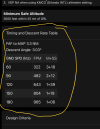
I’m not sure what you mean by a “T notation,” but Pilot has the timing tables under the “Details” tab for approaches and minimums that require it.

1782243269410.png
 
I have a question regarding Garmin Smart Charts. For ILS, VOR, and other timed approaches, is the system designed with the assumption that pilots are supplementing the procedure using GPS and the app, thereby eliminating the need for a “T” (time) notation? Or is the timing information included and I may be overlooking it?

Apologies for the number of questions—I am currently working through an IPC and recently transitioned to using the Garmin Pilot app.
What timing are you doing on an ILS?
 
Same as a localizer, in case the glide slope goes out before localizer only minimums.
 
Same as a localizer, in case the glide slope goes out before localizer only minimums.
In SmartCharts, if you have selected the ILS minimums, you won't see the timing table. In concept, it's a bit like panel GPS databases in the sense that it treats the ILS and the LOC as two different approaches and only gives you the information applicable to the one you selected. Kind of take the general advice to fly the approach you plan and not switch on the "fly."

(Might we why @Ventucky Red didn't see it at first?)
 
In SmartCharts, if you have selected the ILS minimums, you won't see the timing table. In concept, it's a bit like panel GPS databases in the sense that it treats the ILS and the LOC as two different approaches and only gives you the information applicable to the one you selected. Kind of take the general advice to fly the approach you plan and not switch on the "fly."

(Might we why @Ventucky Red didn't see it at first?)
That’s because they are 2 separate approaches. ILS or LOCvs ILS/LOC. I have yet to see an ILS IAP with timing.
 
Kind of take the general advice to fly the approach you plan and not switch on the "fly."

Unless . . . . ATC throws a last-minute change at you !
 
Back
Top