Garmin Pilot Help

Ventucky Red

En-Route
PoA Supporter
Joined
Jan 9, 2013
Messages
2,595
Display Name
Jon
Home Airfield
KCMA
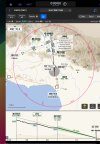
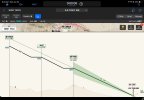
In the landscape view, how do I adjust the glide slope presentation in Smart Charts to be 50% of the screen and not 80% as depicted. I can't find a setting for this, or am I missing something... In advance, thanks for the help.

Current view in landscape orientation

82216.jpg

What I would like to have

48398.jpg
 
In landscape mode, I think you either get the plate view or the lateral glideslope view (turned on and off with the little blue glideslope button in your picture). In portrait, you get both simultaneously. I think it's a design choice. If I'm wrong, I'd love to know it as I have wanted that orientation myself.
 
I think @AvNavCom is correct. It's the way the real estate is divided up in landscape mode. Also in portrait mode if you split the screen between the Map and the SmartChart (I do that regularly during practice approaches so I can also see traffic).
 
Back
Top