Foreflight question?

Gary Ward

En-Route
Joined
Jan 16, 2020
Messages
3,639
Location
Lawrenceburg, Indiana
Display Name
Challenger1
Home Airfield
I67
How do you get FF to start to record each flight automatically?
For the longest time it would start and stop auto and that was when I was using a mini 4. Then I switched to a mini 6 and it would record auto 90% of the time. Then I broke my 6 and have switched back to a 4 for a little while and it will no longer record auto. I have been looking at settings for days and can't figure it out.
Does anyone know?
TIA
 
I use FF for my logs, I’d highly recommend using manual and just hit the record button after engine start and after you shutdown

Auto has always ether shorted or lengthened flights, guess it balances out in the end, but 2 simple finger taps makes
it honest
 
Under settings is a section titled "Track Log" with an option titled "Enable Auto Start/Stop" that says it will automatically record a track log from takeoff (>40 knots) to landing.
Thank you!
I looked several times in the last couple weeks and over looked that button. Gesse it was about only one not turned on.
Somehow I turned it off sometime in the past.
 
Remember, if you Auto Start/Stop, your Taxi time and time holding for departure are a GUESTIMATE by FF. The Auto Start actually starts on your Takeoff roll around 40~50kts and then stops on your rollout, again at 40~50kts. All the Ground time is then a guesstimate by FF. I'd suggest you start the engine, you Tap REC. You Stop the engine, you Tap REC.
 
Yes, I do not like Foreflight's auto logging. I do not use it (I use MFB), but when my clients do it ALWAYS overlogs by 0.2 or more. It's fairly obvious, since if we start engines at 1000 and stop at 1100, it will show 1.2 or something. Its algorithm for "estimating" engine start or whatever it's trying to do is lousy.

0.2 or so may not seem like a big deal, but I'm not about to sign a logbook entry that I KNOW is incorrect. And since I tap Start and Stop on MFB for myself, I do know. And FF is wrong 100% of the time in my experience. So I tell the client and manually edit the entries, trying to explain what's going on. Each time.
 
Yes, I do not like Foreflight's auto logging. I do not use it (I use MFB), but when my clients do it ALWAYS over-logs IMG_5395.jpegby 0.2 or more. It's fairly obvious, since if we start engines at 1000 and stop at 1100, it will show 1.2 or something. Its algorithm for "estimating" engine start or whatever it's trying to do is lousy.

0.2 or so may not seem like a big deal, but I'm not about to sign a logbook entry that I KNOW is incorrect. And since I tap Start and Stop on MFB for myself, I do know. And FF is wrong 100% of the time in my experience. So I tell the client and manually edit the entries, trying to explain what's going on. Each time.
It worked as I just landed, thanks for the reply.
Yeah I have been using FF like most of us since 2015. I noticed years ago that it is not really close time wise. I use the track logs to remember what did that day and helps me record how many landings I did.

I record my log book time from my hobbs meter.
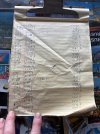
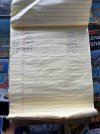
I keep track of my hobbs with this paper log. I have logged every flight on this legal pad since April 2018, every flight.
I am about ready to start a new legal pad. I figure the next owner would like a record of how much I flew it?
I also log on this sheet any maintenance events that helps me keep track of oil, plug, etc changes that i then transfer to the logs.
I store it in the rear pocket on the passenger seat so it gets wear and tear.
IMG_5395.jpegIMG_5396.jpeg
 
Last edited:
Yes, I do not like Foreflight's auto logging. I do not use it (I use MFB), but when my clients do it ALWAYS overlogs by 0.2 or more. It's fairly obvious, since if we start engines at 1000 and stop at 1100, it will show 1.2 or something. Its algorithm for "estimating" engine start or whatever it's trying to do is lousy.

0.2 or so may not seem like a big deal, but I'm not about to sign a logbook entry that I KNOW is incorrect. And since I tap Start and Stop on MFB for myself, I do know. And FF is wrong 100% of the time in my experience. So I tell the client and manually edit the entries, trying to explain what's going on. Each time.

Hobbs time would normally be .2 or more than tach time.
 
Hobbs time would normally be .2 or more than tach time.
Well.... It totally depends upon the flying and the power settings. If you're doing a lot of Touch & Goes and flying at lower power settings in the pattern, then yes. If you go on a long XC with a high RPM/power setting, you may get more time on the Tach than the Hobbs.

Tach Time is all related to RPMs.
 
Hobbs time would normally be .2 or more than tach time.
I'm not talking about tach time (or really, even Hobbs time for that matter, since Hobbs meters can be connected in various ways and there's often rounding involved in Hobbs anyway). FF is typically recording 0.2 or so more than actual CLOCK time from engine start to engine shutdown. Engine start to engine stop is the most liberal of logging options, resulting in the longest possible flight time logged, and FF still logs longer. Meaning FF is basically auto logging your preflight and loading the airplane as flight time.

If you're using FF, it's very simple to test. Write down when you start the engine and when you stop the engine, do the math and compare. I think you will see that most of the time you will have the same experience I do.
 
FF’s times are useless to me. Flew yesterday and FF said 1.9 hours. Tach 1.3.
I always use tach time. It may under report a bit but it’s no big deal.
 
I open a new logbook entry as part of my preflight making sure the 'start' Hobbs time that appears is the same as on my instrumentation. At the end of a flight, during my shutdown flow, I enter the 'ending' Hobbs time and it calculates the 'flight time'. I either finish the log entry at that time or defer until later in a climate controlled environment ;) . Unless my plane was ground run for maintenance, my start Hobbs in a new log is already accurate. I've always used Hobbs time because that is what I was taught to do. It does misrepresent actual flight time by about 15 minutes.
 
I "usually" take a picture of my tach before and after a flight. I get to "see" the Tach Time total for a flight and can look at the iPhone time stamp on the pictures - for those days when I forget to look at my watch or the clock on the panel. I almost always fly low and slow, so the actual time is always a bit more than the tack time. The Foreflight automatic log, when it works, is usually close to my photo method. My old Ercoupe does not have a Hobbs. LOL
 
Last edited:
Yes, I do not like Foreflight's auto logging. I do not use it (I use MFB), but when my clients do it ALWAYS overlogs by 0.2 or more. It's fairly obvious, since if we start engines at 1000 and stop at 1100, it will show 1.2 or something. Its algorithm for "estimating" engine start or whatever it's trying to do is lousy.
It does really well before the flight... But after the flight, the In time is always 15 minutes after the On time. I never taxi that long - I figure in general I'll have 0.2 prior to takeoff (with runup and punching in the flight plan and such) and 0.1 after landing because all I have to do is taxi to the hangar and shut down. The only place I've taxied for >=15 min after landing was sitting in the back of an RJ at DFW.
 
Same as several others here, I go by tach time, for whatever that's worth. It's at least a defensible position, and by default I just take a photo before and after shutdown.

It's also nice to have that since I have a spreadsheet with some auto-calculations for oil changes and AD's that have to be complied with. Putting in the last tach time of the day keeps me informed.

Edit to stay on topic: FF logging kinda sucks. It's recorded my drive home before. No idea why it didn't auto stop after shutting down, but I wondered why my flight track was an extra 30 minutes longer than I thought it was. :D
 
Same as several others here, I go by tach time, for whatever that's worth. It's at least a defensible position, and by default I just take a photo before and after shutdown.
I don't use the Track Log either, but if manually Start/Stop the Track Log it will be as accurate as a stopwatch.

Your photo are a great backup in case you forget to Start or Stop. I usually just send the Route to the Logbook and put in the Landing Tach Time. When I get home I can easily copy the Start Tach Time from my prior entry and then also make any other modifications to the Day/Night time, number of landings, etc. But the basic log entry is there waiting for when I want to get all the official info listed.
 
Same as several others here, I go by tach time, for whatever that's worth. It's at least a defensible position, and by default I just take a photo before and after shutdown.

It's also nice to have that since I have a spreadsheet with some auto-calculations for oil changes and AD's that have to be complied with. Putting in the last tach time of the day keeps me informed.

Edit to stay on topic: FF logging kinda sucks. It's recorded my drive home before. No idea why it didn't auto stop after shutting down, but I wondered why my flight track was an extra 30 minutes longer than I thought it was. :D
FF recorded my drive home last week also! 23.5 hrs logged sitting in my driveway!! I am going to get to 1500 in no time!!
 
FF recorded my drive home last week also! 23.5 hrs logged sitting in my driveway!! I am going to get to 1500 in no time!!
Yet another reason for the manual Start/Stop. In FF attempt to not stop on Stop & Goes, if you keep moving even once you've shut down the plane and get in the car pretty quickly, you get all that extra time! :D
 
Like I said above, I don't use FF tracking for my time, I use it to help me remember which airports I landed at and how many landings. As like most I update my log book every week or so and I have a hard time remembering. I log my flight time off of my paper logs. So I need my paper logs and FF logs/tracking to update my logs.
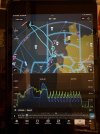
I used to use flightaware for that, but now I am blocked from those flight tracking services. So I just want FF to start auto recording when I take off. I don't care when it stops.IMG_5401.jpeg
 
Last edited:
It's at least a defensible position, and by default I just take a photo before and after shutdown.
I always take pics of flight time (from my transponder) and fuel remaining before I shut down. It's almost as good as that fancy schmancy GDL60 box (or Cirrus OneWithEverything or whatever they called it).

Edit to stay on topic: FF logging kinda sucks. It's recorded my drive home before. No idea why it didn't auto stop after shutting down, but I wondered why my flight track was an extra 30 minutes longer than I thought it was. :D
I think that's why it just cuts off after 15 minutes now. I used to get drives home fairly frequently too. Turns out it's REALLY hard to, on the one hand, keep it going through stop & gos, etc while on the other hand not keep logging when you stuff the plane in the hangar and jump in the car to drive home.

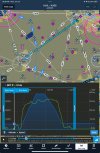
You can at least edit track logs now. I generally shut down very shortly after pulling up in front of my hangar, so I can just go to edit it and when see it getting to the hangar, just truncate it there:

IMG_A8EBCFF57366-1.jpeg
 
I prefer to use the REC button. I push it right after I do my roll-forward-brake-test after engine start. I push it again after I shut down. If you enable Auto Start/Stop, you can edit the times by viewing where you started to move and when you stopped moving. The map replay view makes this easy.
 
Back
Top