ForeFlight Chart Clutter

luvflyin

Touchdown! Greaser!
Joined
May 8, 2015
Messages
17,444
Location
Santa Barbara, CA
Display Name
Luvflyin
Home Airfield
KVUO
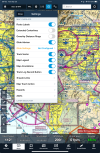
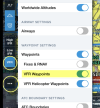
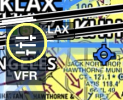
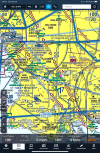
How do I get rid of the green stuff. I was able to get rid of it before. @midlifeflyer showed me how. Hit the little gear settings button up by FPL and push some buttons. But it’s back now and I can’t seem to find the right buttons to select. What’s strange about this is the green things only appear within the boundaries of a TCA Chart. Doesn’t matter if the TCA Chart is being displayed. Even when the ‘resolution’ so to speak is on Sectional, they still show up within the boundaries of where there is a TCA Chart.
1758643914919.png
 
How do I get rid of the green stuff. I was able to get rid of it before. @midlifeflyer showed me how. Hit the little gear settings button up by FPL and push some buttons. But it’s back now and I can’t seem to find the right buttons to select. What’s strange about this is the green things only appear within the boundaries of a TCA Chart. Doesn’t matter if the TCA Chart is being displayed. Even when the ‘resolution’ so to speak is on Sectional, they still show up within the boundaries of where there is a TCA Chart.
1758646519532.png
 
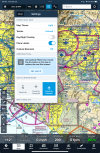
See where it says "Tap the button on the map to explore the new filter drawer"? Smash that hamburger menu, then hit the ... kabob menu and scroll down to waypoints.
 
See where it says "Tap the button on the map to explore the new filter drawer"? Smash that hamburger menu, then hit the ... kabob menu and scroll down to waypoints.
I didn’t see “…Tap the button on the map to explore the new filter drawer…” but I did figure out what you meant by hamburger and kabob. Thanks, but now I’m hungry
 
Might I suggest that instead of turning off the "green stuff" :D, you try turning off the Sectional layer and use FF's Aeronautical layer. A lot of people like it due to the lack of clutter you were referring to. And all the info you need that's on the Sectional is there with just a Tap or a Press in a much easier way to read than with from Sectional.

Try it on a couple of flights that are familiar to you already. And if you don't like it, you can always turn the Sectional back on with two taps. But don't try for only a couple of minutes, give it a chance. Play with it a bit at home and then really give it a chance on a few flights.
 
Yes, especially for seeing ADS-B traffic. A sectional map is crowded because it was designed to be on paper so everything needs to be there all the time. While people like it due to familiarity it is not the best configuration for an electronic map as you are essentially disabling the versatility available with such a format.
 
Might I suggest that instead of turning off the "green stuff" :D, you try turning off the Sectional layer and use FF's Aeronautical layer. A lot of people like it due to the lack of clutter you were referring to. And all the info you need that's on the Sectional is there with just a Tap or a Press in a much easier way to read than with from Sectional.

Try it on a couple of flights that are familiar to you already. And if you don't like it, you can always turn the Sectional back on with two taps. But don't try for only a couple of minutes, give it a chance. Play with it a bit at home and then really give it a chance on a few flights.
Thanks for the suggestion.
 
Yes, especially for seeing ADS-B traffic. A sectional map is crowded because it was designed to be on paper so everything needs to be there all the time. While people like it due to familiarity it is not the best configuration for an electronic map as you are essentially disabling the versatility available with such a format.
How do you see ADSB traffic?
 
Back
Top