Excel fill question

Skyrys62

En-Route
Joined
Apr 5, 2017
Messages
4,183
Location
Detroit Rock City
Display Name
Meet the Fokkers
I have searched the web, but cannot find what I'm looking for.
Should be easy for some of the experts.

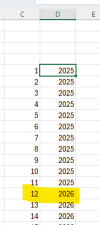
I want to fill 12 cells with the year (only) of 2025, then the next 12 cells with year 2026, and so on... until the year 2050.

Sure it can be done by typing/dragging/filling manually, but is there a formula/sequence for that for a range of cells?
 
Easy way, but requires an extra column, which can be hidden:

Column 1, row 1: first entry is the current year (2025) [this is cell A1, for reference]
Column 1, row 2 and onwards: =A1+(1/12). Drag this one as low as you need to. So row 3 becomes =A2+(1/12), and so on...
Column 2, row 1: = ROUNDDOWN(A1,0). Drag down as needed.
 
Set a column to increment by 1
Have a column with a similar equation to this: =2025+INT(C5/12)
fill down
everything divisible by 12, change to the correct year (could be fixed with a conditional equation)
Copy the year column, paste by value to remove the equations (this might be done in the post above mine to remove the extra column)
Delete the increment column.

1744313926479.png
 
Thanks y'all, that was enough to allow me to get it done.
I will be deleting the months/columns as they expire, so didn't want any formulas or references in the cells, or a hidden value somewhere, plus I'm starting at April.

To avoid all that, I created the dates on another sheet using the =a1+1, then copied/pasted the values only onto the working sheet starting with April.
 
So what I do for scenarios like this is I use a place holder cell. I put it in a place that it won’t affect anything (above my table, column ZZZ, cell A1000, etc.) I put my initial starting point in that cell (say 2025) and then i relate every other cell to that, rather than to the previous cell.

So if you need it monthly, I would do Jan-2025 in cell A1000, then the first cell of my table would be =A1000. The next cell would be =A1000+1, then A1000+2. Once you have the first couple done, you can just drag it as far as you need to populate the next 5/10/20 years as necessary.

For aesthetics, I usually make the text in cell A1000 white, but that is strictly a personal preference.

ETA: I just read your post above where you specifically mentioned that you didn’t want to use this method. Oh well! lol
 
cell a1: year(b1)
cell a2: year(b2)
cell b1: 1/1/2025
cell b2: 2/1/2025
select all four cells and drag little square down.
 
Back
Top