Electronic Checklist Generator - Free

wwjenkins

Pre-Flight
Joined
Nov 22, 2024
Messages
33
Display Name
Seasoned
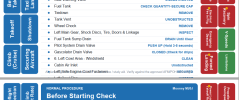
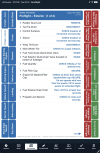
I've been using an electronic version of the laminated checklist cards my flying club equips each airplane with. It looks like this thumbnail when viewed as a document in ForeFlight:
1791134900261.png
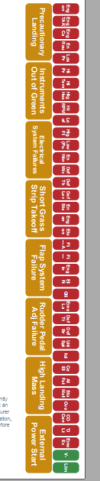
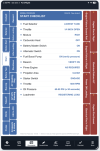
Note the side tabs for navigating between the sections - makes it very usable in flight. Normal tabs on the left and Emergency tabs on the right.

Recently I've been seeing ads online for a service that is selling very nice looking electronic checklists for specific make/model airplanes, at about $30.00 per, and the checklists operate similarly to the version I'm using.

No one is hand-building these - it's done using AI, either OpenAI or Claude. It costs me in the range of $0.25 - $0.50 in AI tokens to generate one. I think it's fine that there is a service you can buy an electronic checklist from, but as AI gets more integrated into our lives the price you can charge for the service will approach $0.

So I thought I would put a website around my AI electronic checklist generator and let some pilots try their hand at using it for free. You upload an image or pdf of your checklist cards, or you can even upload your POH, and the system generates the electronic checklist sections with an interim step allowing you to revise them before they are finalized.

You're welcome to give it a try, no charge, and everything is totally private and unshared - even I don't have access to what you upload or generate.
https://nextrating.app/
 
Yes, I've seen the ones that guy is selling. It's really a great idea for a digital POH (and at least the emergency checklists) and a real pain to do manually.
 
I gave it a two tries.

1. Full M20J POH. Pretty decent job. In additio0pn to the tabs, the PDF is bookmarked. I was impressed that it even grabs information from the supplements. The one thing I noticed as an issue is that the routine attempts to place each checklist group on one page. No problem if the checklist is short, but here, for example is the bottom the the preflight inspection page. As you can see, it keeps shrinking the text and, once it reaches that limit, it just cuts off the rest. Perhaps adding a routine to continue on the next page if certain limits are reached? Same issue with checklists that have a longer title. It gets cut off.


1791138668185.png

2, This is more like how I envision using it personally. I write my own, highly customized, checklists. But, a few years ago, I decided that the emergency checklists should be "original." So my second attempt was pulling Section III from the POH and uploading that alone. Very, very good!!
 
it keeps shrinking the text and, once it reaches that limit, it just cuts off the rest
Thanks. I revised the system to automatically split long lists across 2 (or more) tabs with (1) and (2)... suffixes.
I also provided a way for the user to insert a tab header anywhere in a list of rows, in case you want to control where the split happens.
 
Anyone else hesitant to trust AI with this?
Dad is terrible with anything digital so I've been thinking of this. Tactile physical checklist. Plus with ai and plane modernization. Some things are no longer applicable.

I remember after he got the dynon during preflight he was looking for vacuum. "Where the hell is the vacuum gauge".

Well... The vacuum pump is in the backseat. I think you can skip that one from now on.
 
Anyone else hesitant to trust AI with this?
I hope to hear some ideas on how AI can be untrustworthy in this scenario. The site I provided allows the pilot to do a final review and manual edit before the final checklist is generated, and that final generation step is not AI.
 
Thanks. I revised the system to automatically split long lists across 2 (or more) tabs with (1) and (2)... suffixes.
I also provided a way for the user to insert a tab header anywhere in a list of rows, in case you want to control where the split happens.
One oddity. It's not that much of a problem if you upload a custom checklists, but, while the POH extraction is pretty good, POH checklists have quite a bit of variety. Mooney checklists and Diamond checklist, for example, are not pure challenge/response. Some explanation, some conditional routings. That's a little more difficult to handle.

The other thing is the number of checklists. Some manufacturer go a bit overboard with the number of checklists. Here is your rendition of a DA40. Because of the way Diamond writes POH checklists (IMO the worst in the business), the tabs are unusable. For me, the solution would be to be able to not only edit, but delete tabs while keeping their content. Essentially, grouping a series of checklists into one tab. Plus, to me, tabs are to get there quickly. I don't necessarily need that for everything the airframe manufacturer thinks is an emergency. Good general example is a gear extension failure. You have as much time as you have fuel to deal with that one. I don't need a red tab to get there.
1791213711474.png
 
the solution would be to be able to not only edit, but delete tabs while keeping their content
That capability was added yesterday because I had a similar but lesser issue on checklists generated from a 172 POH. The user interface for editing is not wonderful so maybe in time I'll re-do it or make a video demo. But for now if you try it again you should be able to do what you want.

Note you may need to clear browser cache to get the new version to appear.

I really appreciate feedback like this!
 
@wwjenkins, what does "revert to original" do? And does "Delete" remove just the tab or the content too? Is deleting tab but keeping content as simple as deleting the Tab text?
 
what does "revert to original" do? And does "Delete" remove just the tab or the content too? Is deleting tab but keeping content as simple as deleting the Tab text?

1791218719843.png
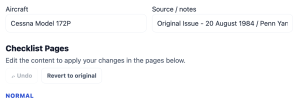
The "Revert to original" at the top of the manual editing section undos all of your changes so you can start over with your edits.
Note there is also an "Undo" button there that will undo your latest change, and it can be clicked multiple times all the way back until you have reverted to the original.
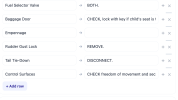
The "Delete" button removes that entire page.

1791218803983.png
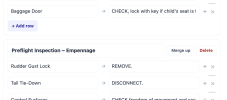
The "Merge up" button removes the Page Title/Tab Label and retains the rows below it, appending them to the page above.
In the above case the system created several distinct pages for the external walkaround checklist, and I wanted them consolidated to a single tab section. So I chose to "Add row" at the end of the previous section and put "Empennage" in the challenge part of that row, leaving the response part empty. So it served as a sort of subheader. Then I clicked the "Merge up" button.

1791219302408.png

So, to delete the tab but keeping the content is as simple as clicking the "Merge up" button.

I know, it's not all that intuitive - kind of clunky. But I think all the required capability is there.
 

Attachments

  • 1791218570908.png
    1791218570908.png
    65 KB · Views: 3
So, to delete the tab but keeping the content is as simple as clicking the "Merge up" button.
That's what I thought. I tried that earlier. Merge up combines the checklists. I don't want to do that. Rather, I want to keep them separate and just avoid additional tabs. Short example.

The DA 40 official emergency checklists include these 4 checklists.
Loss of Oil Pressure​
High Oil Pressure​
High Oil Temperature​
High Cylinder Head Temperature​


I do want to keep all four checklists, but they don't need separate tabs. The fact that the are separate s exactly what results in that unusable tab set up I posted earlier. From an ergonomic standpoint, I'd be at the CHT checklist in flight much faster by tapping on a single "Engine Temp/Pressure" tab and scrolling through the first three than I'd ever get by trying to figure out what these are 1791220239937.png and pick the right one.

I only chose those four because they are next to each other. There are actually a few others I would choose to group together under one tab if I could move them around in a way that made ore sense to me.
 
keep them separate and just avoid additional tabs.
So you want a separate page for each of the 4 checklists in your example, but only one tab for them, and that tab refers to the first checklist, that is, the first page.

How are you thinking it would work to get to the next 3 checklists? Are you scrolling the first checklist up to reveal the second, and so on? If so, that's what my example demonstrated. So perhaps I don't understand your suggestion for how you navigate to a checklist that does not have a tab.
 
The key to successful use of AI is Human in the Loop for any decision making. Trust but verify.
Funny AI story. I have an aftermarket add-on which allows we to use Android Auto/Carplay in my older car. When I switch from an Android to an iPhone, I ran into a problem. Everything worked great, actually better than with Android, except one thing. I could not answer phone calls. Nor could I reject them. I could make calls, but if on the receiving end, I just had to let it ring and ring and ring until it timed out.

So I figured, I'd ask Google AI. It answered based on the model of my Carplay unit and my model iPhone. It told me exactly which settings were necessary to make it work perfectly. Not only did it not fix the problem, but the new settings created new ones that didn't exist before. As I started to undo them, I though, "what happens if I do exactly the opposite of what AI recommended?" So I tried that.

All problems solved.
 
So you want a separate page for each of the 4 checklists in your example, but only one tab for them, and that tab refers to the first checklist, that is, the first page.

How are you thinking it would work to get to the next 3 checklists? Are you scrolling the first checklist up to reveal the second, and so on? If so, that's what my example demonstrated. So perhaps I don't understand your suggestion for how you navigate to a checklist that does not have a tab.
Oh. I though I saw them combined on a single page. I'll give it another try.
 
One thing I find annoying about checklists is that there's rarely an airplane that actually has a complete checklist in one spot.

That is, yes, you have the POH section 3 (emergency) and section 4 (normal) checklists. But then you also have the supplements that may be in the POH, plus the supplements that come with various installed equipment, and possibly others as well.

Ideally, I'd like to be able to upload the POH for the airplane, and then upload the various third-party manuals/supplements that are relevant to that particular airplane, and get a unified checklist that combines everything. That would make it MUCH faster to get a good custom checklist for the airplane.
 
I'd like to be able to upload the POH for the airplane, and then upload the various third-party manuals/supplements that are relevant to that particular airplane, and get a unified checklist that combines everything.
That is a great point - I'd guess nearly every pilot can relate to it.

OK, I have revised the app to allow that to happen - select multiple documents and then upload them together. This one is harder to test on my end - please give a try and comment on whether or not it is working. I'll also work on doing that.
NOTE: you likely need to clear cache in your browser before you can access the changes.

With that kind of feedback we should be able to nudge this app into being a really useful service. Note that I do not intend to evolve this into a business, but I may at some point offer an optional way to make a donation to defray costs, or to an aviation oriented charitable org.
 
Oh. I though I saw them combined on a single page. I'll give it another try.
Well, the "Merge up" does in fact combine them into a single page/tab. My disconnect is in how you're suggesting to navigate between pages if multiple pages are associated to a single tab. In the current design there are only 2 ways to navigate: Tabs move from one page to another, and scrolling moves within a page.
 
I would appreciate it if some of you could offer up some supplemental checklists: STCs, Auto Pilots, etc. You could attach them to a reply here or pm me.
I would use those to test the ability of the service to consolidate several checklists into a single useful document to use with FF.
 
Well, the "Merge up" does in fact combine them into a single page/tab. My disconnect is in how you're suggesting to navigate between pages if multiple pages are associated to a single tab. In the current design there are only 2 ways to navigate: Tabs move from one page to another, and scrolling moves within a page.
The pdf is a just a pdf. The tabs are just graphic bookmarks. Scroll to the next page. I've been dealing with PDF documents almost as long as they have existed and have never found one that I couldn't move through by scrolling. Including these. I can see it being an issue for the fmd file, but not for a pdf. .
 
Last edited:
The pdf is a just a pdf. The tabs are just graphic bookmarks. Scroll to the next page. I've been dealing with PDF documents almost as long as they have existed and have never found one that I couldn't move through by scrolling. Including these. I can see it being an issue for the fmd file, but not for a pdf. .
On my iPad the PDF is scroll-able in the right-left directions. Scrolling right takes you to the next tab.

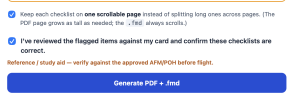
I've now added a checkbox option to allow you to choose that long pages will scroll up-down rather than splitting into multiple pages.

1791305565642.png
Thanks for persisting with me on this.
 
I've now added a checkbox option to allow you to choose that long pages will scroll up-down rather than splitting into multiple pages.
I've done some testing and don't find that feature to be very useful. The reason is that ForeFlight automatically resizes a PDF to fit on a page, so when you tab to a page that is very long it is shrunk to fit which may make it unreadable. The only correction then is to use pinch-zoom to expand the size up to where is is readable and the page can be scrolled up-down. Pretty clunky.

I'm open to feedback and suggestions on that, if there's anyone that is still hanging in their on this :)

Otherwise the service still works as before so please continue trying it.
 
On my iPad the PDF is scroll-able in the right-left directions. Scrolling right takes you to the next tab.

I've now added a checkbox option to allow you to choose that long pages will scroll up-down rather than splitting into multiple pages.

View attachment 155535
Thanks for persisting with me on this.
Interesting. I'm not sure why go to next page world be interpreted as go to next tab. Is there some coding that changes basic pdf behavior?
 
Interesting. I'm not sure why go to next page world be interpreted as go to next tab. Is there some coding that changes basic pdf behavior?
OK, I've revamped this again.

Now, a looooong page will be split into multiple pages, but will still get only 1 tab for the group. Clicking the tab takes you to the first page and you can then swipe left to get the next page while the selected tab does not change. Plus when there are multiple pages in the group there will be an arrow in the bottom-right corner indicating there is more to view in that checklist.

Here's an example screenshot:
1791318646747.png

Does this get closer to the suggested approach?
 
OK, I have revised the app to allow that to happen - select multiple documents and then upload them together. This one is harder to test on my end - please give a try and comment on whether or not it is working. I'll also work on doing that.

With that kind of feedback we should be able to nudge this app into being a really useful service. Note that I do not intend to evolve this into a business, but I may at some point offer an optional way to make a donation to defray costs, or to an aviation oriented charitable org.
Awesome! I'll have to give it a try soon (probably Thursday at this point).

Here's some more ideas, and if you can do both then you'll probably have every pilot knocking at the door:

1) Allow for editing of the checklists.
2) Export to .ace (Garmin) and .fmd (ForeFlight) checklist formats.
 
Awesome! I'll have to give it a try soon (probably Thursday at this point).

Here's some more ideas, and if you can do both then you'll probably have every pilot knocking at the door:

1) Allow for editing of the checklists.
2) Export to .ace (Garmin) and .fmd (ForeFlight) checklist formats.
Thanks.
The .fmd version is already supported. I'll investigate .ace to see if anyone has reverse-engineered the format.
Editing of the checklist is also supported already. We will be looking to make the editing interface more intuitive but the functionality is currently available.

I'm looking forward to hear your feedback when you get a chance to try it.
 
The .ace format is now automatically produced, in addition to the PDF for FF Docs and the .fmd for FF checklists
If you’re expand in there you probably want to include the Garmin Pilot .gpls format as well.
 
Well, as far as I can tell, "Merge Up" creates a single checklist, not what I was trying to accomplish, which is basically to retain the separate pages with their headings but not have the tab situation I described in Post #11. That's neither here nor there.

Anyway, I tried something new this morning. My normal operation checklists are my own design, so converting those to some different PDF format is not something I'm interested in doing. But, I have been trying to move myself to true eChecklists (old dog, new trick). One of the oddities with mine is, due to variety I fly, my personalized checklists are part operational and part referential. I gave your app a try with one of those and, while the results were not perfect (I don't expect them to be), your app rewrite of my my checklists to fmd and gplt is better than anything I've thought of. (I never knew fmd has a "reference" heading.

BTW Bill, I also have a beta account on the main project. We're corresponded about it.
 
The key to successful use of AI is Human in the Loop for any decision making. Trust but verify.
But that verification is dependent on the data and justification given by the AI. Which means, to truly verify the AI information, you would have to do the task from scratch. Then using AI simply makes the task harder/longer.

We all know AI makes mistakes, at times it simply lies, and at times tries to defend itself. AI is good for some things, but I'm not giving it a task my life may depend upon.
 
Last edited:
Then using AI simply makes the task harder/longer.
It makes it easier/shorter/possible.

I'm curious whether you tried it enough to even see what the verification process looks like or just using your imagination to imagine the worst possible scenario.

To me, AI has different purposes. There are more than these, but the ones I encounter are:

1. Looking for something. Wearing that hat, AI is just the next natural step in search engines. Newsflash: like all search engines, it's GIGO.
2. Research. Depending on what you are looking for, it's mostly the same GIGO. Plus, AI has the annoying habit of making things up when it can't find an answer. That's the bad news. The good news is, like having a human assistant, the quality of what you get depends on the quality of your question. That's where a lot of people get in trouble. As they say,
1791384679210.png
3. Professional research. Add to #2 the issue of confidentiality. Fortunately, professionals who use AI for research have ways to overcome that. Example, Lexis AI for lawyers. AI is using their extensive legal database, not the generalized Internet. Their AI does not use your data for "model training." What you upload and ask for is encrypted and confidential. The downsides of 1 and 2, except for the user's needing to learn how to create effective prompts, are gone. It's basically faster for those initial pre-verification steps than you are.
4. Coding. Sure, it can be wrong and bad code doesn't work. But let's take what @wwjenkins is doing here. It's taking the data you give it - your checklist or POH and coding a document from that data. Even if the underlying AI is using it for model training, so what? You are afraid AI is going to learn something from your POH other than how to do the requested task beter?
5. Something you don't know how to do. Kind of an offshoot of coding. I wish I was really good at modifying and enhancing photographs with Photoshop, etc. I'm not. AI is. So I use it for that. In terms of what Bill is doing here? Let's assume you want to create a tabbed PDF to use as an electronic checklist. Go ahead. Give it a try. I have and I can guarantee that, even if you know how, even with cross-checking this app's work, it is easier and faster with AI than without it.

I did a 4&5 combo a few months ago. As some know, I use MyFlightBook. I get its data uploaded to my Google Drive daily. That's a lot of files. I use to manually delete the files that were older than two months. Since Google has a scripting language, I asked AI to help me write a routine that does it automatically. Voila. I could probably take several days to lear that coding myself, but this took about 15 minutes, including tweaks - many recommended by AI. It's been working perfectly for months.

Are there real dangers to AI? Absolutely. Is that a reason to fear it's benefits? Absolutely not.
 
BTW Bill, I also have a beta account on the main project. We're corresponded about it.
Yes, hi Mark. Thanks for your ongoing excellent feedback on both the previous version of nextrating and this one too.

BTW the previous version, which a beta and focused mostly on the debrief process, has been torn down and only this checklist app remains, also in beta. In this new form there are no user accounts, etc so any previous information you had in my system is no longer present.
 
Well, as far as I can tell, "Merge Up" creates a single checklist, not what I was trying to accomplish, which is basically to retain the separate pages with their headings but not have the tab situation I described in Post #11. That's neither here nor there.

Anyway, I tried something new this morning. My normal operation checklists are my own design, so converting those to some different PDF format is not something I'm interested in doing. But, I have been trying to move myself to true eChecklists (old dog, new trick). One of the oddities with mine is, due to variety I fly, my personalized checklists are part operational and part referential. I gave your app a try with one of those and, while the results were not perfect (I don't expect them to be), your app rewrite of my my checklists to fmd and gplt is better than anything I've thought of. (I never knew fmd has a "reference" heading.

BTW Bill, I also have a beta account on the main project. We're corresponded about it.
OK, the next version is now available. I think this comes closer to what you are envisioning: "retain the separate pages with their headings but not have the tab". The new button is "Same tab" and is shown here:
1791387278078.png

Also you said "the results were not perfect" - I'd like to hear what fell short.
 
OK, the next version is now available. I think this comes closer to what you are envisioning: "retain the separate pages with their headings but not have the tab". The new button is "Same tab" and is shown here:


Also you said "the results were not perfect" - I'd like to hear what fell short.
Mostly me and what I can do with fmd.
 
It makes it easier/shorter/possible.

I'm curious whether you tried it enough to even see what the verification process looks like or just using your imagination to imagine the worst possible scenario.

To me, AI has different purposes. There are more than these, but the ones I encounter are:

1. Looking for something. Wearing that hat, AI is just the next natural step in search engines. Newsflash: like all search engines, it's GIGO.
2. Research. Depending on what you are looking for, it's mostly the same GIGO. Plus, AI has the annoying habit of making things up when it can't find an answer. That's the bad news. The good news is, like having a human assistant, the quality of what you get depends on the quality of your question. That's where a lot of people get in trouble. As they say,
View attachment 155575
3. Professional research. Add to #2 the issue of confidentiality. Fortunately, professionals who use AI for research have ways to overcome that. Example, Lexis AI for lawyers. AI is using their extensive legal database, not the generalized Internet. Their AI does not use your data for "model training." What you upload and ask for is encrypted and confidential. The downsides of 1 and 2, except for the user's needing to learn how to create effective prompts, are gone. It's basically faster for those initial pre-verification steps than you are.
4. Coding. Sure, it can be wrong and bad code doesn't work. But let's take what @wwjenkins is doing here. It's taking the data you give it - your checklist or POH and coding a document from that data. Even if the underlying AI is using it for model training, so what? You are afraid AI is going to learn something from your POH other than how to do the requested task beter?
5. Something you don't know how to do. Kind of an offshoot of coding. I wish I was really good at modifying and enhancing photographs with Photoshop, etc. I'm not. AI is. So I use it for that. In terms of what Bill is doing here? Let's assume you want to create a tabbed PDF to use as an electronic checklist. Go ahead. Give it a try. I have and I can guarantee that, even if you know how, even with cross-checking this app's work, it is easier and faster with AI than without it.

I did a 4&5 combo a few months ago. As some know, I use MyFlightBook. I get its data uploaded to my Google Drive daily. That's a lot of files. I use to manually delete the files that were older than two months. Since Google has a scripting language, I asked AI to help me write a routine that does it automatically. Voila. I could probably take several days to lear that coding myself, but this took about 15 minutes, including tweaks - many recommended by AI. It's been working perfectly for months.

Are there real dangers to AI? Absolutely. Is that a reason to fear it's benefits? Absolutely not.

Great post Mark! Agreed on all counts.

Regarding #1, I had pretty good Google-fu with "dumb" Google. I've had to re-learn how to use Google, but it's far more powerful now. I was in Dallas last weekend and I remembered really liking a couple of different restaurants I'd been to in the area nearly a decade ago that I wanted to return to if they were still open. I probably wouldn't have found them without the AI on Google. One of them opened up some new locations since then and then closed the original location I remembered, so "burger joint in Roanoke that makes their own root beer" would have probably led to nothing... And did, on the first prompt. But when I said "I'm looking to find a place that was there in around 2016-2017" it immediately popped up with the correct answer. Same for "I'm looking for a Mexican restaurant from that time frame that had excellent brisket tacos and a margarita that had sangria in it too." It said "You're probably thinking of Mi Cocina and their Mambo Taxis." Sure enough... Again, not a thing that would have been easy with a traditional Google search.

The prompt is key. I'd have gotten faster results the first time if I had included the timeframe right away. I'm getting better at telling it what I really want right away, though, which is different than a traditional search as with a "dumb" search, too much detail right away leads to not enough (or no) results.

For software development, even though I know several languages, most of them are not the ones that are in wide use today, especially not on the platforms I want to develop on. Learning a new language for a human takes at least some weeks worth of really hard work, and it takes a couple of years of making mistakes and learning from them before you're really an artist. I'd love to learn Swift, Python, Typescript, etc but without getting paid for it, the time investment is too high. With AI, I can have it develop in those languages and very quickly do a ton of work based solely on a detailed prompt, and then I can make updates far quicker.

In fact, I've been using the AI to tell it what I want to do, suggest the best platform to accomplish my goals, and decide on a language and an architecture before even starting with the code part. Claude can put together a really nice spec document and plan out the entire process including versions out into the future, and then develop individual versions with Claude Code implementing a particular feature set and testing and using those before moving to more complicated versions.

It's actually not unlike giving someone a computer for the first time, and teaching them how to effectively use spreadsheets, databases, etc to make their work much quicker. It's making the developers much quicker.

Yes, you need to check its work. But even a human developer needs to check their work.
 
Back
Top