Day to Update Garmin Databases?

Cogito

Pre-takeoff checklist
Joined
Mar 17, 2013
Messages
386
Location
Los Angeles
Display Name
Cogito
Home Airfield
SZP
I understand I have to update my Garmin G3X and GTN databases monthly, but has anyone found a day of the month that's best to regularly update them? It's currently 3/17, and the US IFR/VFR Charts (2602) expire on 3/19 (in two days) but the next cycle (2603) is not yet available. Any advice appreciated.
 
I understand I have to update my Garmin G3X and GTN databases monthly, but has anyone found a day of the month that's best to regularly update them? It's currently 3/17, and the US IFR/VFR Charts (2602) expire on 3/19 (in two days) but the next cycle (2603) is not yet available. Any advice appreciated.
They have a handy-dandy chart for that:
 
Pretty sure it all updates every eighth Thursday, so I set a reminder for that.

EDIT: As was correctly pointed out below, they update every 28 days, not 56. My reminder is set for 28 days. Oops…
 
Last edited:
They have a handy-dandy chart for that:
Didn't know that existed...kinda cool.

I think I'll stick to my strategy of letting Database Concierge take care of it and being a little surprised and delighted every time my FS510 sucks an update out of my iPad.
 
It’s available today and the card with new data can be inserted into the device.
It’s required to be in the device by Thursday.

If you insert it today, the device won’t actually use it yet, but it will be available for install from the card on Thursday.

It stores both sets in the plane and mine offers me to revert to the old version - I suppose that’s if the newest one becomes corrupted?
 
Didn't know that existed...kinda cool.

I think I'll stick to my strategy of letting Database Concierge take care of it and being a little surprised and delighted every time my FS510 sucks an update out of my iPad.
How does the Database Concierge work? Does it require a Garmin Pilot subscription?
 
They have a handy-dandy chart for that:
Thanks, very helpful. Says database will be available tomorrow and required the following day, I thought there was more leeway between install date and effective date. Bookmarked your link.
 
How does the Database Concierge work? Does it require a Garmin Pilot subscription?
Yes, GP subscription required. The basic version is 110/yr. Also need a FS510, which is about $1500.
 
I just let Garmin Pilot automatically download the updates and let me know when they're available. In the space of about a minute, my main GI275 receives everything that requires updates, and then propagates that to everything else. I think the only device that still requires stone-age SD cards is my GNC215, and I hold out hope that one day it will also be able to receive updates from the GI275.
 
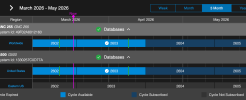
The timing is easy to view in Garmin database manager. Green lines are when the data is available, magenta line is today and the black line just to the right of the magenta line is when the new DB goes active.
Screenshot 2026-03-17 at 4.00.40 PM.png
 
Thanks, very helpful. Says database will be available tomorrow and required the following day, I thought there was more leeway between install date and effective date. Bookmarked your link.
It depends on which data, the nav & airport data were available last Thursday.

I get FliteCharts in my bundle so rather than two downloads, I wait till the FCs come out (today) and get them both at the same time.
 
Didn't know that existed...kinda cool.

I think I'll stick to my strategy of letting Database Concierge take care of it and being a little surprised and delighted every time my FS510 sucks an update out of my iPad.
Me too. It sure beats putting wear and tear on a SD card slot.
 
It is so choice. If you have the means, I highly recommend picking one up.
I mean, to be fair the Flightstream does do other stuff, too...

Honestly, database concierge wasn't even on my list when I bought it. It was the easiest/cheapest way to get ADSB-in to my tablet.
 
I use the concierge service for my I pad. it does it on its own and when I get to the plane it updates.
It’s as simple as that.
Me too. It sure beats putting wear and tear on a SD card slot.
My FS510 as never been out of the SD slot of my 650 since 2018 now that you mention it. I don't know what it looks like.
Most times my Ipad updates GP on it's own when at home.

I did think to myself that I would pull it out of the plane when I sell it for my next Garmin stack?
 
I use the concierge service for my I pad. it does it on its own and when I get to the plane it updates.
It’s as simple as that.

My FS510 as never been out of the SD slot of my 650 since 2018 now that you mention it. I don't know what it looks like.
Most times my Ipad updates GP on it's own when at home.

I did think to myself that I would pull it out of the plane when I sell it for my next Garmin stack?
I did let one go with my 182 and had to buy another one for my 210...definitely should have kept it since the price had risen a few hundred bucks.
 
I am clearly on the shortbus here, but I have a GTN650 and a G3X Touch, both of which require SD cards. Am I hearing that there is a way to do these downloads that does not involve an SD card? I have heard I can install some new device to pull the update from mobile data but how are you doing it from an ipad? Is it as simple as getting garmin pilot and using bluetooth on the plane?

Separately, my upload takes about 20-30 minutes, almost all of that with IFR/VFR charts and Flitecharts. Is that normal?
 
What you need for the wireless uploads is an FS510. That is an SD card that has wifi and memory. It's about $1,500. It goes in your GTN and also allows communication between your iPad and your avionics.
 
What you need for the wireless uploads is an FS510. That is an SD card that has wifi and memory. It's about $1,500. It goes in your GTN and also allows communication between your iPad and your avionics.
Thanks. Looks like it's more like $1900, at least at garmin.com. But then how am I getting the data onto my ipad? Does Garmin pilot do that?
 
What you need for the wireless uploads is an FS510. That is an SD card that has wifi and memory. It's about $1,500. It goes in your GTN and also allows communication between your iPad and your avionics.
I think you can also do it wirelessly from a GI275. I know you can plug a USB stick into the GI275 and it will blast databases to the rest of the panel so I suspect that capability extends to wireless.
Thanks. Looks like it's more like $1900, at least at garmin.com. But then how am I getting the data onto my ipad? Does Garmin pilot do that?
From Garmin Pilot to the panel via WiFi. From Garmin HQ to Garmin Pilot is like any other bits of data going into the iPad, which can be a SIM card and cellular service if you want to be sexy.
 
There are, to my knowledge, two ways to enable data transfer from an iPad to Garmin avionics. Both require Garmin Pilot, which automatically downloads all updates for your devices and transmits them over WiFi.

The first is a GI 275, which has built-in Bluetooth and WiFi capabilities. When the DB update is selected, it offers update via WiFi or USB. Once WiFi is selected, it briefly creates its own WiFi network, which the iPad automatically logs into (once set up) and the applicable DBs are transferred to the GI 275. Once the GI 275 has the updates, it propagates those updates to all other applicable devices (in my case, the other GI 275s and my GNX 375). Total time from selecting the update option in the GI 275 to all devices being updated is probably a minute. The only step requiring any intervention is the five seconds it takes to direct a DB update.

The second option is the Flight Stream 510. As others have noted above, which offers a similar capability to hardware which doesn't have WiFi built in.

For my money, it's hard to overstate the convenience of not having to screw around with Garmin DB manager on my PC, multiple SD cards, and keeping track of when updates are required. It's all automagical, requiring only that I direct a DB update when GP tells me there are new DBs available, or when my avionics grumpily inform me that they are not current. Haha!

 
There are, to my knowledge, two ways to enable data transfer from an iPad to Garmin avionics. Both require Garmin Pilot, which automatically downloads all updates for your devices and transmits them over WiFi.

The first is a GI 275, which has built-in Bluetooth and WiFi capabilities. When the DB update is selected, it offers update via WiFi or USB. Once WiFi is selected, it briefly creates its own WiFi network, which the iPad automatically logs into (once set up) and the applicable DBs are transferred to the GI 275. Once the GI 275 has the updates, it propagates those updates to all other applicable devices (in my case, the other GI 275s and my GNX 375). Total time from selecting the update option in the GI 275 to all devices being updated is probably a minute. The only step requiring any intervention is the five seconds it takes to direct a DB update.

The second option is the Flight Stream 510. As others have noted above, which offers a similar capability to hardware which doesn't have WiFi built in.

For my money, it's hard to overstate the convenience of not having to screw around with Garmin DB manager on my PC, multiple SD cards, and keeping track of when updates are required. It's all automagical, requiring only that I direct a DB update when GP tells me there are new DBs available, or when my avionics grumpily inform me that they are not current. Haha!
Thanks. I have a G3X/GTN 650 panel and I remember when I had a Garmin Pilot subscription I was able to wirelessly update either the G3X or the GTN databases, but not both (I can’t remember which) through the FlightStream built into the G3X. I can already wirelessly upload flight plans to the GTN, was hoping I wouldn’t have to spend an additional 1,500 and 100/year for a Garmin Pilot subscription for database updates
 
I have a GTN 650 and a G500. That's three SD cards to update. It takes me maybe 15 minutes to update all of them monthly. I do have two sets so one can be updated while the other is in the plane. $1,895 for a FS510 to do it wirelessly is not remotely worth it. (to me, YMMV)
 
The G3X doesn’t do Database Sync, which is the part of the Database Concierge stuff that moves databases between units. You wouldn’t want to transfer the charts over RS-232 or CAN bus, anyhow. So on my G3X plane, I’m stuck with SD cards. And it wouldn’t be so bad except that the Windows software is so terrible. Every single time I do an update, I have to start the update, get to the part where it can’t see my SD card, cancel, End Task on the updater and its background tasks, then start over.

I do like Database Concierge and Sync on the plane with a TXi panel, but it has its own quirks.
 
The G3X doesn’t do Database Sync, which is the part of the Database Concierge stuff that moves databases between units.
Ah, that's the main issue then. The ability to update a single item and have that update propagate throughout all the other avionics is really the key. I very nearly upgraded my panel to include a G3X recently, since I'm already having a GFC 500 installed. After some consideration, I decided to hold off because it seems that the G3X is hitting the limitations of the hardware. Hopefully there's a replacement coming out soon (which I know we've all been watching for) that will bring modern data capabilities to the otherwise excellent display.
 
The G3X doesn’t do Database Sync, which is the part of the Database Concierge stuff that moves databases between units. You wouldn’t want to transfer the charts over RS-232 or CAN bus, anyhow. So on my G3X plane, I’m stuck with SD cards. And it wouldn’t be so bad except that the Windows software is so terrible. Every single time I do an update, I have to start the update, get to the part where it can’t see my SD card, cancel, End Task on the updater and its background tasks, then start over.

I do like Database Concierge and Sync on the plane with a TXi panel, but it has its own quirks.
If you're plugging in some sort of adapter that has your SD card in it, plug it in when prompted to select the drive that has the SD card and not before. Then you might have to refresh the updater app only. I found that way it always finds the drive and SD card without issue.
 
I use Garmin pilot wirelessly via the FS-510 on my G1000 NXi to do all my database updates. I found that using one SD card for the G1000 NXi is so much smoother and faster that I'll never go back to the 510 for this purpose...
 
I have a GTN 650 and a G500. That's three SD cards to update. It takes me maybe 15 minutes to update all of them monthly. I do have two sets so one can be updated while the other is in the plane. $1,895 for a FS510 to do it wirelessly is not remotely worth it. (to me, YMMV)
I was just looking for confirmation that the 15-30 minutes it takes me to do the update wasn't crazy
 
Back
Top