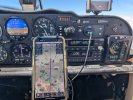
Bluetooth vs WiFi portables

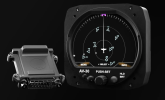
AV-30 really, really needs to display heading bug in MFD mode. I think they think they are being clever and luring people into buying 3 units for a dedicated traffic mode. IMO using the added capability to sell 2 units makes more business sense.

Now I'm looking at the new iFly Aviation Tablet. It has hard wire serial out to send NMEA to the HSI and engine monitor without the instability of Bluetooth.
I think traffic mode takes a lot of the graphics processing of the AV30. I suspect that is why that page is relatively sparse. I recall reading (but can’t locate the reference) that if you have an AV Link (traffic and wireless update) on both AV 30s that enabling traffic on both units could cause performance issues.

The hardwire direct from my portable GPS seems solid. I also sometimes use that for traffic as it is larger than the AV30.
 
The plot thickens. The promo photos from uAvionix show a heading bug. My unit does not.

That sounds like a trivial thing, but it is key to being able to switch back and forth between HSI and MFD view while holding course.
 
The plot thickens. The promo photos from uAvionix show a heading bug. My unit does not.

That sounds like a trivial thing, but it is key to being able to switch back and forth between HSI and MFD view while holding course.
I saw the website photo showing the heading bug, but I didn’t see a heading bug in the pilots guide photos. I suspect the photos on the web were generated before the final firmware was released.
 
The plot thickens. The promo photos from uAvionix show a heading bug. My unit does not.

That sounds like a trivial thing, but it is key to being able to switch back and forth between HSI and MFD view while holding course.
You can display the heading bug on the AI according to the pilots guide, but no Autopilot.

7.5.5 Flight Direction Indicator

The upper portion of the AI can be configured to display direction of flight
in the form of either non-slaved DG (non-slaved heading), magnetometer
aided, or GPS track.

Both modes support a magenta heading bug, and the GPS track mode
supports a green bearing-to indicator. The heading bug is not interfaced
to the autopilot and is for reference only.
 
You can display the heading bug on the AI according to the pilots guide, but no Autopilot.

7.5.5 Flight Direction Indicator

The upper portion of the AI can be configured to display direction of flight
in the form of either non-slaved DG (non-slaved heading), magnetometer
aided, or GPS track.

Both modes support a magenta heading bug, and the GPS track mode
supports a green bearing-to indicator. The heading bug is not interfaced
to the autopilot and is for reference only.

I've got the heading bug in AI and DG/HSI mode. Just not on the MFD traffic display.
 
I've got the heading bug in AI and DG/HSI mode. Just not on the MFD traffic display.
I just meant you could use the heading bug on the AI while in traffic mode on the mfd.

I know, not the same but it’s all I could find.
 
If you had the flight plan displayed on the traffic page, would the heading bug still be needed for your use case, or would you just follow the magenta line?
 
If you had the flight plan displayed on the traffic page, would the heading bug still be needed for your use case, or would you just follow the magenta line?

Magenta line would be fine. But I need something. Right now, when I switch to traffic page, I have to remember my desired heading. Once I get the 2nd AV-30 installed, I can do as Szwinger suggests and refer to the heading bug and bearing marker on the AHI. But that display is poor and difficult to read. . The optimal approach would be something on the traffic page.

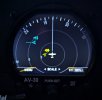
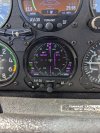
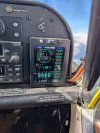
Here is what I see now:

PXL_20250501_002419230 (1).jpg

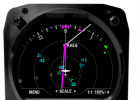
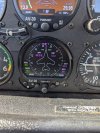
Here is what I would like to see ... screen grab from the uAvionix web site product announcement for the AV-LINK:

uavionix heading bug.PNG
 
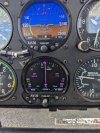
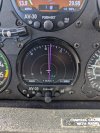
HSI mode is excellent. Only issue is Bluetooth stability.

Relocating the bluetooth adapter fixed the stability issues. It was too close to other emitters, and blocked by steel tubes and wiring. I moved it to an interior side panel so it has line-of-sight to my phone mount. Very stable connection now.

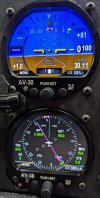
It really is a neat setup for XC. I flew two RNAV approaches under the hood this weekend using the HSI slaved to my EFB, and it worked great. Very relaxing to see course and track isolated from map clutter. I took a short trip through a high traffic area, and being able to switch to traffic view and zoom in when cued by the EFB was a big help. I felt like a checkbook fighter pilot, zooming in my radar scope on a bogie at 12 o'clock high.

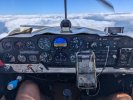
pair of av30.JPG
 
Last edited:
Magenta line would be fine. But I need something. Right now, when I switch to traffic page, I have to remember my desired heading. Once I get the 2nd AV-30 installed, I can do as Szwinger suggests and refer to the heading bug and bearing marker on the AHI. But that display is poor and difficult to read. . The optimal approach would be something on the traffic page.

Here is what I see now:

View attachment 141240

Here is what I would like to see ... screen grab from the uAvionix web site product announcement for the AV-LINK:

View attachment 141239

Software 3.1.1 was just released for AV-30-C. It adds the option to display flight plan on the traffic page. https://uavionix.com/press/uavionix...date-adds-wind-speed-direction-more-to-av-30/

Also, I saw a sneak peak of 3.2.0. It adds heading and nav bugs to the traffic display. I hope this is helpful for your flying.
1758819545736.png
 
Software 3.1.1 was just released for AV-30-C. It adds the option to display flight plan on the traffic page. https://uavionix.com/press/uavionix...date-adds-wind-speed-direction-more-to-av-30/

Also, I saw a sneak peak of 3.2.0. It adds heading and nav bugs to the traffic display. I hope this is helpful for your flying.
View attachment 145461
Cool! I spoke to their product manager at Oshkosh, and he said they were waiting on approval for that.

Dang, I'm about to launch on a long XC trip today. Wish I had my kit to update.
 
Software 3.1.1 was just released for AV-30-C. It adds the option to display flight plan on the traffic page. https://uavionix.com/press/uavionix...date-adds-wind-speed-direction-more-to-av-30/

Also, I saw a sneak peak of 3.2.0. It adds heading and nav bugs to the traffic display. I hope this is helpful for your flying.
View attachment 145461

Hey, incredible timing! I saw this post just as I was pulling out of the hangar to fly from Florida to Kansas.

Since I have the AV-Link, I was able to update the firmware using my phone. So now I have my flight plan on the traffic display. Huge improvement!

I could not find how to turn the wind arrow on. Will dig into the manual tonight.
 
Hey, incredible timing! I saw this post just as I was pulling out of the hangar to fly from Florida to Kansas.

Since I have the AV-Link, I was able to update the firmware using my phone. So now I have my flight plan on the traffic display. Huge improvement!

I could not find how to turn the wind arrow on. Will dig into the manual tonight.
Wind requires an OAT probe and GPS. If you have both of those it'll be available in any of the data overlay spots.
 
Wind requires an OAT probe and GPS. If you have both of those it'll be available in any of the data overlay spots.

Yep, that must be my issue. I'm trying to get the wind on the DG, but the OAT is connected to the AI. I think I have GPS input to both. I only updated the DG to the new version, because that is the one with the AV-Link attached. When I get back from the trip, I'll update the AI.
 
Got the wind arrow working. Fantastic! I haven't decided which display l like better: vector or HW/CW components.

How many competing devices offer this?
 
How many competing devices offer this?
Not sure how many other competing devices there are, although wasn't there an Aussie company offering a set of round-dial digital instruments which could be daisy-chained?

The GI-275 will certainly display wind arrows (vector or component). The one I have in the HSI position is ordinarily set to display wind components, with nav and traffic data overlaid on a moving map. I will occasionally switch it to pure HSI for a cleaner view, and of course it has the back-up AI function.

Regarding connectivity, the routine BT connection is generally good but very occasionally doesn't seem to want to connect to my iPad running GP. Being able to update databases via a quick WiFi connection is amazing. Love that it automatically propagates to all my other avionics from the GI-275. I would not want to go back to fooling around with SD cards.
 
Got the wind arrow working. Fantastic! I haven't decided which display l like better: vector or HW/CW components.

How many competing devices offer this?
Pretty much all of them, as long as they have the right inputs (GPS, airspeed, altitude, temperature, heading) to be able to calculate it.
 
Software 3.1.1 was just released for AV-30-C. It adds the option to display flight plan on the traffic page. https://uavionix.com/press/uavionix...date-adds-wind-speed-direction-more-to-av-30/

Also, I saw a sneak peak of 3.2.0. It adds heading and nav bugs to the traffic display. I hope this is helpful for your flying.
View attachment 145461

This was FAA-approved for AV-30-C. Available as 3.2.1 on the uAvionix website. AV-30-C can now display ADS-B traffic on the same page as a GPS flight plan, nav bugs, and heading bug.
 
This was FAA-approved for AV-30-C. Available as 3.2.1 on the uAvionix website. AV-30-C can now display ADS-B traffic on the same page as a GPS flight plan, nav bugs, and heading bug.

Nice. I love how uAvionix continually improves their products. Will look forward to doing the update when I get back home next month.
 
Back
Top